DeepSeek OCR API Pricing: Tested on Scans and Photos
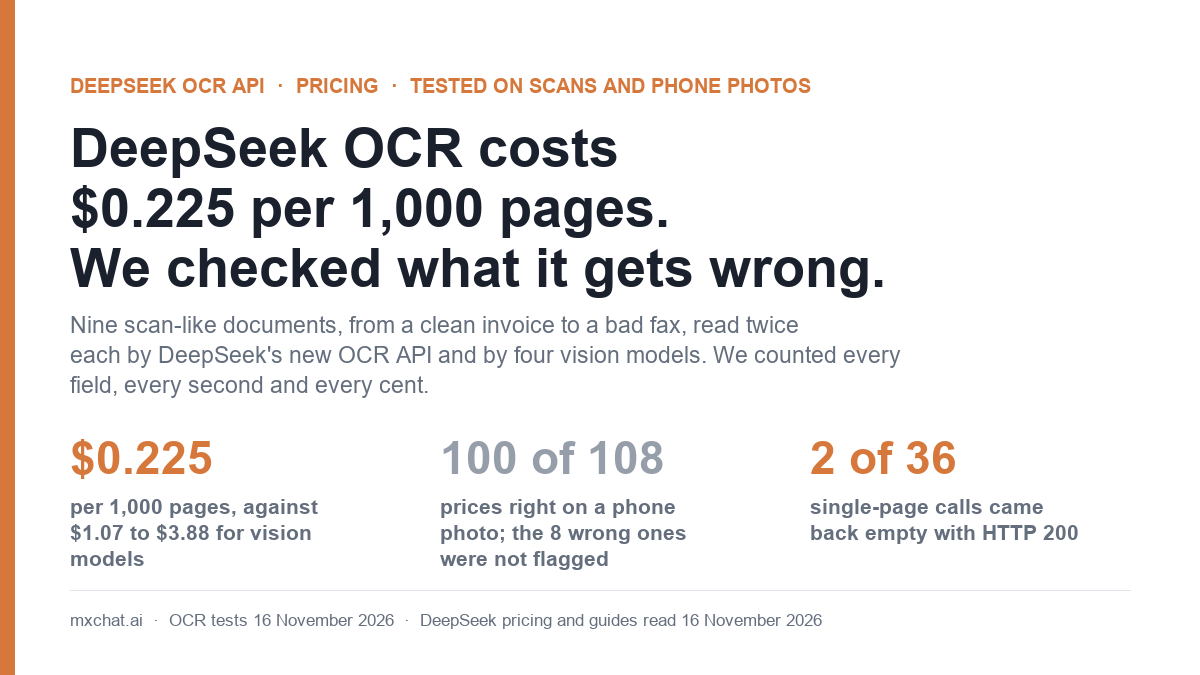
On 13 November 2026 DeepSeek put an OCR endpoint on sale alongside its new web search tools. The DeepSeek OCR API has the lowest list price we have seen for reading text out of scans and photos: $0.225 per 1,000 pages, flat, with no token maths.
A price that low raises one question: is it any good? On 16 November 2026 we made nine scan-like documents with known contents, from a clean invoice to a bad fax, and had DeepSeek’s OCR and four general vision models read each one twice. The short version: DeepSeek cost 5 to 17 times less than the vision models and read a phone photo of a dense price list better than any of them (100 of 108 prices right, against 94 to 99). It also returned two empty pages with HTTP 200 in 36 calls, fell apart on a bad fax, and, like every other engine but one, never told us which numbers it was unsure about.
DeepSeek OCR API pricing and limits
These are the figures on DeepSeek’s Models and Pricing page and its OCR guide, read on 16 November 2026.
| Item | What DeepSeek’s documentation says |
|---|---|
| Price | $0.225 per 1,000 pages, for the OCR API and for file parsing in chat |
| How pages are counted | By the page_count in the response. Failed or timed-out recognitions are not billed. |
| Peak and off-peak | No difference. DeepSeek’s half-price hours apply to model tokens, not to OCR. |
| Endpoint | POST https://api.deepseek.com/v1/tools/ocr, multipart form |
| Parameters | Two, both required: file and purpose. Any other field returns HTTP 400. |
Modes (purpose) | text_recognition (text only) or rich_layout_recognition (text plus a bounding box for every block). Same price. |
| File types | PDF, DOC, DOCX, PPT, PPTX, PNG, JPEG, WebP, GIF, BMP, TIFF |
| Limits | 100 MiB per file, 1,000 pages, 180 seconds in total, 15 recognitions in progress per account |
| Storage | The file “is not stored in the Files API and is not passed to a chat model” |
| Token counts in the response | “For reference only; not used for billing” |
There is no language setting, no page-range setting and no output-format setting. You send a file and get back one block of text per page, which DeepSeek describes as “the raw model output for the page, without any cleanup”. That last phrase matters later.
We covered the rest of the 13 November release, including web search fees, in our DeepSeek web search API pricing test. That post ran one clean two-page PDF through OCR. This one is the fuller test.
How we tested it
We did not use real customer documents. We generated nine pages ourselves so that we knew every character that should come back, then damaged some of them the way real paperwork gets damaged.
| Document | What it is | Fields we checked |
|---|---|---|
| Invoice, clean | A one-page invoice with a 12-row table, totals, bank details and a payment reference, as a 150 dpi PNG | 48 |
| Invoice, phone photo | The same invoice rotated 3.4 degrees, with perspective, uneven light, blur, noise and heavy JPEG compression | 48 |
| Invoice, bad fax | The same invoice at about 100 dpi in pure black and white with speckle. The small print is hard for a person to read. | 48 |
| Invoice, turned 90 degrees | The clean invoice, sideways | 48 |
| Policy page, clean | A returns policy in two columns of serif text | 12 |
| Policy page, phone photo | The same page with the phone-photo damage | 12 |
| Price list, clean | 36 rows of product codes and three prices each, in small type | 145 |
| Price list, phone photo | The same list with the phone-photo damage | 145 |
| Handwriting-style note | Nine lines in a handwriting font on lined paper. A font, not real handwriting. | 10 |
A “field” is one value that has to be exactly right to be useful: an invoice number, a date, an amount, a product code, a phone number. Each engine read each page twice, so every engine faced 1,032 field checks.
The engines were DeepSeek OCR in both modes, and four vision models sent the same image with one instruction: transcribe everything exactly as Markdown, keep tables as tables, and write [illegible] for anything you cannot read. The models were Gemini 3.5 Flash-Lite, Gemini 3.8 Flash with thinking set to low, Claude Haiku 5.5 and GPT-6 Luna, each called on its maker’s own API with our paid keys from our WordPress server. In total: 108 single-page reads, 7 PDF reads, and 9 file-parsing calls.
What 1,000 pages cost
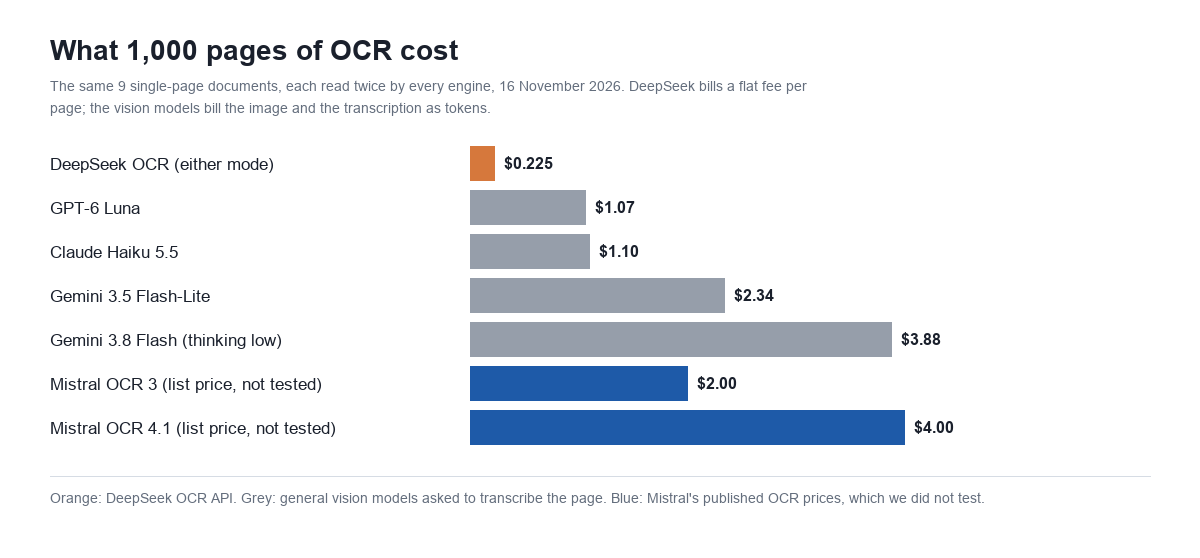
| Engine | List price | Input tokens per page | Output tokens per page | Cost per 1,000 pages |
|---|---|---|---|---|
| DeepSeek OCR, either mode | $0.225 per 1,000 pages | not billed | not billed | $0.225 |
| GPT-6 Luna | $0.10 / $0.50 per million tokens | 1,922 | 1,746, of which 1,111 reasoning | $1.07 |
| Claude Haiku 5.5 | $0.10 / $0.50 | 2,124 | 1,770, of which 888 thinking | $1.10 |
| Gemini 3.5 Flash-Lite | $0.30 / $2.50 | 1,157 | 798 | $2.34 |
| Gemini 3.8 Flash, thinking low | $0.75 / $3.75 until 31 December 2026 | 1,157 | 802 | $3.88 |
On our nine documents DeepSeek was 4.7 times cheaper than the cheapest vision model and 17 times cheaper than Gemini 3.8 Flash. At 10,000 pages a month that is $2.25 against $10.65 to $38.76.
Two things make the vision models harder to budget. First, the bill depends on the page. The handwriting-style note cost $0.27 to $1.29 per 1,000 pages on the vision models, and the dense price list cost $1.41 to $7.29, because a transcription is billed as output tokens and a full table is a lot of output. DeepSeek charged the same for both. Second, the two cheapest models spent most of their output thinking: 63% of GPT-6 Luna’s output tokens and half of Claude Haiku 5.5’s were reasoning, which you pay for and never see.
Gemini 3.8 Flash doubles in price on 1 January 2027, which would put it at about $7.75 per 1,000 pages on this test. For reference, Mistral lists its dedicated OCR models at $2 per 1,000 pages (OCR 3) and $4 (OCR 4.1). We did not test those.
Accuracy: fields read correctly
Each cell is the number of fields exactly right across two reads.
| Document | Possible | DeepSeek text mode | DeepSeek layout mode | Gemini 3.5 Flash-Lite | Gemini 3.8 Flash | Claude Haiku 5.5 | GPT-6 Luna |
|---|---|---|---|---|---|---|---|
| Invoice, clean | 96 | 96 | 48 * | 96 | 96 | 96 | 96 |
| Invoice, phone photo | 96 | 94 | 94 | 90 | 91 | 94 | 70 |
| Invoice, bad fax | 96 | 8 | 10 | 42 | 65 | 40 | 12 |
| Invoice, turned 90 degrees | 96 | 81 | 93 | 96 | 96 | 96 | 91 |
| Policy page, clean | 24 | 24 | 24 | 24 | 24 | 24 | 24 |
| Policy page, phone photo | 24 | 24 | 24 | 24 | 24 | 24 | 24 |
| Price list, clean | 290 | 145 * | 290 | 290 | 290 | 290 | 290 |
| Price list, phone photo | 290 | 240 | 242 | 224 | 237 | 250 | 0 |
| Handwriting-style note | 20 | 20 | 20 | 20 | 20 | 20 | 20 |
| Total | 1,032 | 732 | 845 | 906 | 943 | 934 | 627 |
* One of the two reads came back empty. See “Two empty pages” below.
On clean pages every engine was perfect when it answered. All six kept the two-column policy page in the right reading order, on the clean page and on the photo. All six read the handwriting-style note without a mistake, though a neat handwriting font is a much easier test than a real person’s pen. The differences are in the damaged pages.
Where each engine went wrong
The phone photo of an invoice: everyone got a payment detail wrong
DeepSeek and Claude Haiku 5.5 each read 47 of 48 fields, both times. The one they missed was the same: the payment reference NGS-4871-QX7 came back as HGS-4871-QX7 in all four reads from each.
The two Gemini models got the reference right in three of four reads and then misread something worse. The bank account number 60418825 came back as 60416825 in all four Gemini reads. GPT-6 Luna returned two different wrong account numbers in its two reads. So on one ordinary photo of an invoice, all six engines returned a wrong payment field at least once, and none marked it as uncertain. If your workflow pays invoices from OCR output, that is the result to remember.
The phone photo of a price list: 7 to 14 wrong prices per page, stated confidently
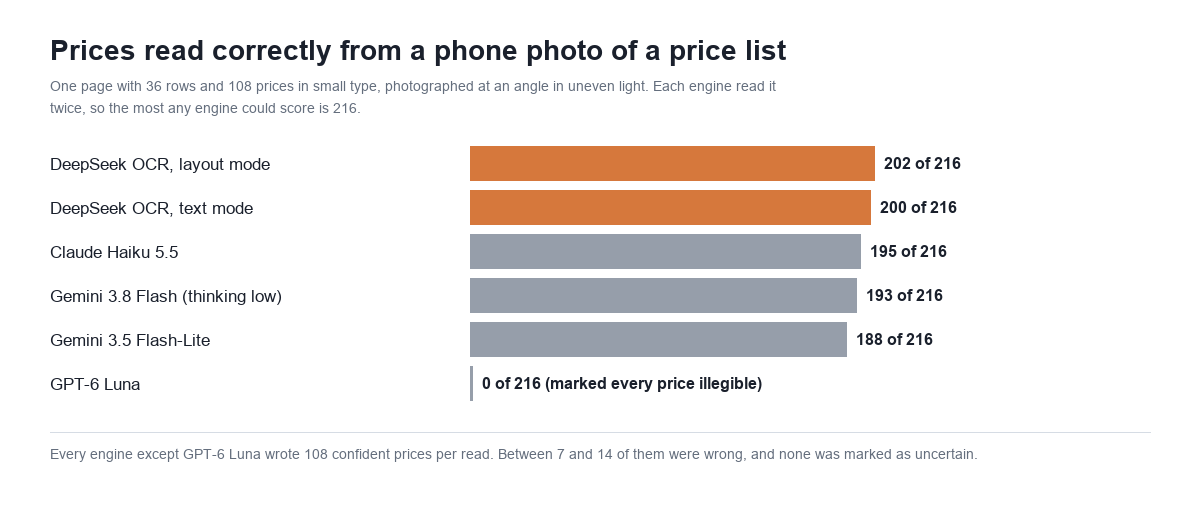
This page has 108 prices in small type. DeepSeek read 100 of them correctly in text mode and 101 in layout mode, on both reads. Claude Haiku 5.5 managed 96 and 99, Gemini 3.8 Flash 95 and 98, Gemini 3.5 Flash-Lite 94 and 94.
The bigger finding is what happened to the rest. Every one of those engines wrote out all 108 prices as if it had read them. Between 7 and 14 per page were wrong: 1,762.83 where the page says 1,762.63, for example. We had told the vision models to write [illegible] when they could not read something, and on this page none of them did, even once.
GPT-6 Luna did the opposite. It kept the product names, marked all 144 codes and prices as illegible, and returned no numbers at all. That is useless as a transcription and honest as a signal: it was the only engine in the test that told us the page was too poor to trust. It also took 36 seconds to say so.
Product codes such as IR-4651-D were harder than prices for everyone. Out of 72 across two reads, Claude Haiku 5.5 got 53 right, Gemini 3.8 Flash 43, DeepSeek 38 in each mode and Gemini 3.5 Flash-Lite 36.
The bad fax: DeepSeek looped until it hit its output limit
Nobody read the fax well. Gemini 3.8 Flash was best with 65 of 96 fields, and it still invented values. Claude Haiku 5.5 and Gemini 3.5 Flash-Lite got about 40, each with 8 to 15 made-up amounts per page mixed in with the real ones.
DeepSeek read the large print at the top, then filled the table with a repeating row, “100% A, 100%, 100%, 100%”, more than 200 times until it reached 8,192 output tokens and stopped with finish_reason: "length". That took 10.6 seconds against the usual 2.7. Layout mode on the same page invented a street address that is not on the invoice and then repeated one sentence until it hit the same limit. This happened on all four fax reads.
Because DeepSeek bills by page, the loop cost nothing extra. The risk is downstream: a 15,000-character block of nonsense that looks like a table. Check finish_reason on every page and throw away any page that ends in length.
The sideways page: text mode dropped the header and the totals
With the invoice turned 90 degrees, three of the four vision models read every field, and GPT-6 Luna missed two or three. DeepSeek’s text mode returned the table and the payment details but left out the invoice number, both dates, the purchase order and the totals, scoring 40 and 41 of 48. Layout mode recovered most of them (45 and 48). If your scans can arrive sideways, rotate them first or use layout mode.
Two empty pages with HTTP 200
Two of our 36 single-page DeepSeek calls returned HTTP 200, page_count: 1, finish_reason: "stop" and an empty text, with 0 output tokens in the reference usage. Both were clean, easy pages: the clean invoice in layout mode and the clean price list in text mode. The second read of each, less than a minute later, was perfect.
We could not tell from a balance that moves in whole cents whether those two pages were billed. DeepSeek’s guide says billing follows page_count, and both responses reported one page. At this price the money is not the issue. The issue is that nothing in the status code tells you the page is missing, so treat an empty page as a failure and retry it. These two responses are why DeepSeek’s totals in the table above are lower than its per-page accuracy suggests.
Speed, and a 10-page scanned PDF
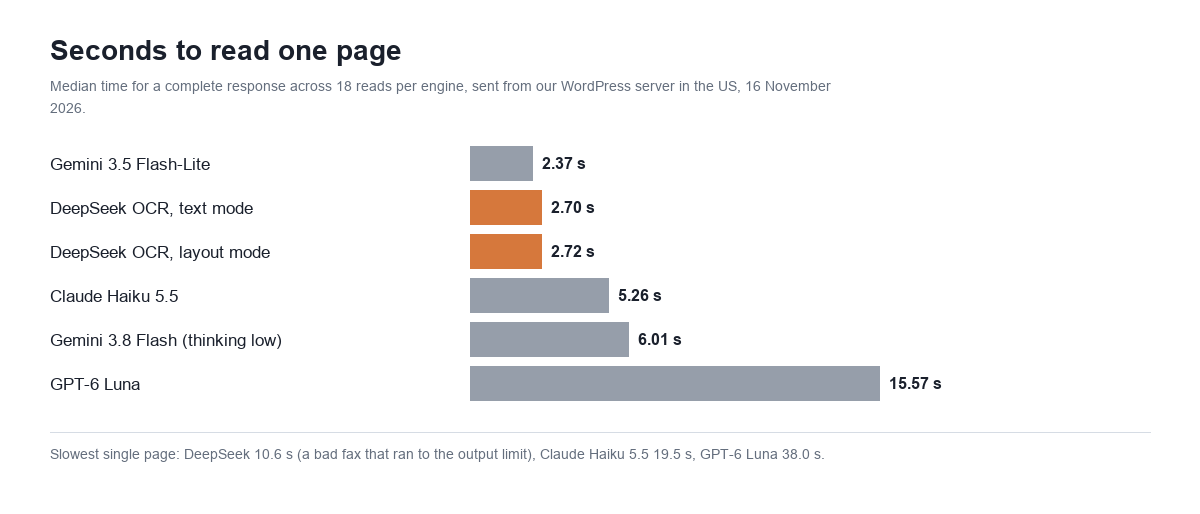
DeepSeek took a median of 2.70 seconds per page and was steady: 2.5 to 2.8 seconds for most pages and about 4.6 for the dense price list. Gemini 3.5 Flash-Lite was slightly faster at 2.37 seconds. Claude Haiku 5.5 took 5.26 seconds, Gemini 3.8 Flash 6.01 and GPT-6 Luna 15.57.
We also joined ten pages into one image-only PDF, the kind a scanner produces, and sent the whole file.
| Engine | Time for 10 pages | What was billed | Cost for the file |
|---|---|---|---|
| DeepSeek OCR, text mode | 7.0 s and 13.1 s | 10 pages | $0.00225 |
| DeepSeek OCR, layout mode | 13.3 s | 10 pages | $0.00225 |
| Claude Haiku 5.5 | 29.1 s | 15,588 input and 9,703 output tokens | $0.0064 |
| Gemini 3.5 Flash-Lite | 16.0 s | 5,334 input and 7,596 output tokens | $0.0206 |
DeepSeek appears to read the pages of a PDF in parallel: ten pages took about as long as two or three single ones. The slower runs were the ones where the fax page looped to its limit. One of the two text-mode runs avoided the loop on that page and the other did not, so the same file can come back different twice.
Text mode or layout mode?
Both cost the same and took the same time. Text mode returns plain paragraphs and tables. Layout mode returns the same text with a tag and four coordinates in front of every block, like this: <|ref|>text<|/ref|><|box|>[[689,80,930,95]]<|/box|> Invoice number: INV-2026-004871. Coordinates run from 0 to 1,000 across the page.
Layout mode was a little more accurate on our damaged pages, and much better on the sideways one. Its output is longer and you have to strip the tags before you can use the text. If you only want the words, start with text mode and fall back to layout mode for pages that come back short.
One thing to plan for in either mode: the table format is not consistent. Text mode returned HTML tables (<table border=1>) for most pages and a Markdown table for the sideways invoice. That is what “raw model output, without any cleanup” means in practice. Your code has to accept both.
File parsing in chat: the OCR error becomes the bot’s answer
DeepSeek’s other route to the same engine is file parsing: upload a document once to /files, pay the same $0.225 per 1,000 pages, then attach its file_id to chat requests and pay only input tokens after that. We uploaded the phone photo of the invoice as a one-page PDF. The upload took 2.7 seconds and the document added about 700 input tokens to each question.
We asked deepseek-flash four questions about it, twice each, using our live support prompt. Six of the eight answers were refusals, because our prompt tells the bot to answer only about MxChat. That is the same lesson as our web search test: the system prompt decides whether a new tool gets used.
One of the two real answers is the reason for this section. Asked for the payment details, the bot replied with reference HGS-4871-QX7 and account number 60416825. Both are wrong, both came from the parsed text, and the answer gave no hint of doubt. Saved as a PDF, the photo had been compressed a second time. Sent to the OCR endpoint, that PDF lost four fields where the original image lost one. A chatbot repeats OCR mistakes in a confident voice. For anything involving money, show the customer the original document as well.
Scanned PDFs in a WordPress chatbot knowledge base
This is where OCR pricing meets a real problem for chatbot owners. MxChat, like any tool that imports PDFs by reading their text layer, has nothing to read in a scanned PDF. A scanned PDF has no text layer. It is a stack of pictures.
We checked this on our own site with MxChat 3.2.28. The plugin’s PDF reader returned 0 characters from our 10-page scanned PDF and 0 from the one-page scan, and 1,387 characters from a normal text PDF of the policy page. MxChat does not fail silently here: the knowledge importer reports “No extractable text — the PDF is empty, scanned images only, or larger than the size limit.” But the result is the same. Nothing from that file reaches the bot.
So the practical use of a $0.225 OCR price is as a step before import:
- Run scanned PDFs through OCR first, then add the returned text to the knowledge base as a text file or a page. A 200-page scanned manual costs about $0.045 on DeepSeek, against $0.21 to $0.78 on the vision models we tested.
- Check each page before you import it. Drop pages that are empty or that ended in
length, and retry them. - Read the numbers yourself. Prose survived every photo in our test. Small numbers did not. If a price list or a part-number table matters, compare it with the original before the bot starts quoting it.
- Rescan bad originals. No engine rescued the fax. A new scan is cheaper than any model.
MxChat’s chat models are a separate bill from any of this. Our guides to DeepSeek API pricing and peak hours, Claude Haiku 5.5 pricing, Gemini Flash-Lite pricing and GPT-6 Luna pricing cover what the same models cost per chatbot answer. Knowledge base setup is in the documentation, image handling in chat is one of the add-ons, and plans are on the MxChat Pro page.
Which one should you use?
| If you need | Our pick from this test | Why |
|---|---|---|
| Lowest cost on clean or lightly damaged pages | DeepSeek OCR, with a retry on empty pages | $0.225 per 1,000 pages, 2.7 seconds, best on the price-list photo |
| Pages that may be sideways or very poor | Gemini 3.8 Flash or Claude Haiku 5.5 | Best on the fax and unaffected by rotation, at 5 to 17 times the price |
| Speed above all | Gemini 3.5 Flash-Lite or DeepSeek OCR | 2.4 and 2.7 seconds per page |
| A warning when a page is unreadable | GPT-6 Luna as a second opinion | The only engine that refused to guess, but slow and weakest on damaged pages overall |
| Bounding boxes | DeepSeek OCR layout mode | Included in the same price |
Keep the sample size in mind. This was nine documents in English, two reads each, on one day. It is enough to show the price gap and the kinds of mistakes to expect. It is not enough to rank the engines on your paperwork. Run twenty of your own pages before you commit.
Frequently asked questions
How much does the DeepSeek OCR API cost?
$0.225 per 1,000 pages, which is $0.000225 per page. The price is the same in both modes and at all hours. Failed recognitions are not billed.
Is DeepSeek OCR billed in tokens?
No. The response includes token counts, but DeepSeek’s documentation says they are for reference only. You are billed by page_count.
How accurate is DeepSeek OCR?
On clean pages in our test it was exact. On a phone photo of an invoice it read 47 of 48 fields, and on a phone photo of a dense price list about 100 of 108 prices. It failed on a bad fax and returned two empty pages in 36 calls.
Is DeepSeek OCR cheaper than using a vision model?
Yes, on our documents. The same pages cost $1.07 per 1,000 on GPT-6 Luna, $1.10 on Claude Haiku 5.5, $2.34 on Gemini 3.5 Flash-Lite and $3.88 on Gemini 3.8 Flash.
What file types and sizes does it accept?
PDF, DOC, DOCX, PPT, PPTX, PNG, JPEG, WebP, GIF, BMP and TIFF, up to 100 MiB and 1,000 pages per file, with 15 recognitions in progress per account.
Does DeepSeek OCR read handwriting?
DeepSeek’s guide makes no claim about handwriting. It read our handwriting-style note perfectly, but that note used a tidy font. We have not tested real handwriting.
What format does the text come back in?
One text block per page. Paragraphs are plain text. Tables came back as HTML in most of our reads and as Markdown in a few. Layout mode adds a tag and coordinates before each block.
Can a WordPress chatbot read a scanned PDF?
Not directly in most plugins. MxChat’s knowledge importer read 0 characters from our scanned PDF and said so. Run the scan through OCR first and import the text.
Prices and limits from DeepSeek’s Models and Pricing page and OCR guide, Google’s, Anthropic’s, OpenAI’s and Mistral’s pricing pages, read 16 November 2026. Tests run 16 November 2026 from mxchat.ai’s server with paid API keys: 108 single-page reads, 7 PDF reads and 9 file-parsing calls. The DeepSeek part cost about $0.02 and the whole test about $0.20.