Your Guide to a Chatbot for IT Support
Remember the old way of IT support? You’d file a ticket for a simple password reset and then… wait. Hours, maybe even days, could pass before you got a response. An IT support chatbot is a complete game-changer, acting as an intelligent, on-demand expert for your company's common IT issues and delivering instant, 24/7 help.
From Support Tickets to Instant AI Answers

The traditional IT help desk has always felt a bit like a traffic jam. An employee hits a simple roadblock—a password lockout or a tricky VPN connection—and gets stuck in a queue. All that waiting around kills productivity and adds a layer of frustration to their day. This manual ticketing system just creates a bottleneck, burying skilled IT professionals under a mountain of repetitive, low-level tasks.
This guide is all about moving beyond that outdated model and into the world of intelligent, conversational AI. We'll walk through how this technology tackles those persistent business challenges by wiping out wait times and easing employee frustration. The chatbot becomes your first line of defense, ready to handle thousands of common requests at once, any time of day or night.
The True Cost of Inefficient Support
Slow IT support has a real price tag, and it goes far beyond the IT department's budget. When your team can't get quick answers, their work stops cold. That directly hits project timelines and overall business output. This kind of constant friction also chips away at morale, making internal systems feel more like an obstacle than a tool for success.
By automating those routine questions, you can completely reshape your support operations. This frees up your valuable IT team from the relentless grind of Tier 1 tickets. Instead, they can focus their brainpower on complex projects, strategic planning, and critical infrastructure work that actually moves the business forward.
What This Guide Will Cover
Think of this article as your roadmap to a new era of efficient IT support. We'll cover everything you need to know to bring a powerful chatbot into your organization. You'll learn about:
- Core Concepts: What exactly are these chatbots, and how are they different from the clunky, rule-based bots of the past?
- Business Impact: The tangible benefits you can expect, from serious cost savings to a big boost in team productivity.
- Practical Use Cases: Real-world scenarios showing how chatbots solve the everyday IT headaches your employees face.
- Deployment Strategy: A straightforward checklist for a smooth rollout, covering everything from initial planning to launch day.
This shift isn't just about plugging in a new tool; it's about rethinking how you deliver support from the ground up. The goal is to build a self-service culture where people are empowered with immediate answers, turning the help desk from a slow-moving line into an instant knowledge hub. To learn more, explore the fundamentals of help desk automation.
What Is an IT Support Chatbot, Really?
Imagine you could clone your best junior IT support person. This new team member would be available 24/7, could handle thousands of employee requests at once without breaking a sweat, and would never get tired or forget a single step in a troubleshooting guide.
That's the promise of a modern IT support chatbot. It's a specialized AI program built to be the first-line-of-defense for all those common, repetitive tech problems that clog up your helpdesk.
Forget the rigid, frustrating chatbots of the past that felt like talking to a brick wall. Today's AI-powered assistants are a whole different breed. They don't just hunt for keywords; they actually understand what your employees are trying to say, even with typos or casual language. This magic is powered by Natural Language Processing (NLP), which lets the bot have a genuinely helpful, human-like conversation.
The Brains of the Operation
So, how does this bot know how to fix a printer jam or reset a specific software password for your company? It all comes down to its "brain"—a secure, centralized knowledge base. This isn't just a random pile of documents; it's a curated library of your organization's most trusted IT information.
At its heart, a great IT support chatbot depends on a solid understanding of what is a knowledge management system to give people the right answers, instantly. The bot taps directly into the sources your team already uses and trusts:
- Internal Wikis: Step-by-step guides from places like Confluence or SharePoint.
- FAQs and Manuals: Official instructions for company-approved software and hardware.
- Past Support Tickets: Anonymized solutions from issues your team has already solved.
By plugging into these systems, the chatbot learns from the very same playbooks your human experts rely on. This ensures every answer is consistent, accurate, and perfectly aligned with your company's established procedures.
Think of it like an open-book test. When an employee asks about a VPN issue, the chatbot doesn't guess. It instantly opens the official company guide on VPNs and provides the approved, step-by-step solution. This simple process removes the risk of human error for common requests and guarantees a consistent quality of support every single time.
A Smarter Kind of Conversation
This is a huge leap from the old, rule-based bots. Those were like glorified phone trees, forcing you down a rigid path ("Press 1 for password resets, Press 2 for software issues"). If your problem didn't fit one of their neat little boxes, you hit a dead end.
An AI chatbot, on the other hand, can hold a real conversation. It asks clarifying questions, understands the context of the issue, and changes its approach based on what the user says. It’s this ability to have a fluid, intelligent dialogue that makes it feel less like a tool and more like a true virtual agent.
This shift isn't just a niche trend. By 2025, over 60% of large enterprises are expected to be using AI chatbots for IT support, moving on from slower, more traditional helpdesks. Now that we've covered the basics, let's dig into the real business impact these bots can have.
Why Top Companies Are Turning to AI for Their IT Helpdesks

Businesses aren't just adding IT chatbots for show; they're doing it for real, measurable results. Integrating AI into a helpdesk isn't a trend—it’s a strategic move to turn what's often seen as a cost center into an engine for efficiency and employee support.
This shift creates a ripple effect that benefits everyone, from the CFO looking at the bottom line to the individual employee trying to get their work done. You get the hard business wins like serious cost savings and productivity boosts, plus the technical advantages that make your entire IT operation more robust and scalable.
Unlocking Key Business Advantages
The first thing most leaders notice after implementing an IT support chatbot is the immediate drop in operational costs. Think about all the repetitive, high-volume tickets that clog up an IT team's queue—password resets, software access requests, Wi-Fi issues. Automating these frees up your skilled technicians to focus on complex problems, directly saving money.
This automation has a huge impact on company-wide productivity. When an employee hits an IT snag, every minute they spend waiting for help is a minute they aren't working. An AI chatbot cuts out the queue, delivering instant fixes that get people back to their tasks in moments, not hours.
And naturally, when support is fast and effective, satisfaction with the IT department skyrockets. Employees see IT not as a roadblock, but as a responsive partner that helps them succeed.
The numbers speak for themselves. Businesses using AI chatbots for IT support can save up to $300,000 annually. On a global scale, this kind of automation is set to slash over 2.5 billion human work hours each year. For a closer look at the data, you can check out these powerful AI chatbot stats on thunderbit.com.
Gaining a Technical Edge
From a purely technical perspective, the benefits are just as compelling. An AI chatbot offers 24/7/365 availability, providing support long after your human team has gone home. This is essential for global companies with teams across different time zones or for anyone burning the midnight oil to hit a deadline.
Another major technical win is instant scalability. When a company-wide software update causes a flood of tickets, a human helpdesk gets swamped. A chatbot, on the other hand, can handle thousands of conversations at once without breaking a sweat, ensuring everyone gets help right away.
Plus, every single interaction with the chatbot is a data point. The bot automatically logs every query and solution, creating a goldmine of insights into common IT problems. This helps IT leaders spot recurring issues, improve knowledge base articles, and fix systemic problems before they escalate. For a look at how this works in a large-scale environment, see our guide on chatbots for enterprise.
The table below really puts things into perspective, comparing the old way with the new. It’s a head-to-head look at how a chatbot-powered model stacks up against a traditional, human-only support system.
IT Support Models: A Head-to-Head Comparison
| Metric | Traditional IT Support | Chatbot-Augmented IT Support |
|---|---|---|
| Response Time | Minutes to hours | Instant (24/7) |
| Resolution Rate (Tier 1) | ~60-70% | Up to 90% automatically |
| Cost Per Ticket | High (human labor) | Low (fractions of a cent) |
| Scalability | Limited by headcount | Virtually unlimited |
| Employee Satisfaction | Moderate to low | High |
| Data & Insights | Manual tracking | Automated, real-time analytics |
As you can see, the differences in speed, cost, and overall effectiveness are stark. The data makes it clear why a modern, AI-augmented approach isn't just an improvement—it's a complete reimagining of what IT support can be.
See How an IT Chatbot Solves Real Problems

It’s one thing to talk about what an IT chatbot can do, but it’s another to see how it works in the real world. Let’s walk through a few everyday scenarios that probably sound all too familiar. These stories show just how an AI assistant turns those moments of frustration into simple, automated fixes.
Take Sarah, an employee trying to start her week. It’s Monday morning, and she’s locked out of her account after fumbling her password. The old way? Submit a ticket, wait for IT to see it, and hope she gets back in before lunch.
Instead, she opens the IT chatbot. After a quick, secure identity check, the bot walks her through the password reset process. In less than two minutes, Sarah is logged in and working. No ticket, no downtime, no lost productivity.
Automating Onboarding and Access Requests
Now, picture a new hire, David. On day one, he needs access to a whole suite of software to get started. Traditionally, this meant a flurry of emails and tickets, often with long waits for manual approvals from different departments.
David just tells the chatbot, "I need access to the design software suite." The bot knows his role, sees he's a new designer, and automatically triggers the standard software request workflow. His manager gets an instant notification and approves it with a single click.
Behind the scenes, the chatbot connects with the company's identity management system to grant him access. A process that used to take days is now done before David has even finished his first cup of coffee. It’s a smooth, welcoming experience from the very beginning.
Guided Troubleshooting for Tricky Issues
What about more complex problems, like a VPN that just won't connect? Maria is working from home when her connection to the company network suddenly drops. The error message is cryptic, and she wouldn't even know how to describe the problem in a ticket.
She opens the IT chatbot and types, "My VPN isn't working." The bot doesn't just send her a link to a generic FAQ page. It kicks off an interactive troubleshooting session.
- Initial Diagnosis: It starts by asking for the specific error message she sees.
- Step-by-Step Instructions: Based on her answer, it suggests a simple first step, like checking her Wi-Fi or restarting the VPN client.
- Advanced Checks: If that doesn't work, it guides her through more technical steps, like clearing her cache or verifying network settings, complete with helpful screenshots.
This guided process gives Maria the power to solve the problem herself. The chatbot acts like a patient expert, walking her through the same steps a human technician would, but without the wait.
Smart Escalation When a Human Is Needed
Of course, not every issue can be solved by a bot. A truly effective chatbot for IT support understands its own limitations. Let’s say Maria’s VPN problem is still there after she’s tried everything the bot suggested.
At this point, the chatbot knows it's time to bring in a person. But it doesn't just say, "Contact IT." It performs a smart handoff. It has already collected critical information from their chat:
- The user’s device and operating system.
- The exact error message.
- The specific troubleshooting steps she’s already completed.
The chatbot bundles all this data into a detailed support ticket, opens it in the helpdesk system, and assigns it to the right network team. It even gives Maria the ticket number so she can track it. When a human agent finally looks at the ticket, they have the full story and can start solving the problem right away—no more asking questions Maria has already answered.
These are just a handful of examples, but you can explore even more possibilities in these detailed chatbot use cases that can completely reshape your internal support.
The Technology Driving Your AI Helpdesk
What makes a modern IT support chatbot feel less like a clunky machine and more like a helpful expert? The secret isn't just clever programming; it's about a powerful approach that combines the best of AI with your own trusted company knowledge.
The core technology making this all happen is called Retrieval-Augmented Generation (RAG). It might sound like a mouthful, but the concept is surprisingly simple and incredibly effective. Think of it as the key that unlocks accurate, relevant, and trustworthy answers for your employees every single time.
The Open-Book Exam Analogy
Imagine asking a standard AI a question about your company's specific VPN setup. Without access to your internal documentation, that AI is basically taking a closed-book test. It has to rely on its general training from across the internet, meaning it might guess, give a generic answer, or worse, just make something up. That’s a huge risk when you need precise, reliable IT support.
Now, think about RAG as giving the AI an open-book exam. Instead of guessing, the chatbot first retrieves the correct information directly from a secure, pre-approved library of your company’s internal documents. This library is its knowledge base.
The RAG process ensures the AI isn't just creative; it's factual. The chatbot is required to "show its work" by finding the answer in your official guides before it generates a response for the employee. This grounds every answer in your reality, not in generalized web data.
A solid knowledge base is the foundation of any great AI helpdesk, storing all the information the chatbot needs to provide instant answers. If you're looking to set one up, you can explore guides on choosing the best knowledge base software that fits your team's needs.
How It All Connects
The knowledge base acts as the chatbot's single source of truth. This curated collection can include a huge range of your internal IT materials, creating a comprehensive brain for the AI to consult. To really get a handle on this foundational tech, check out our detailed guide on what is Retrieval-Augmented Generation and how it powers the smartest chatbots.
Common sources you can plug into an IT chatbot’s knowledge base include:
- Confluence and SharePoint: Pulling from your team’s detailed how-to articles and project documentation.
- Internal Wikis: Accessing step-by-step troubleshooting guides and standard operating procedures.
- Past Support Tickets: Learning from the solutions that your human experts have already provided.
This direct connection means your chatbot is always up-to-date. When your IT team updates a setup guide in SharePoint, the chatbot instantly has access to that new information—no manual retraining required.
Beyond Answers With Smart Integrations
A truly effective chatbot for it support does more than just answer questions; it takes action. This is where seamless integrations come in, turning the chatbot from a simple information tool into a fully functional part of your IT ecosystem.
For instance, by integrating with Active Directory, the chatbot can securely verify an employee’s identity before helping with a sensitive request like a password reset. This ensures only authorized users can access and modify their accounts, keeping everything locked down.
What’s more, integrating with an IT Service Management (ITSM) platform like Jira or ServiceNow enables smart escalation. When a problem is too complex for the bot, it can automatically create a detailed ticket, fill it with the conversation history, and assign it to the right human agent. This makes the whole support process smoother, faster, and way more efficient.
Your Practical Chatbot Deployment Checklist
So, you're ready to bring an IT support chatbot into your organization. That's a great move. But a successful launch doesn't just happen—it’s built on a clear, strategic plan. Think of it less like flipping a switch and more like a well-managed project.
This checklist breaks the entire process down into practical, manageable phases. It’s designed to guide you from the initial idea all the way to a smooth, company-wide rollout that people actually want to use. Following these steps helps you tackle the right things in the right order.
Phase 1: Define Your Foundation
Before you even think about the tech, you need a solid foundation. This is where most people go wrong—they try to automate everything at once. Don't fall into that trap. Start small, pick your battles, and focus on getting a few key wins to build momentum.
Pinpoint High-Volume, Low-Effort Tasks: Crack open your helpdesk data. What are the top 3-5 issues clogging up your support queue every single day? We're talking about the repetitive, soul-crushing stuff: password resets, software access requests, or basic "how do I connect to the VPN?" questions. These are your prime candidates for automation.
Set Clear Goals You Can Actually Measure: What does "success" look like for you? Define your key performance indicators (KPIs) before you start. Maybe your goal is to cut down Tier 1 ticket volume by 25%. Or perhaps you're aiming for an 80% first-contact resolution rate for the issues the bot handles. Whatever it is, make it specific.
Choose the Right Platform: Not all chatbot platforms are created equal. You need one that fits your technical setup and your team's skills. If you're running a WordPress site, a solution like MxChat is a no-brainer because of its no-code setup and seamless integration. Look for must-have features like a powerful knowledge base connection (using RAG), an easy-to-use conversation builder, and solid security protocols.
Phase 2: Build and Test
With your plan in place, it’s time to build the chatbot’s brain and put it through its paces. This phase is all about feeding it quality information and making sure the user experience is genuinely helpful, not a frustrating dead end.
A chatbot is only as smart as the information it can access. The quality of your knowledge base will directly determine the success of your deployment. Remember the old saying: garbage in, garbage out.
This diagram shows how a modern AI helpdesk works. It’s powered by a central AI brain that leans on a knowledge base and RAG to pull accurate answers and connect with other systems.
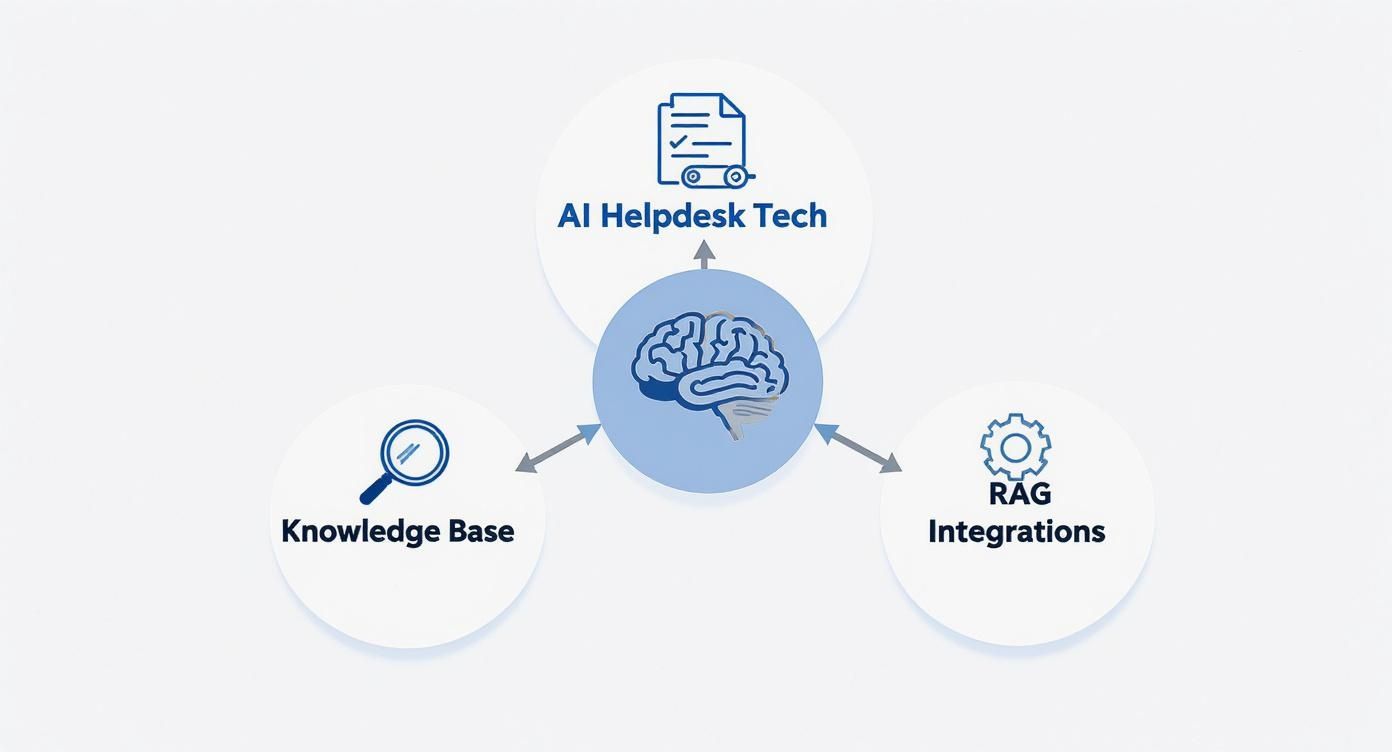
This setup is what allows the chatbot to go from being a simple FAQ machine to a tool that can actually solve problems.
- Curate Your Knowledge Base: Time to gather your existing IT documentation. Start with the good stuff: well-organized FAQs, how-to articles from Confluence or SharePoint, and any internal wikis you have. The key is to make sure the information is up-to-date, accurate, and written in plain English.
- Design Smart Conversation Flows: Map out the ideal chat for your top use cases. Put yourself in an employee's shoes. What questions will they ask? Design a path that guides them to a solution, and always include a clear escape hatch to a human agent if the bot gets stuck. Nothing is more frustrating than being trapped in a loop.
- Run a Pilot Test: Before you go live for everyone, roll out the chatbot to a small, friendly group of users. This pilot program is your secret weapon. It’s where you’ll get honest feedback on everything from the bot’s tone to the accuracy of its answers. Use their input to iron out the kinks.
Phase 3: Launch and Promote
Once your pilot test is done and you've polished the chatbot based on real-world feedback, you're ready for the main event. A successful launch is as much about communication as it is about technology. You need to get your team excited to use their new virtual assistant.
- Create a Communication Plan: Don't just quietly turn the chatbot on and hope people stumble upon it. Announce it! Use company-wide emails, banners on your intranet, and a quick mention in team meetings to spread the word.
- Make Simple "How-To" Guides: Nobody wants to read a 20-page manual. Create a short video or a simple one-page PDF that shows employees how to use the bot and what it's good for.
- Ask for Ongoing Feedback: The launch isn't the finish line; it's the starting pistol. Make it incredibly easy for users to rate their chat and leave comments right in the window. This constant feedback loop is what will help you make the bot smarter and more useful over time.
Common Questions About IT Support Chatbots
It's completely normal to have a few questions before bringing a new piece of tech into your workflow, no matter how great the benefits sound. When teams start looking into a chatbot for IT support, a few common concerns almost always pop up around maintenance, capabilities, and security. Let's tackle those head-on so you can feel confident about your decision.
One of the first questions I usually hear is, "How much work does it take to keep this thing updated?" People often picture a constant, manual grind of feeding the bot new information. The good news is, that's not how modern chatbots work anymore.
Today's best tools are built with RAG technology, which means they plug directly into the knowledge bases you already use. If you update a how-to guide in SharePoint or tweak a process in Confluence, the chatbot instantly sees that new information. Your job isn't to update the bot; it's just to keep your central documentation in good shape. It shifts the focus to good housekeeping, which is a best practice anyway.
Handling Complexity and Security
"But can it handle our really weird or complex problems?" That's another big one. A well-designed IT support chatbot is smart enough to know what it doesn't know. Its purpose is to knock out the high-volume, repetitive stuff—password resets, software access requests, Wi-Fi issues—not to solve a bizarre, one-off server issue that needs a senior engineer.
For those tricky situations, the chatbot becomes the perfect assistant. It's programmed to recognize when a problem is over its head. When that happens, it gracefully pivots to gathering all the essential information from the user—what they've tried, any error codes they're seeing—and then packages it all into a perfectly detailed ticket for the right human expert. No more back-and-forth emails just to get the basic facts.
Security is non-negotiable, especially in IT. Any chatbot platform worth considering has to be built with enterprise-grade security at its core. We're talking about data encryption, strict role-based access controls (so only the right people can manage the bot), and complete audit logs that track every single change and interaction.
Finally, what about compliance with rules like GDPR? Any reputable chatbot provider builds its platform with this in mind from day one. They should offer secure integration protocols and data residency options, letting you choose where your data lives. The system is designed to only pull the specific information it needs to answer a question, keeping the rest of your sensitive data locked down and secure.
Ready to transform your IT support with a secure, intelligent, and easy-to-manage AI assistant? MxChat provides a no-code platform for WordPress, allowing you to build a powerful chatbot that integrates directly with your knowledge base. Start automating routine tasks and freeing up your IT team today. Learn more about MxChat.