DeepSeek Web Search API Pricing: A Chatbot Test
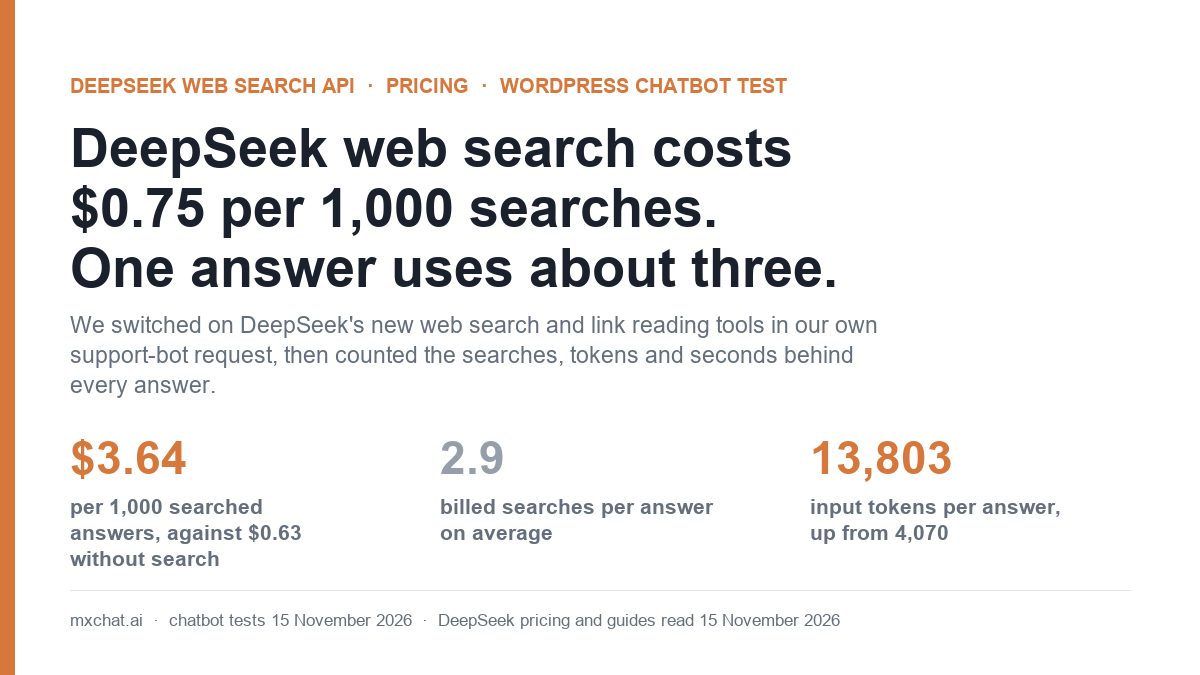
On 13 November 2026 DeepSeek opened the features of its own chat app to developers: web search, deep thinking search, link reading, file parsing, OCR, speech and a safety check, all callable from the API. The DeepSeek web search API is the one most chatbot owners will reach for first, and its price looks tiny: $0.75 per 1,000 searches.
That number is per search, not per answer. On 15 November 2026 we switched the new tools on inside our own support-bot request and counted what each answer used. The short version: one searched answer on deepseek-flash was billed for 2.9 searches on average and 13,803 input tokens, against 4,070 without search. That is $3.64 per 1,000 answers at off-peak rates, against $0.63 without search. The search fee was 60% of the bill. And with our normal support prompt, the bot mostly refused to search at all.
DeepSeek web search API pricing, and the rest of the 13 November release
These are the prices on DeepSeek’s Models and Pricing page, read on 15 November 2026. Token prices are per million tokens. DeepSeek charges half price outside peak hours, which are 01:00 to 04:00 and 06:00 to 10:00 UTC, Monday to Friday.
| What you call | Price | How it is counted |
|---|---|---|
| Web search (tool in a chat request, or the Search API) | $0.75 per 1,000 searches | Each query in a search call that returns results. Failed or empty searches are free. |
| Link reading (tool, or the Fetch API) | $0.75 per 1,000 fetches | Each page fetched successfully. |
| File parsing and OCR | $0.225 per 1,000 pages | Per page, once, when parsing succeeds. |
| Text to speech | $0.45 per 10,000 characters ($0.225 limited-time) | Per character. No end date given for the discount. |
| Speech to text | $0.116 per hour of audio ($0.058 limited-time) | Per second of audio. |
Safety check (safety_check: high) | No separate price | Review tokens are billed as output tokens. |
deepseek-flash tokens | $0.30 input / $0.006 cached / $1.20 output at peak; half off-peak | Search results and fetched pages are added to the prompt and billed as input. |
The last row is the one the price list does not spell out. DeepSeek’s pricing page lists the search fee and the token prices separately and does not say that search results become input tokens. Its own usage example shows 1,905 input tokens for a one-line question, and our test confirms it: results are billed as input, and the model runs twice.
The standalone Search and Fetch APIs are not new. They went on sale on 31 October, and we covered them in our DeepSeek V4 Pro pricing test. What is new is that the model can now call search by itself: you add {"type": "deepseek_web_search"} or {"type": "deepseek_read_url"} to the tools list of a normal chat request, and DeepSeek runs the search, feeds the results to the model and returns one finished answer with citations.
How we tested it
The request was the one our own MxChat support bot sends: the site’s system prompt (3,478 characters) plus four knowledge-base passages of about 4,000 characters each, then one question. That is about 4,070 input tokens. We sent it from our WordPress server to api.deepseek.com/chat/completions with the site’s paid key, model deepseek-flash, no streaming.
- Four questions the knowledge base cannot answer, each with a fact we could check: the latest WordPress version, DeepSeek’s own search price, Anthropic’s price for Claude Fable 5.2, and the date Google reroutes Gemini 2.5 Pro.
- Two questions the knowledge base can answer, to see whether the bot searches when it does not need to.
- Four questions containing a link, for the link reading tool.
- Two prompts. First our support prompt exactly as it runs on the site, which tells the bot to answer only from the knowledge base. Then the same prompt with one sentence added: “If the knowledge base does not contain the answer, use web search to find it, or read the link the visitor sent.”
In total we sent 105 chat requests and 8 speech, OCR and file calls. Four chat requests were rejected on purpose, to map the rules. The test ran on a Sunday, so everything was billed at off-peak rates. Costs below use the tokens each answer reported, with the first pass priced as uncached, plus $0.75 per 1,000 for every billed search or fetch the API reported in usage.server_tool_use.
What 1,000 answers cost with web search on
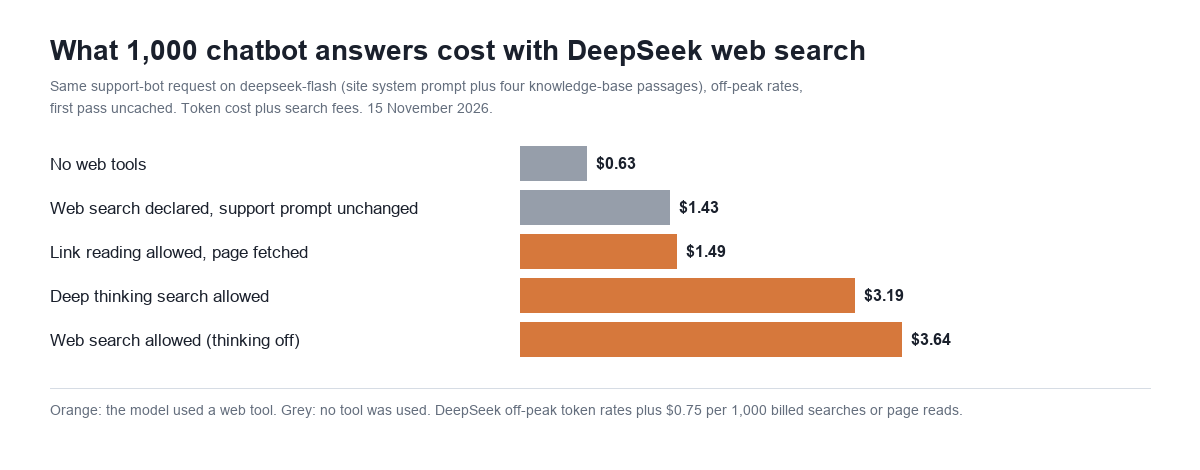
| Setup (deepseek-flash) | Answers | Input tokens | Billed searches per answer | Tokens, per 1,000 | Search fees, per 1,000 | Total off-peak | Total at peak | Median time |
|---|---|---|---|---|---|---|---|---|
| No web tools | 8 | 4,070 | 0 | $0.63 | $0.00 | $0.63 | $1.26 | 1.09 s |
| Web search allowed, thinking off | 20 | 13,803 | 2.9 | $1.46 | $2.17 | $3.64 | $5.10 | 2.54 s |
| Deep thinking search allowed | 8 | 17,852 | 2.0, plus 0.12 page fetches | $1.59 | $1.59 | $3.19 | $4.78 | 3.35 s |
| Link reading allowed, page fetched | 6 | 9,187 | 1 fetch | $0.74 | $0.75 | $1.49 | $2.24 | 2.08 s |
| Web search allowed, question answered by the knowledge base | 4 | 4,102 | 0 | $0.64 | $0.00 | $0.64 | $1.28 | 1.31 s |
Three things drive the bill.
One answer is about three searches. When the model decides to search, it writes several queries at once and DeepSeek bills each one. In 13 of 20 searched answers it sent exactly three. Five sent two, one sent one, and one sent eight across two rounds. The average was 2.9, so the real fee is about $2.17 per 1,000 answers, not $0.75.
The model runs twice, and the results are input. A searched answer is two passes: one where the model reads the question and writes its queries, and one where it reads the results and answers. The API adds both passes together in prompt_tokens. So our 4,070-token prompt was counted twice, plus roughly 5,000 tokens of search results. The second pass read the prompt from DeepSeek’s cache, which is why the token cost rose 2.3 times while the token count rose 3.4 times.
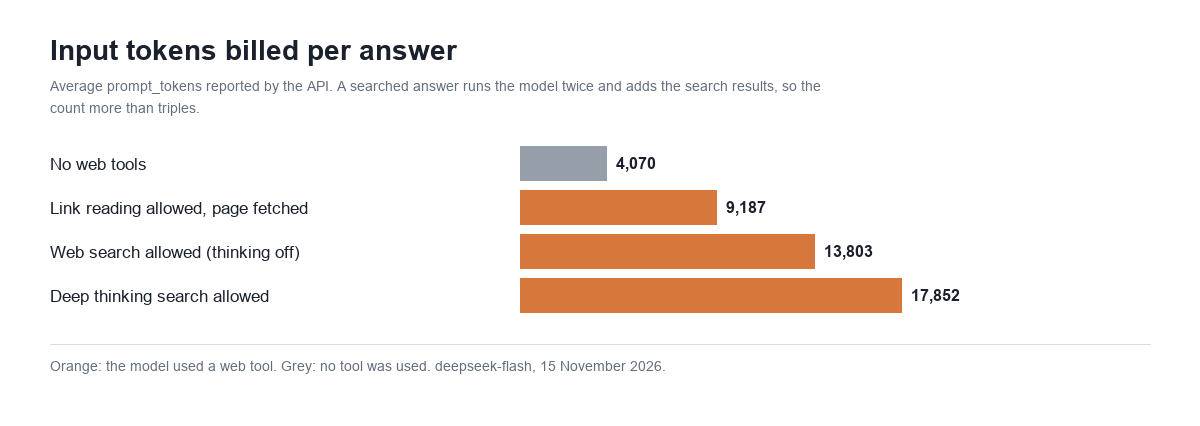
Search fees do not get cheaper off-peak or with caching. DeepSeek’s half-price hours and its cache discount apply to tokens only. For a returning visitor whose prompt is fully cached, the token part of a searched answer fell to $0.92 per 1,000, but the $2.17 in search fees stayed. At that point search fees were 70% of the bill.
With a normal support prompt, the bot refused to search
This was the result we did not expect. Our live support prompt tells the bot to answer from its knowledge base and say so when the answer is not there. We added the web search tool to that request and changed nothing else.
| Setup | Answers | Searched | Correct | Refused | Wrong |
|---|---|---|---|---|---|
| No web tools | 8 | 0 | 0 | 8 | 0 |
| Web search declared, support prompt unchanged | 8 | 2 | 1 | 7 | 0 |
| Deep thinking search declared, support prompt unchanged | 8 | 0 | 0 | 8 | 0 |
| Web search allowed in the prompt, thinking off | 20 | 20 | 14 | 5 | 1 |
| Deep thinking search allowed in the prompt | 8 | 8 | 8 | 0 | 0 |
With the prompt unchanged, the bot searched in 2 of 16 answers. In one of those two it ran three billed searches, was billed for 12,829 input tokens and still replied “I don’t have enough information in my knowledge base.” We paid for the search and the visitor got nothing.
Adding one sentence that permits search fixed the first problem: all 28 answers searched. It did not fully fix the second. With thinking off, 5 of 20 answers searched and then refused anyway, including the eight-search answer, which cost 27,867 input tokens. One more answered wrongly: it said the latest WordPress was 6.9 from December 2025, when it is 7.1.4. So 6 of 20 searched answers, 30%, were paid for and did not help.
Deep thinking search got all 8 right, including the WordPress version, and it searched less: two queries per answer on average. It spent more tokens reading results, so the total came out slightly cheaper than plain search in this test, $3.19 against $3.64. Eight answers is a small sample, so read that as “about the same price, better answers” and not as a firm ranking.
The bot did not search when it had no reason to. All six requests that asked something the knowledge base covers were answered from the knowledge base with zero searches, with the search tool declared every time.
Speed: about 1.5 seconds more, with a long tail
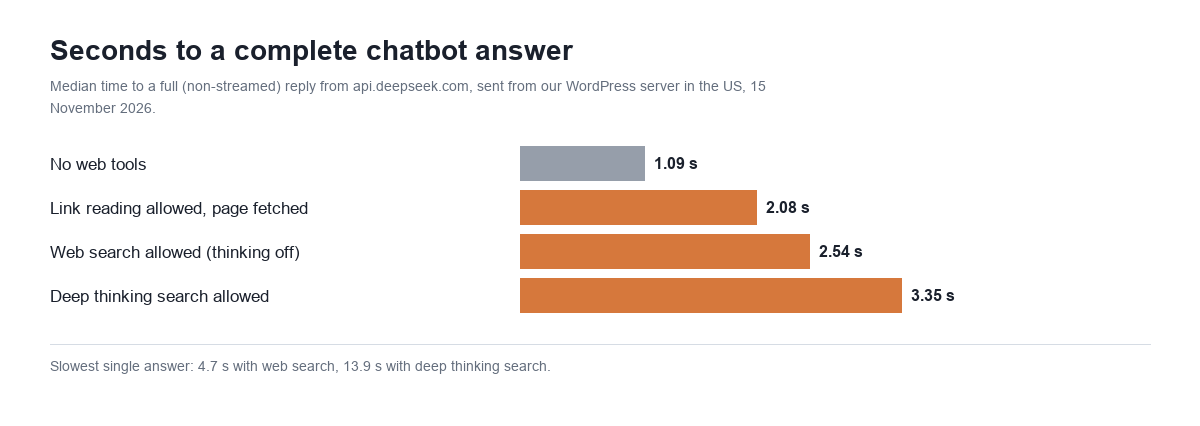
A searched answer took a median of 2.54 seconds against 1.09 without search. The slowest was 4.66 seconds. Deep thinking search had a median of 3.35 seconds, but one answer took 13.88 seconds: the model searched, opened a page, searched again and opened another page, and that single answer was billed for 46,894 input tokens. DeepSeek’s guide says a deep thinking search can make up to about 20 tool calls before it answers. For a live chat window, that tail matters more than the median.
Link reading: one fetch, about 1,000 tokens, and the same “runs twice” rule
With deepseek_read_url declared, the model reads links found in the visitor’s last message. In our test a fetched page added one $0.00075 fetch fee and about 1,000 tokens of page text, and the prompt was again counted twice. That came to $1.49 per 1,000 answers off-peak.
The model decided for itself whether to open the link. Asked to summarise a wordpress.org plugin page, it answered from the knowledge base all four times without fetching. With our unchanged support prompt it fetched in 4 of 8 answers; with the extra sentence, 6 of 8. One fetch of our own documentation page took 7.27 seconds.
Rules we hit along the way
| What we sent | What came back |
|---|---|
| Web search plus one of our own function tools, thinking off | HTTP 400: client tools can only be combined with the web tools “in thinking mode” |
| The same, thinking on | Accepted. Asked for an order status, the model called our function. |
A function tool plus safety_check: high, thinking off | HTTP 400, same message |
tool_choice naming deepseek_web_search | HTTP 400: “cannot be forced” |
tool_choice: "required" | Accepted, and the bot searched (three billed searches) |
Web search on deepseek-v4-pro | Accepted and billed three searches in our one request, but the reply was a search query, not an answer. DeepSeek’s guide says to use deepseek-flash. |
| Web search tool declared, thinking off, no search made | No extra input tokens (4,066 with and without the tool) |
| Web search tool declared, thinking on, no search made | About 1,000 extra input tokens on every request (5,093 against 4,095) |
safety_check: high on 13 requests | safety_tokens: 0 on every one. No added cost on ordinary support questions. |
The first row is the one a WordPress chatbot will trip over. A bot that already uses function tools, for order lookups or forms, cannot add DeepSeek web search with thinking off. It has to turn thinking on, which means deep thinking search, the 1,000-token surcharge on every request and the slow tail above.
One more observation, on a sample too small to lean on: with safety_check: high and search allowed, two of four answers ran searches that returned no sources, which are not billed, and then refused. A third quoted DeepSeek’s price in yuan. We would test that combination on your own questions before turning both on.
The rest of the release: OCR, file parsing and speech
We ran one small check on each of the other new APIs, using a two-page PDF support guide we made for the test and one of our own bot answers.
| API | What we sent | Result | Time | Cost at list price |
|---|---|---|---|---|
| OCR | One-page PNG, then a two-page PDF | Text and numbered steps exact; the price table came back as a table with two cells of one row merged; page_count 1 and 2 | 2.5 s and 2.8 s | $0.000225 per page |
| OCR with layout | The same two files | Same text with a bounding box for every block | 2.6 s and 2.8 s | $0.000225 per page |
| File parsing in chat | The PDF uploaded once, then asked about twice | Correct answer both times; the document added about 350 input tokens | 2.8 s upload, 1.1 s per answer | $0.00045 once, then tokens |
| Text to speech | A 213-character bot answer, voice stella | 13.9 seconds of 24 kHz audio | 3.7 s | $9.59 per 1,000 answers that length ($4.79 at the limited-time price) |
| Speech to text | That audio, sent back | Word for word, except “MxChat” came back as “MX Chat” | 2.3 s | $0.45 per 1,000 clips that length ($0.23 limited-time) |
Speech is the surprise in that table. Reading a 213-character answer aloud costs about $0.0096 at list price, and generating that answer on deepseek-flash cost about $0.0006. A voice bot on DeepSeek would spend roughly fifteen times more on the voice than on the model. Our OpenAI TTS pricing test and Whisper pricing test have the comparison figures for OpenAI’s speech models.
What this means for a WordPress chatbot
- Budget per answer, not per search. Plan for about three billed searches and roughly 10,000 extra input tokens every time the bot searches. On our request that is $3.64 per 1,000 searched answers off-peak and $5.10 at peak.
- Your system prompt decides whether search happens. A prompt that says “answer only from the knowledge base” will mostly block it, and can leave you paying for searches that end in a refusal. Say plainly when the bot may search.
- Keep the knowledge base as the first source. The bot did not search when its knowledge base had the answer, so a well-stocked knowledge base keeps most answers at the $0.63 rate.
- Check the answers, not only the citations. With thinking off, one answer in twenty was confidently out of date. Deep thinking search was more accurate here, at the price of a slow tail.
- Watch
usage.server_tool_use. The billed counts aretool_searchandtool_fetch. The fields namedweb_search_requestsin DeepSeek’s examples are for display only.
DeepSeek web search in MxChat
MxChat 3.2.28 supports DeepSeek as a model provider and sends every DeepSeek request with thinking disabled, which is the cheap, fast setting in our DeepSeek Flash pricing test. It does not declare DeepSeek’s web search or link reading tools, so none of the search fees in this post apply to an MxChat bot today. Your DeepSeek bill is tokens only, at the rates in our DeepSeek peak-hours pricing guide.
If you want live web answers in MxChat now, that runs through the Perplexity add-on, which we priced in our Perplexity Sonar pricing test. Plans and add-ons are listed on the MxChat Pro page, and setup steps are in the documentation.
Frequently asked questions
How much does the DeepSeek web search API cost?
$0.75 per 1,000 searches, plus the tokens. Each query the model writes is one billed search, and the results are billed as input tokens. In our test a searched answer on deepseek-flash cost $3.64 per 1,000 answers off-peak: $2.17 in search fees and $1.46 in tokens.
How many searches does one answer use?
2.9 on average in our 20 searched answers with thinking off. Thirteen used exactly three, and one used eight. Deep thinking search averaged two.
Are search results billed as input tokens?
Yes. Our prompt was 4,070 tokens, and a searched answer reported 13,803 input tokens on average. The model runs once to write its queries and once to answer, so the prompt is counted twice and about 5,000 tokens of results are added.
Is DeepSeek web search cheaper off-peak?
Only the token part. DeepSeek’s half-price hours and cache discount do not apply to the $0.75 per 1,000 search fee, which was 60% of the off-peak bill in our test.
Which DeepSeek models support web search?
DeepSeek’s guide says to use deepseek-flash. A request to deepseek-v4-pro was accepted and billed for three searches in our test, but it returned a search query in place of an answer.
Can I use DeepSeek web search together with function calling?
Only with thinking turned on. With thinking off, a request that declared both a function tool and a web tool was rejected with HTTP 400.
Can I force the model to search?
Not by name: naming the web search tool in tool_choice returns HTTP 400. Setting tool_choice to required was accepted and the bot searched. The more reliable lever in our test was the system prompt.
What does DeepSeek OCR cost?
$0.225 per 1,000 pages, for both the OCR API and file parsing in chat. Our two-page PDF came back as Markdown in 2.8 seconds, with the text exact and one table row slightly merged.
Prices and rules from DeepSeek’s Models and Pricing page, changelog and guides, read 15 November 2026. Chatbot tests run 15 November 2026 from mxchat.ai’s server with a paid DeepSeek API key: 105 chat requests and 8 speech, OCR and file calls, about $0.15 in API cost.