GPT-6 Luna Pricing: Half the Cost, If You Set Effort
GPT-6 Luna pricing is half of what GPT-5.6 Luna cost, and OpenAI says the cut is permanent. When GPT-6 Sol and GPT-6 Luna shipped on 22 September 2026, Luna came in at $0.10 per million input tokens and $0.50 per million output tokens, against $0.20 and $1.20 for GPT-5.6 Luna. For anyone running a WordPress chatbot on the cheapest OpenAI tier, that reads like a free 50% saving. It mostly is. There is one setting that decides how much of it you keep, and most plugins do not set it for a model they have never heard of.
We measured the switch on Monday 28 September 2026: 68 real Chat Completions calls to the OpenAI API from a production WordPress server, using the site’s live system prompt, retrieved knowledge-base pages and three real visitor questions. Chat Completions is the endpoint most WordPress chatbot plugins call, including ours, so that is the one we tested. Our own site chatbot runs on GPT-5.6 Luna today, so this is also the test we needed before moving it.
- A retrieval chatbot reply fell from $1.18 to $0.57 per 1,000 replies (−52%), comparing GPT-5.6 Luna at the reasoning effort our plugin sends (
low) with GPT-6 Luna atnone. The answers were as accurate and as short. - GPT-6 Luna’s default reasoning effort is
medium. Leave the parameter out and it spent 78 reasoning tokens per reply, cost 7% more thannoneand took 1.88 seconds instead of 1.10. The visible answers were no longer and no better. reasoning_effort: "minimal"is rejected with HTTP 400 on GPT-6 Luna. A plugin that usesminimalas its generic “cheapest” setting will break on the new model rather than fall back.- The tokenizer did not change. Both models counted the identical prompts at exactly the same number of input tokens, so the rate card is the bill.
Update, 5 October 2026: Two Mistral models now sit in the same budget tier as GPT-6 Luna on our chatbot request: Ministral 3 14B at $0.45 per 1,000 replies and Mistral Small 4 at $0.61, against $0.57 here. Mistral Medium 3.5 cost $6.78. See our Mistral API pricing test.
Update, 7 October 2026: GPT-6 Luna is also the only model on OpenAI’s new Decisions API, which bills input only. On short routing jobs it answered in 0.11 seconds against 0.97 on Chat Completions, but it does not cache prompts. See our OpenAI Decisions API pricing test.
Update, 8 October 2026: Claude Haiku 5.5 launched at the same $0.10 / $0.50 per million as GPT-6 Luna, but counted the same chatbot request as 1.67 times as many tokens. Per 1,000 replies it cost $0.63 to $0.75 against $0.53 for GPT-6 Luna. See our Claude Haiku 5.5 pricing test.
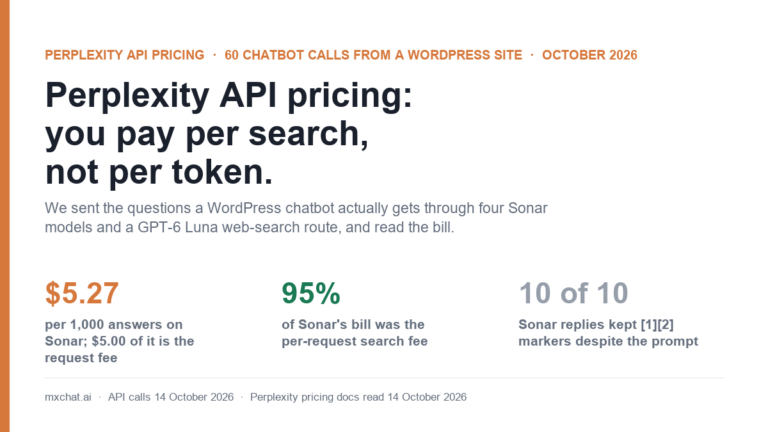
Update, 14 October 2026: Asked about anything recent without web search, GPT-6 Luna answered wrongly in 10 of 10 replies in our latest test. With OpenRouter web search it got every checkable fact right, at $15.93 per 1,000 answers against $5.27 for Perplexity Sonar. Details in our Perplexity API pricing test.
The GPT-6 Luna rate card next to GPT-5.6 Luna
These are OpenAI’s published rates per million tokens as they read on 28 September 2026. Neither model has a retirement date on OpenAI’s deprecations page; GPT-5.6 Luna is still listed as a current model and the replacement for the retiring GPT-5 Nano.
| Per 1M tokens | GPT-5.6 Luna | GPT-6 Luna | Change |
|---|---|---|---|
| Input | $0.20 | $0.10 | −50% |
| Cached input (read) | $0.02 | $0.01 | −50% |
| Cache write | $0.25 | $0.125 | −50% |
| Output (includes reasoning tokens) | $1.20 | $0.50 | −58% |
| Context window / max output | — | 1,050,000 / 128,000 | — |
| Reasoning effort values | none, low, medium, high | none, low, medium (default), high, xhigh, max | — |
| Knowledge cutoff | — | 18 May 2026 | — |
The output cut is the bigger percentage, and for a chatbot it is nearly irrelevant. A retrieval chatbot sends several thousand tokens of instructions and retrieved pages and gets back a short answer. On our calls, input was about 97% of the GPT-6 Luna bill. The 50% input cut is the saving; the 58% output cut adds roughly a cent per thousand replies. If you want the longer version of why input dominates, our GPT-5.6 Luna cost breakdown walks through it on the previous model.
How we tested
Every call went from the mxchat.ai WordPress server to https://api.openai.com/v1/chat/completions with the site’s own API key, which never left the server. Each request carried the site chatbot’s real system prompt and a user message made of four retrieved pages plus the question, the same layout a retrieval (RAG) chatbot sends. The three questions were ones visitors actually ask us:
- Does MxChat work with WooCommerce, and can the bot look up an order status for a logged-in customer?
- Do I need Pinecone to use the knowledge base, or can I store embeddings in WordPress?
- Can a visitor be handed over to a human on Slack or Telegram when the bot cannot answer?
We ran two batches. The first retrieved pages by recency, which turned out to be a useful accident: the retrieved pages did not contain the answers, so every reply from both models was a polite “I don’t have enough information” with a link to the documentation. That is 36 calls of the refusal shape, which every real chatbot produces some of the time. The second batch retrieved pages by relevance, so the answers were in the context, and produced 30 real answers. Each configuration ran every question twice. Two further calls tested minimal effort and were rejected. Total: 68 calls, 66 billed, for well under ten cents.
What a reply costs on each model
Costs below are per 1,000 replies, computed from the usage fields OpenAI returned on each call and priced at list rates. Answers are the mean of both runs; refusals are first-time questions only, since their repeats were read from the cache. They include cache writes, because Chat Completions wrote every prompt to the cache at 1.25 times the input rate (more on that below).
| Model and reasoning effort | Answers: cost per 1,000 | Refusals: cost per 1,000 | Output tokens (answers) | Reasoning tokens (answers) | Mean latency (answers) |
|---|---|---|---|---|---|
GPT-5.6 Luna, low (MxChat’s current setting) | $1.18 | $1.48 | 66 | 20 | 1.73 s |
| GPT-5.6 Luna, default | $1.20 | $1.55 | 87 | 37 | 1.79 s |
GPT-6 Luna, none | $0.57 | $0.74 | 38 | 0 | 1.10 s |
GPT-6 Luna, low | $0.58 | $0.73 | 65 | 22 | 1.62 s |
GPT-6 Luna, default (medium) | $0.61 | $0.77 | 120 | 78 | 1.88 s |
Answers averaged 4,399 input tokens and refusals 5,673, because the recency-retrieved pages happened to be longer. Either way the result is the same shape: GPT-6 Luna halves the bill at every effort level, and the effort level moves the price by a few percent at most.

At real volumes the money is modest, which is worth saying plainly. A site answering 10,000 questions a month pays about $11.79 on GPT-5.6 Luna at low and $5.69 on GPT-6 Luna at none. At 50,000 questions the gap is about $31 a month.
| Replies per month | GPT-5.6 Luna (low) | GPT-6 Luna (none) | GPT-6 Luna (default) | Saving vs GPT-5.6 Luna |
|---|---|---|---|---|
| 1,000 | $1.18 | $0.57 | $0.61 | $0.61 |
| 10,000 | $11.79 | $5.69 | $6.10 | $6.11 |
| 50,000 | $58.96 | $28.43 | $30.49 | $30.53 |
| 250,000 | $294.80 | $142.15 | $152.43 | $152.65 |
For a small WordPress site the switch is worth doing because it is free, not because it changes the budget. For an agency running a few dozen client bots on one key, or a busy WooCommerce store, the saving is real money for changing one setting.
The setting that matters: reasoning effort
GPT-6 Luna is a reasoning model. Before it writes the visible answer it can spend hidden reasoning tokens, and those bill at the output rate. How many it spends is controlled by reasoning_effort, and on GPT-6 Luna the default, used whenever the parameter is absent, is medium.
For a chatbot answering from retrieved documents, that default buys nothing we could see. At medium, GPT-6 Luna spent between 0 and 116 reasoning tokens per answer, 78 on average, and produced visible answers averaging 25.8 words. At none it spent zero and produced answers averaging 25.8 words. The answers said the same things: WooCommerce order lookups work for logged-in customers with MxChat Pro and the WooCommerce add-on, embeddings can live in the WordPress database, Telegram handoff exists and Slack handoff was not in the retrieved pages.

The cost of medium is small, about 7% on the bill, because output is a small share of it. The latency is not small. Mean response time went from 1.10 seconds to 1.88 seconds, 71% slower, and the slowest medium answer took 2.76 seconds against 1.28 seconds for the slowest none answer. In a chat window that is the difference between an answer that feels instant and one that makes the visitor watch the typing indicator.
Three details about effort that matter to anyone configuring a plugin:
minimaldoes not exist on GPT-6 Luna. The API returned HTTP 400, “Unsupported value: ‘reasoning_effort’ does not support ‘minimal’ with this model.” The original GPT-5 models requiredminimalas their floor and rejectednone; GPT-6 Luna is the reverse. Code that maps “fastest” tominimalfor every GPT model will fail on every request.lowsometimes reasons anyway. Four of sixlowanswers used no reasoning tokens, two used 86 and 49. On GPT-5.6 Luna,lowbehaved the same way (0 to 79). If you want predictable latency,noneis the only setting that guarantees zero.- Function calling on Chat Completions requires
none. OpenAI’s model page says Chat Completions supports function calling on GPT-6 Luna only withreasoning_effortset tonone; other effort levels and built-in tools need the Responses API. A chatbot that uses tools for order lookups or form submissions over Chat Completions has no choice to make.
Why “just change the model name” is where this goes wrong
Most WordPress AI plugins keep a table of known models and the parameters each one accepts. When a model is not in the table, the common behaviour is to send nothing model-specific and let the API use its defaults. For GPT-5.x that was harmless. For GPT-6 Luna it means medium effort: the answers still arrive and the bill still halves, so nothing looks broken, but every reply is about 0.8 seconds slower than it needs to be.
This is not hypothetical. An open-source agent framework filed exactly this bug against itself the week GPT-6 shipped: GPT-6 Sol and Luna fell through to a default row, the configured effort was dropped, and the context window was recorded as 200,000 tokens instead of 1,050,000. Our own plugin is in the same position today. MxChat’s model catalog lists GPT-5.6 Sol, Terra and Luna with an explicit chat effort of low, and returns no effort at all for any model outside the GPT-5 family. GPT-6 Luna is not in the catalog yet, which means a site cannot pick it from the dropdown, and when it is added it needs its own effort entry rather than the fall-through.
If you are checking your own plugin, the questions are short. Is gpt-6-luna in the model list? What does the plugin send as reasoning_effort for it: none, something else, or nothing? Does it send temperature? OpenAI documents sampling parameters on these models only for effort none, so a plugin that sends a temperature alongside the default effort may see errors or silently ignored settings.
The cache did not help, and cost 24% extra
Every first-time prompt in our test was written to OpenAI’s cache in full, at 1.25 times the input rate. In the second batch each question was sent twice, but the second copy differed by one word in the last line of the user message. That was enough: the whole prompt, about 4,000 to 4,700 tokens, was written again, and the first write was never read. Only the first batch’s word-for-word repeats read from the cache.
For a retrieval chatbot that is the normal case, because the retrieved pages change with every question. On GPT-6 Luna the write premium added about 24% to what the same calls would cost at the plain input rate ($0.57 against $0.46 per 1,000 answers). We measured this in detail on GPT-6 Luna, GPT-6 Sol and GPT-5.6 Luna two days ago in our write-up of OpenAI’s cache-write charge, including when the explicit caching mode pays for itself. The short version for this post: the 50% cut applies to cache writes too, so the premium is a smaller number in dollars, but it is still there.

Quality: did the cheaper model answer worse?
On these questions, no. We read all 66 replies. With the relevant pages retrieved, both models answered all three questions correctly and within the site prompt’s rules: short, drawn from the retrieved pages, and honest about the one thing the pages did not cover (Slack handoff). GPT-6 Luna was slightly more likely to mention that WooCommerce order lookups need a Pro licence, which the retrieved documentation says. With irrelevant pages retrieved, both models declined in every case rather than invent an answer, which is what the system prompt asks for.
Three questions are a small sample. They are the right sample for the claim we are making, which is about cost and latency for a short retrieval answer, not about general intelligence. Independent benchmark tables published since launch put GPT-6 Luna and GPT-5.6 Luna within a point of each other on general indices, with GPT-6 Luna producing more reasoning tokens per task at its default effort. That matches what we saw: same answers, more hidden work unless you turn it off.
Should a WordPress chatbot switch to GPT-6 Luna?
For a retrieval chatbot answering site-specific questions, yes, with the effort set explicitly. Our recommendation, in order:
- Set
reasoning_efforttononefor the chat itself. It was the cheapest and fastest setting and gave the same answers. - Use
lowonly if you have seennoneget a specific kind of question wrong. Expect occasional reasoning bursts and latency spikes. - Never leave it unset on GPT-6 Luna unless you want
medium. - Remove any
minimalmapping and any temperature setting that is sent with effort other thannone. - Re-check your spending cap. Halving the per-reply cost is a good moment to lower a monthly API limit, which also caps the damage from abuse; see our notes on denial-of-wallet attacks against chatbots.
There is no deadline. GPT-5.6 Luna has no retirement date, so a site that cannot switch today loses nothing but the saving. If you are comparing vendors rather than OpenAI generations, the cheapest alternatives we have measured on the same questions are in our DeepSeek V4.1 Flash test, where the off-peak price is close to GPT-6 Luna’s and the peak price is well above it. For the larger GPT-6 models, see GPT-6 Astra pricing.
What this means for MxChat sites
MxChat’s live chatbot on this site runs GPT-5.6 Luna at low effort, which is the top row of the cost table. GPT-6 Luna is not yet in the plugin’s model list. We have logged the catalog entry, with chat effort set to none, as the change to make; until it ships, GPT-5.6 Luna keeps working at the old price. If you run MxChat and want to see what the rest of the setup looks like, the MxChat documentation covers model selection and the knowledge base, and MxChat Pro adds the WooCommerce and live-agent features the test questions asked about.
FAQ
How much does GPT-6 Luna cost?
$0.10 per million input tokens, $0.01 per million cached input tokens, $0.125 per million cache-write tokens and $0.50 per million output tokens, as listed on 28 September 2026. On our retrieval chatbot test that came to $0.57 per 1,000 replies.
Is GPT-6 Luna cheaper than GPT-5.6 Luna for a chatbot?
Yes, by about half. Our measured cost fell from $1.18 to $0.57 per 1,000 answers, and from $1.48 to $0.74 per 1,000 refusals, with identical input token counts on both models.
What is GPT-6 Luna’s default reasoning effort?
medium. If your code does not send reasoning_effort, the model reasons at medium. On our test that added 78 reasoning tokens and about 0.8 seconds per reply without changing the answers.
Does GPT-6 Luna support reasoning_effort “minimal”?
No. It returns HTTP 400. The supported values are none, low, medium, high, xhigh and max.
Is GPT-5.6 Luna being retired?
Not as of 28 September 2026. OpenAI’s deprecations page lists no shutdown date for GPT-5.6 Luna, and names it as the replacement for GPT-5 Nano, which retires on 11 December 2026.
Method note: 68 Chat Completions calls on 28 September 2026 from the mxchat.ai production server (66 billed, 2 rejected), models gpt-5.6-luna and gpt-6-luna, the site’s live system prompt, four retrieved pages per question, three questions, each configuration run twice. Costs are computed from the returned usage fields at OpenAI’s list rates. Latency is wall time from the server, including network.