WordPress 7.1 Abilities API: 7 New Hooks, Tested
WordPress 7.1 “Mary Lou” shipped on 19 August 2026, and the release coverage has settled on the same three things: tabs, the playlist block, and native responsive styling. Those are real. They are also not the change most likely to affect you if you run an AI chatbot, an MCP server, or any plugin that exposes actions to an agent.
The quieter change is that the WordPress Abilities API grew seven new hooks, and two of them can decide whether an ability runs at all. I found this by downloading the 7.0.4 and 7.1 release packages and diffing them, rather than by reading the release notes — and the numbers below all come from that diff or from WP-CLI on a live site.
What the Abilities API is, in one paragraph
The Abilities API landed in WordPress 7.0. It gives plugins a standard way to say “here is a thing that can be done on this site” — with a JSON Schema for its input, a schema for its output, and a permission callback. An AI agent, an MCP client, or the REST API can then discover those abilities and run them. It is the plumbing that lets a language model do something on your site rather than just talk about it. If you want the wider picture of what that exposure looks like, we covered it in what AI agents can actually do to your WordPress site.
In 7.0.4, WP_Ability::execute() was a mostly closed pipeline: normalize the input, validate it, check permission, run the callback, validate the output. Two actions fired along the way, and neither could change anything. In 7.1 that pipeline is filterable at nearly every step.
The seven new hooks
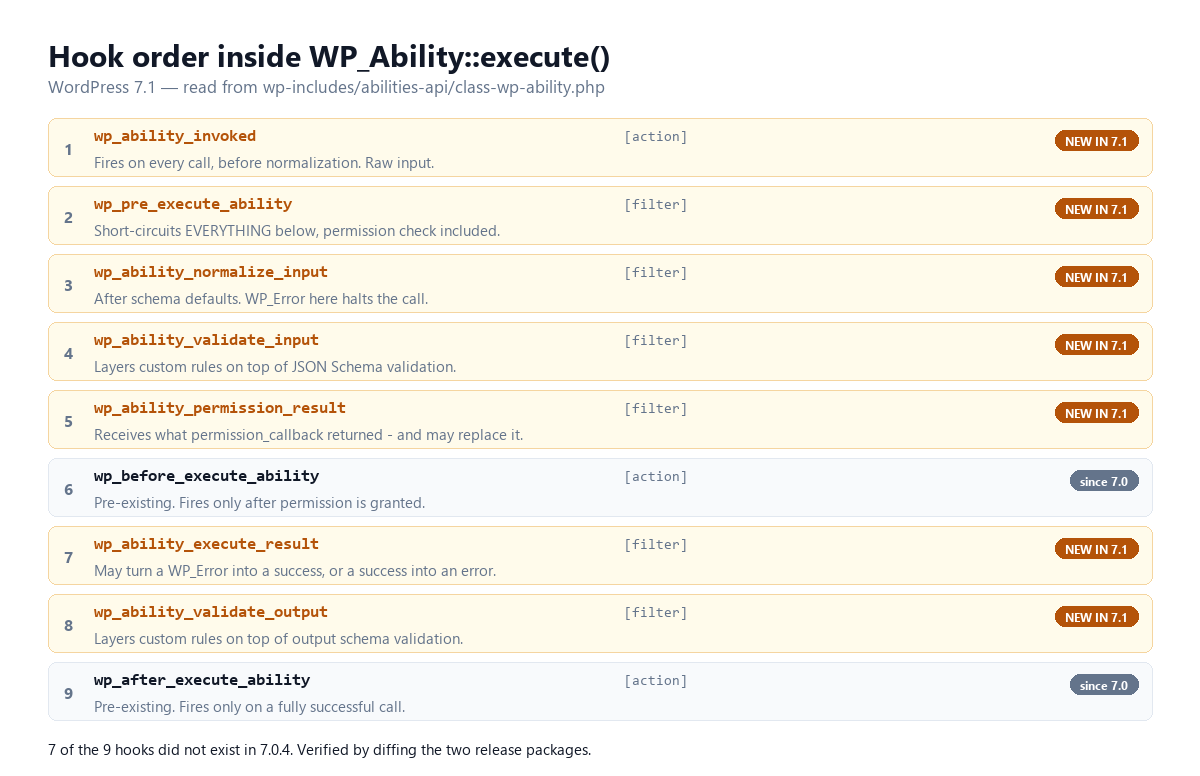
Nine hooks now fire inside a single ability call. Seven of them are new. I verified each one by grepping both release packages for the literal hook name:
| Hook | Type | In 7.0.4? | What it sees |
|---|---|---|---|
wp_ability_invoked | action | No | Raw input, before normalization |
wp_pre_execute_ability | filter | No | Everything, and can skip everything |
wp_ability_normalize_input | filter | No | Input after schema defaults |
wp_ability_validate_input | filter | No | The validation verdict |
wp_ability_permission_result | filter | No | The permission verdict |
wp_before_execute_ability | action | Yes | Input, after permission passed |
wp_ability_execute_result | filter | No | The callback’s return value |
wp_ability_validate_output | filter | No | The output validation verdict |
wp_after_execute_ability | action | Yes | Input and result, on success only |
Most of these are straightforwardly useful. wp_ability_normalize_input exists so you can default beyond what JSON Schema expresses; core’s own docblock suggests prompt enrichment and injecting caller metadata as the intended uses. wp_ability_execute_result is where you would put response formatting or content safety filtering. wp_ability_invoked is an audit log in one line of code, because it fires on every call regardless of outcome — validation failure, permission denial, short-circuit, or success — and it fires before normalization, so you capture what the caller actually sent.
That last one is genuinely good news and worth acting on. If you have ever wanted to know which abilities an agent is probing on your site, you now get it for free.
Two of them can grant access
Here is the part the release notes do not frame this way.
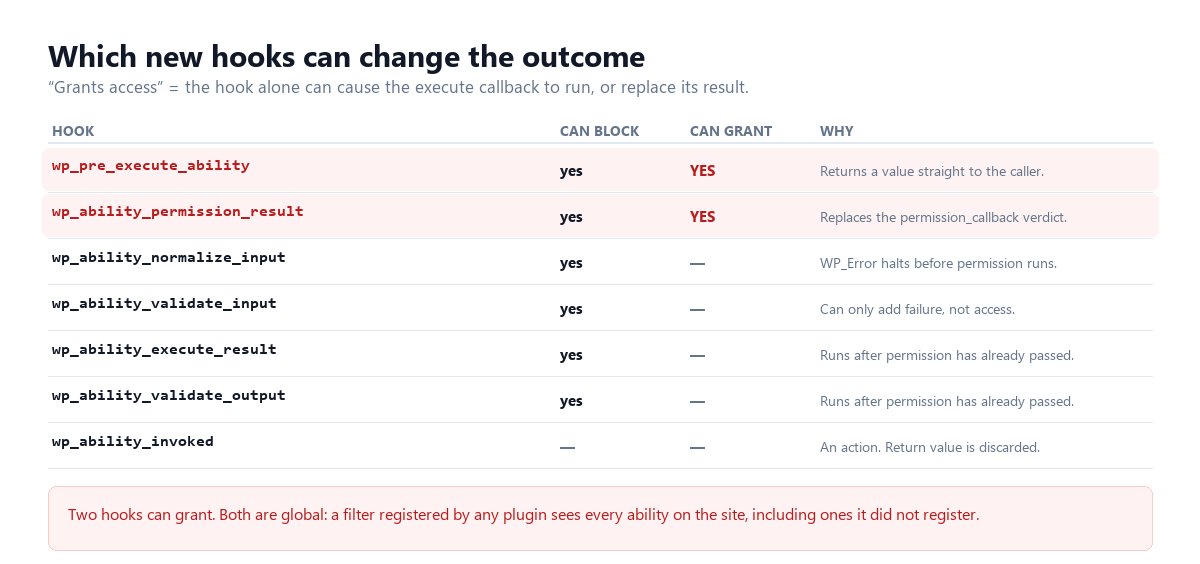
wp_ability_permission_result fires after the ability’s registered permission_callback returns, and it receives that verdict as its first argument. Whatever it returns replaces the verdict. Core’s own documentation is explicit about the intent — “multi-factor authorization gates or temporary permission elevation for trusted contexts” — and equally explicit about the mechanism: return true to grant, false to deny, a WP_Error to deny with a message. Anything else is coerced to false.
wp_pre_execute_ability goes further. It fires second, before normalization, and if it returns anything other than the sentinel value it was handed, execute() returns that value immediately. Core’s docblock lists what gets skipped: “input normalization, input validation, permission checks, the registered execute callback, output validation, and the surrounding actions.” It then adds the sentence that matters most: “Because validation is bypassed, callers that short-circuit are responsible for the integrity of any value they consume.”
Both are global. A filter registered by any plugin sees every ability on the site, including ones registered by other plugins.
The honest counter-argument
This is not a privilege escalation bug, and it would be dishonest to sell it as one. Any plugin running on your site already executes arbitrary PHP as your site. A plugin that wants to bypass a permission check has never needed a filter to do it — it could call the underlying function directly. Nothing in 7.1 gives plugin code a capability it did not already have.
What changes is narrower, and still worth your attention. Ability permission decisions are now overridable from a single, well-known, global extension point. That matters in three practical situations: a plugin that is careless with an add_filter and returns true too broadly; a plugin that is compromised in a supply-chain attack and wants a quiet, generic foothold rather than an obvious one; and a site owner debugging why an agent could do something they thought was blocked. In all three, the answer may now live in a filter belonging to a plugin that has nothing to do with the ability being called.
The mitigation is not to avoid the hooks. It is to know they exist and to be able to enumerate who is using them, which almost nobody can do today.
The new public flag, and a default worth checking
7.1 also adds a public meta key to ability registration. Its default is false, and it seeds the per-channel flags rather than replacing them. The resolution order in the source runs from most specific to least: an explicit show_in_rest wins; failing that, public supplies the default; failing that, false.
The docblock is the interesting bit. It describes public as meaning the ability is “meant to be available to clients such as the REST API, MCP, or AI agents.” That is core naming MCP and AI agents as first-class consumers of abilities in a stable release, which tells you where this API is heading. There is also a new guard: pass a non-boolean public and registration throws an InvalidArgumentException rather than silently coercing.
If you register abilities today, this is the change most likely to need a line from you. Auditing which of your abilities are reachable from outside is a five-minute job and worth doing before you upgrade.
A small new class with a specific job
7.1 adds WP_Filter_Sentinel, a final class whose entire body is empty. It is 25 lines, almost all documentation, and it is loaded from wp-includes/plugin.php — the hook API itself, not the Abilities API.
It solves a problem every WordPress developer has hit. If you want a filter to mean “I did not touch this,” you need a default value that no legitimate filter would return. null and false both fail, because a filter might legitimately want to return them. A fresh WP_Filter_Sentinel is unique by object identity, so === against the original instance is a reliable “nobody changed this” test — which is exactly how wp_pre_execute_ability distinguishes “continue normally” from “short-circuit with the value null.”
Only the Abilities API uses it in core right now. Living in plugin.php suggests core intends it as a general pattern, and it is a good one to copy in your own filters.
What this looks like on a real site
Abstractions are easy to wave at, so I ran the same questions against this site over WP-CLI.
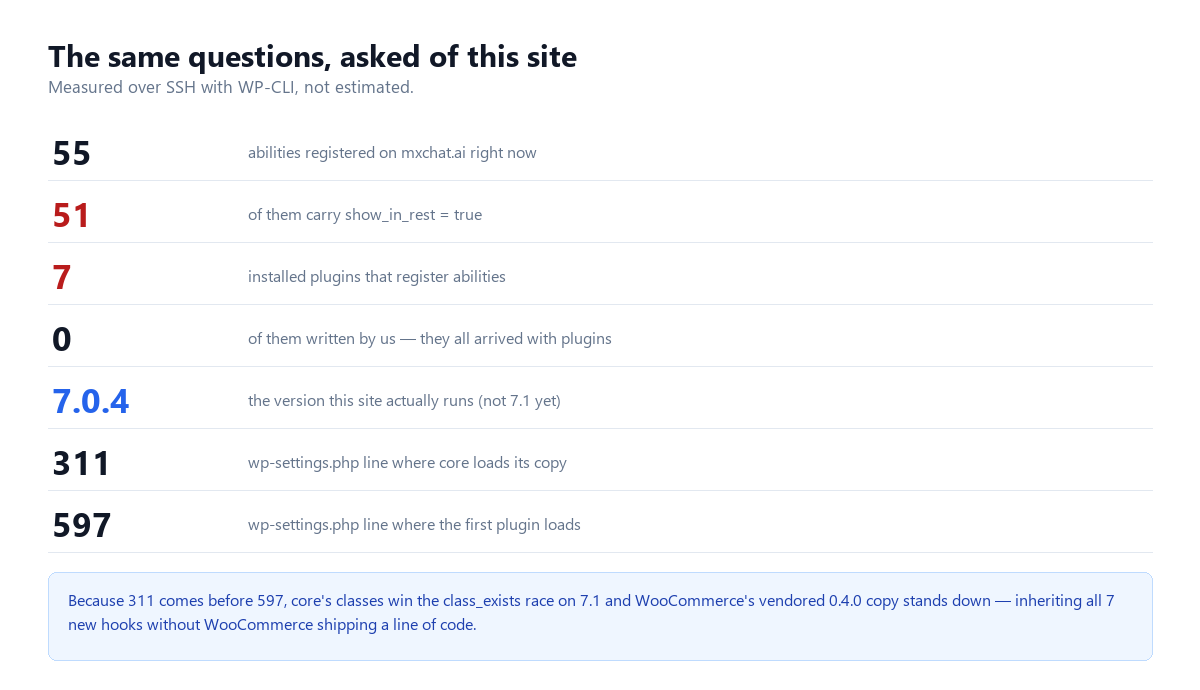
Fifty-five abilities are registered. Fifty-one of them carry show_in_rest = true. Not one was registered by us — they all arrived with plugins, and there are more of those than I expected. Seven installed plugins register abilities: WooCommerce, WooCommerce PayPal Payments, Rank Math SEO and its Pro add-on, WPForms Lite, WP Mail SMTP, and Imagify. None of them is an “AI plugin” in the way anyone means the phrase.
WooCommerce goes furthest. It ships its own vendored copy of the Abilities API at version 0.4.0, plus an MCP adapter that is loaded and running — I confirmed the class is in memory, not merely on disk — exposing abilities named DiscoverAbilitiesAbility, ExecuteAbilityAbility and GetAbilityInfoAbility. An MCP client that reaches those three has discovery and execution over the whole registry.
That vendored copy produces a non-obvious upgrade effect. Its bootstrap wraps every class in a class_exists guard, so it only loads its own classes if core has not already defined them. Core requires the Abilities API at line 311 of wp-settings.php; the first plugin is included at line 597. Core wins by a comfortable margin.
So the moment a WooCommerce site upgrades to 7.1, WooCommerce’s abilities start running through core’s WP_Ability — including all seven new filters — without WooCommerce shipping a single line of code. That is almost certainly the intended design, and it is also the kind of change that does not appear in anyone’s changelog.
For the record: this site runs 7.0.4 as I write, not 7.1. The figures above are the pre-upgrade state, which is the useful one to capture.
What to actually do
| If you… | Do this | Effort |
|---|---|---|
| Run any AI or MCP plugin | Count your registered abilities and how many are REST-exposed before upgrading | 5 min |
| Want visibility | Hook wp_ability_invoked to log ability name plus caller on every call | 10 min |
| Register abilities in your own code | Set public explicitly instead of relying on the default | Per ability |
| Care about the permission surface | Grep your plugins for wp_ability_permission_result and wp_pre_execute_ability | 2 min |
| Write a short-circuit filter | Return the sentinel unchanged to continue; never construct a fresh one | Design rule |
| Maintain a chatbot plugin | Decide now whether wp_ability_execute_result is where your safety filtering belongs | Design call |
The two-minute grep is the one I would not skip. It costs nothing and it is the only way to find out whether something on your site is already reaching into ability permissions.
Where we stand
MxChat does not register abilities today, which means none of this changes its behaviour on upgrade. It does mean the audit hook is now the cheapest observability win available to anyone running an agent-facing site, and we are looking at wp_ability_invoked for exactly that.
The broader pattern is worth naming. Core is building the agent surface faster than the tooling to inspect it. Between the system-prompt storage question in 7.1 and the isolation failures the IEEE study found across 17 chatbot plugins, the consistent gap is not capability — it is the ability to answer “what can an agent do on my site, and who decided that?” Seven new hooks make that question more answerable and more urgent at the same time.
If you want the practical version of all this for a chatbot specifically, our documentation covers how MxChat scopes what it can reach, and MxChat Pro is where the controls live.
Method
Every figure here comes from one of two places. Version claims and hook inventories come from diffing the official 7.0.4 and 7.1 release packages downloaded from wordpress.org — the 7.1 package reports wp_version = '7.1', and api.wordpress.org reports current: 7.1. Site figures come from WP-CLI over SSH against the live install. No claim here rests on a summary article, including the ones that told me what to look for.
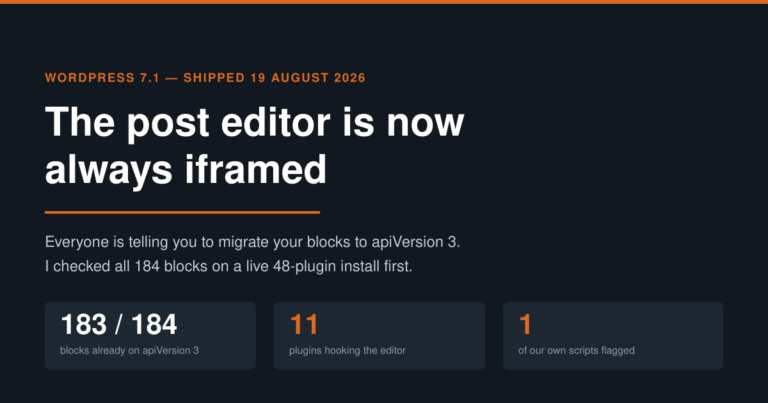
Related: 7.1 also made the post editor unconditionally iframed, which is a bigger deal for plugin authors than the hook changes above — we audited all 184 blocks and 48 plugins on this install to find what actually breaks.