WooCommerce 11.1: The New No-Login Order Withdrawal Page
On 1 September 2026, WooCommerce 11.1 ships a page that any visitor can open without logging in, fill in with a name, an email address and an order number, and submit. It is called the order withdrawal form, it lives at /my-account/withdraw-order/, and the pre-release notes describe it in three words that will make any store owner sit up: no auth required.
That description is accurate. It is also, on its own, misleading. I downloaded the 11.1.0-beta.1 build that Automattic published on 18 August and read the implementation rather than the summary of it, and the picture underneath is more interesting than either “new EU compliance feature” or “unauthenticated endpoint on your store.”
Here is what is actually arriving, what protects it, the one part that genuinely deserves your attention, and a second change in the same release that nobody is writing about but that can silently break plugins — including chatbots — that render WooCommerce blocks.
What the order withdrawal endpoint actually is
The EU’s consumer rules give buyers a right to withdraw from a distance purchase within 14 days, no reason required. Until now, WooCommerce left the mechanics of that entirely to the merchant: a contact form, an email address, a support inbox. In 11.1 it becomes a first-class, feature-gated endpoint.
From the source, in src/Internal/OrderWithdrawal/OrderWithdrawalController.php:
- Feature ID
order_withdrawal, gated throughFeaturesUtil::feature_is_enabled() - Endpoint slug
withdraw-order, overridable via the optionwoocommerce_myaccount_order_withdrawal_endpoint - Registered as a My Account query var — but unlike the neighbouring endpoints, it does not sit behind the
is_user_logged_in()guard thatclass-wc-shortcode-my-account.phpapplies to orders, downloads and account details
It is off by default. The controller registers a “feature highlight” admin notification only when the feature is disabled, which is Automattic’s way of nudging you to turn it on. The 11.1 changelog also records that the feature was moved out of experimental status in this release (PR #67391), so this is a deliberate general-availability step, not a preview.
What it is not: it does not cancel or refund anything
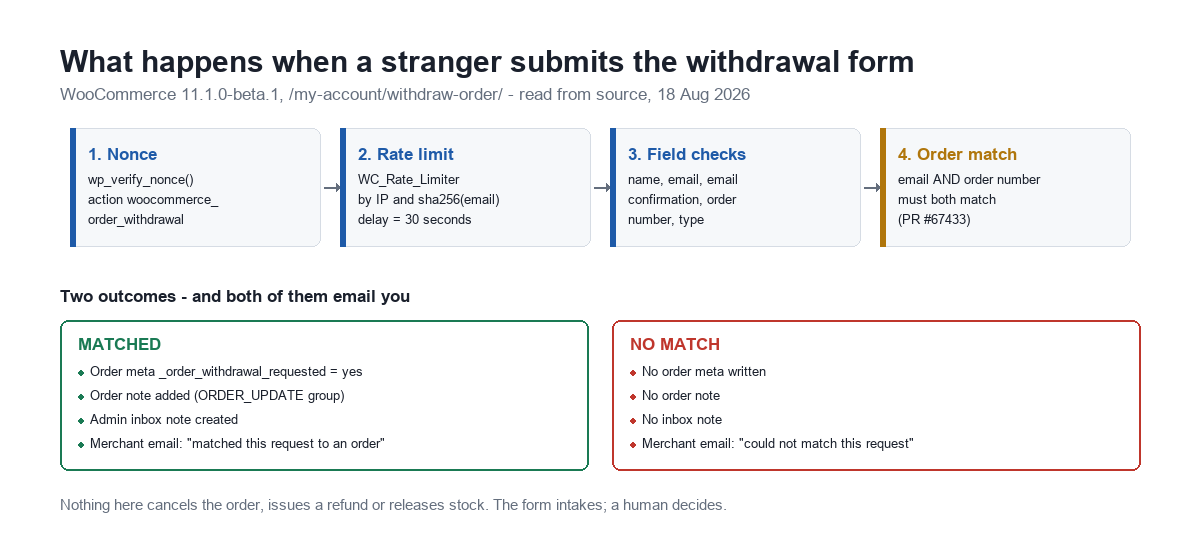
This is the part most coverage will get wrong, so it is worth stating before anything else. A successful submission does not touch the order’s status, does not issue a refund, and does not release stock. Reading OrderWithdrawalFormProcessor.php end to end, a matched request does exactly four things:
- Sets the order meta key
_order_withdrawal_requestedtoyes - Adds an order note in the
ORDER_UPDATEnote group - Creates an admin inbox note, named with the prefix
wc-order-withdrawal-requested-order- - Sends two emails — one to the customer, one to the merchant
The customer email says, verbatim: “We will review your request and contact you about next steps, including any refund due.” This is a request intake form. The withdrawal itself is still a human decision, made by you, in the admin. If you were bracing for a button that lets strangers cancel orders, that is not what shipped.
One detail suggests the feature was built by someone paying attention: the inbox note is deleted on woocommerce_before_delete_order, on before_delete_post, and on woocommerce_privacy_remove_order_personal_data. A GDPR erasure removes the withdrawal note along with the order. That is three hooks for a cleanup path most features would have forgotten entirely.
What protects an endpoint with no login
“No auth required” means guest-accessible, not unprotected. Four mechanisms sit in front of it, all of them readable in the beta source:
| Mechanism | Implementation | What it stops |
|---|---|---|
| Nonce | wp_verify_nonce() against action woocommerce_order_withdrawal | Off-site form posts and basic CSRF |
| Rate limit by IP | WC_Rate_Limiter, key prefix order_withdrawal_ip_ | Rapid-fire submission from one address |
| Rate limit by email | Same limiter, keyed on sha256 of the submitted address | One address hammered from many IPs |
| Order matching | Email and order number must both match (PR #67433) | Guessing at bare order numbers |
The matching logic is more careful than a single lookup. If the submitted order number is all digits it tries wc_get_order() directly; otherwise, and as a fallback, it pulls every order for that billing email with wc_get_orders() and compares normalised order numbers. That second path exists because plugins that rewrite order numbers — sequential-order-number plugins, prefixed invoice schemes — make the visible number different from the internal ID. Someone thought about the real-world install.
The part that deserves your attention
Not a vulnerability. A workload.
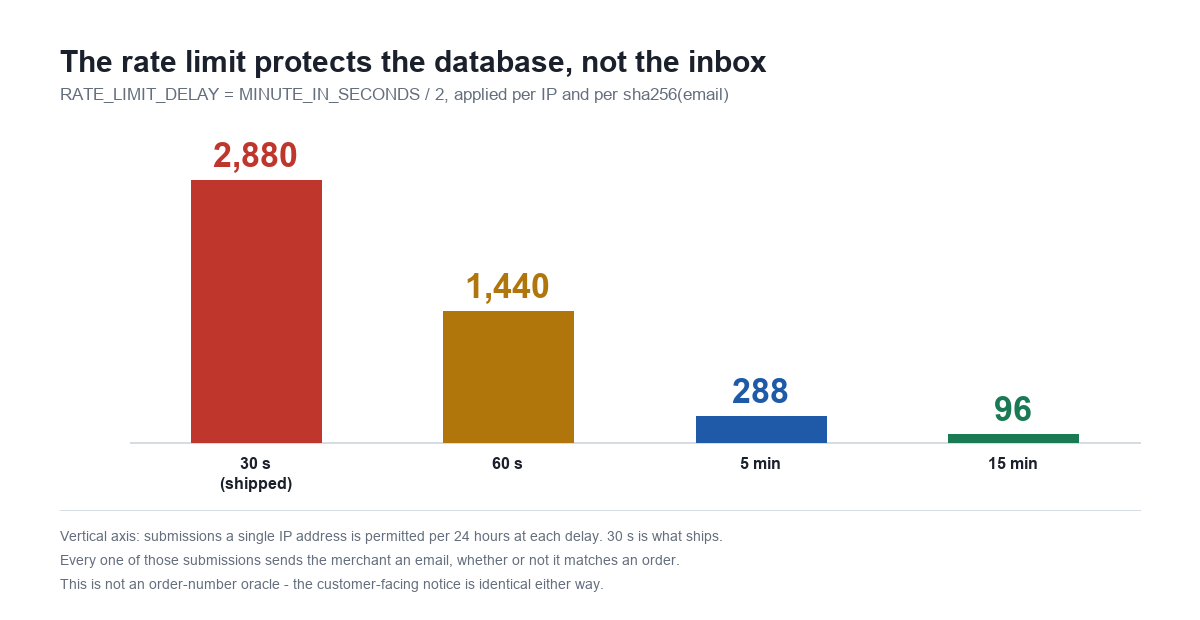
The rate limit delay is defined as RATE_LIMIT_DELAY = MINUTE_IN_SECONDS / 2. Thirty seconds. And a submission that matches no order still sends the merchant an email — the code branches on the match and writes one of two sentences into it:
- Matched: “WooCommerce matched this request to an order and added an order note.”
- Unmatched: “WooCommerce could not match this request to an order automatically, so no order note was added.”
The customer-facing notice is the same either way, so this is not a public oracle for whether an order exists. But the arithmetic on the merchant side is worth doing once before you enable the feature, because thirty seconds is a database protection, not an inbox protection.
The honest framing: this is the same exposure profile as any public contact form, and you almost certainly already run one. The difference is that a contact form does not arrive pre-wired to your order records with an official-looking template. Turn it on with your spam posture in mind, not only your compliance posture.
The 14-day window is enforced, but softly
The withdrawal window is a constant: WITHDRAWAL_WINDOW_IN_DAYS = 14, measured against the order’s date_created. Requests outside it are not rejected. They go through, and the merchant gets an added warning (PR #67160):
“This order is older than %1$d days. Only orders within %2$d days of delivery are eligible for withdrawal.”
Note the mismatch hiding in that sentence: the law counts from delivery, the code counts from order creation. For a digital product those are the same moment. For anything shipped they are not, and the warning you receive will be wrong in the customer’s favour on any order that took more than a few days to arrive. Treat it as a merchant-judgement prompt, not an eligibility ruling.
Does this apply to your store?
The inbox notification is targeted at “EU-selling live stores” (PR #67295), which raises an obvious question most owners answer wrongly from memory. The setting that decides it is woocommerce_allowed_countries.
I checked ours rather than assuming. It reads all — while woocommerce_specific_allowed_countries holds ["US"], a list that is simply ignored while the mode is all. So a store we would casually describe as US-facing sells to every EU member state and is squarely in scope. If you have ever narrowed your shipping zones and assumed that narrowed your selling countries, check the option, not your memory:
wp option get woocommerce_allowed_countries
wp option get woocommerce_specific_allowed_countries
The change nobody is writing about
Buried in the performance section of the same changelog:
“Skip block and pattern registration on requests that never render blocks. Add the
woocommerce_should_register_blocksfilter to let extensions opt out.” (PR #65781)
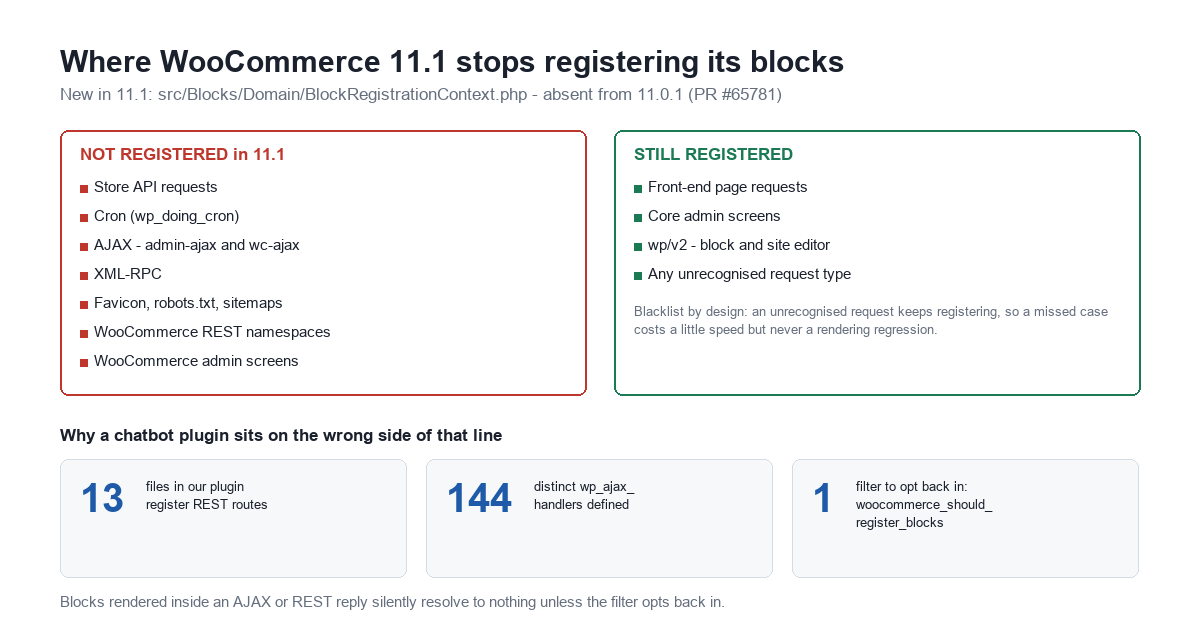
This is a new file, src/Blocks/Domain/BlockRegistrationContext.php, which does not exist in 11.0.1 — I confirmed that by listing the path on a live 11.0.1 install and getting “No such file or directory.” From 11.1, WooCommerce stops registering its block types and patterns on request types it has classified as non-rendering:
| Context | 11.1 behaviour |
|---|---|
| Store API requests | Blocks not registered |
Cron (wp_doing_cron()) | Blocks not registered |
AJAX — admin-ajax and wc-ajax | Blocks not registered |
| XML-RPC | Blocks not registered |
| Favicon, robots.txt, XML sitemaps | Blocks not registered |
| WooCommerce REST namespaces | Blocks not registered |
WooCommerce admin screens (admin.php?page=wc-*) | Blocks not registered |
Front end, core admin, wp/v2 (block & site editor) | Unchanged — still registered |
The design is deliberately conservative, and the code comment says so: it is a blacklist, so “an unrecognised request keeps registering (the previous behaviour), so a missed case costs a little performance but never a rendering regression.” Product and variation descriptions rendered through do_blocks are handled separately, on demand.
Why a chatbot plugin should care about a performance optimisation
Because a chatbot answers over exactly the two transports on that list. Our own plugin registers REST routes in 13 files and defines 144 distinct wp_ajax_ handlers — and that shape is typical, not unusual, for any plugin that returns content to a page without a reload.
If your plugin builds a reply that includes rendered WooCommerce block markup — a product card, a mini-cart summary, a price block pulled into an answer about stock — and it builds that reply inside an AJAX or REST request, those blocks stop resolving in 11.1. Not with an error. The block simply is not registered, so it renders as nothing.
The fix is one filter, and it exists precisely for this case:
add_filter( 'woocommerce_should_register_blocks', function ( $should_register ) {
    // Opt back in for our own REST namespace only.
    $uri = isset( $_SERVER['REQUEST_URI'] ) ? $_SERVER['REQUEST_URI'] : '';
    if ( defined( 'REST_REQUEST' ) && REST_REQUEST
        && false !== strpos( $uri, '/my-plugin/v1/' ) ) {
        return true;
    }
    return $should_register;
} );
Scope it to your own namespace. Returning true unconditionally hands back the performance win for every cron tick and sitemap fetch on the site, which is the thing the release was trying to fix.
The refund preview endpoint
One more addition worth knowing about, because it pairs with the withdrawal form: POST /wc/v3/orders/{id}/refunds/preview (PR #67613) returns server-computed refund totals and per-line breakdowns without creating a refund.
That is a useful primitive for anyone automating support. A bot can now answer “how much would I get back?” with a number computed by WooCommerce’s own tax and rounding logic, rather than an estimate assembled client-side that will be wrong on partial refunds and shipping tax. And it can do so with no ability to actually move money — the read is separated from the write, which is the correct shape for anything an unattended assistant is allowed to touch.
What your bot is about to be asked
If you enable the withdrawal endpoint, a new page appears on your store and customers will find it. Before 1 September, two questions are worth pre-answering in your chatbot’s knowledge base, because the form itself creates them:
- “Where do I cancel my order?” — the answer is now a URL on your own site rather than a support address, and it is a URL your bot will not know about unless you tell it.
- “I submitted the withdrawal form, what happens next?” — the honest answer is “a human reviews it,” and a bot that replies “your order has been cancelled” because it pattern-matched the word withdrawal will cause a genuine dispute.
This is the unglamorous half of running an AI assistant on a store: every feature the platform ships is a new thing the assistant can be confidently wrong about. If you are working out how to keep a bot’s answers tied to what your store actually does, our documentation covers the knowledge-base side, and the same discipline we applied to what a chatbot is allowed to read from a page applies to what it is allowed to assert about an order.
A test checklist before 1 September
| # | Check | How |
|---|---|---|
| 1 | Are you actually selling to the EU? | wp option get woocommerce_allowed_countries |
| 2 | Does the withdrawal endpoint collide with an existing page? | Look for anything already at /my-account/withdraw-order/ |
| 3 | Do your merchant emails reach a monitored inbox? | Submit one request against a real order on staging |
| 4 | Does an unmatched submission behave the way you expect? | Submit a bogus order number and read the merchant email |
| 5 | Do any of your plugins render Woo blocks over AJAX or REST? | Grep your plugins for render_block, do_blocks, parse_blocks |
| 6 | If so, do they opt back in? | Add a scoped woocommerce_should_register_blocks filter |
| 7 | Does your bot know the new page exists? | Ask it “how do I cancel my order?” and read the answer |
How I checked this
Everything above comes from the 11.1.0-beta.1 build published to the WooCommerce GitHub releases page at 10:13 UTC on 18 August 2026, downloaded and read directly, plus the changelog shipped inside that build. The 11.0.1 comparisons come from a live install running that version. Where a string is quoted, it is the string in the source, not a paraphrase.
The final release is scheduled for 1 September 2026, and beta code changes — the order-matching behaviour was itself amended during the beta cycle, and the rate limiting was added late (PR #67069). Re-check anything you are going to depend on against the final build. But the shape is set: a public withdrawal page that intakes rather than executes, and a performance change that quietly narrows where WooCommerce blocks exist.
If you are running an AI assistant against a WooCommerce catalogue and want it answering from your real store data rather than guessing, that is what MxChat Pro is built for — and if you would rather understand the cost side first, we measured what a self-hosted chatbot conversation actually costs down to the token.