WordPress 7.1 AI Guidelines: Where System Prompts Live
Verified — 20 August 2026, against the shipped release: Guidelines is not in WordPress 7.1.
This post said the Guidelines feature appeared in the June roadmap, was absent from the August Field Guide, and that secondary coverage contradicted itself — and it declined to call the outcome. Here is the outcome, checked rather than read about.
WordPress 7.1 “Mary Lou” shipped on 19 August 2026. We downloaded the final release package — wp_version = '7.1', matching what api.wordpress.org reports as current — and searched its wp-admin and wp-includes trees for the string “guideline” in any casing. The result is identical to the release candidate we checked a day earlier: four files match, and none of them is the feature — the licensing page freedoms.php, a code comment in class-wp-object-cache.php, a TinyMCE language file, and a minified image worker. There is no options-guidelines.php admin page. As controls in the same search, wp_register_ability matched 10 files and a nonsense string matched 0, so the search itself works.
The caveat from the previous check is now closed. That check ran against 7.1-RC3 and said plainly that a release candidate is not the final tag, and that if Guidelines appeared in the shipped release this box would be wrong and would be corrected again. It did not appear. The publications that described “Settings → Guidelines” in the present tense were describing a screen that does not exist in WordPress 7.1.
WordPress 7.1 ships on 19 August 2026. If you have read anything about its AI features in the last month, you have probably read about Guidelines — a place in core to write down your brand voice and editorial rules once, so every AI tool on the site can read them instead of you re-explaining yourself in every prompt.
It is a genuinely good idea. It is also not in the Field Guide.
This post is two measurements. The first is what the primary sources actually say about Guidelines, because the secondary coverage flatly contradicts itself. The second is the more useful one: on a real commercial WordPress site, where does your system prompt actually live right now? We audited ours. The answer is three different storage shapes across two plugin directories, and nearly eight kilobytes of AI instructions loaded on every single page request by plugins that are no longer installed.
What the roadmap actually promised
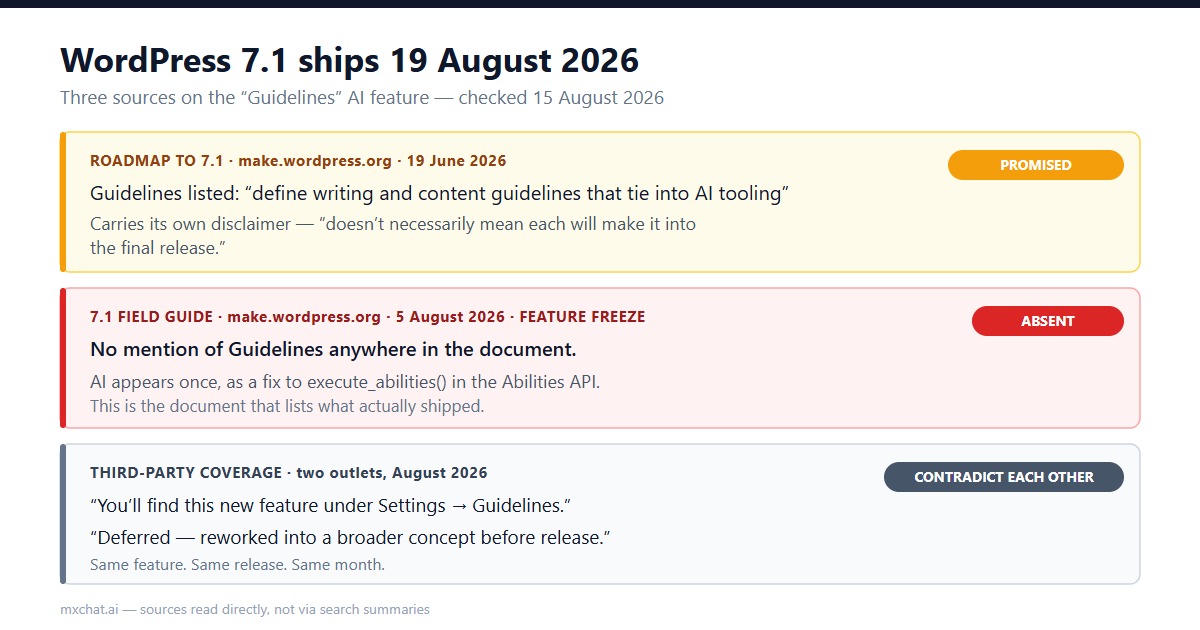
The primary source is the Roadmap to 7.1 post on make.wordpress.org, published 19 June 2026. It describes Guidelines as the ability to “define writing and content guidelines that tie into AI tooling, with the ability to import/export guidelines between sites” — a persistent, structured home for editorial rules and brand voice inside WordPress itself.
That is a real proposal from the people who build WordPress, and it is worth taking seriously. But the same post carries its own disclaimer, in plain language: what is shared there “is being actively pursued, but doesn’t necessarily mean each will make it into the final release.”
Roadmaps are statements of intent. They are written two months before feature freeze, and they say so.
What the Field Guide actually says
The document that tells you what shipped is the WordPress 7.1 Field Guide, published 5 August 2026 on the same site. The Field Guide is written after feature freeze and exists precisely so that plugin and theme developers know what is in the release they are about to be tested against.
It does not mention Guidelines. Not as a feature, not as a settings screen, not as a deferral.
AI appears in the 7.1 Field Guide exactly once, in the “But wait, there’s more!” section: ticket #65504, a correctness fix to the AI Client updating execute_abilities() to mirror has_ability_calls() by checking is_ability_call() before executing, plus regression coverage for mixed calls. That is a useful bug fix in the Abilities API that 7.0 introduced. It is not a brand voice system.
Meanwhile the third-party coverage splits cleanly in half, in the same month, about the same release:
| Source | Date | What it says about Guidelines |
|---|---|---|
| Roadmap to 7.1 (make.wordpress.org) | 19 Jun 2026 | Listed as actively pursued, with an explicit “may not ship” disclaimer |
| 7.1 Field Guide (make.wordpress.org) | 5 Aug 2026 | No mention anywhere in the document |
| Third-party outlet A | Aug 2026 | “You’ll find this new feature under Settings → Guidelines” — present tense, as fact |
| Third-party outlet B | Aug 2026 | Deferred — “reworked into a broader concept before release” |
One of those outlets describes a settings screen, in the present tense, for a release that had not yet come out when it was written.
The honest limit of that finding
Absence from a document is not a cancellation notice. We could not find a primary source stating that Guidelines was formally deferred, and we are not going to invent one. What we can say precisely is this: the authoritative post-freeze document for 7.1 does not contain the feature, and the coverage claiming you will find it under Settings contradicts both the Field Guide and the other half of the coverage.
So the practical advice is narrow and boring. Do not plan your 2026 content workflow around Guidelines existing on 19 August. Update, open Settings, and look. That takes ten seconds and beats trusting either of us.
So where do your AI instructions live today?
This is the part that matters regardless of what ships next week, and it is the part nobody writes about, because it requires looking in a database rather than reading a changelog.
We ran the audit on our own production install: WordPress 7.0.3, 50 plugin directories, a live WooCommerce store. The method was a scan of wp_options for prompt-bearing configuration — by option name and, critically, by option value, because plugins that store settings in a serialized blob are invisible to a name-only search.
Two controls ran in the same batch, which is the only reason any of the numbers below are trustworthy. A deliberately nonsensical pattern returned 0 everywhere it was tried. A known-present option, siteurl, returned 1. The search works.
The controls immediately earned their place. Scanning option names for persona returned exactly one hit — which turned out to be woocommerce_allow_bulk_remove_personal_data. A substring match, not a persona setting. Had we printed the count without printing the list beside it, that one would have gone straight into the article as a finding.
The inventory
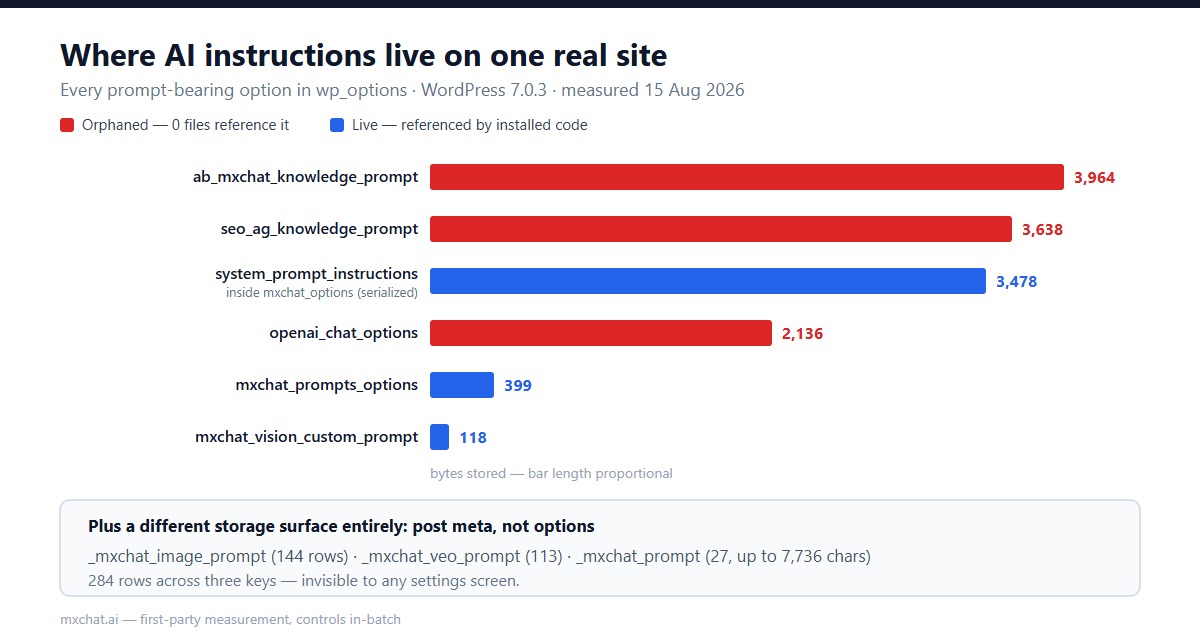
Here is every place AI instruction text is stored on this site:
| Where | What | Size | Autoloaded? | Referenced by |
|---|---|---|---|---|
| Serialized options blob | mxchat_options → system_prompt_instructions | 3,478 chars | No | 198 files |
| Standalone option | mxchat_prompts_options | 399 bytes | No | 13 files |
| Standalone option | mxchat_vision_custom_prompt | 118 bytes | Yes | 2 plugins |
| Standalone option | ab_mxchat_knowledge_prompt | 3,964 bytes | Yes | 0 files |
| Standalone option | seo_ag_knowledge_prompt | 3,638 bytes | Yes | 0 files |
| Standalone option | openai_chat_options | 2,136 bytes | Yes | 0 files |
| Post meta | _mxchat_image_prompt | 144 rows | n/a | — |
| Post meta | _mxchat_veo_prompt | 113 rows | n/a | — |
| Post meta | _mxchat_prompt | 27 rows, up to 7,736 chars | n/a | — |
Three storage shapes: a key inside a serialized settings array, standalone option rows, and 284 rows of post meta that no settings screen will ever show you. If someone asked you to “update the brand voice across the site,” you would have to know about all three.
Three of them are orphans
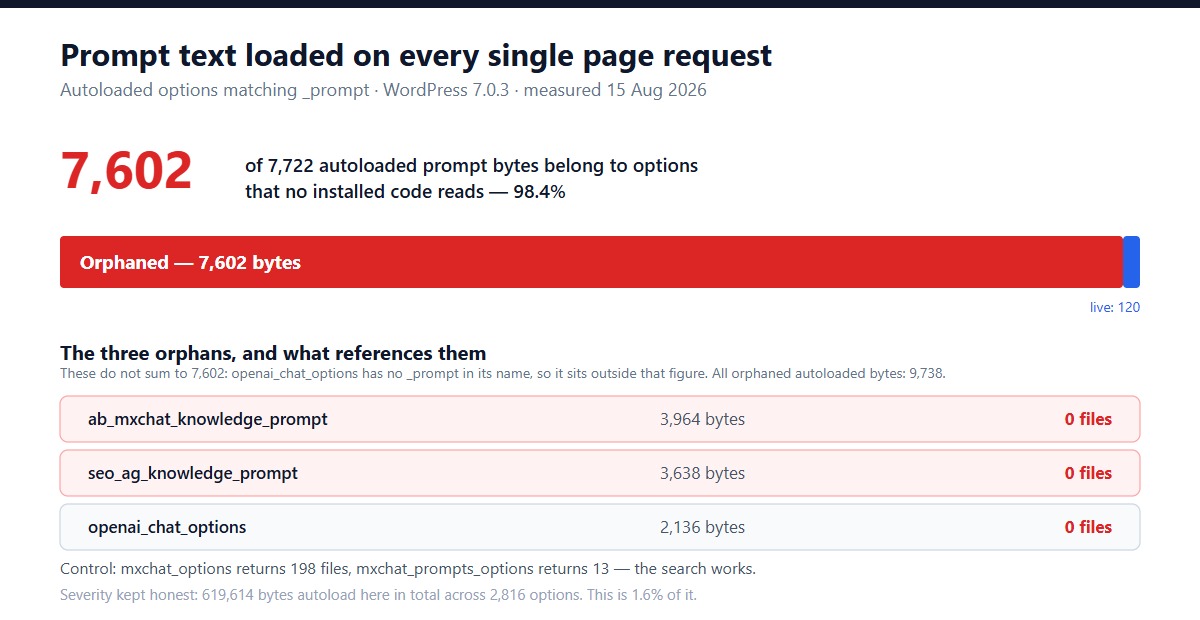
Three of those options are referenced by nothing. We searched the entire wp-content tree, plus wp-includes and wp-admin, for each option name:
ab_mxchat_knowledge_prompt— 3,964 bytes, autoloaded, 0 filesseo_ag_knowledge_prompt— 3,638 bytes, autoloaded, 0 filesopenai_chat_options— 2,136 bytes, autoloaded, 0 files
A result of zero is usually a statement about your search, not about the world, so the same command was run against two options we knew were live: mxchat_options returned 198 files and mxchat_prompts_options returned 13. Three zeros sitting next to a 198 and a 13 is a finding. Three zeros on their own would have been a broken grep.
That control mattered more than expected. An earlier pass searched only wp-content/plugins/ and reported that mxchat_options — one of the most-referenced options on the site — had no owner either. This install has a second plugin tree at wp-content/mxbot-plugins/, and the narrow search never looked in it. Widening the search is what turned a false universal negative into a real one.
What these orphans are is easy to guess and worth stating carefully: leftovers. A plugin was installed, wrote its settings, and was later removed or renamed without an uninstall routine that cleaned up after itself. WordPress does not garbage-collect options, so they simply stay. And because they were registered with autoload enabled, every one of them is read out of the database and into memory on every single request your site serves — front end, admin, REST, cron.
The arithmetic, kept honest: 7,722 bytes of autoloaded options match the _prompt pattern, and 7,602 of those — 98.4% — belong to the two orphans. Adding openai_chat_options, which has no _prompt in its name, the total orphaned autoloaded payload is 9,738 bytes. Against 619,614 bytes of autoloaded options in total across 2,816 rows, that is about 1.6%.
So this is not a performance emergency, and we are not going to dress it up as one. It is a governance problem: nobody on the team knew those prompts were there, nothing surfaces them, and a stray copy of your brand voice from a plugin you uninstalled a year ago is exactly the kind of thing that turns up in an AI answer six months later and cannot be explained.
What the live one costs you
The one prompt on that list that is genuinely in use is system_prompt_instructions, at 3,478 characters. That is roughly 870 tokens, and it is prepended to every conversation turn the chatbot handles.
We measured what that costs on this site when we priced the Claude Sonnet 5 increase across 488 stored conversations: that single unchanging paragraph accounted for 47.3% of all billed input tokens — 1,363,376 of 2,882,046 — because the API is stateless and the whole prefix is re-sent on every request.
This is the real argument for a shared guidelines store, and it is not the one usually made. “Write your brand voice once” sounds like a convenience feature. On a site running an AI chatbot, the same text being defined in four places and re-billed on every turn is a line item.
Run this on your own site
Two commands. Adjust wp_ to your table prefix. The first finds prompt-bearing options by name and by value, so serialized settings blobs do not hide:
wp db query "SELECT option_name, LENGTH(option_value) AS len, autoload
  FROM wp_options
  WHERE option_name REGEXP 'prompt|instruction|guideline'
     OR option_value LIKE '%system_prompt%'
  ORDER BY len DESC LIMIT 40;"
The second tells you whether anything still reads each one. Run it per option name, and run it against an option you know is live as a control:
grep -rl "ab_mxchat_knowledge_prompt" wp-content/ wp-includes/ wp-admin/ | wc -lIf that returns 0 and your control returns a healthy number, you have found an orphan. If everything returns 0, you have found a broken command — check your paths before you delete anything.
One caution, because this is a live database: verify before you remove. An option with no code references today may still be read by something you have deactivated rather than deleted, and a plugin can build an option name dynamically at runtime, which no grep will catch. Export the rows first. We have not deleted ours.
What Guidelines would fix, and what it wouldn’t
If a core Guidelines store lands in 7.1 or later, it fixes exactly one thing well: it gives WordPress a canonical, exportable place for editorial rules, so a well-behaved plugin can read your brand voice guidelines instead of asking you to paste them into its own settings screen.
What it will not do is retroactively collect what is already scattered. Nothing in a new core API reaches into a serialized options blob, or 284 rows of post meta, or three orphaned rows from plugins you removed, and consolidates them. Plugins have to opt in, and your existing prompts stay exactly where they are until somebody migrates them by hand.
That is worth knowing before 19 August rather than after, because the temptation with a feature like this is to assume it tidies up on your behalf. It does not. The tidying is the same manual audit above — it just gets a better destination at the end of it.
Limits of this audit
One site, one plugin stack, one day. The specific option names here are ours; yours will differ. The 47.3% token figure comes from our own conversation corpus and will not transfer to a site with different traffic or a shorter prompt. And the Guidelines finding is an absence in a document, which is strong evidence but not a statement from the release team.
What does transfer is the method: scan by value as well as by name, put a known-positive and a known-negative control in the same batch, print the list next to the count, and search the whole tree rather than the directory you assumed was the only one. Every wrong number in this post was caught by one of those four habits.
If you are running an AI chatbot on WordPress, the model layer underneath it moves faster than the plugin layer on top — we have written before about model IDs going stale in plugin dropdowns, and about what core decided not to build for AI in 7.1. It is also worth checking that your site is taking the updates it thinks it is taking; ours was not. Our own setup notes live in the MxChat documentation.
Before you update next week: go find out where your system prompt lives. There is a decent chance it is in more places than you think, and at least one of them is talking to nobody.
Related: WordPress 7.1 added seven new hooks to the Abilities API, and two of them can override an ability's permission check — here is what changed, read from the release source.
Also worth auditing before you update: 7.1 made the post editor always iframed, so editor CSS and scripts that assumed one shared document quietly stop working — here is the check we ran across 184 blocks.