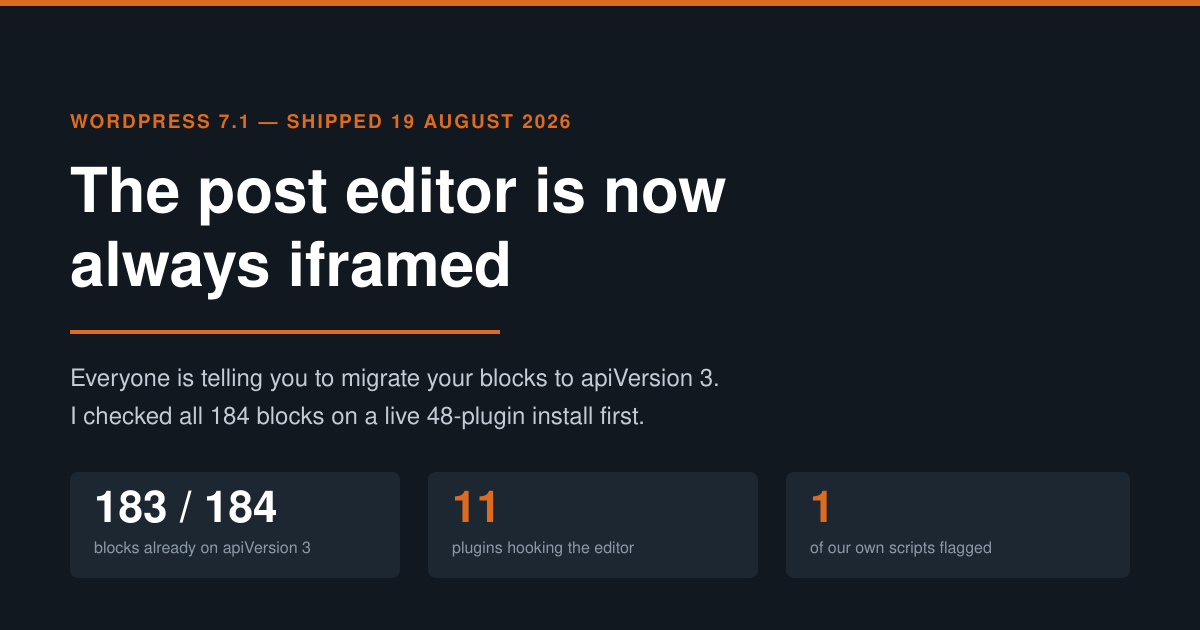
WordPress 7.1 Iframed Editor: I Audited 184 Blocks
WordPress 7.1 “Mary Lou” shipped on 19 August 2026, and one line in the developer notes matters more than the rest of the release combined: the post editor is now always iframed. Not iframed when your theme is block-based. Not iframed when every block in the content declares a modern API version. Always.
The advice that followed was immediate and near-universal: migrate your blocks to apiVersion 3. It is good advice. It is also, for a lot of sites, advice about a job that is already finished — and it points at the wrong file. So before repeating it, I ran the check against a real install: mxchat.ai, 48 active plugins, WooCommerce and Rank Math and Wordfence and our own chatbot plugins all loaded at once.
184 blocks. 183 of them were already on apiVersion 3. The migration everyone is warning about was over before the release landed. The thing that actually breaks is somewhere else entirely, and block.json cannot see it.
What changed, precisely
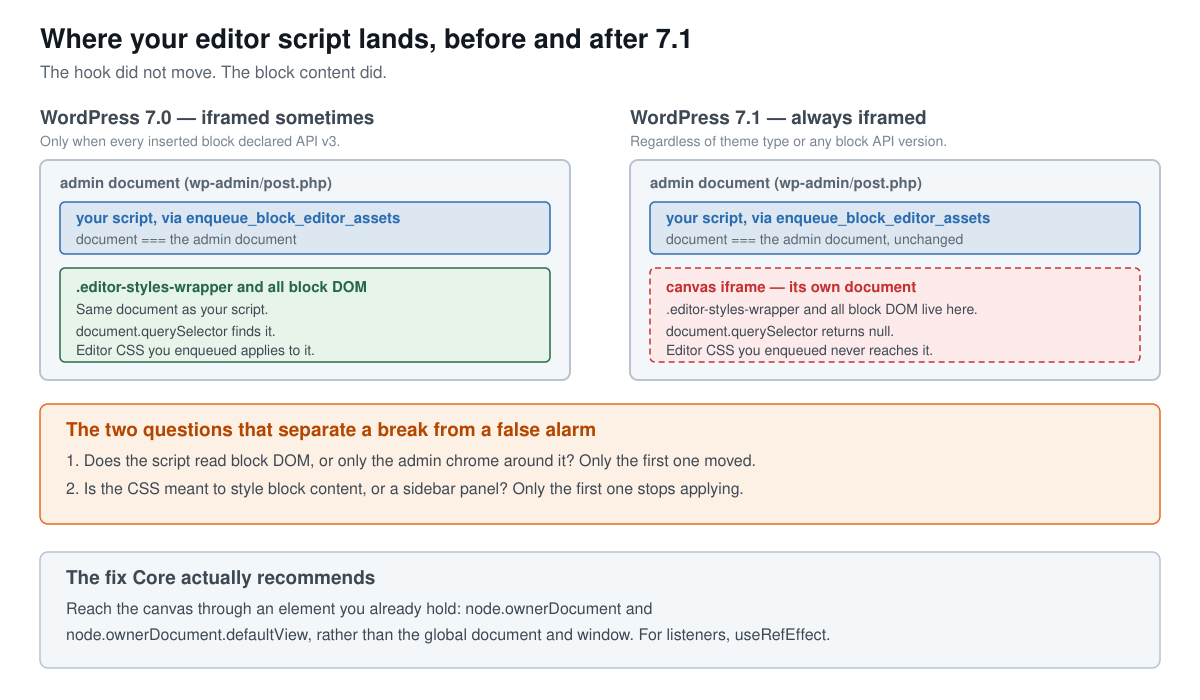
In WordPress 7.0, whether the post editor ran inside an iframe was a decision made at runtime. Core looked at the blocks actually inserted in the content: if all of them declared block API version 3 or higher, the canvas was iframed. If even one older block was present, Core dropped the iframe and rendered the canvas in the same document as the rest of wp-admin, for compatibility.
7.1 removes that branch. The Core dev note states it without hedging: the post editor is always iframed, “regardless of the theme type, the block API versions of the registered blocks, or the block API versions of the blocks in the content.” The implementation landed in Gutenberg PR #74042, and Core’s note documents no opt-out filter and no compatibility path back to the old behaviour.
| WordPress 7.0 | WordPress 7.1 | |
|---|---|---|
| Canvas iframed? | Only if every inserted block was API v3+ | Always |
| Depends on theme type? | Yes | No |
| Depends on registered block versions? | Yes | No |
| Opt-out filter | n/a | None documented |
Where enqueue_block_editor_assets loads | Admin document | Admin document — unchanged |
| Where block DOM lives | Usually the admin document | Inside the canvas iframe |
Read the last two rows together, because that pair is the whole story. Your hook did not move. Your script still loads into the outer admin document, exactly where it always did. What moved is the content it was reaching for.
The audit, and the number that surprised me
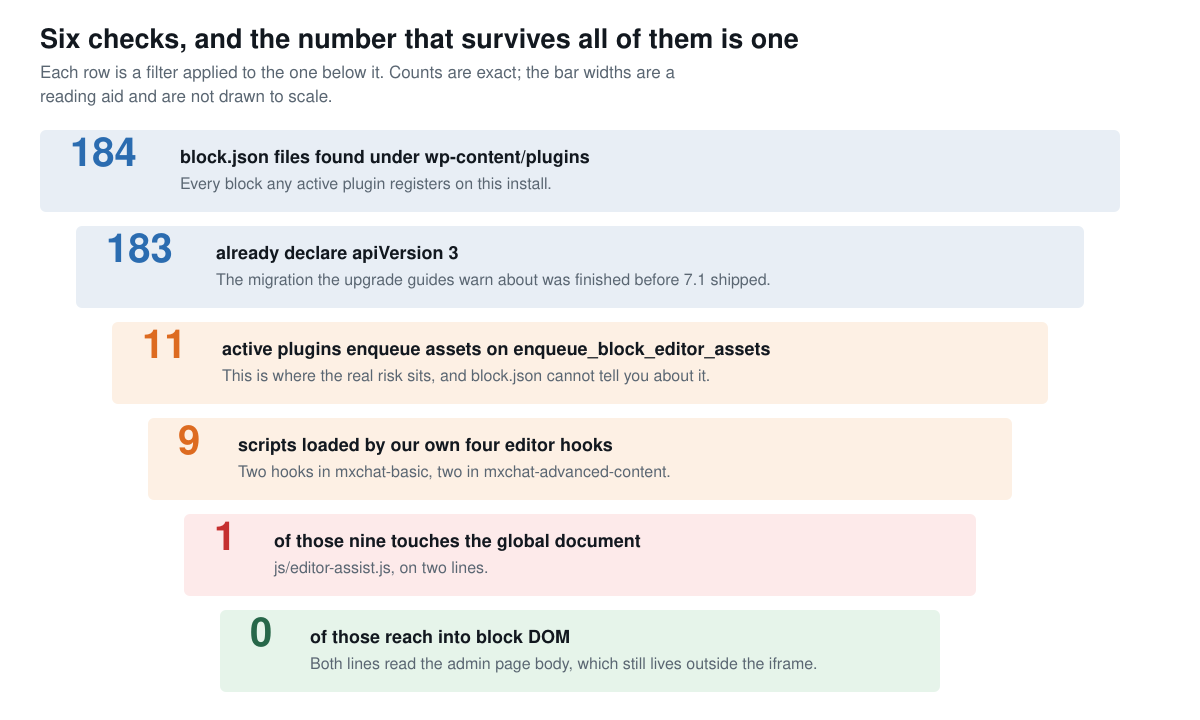
The method was deliberately boring. Find every block.json under wp-content/plugins, read the apiVersion key out of each, and count what comes back. On this install that is 184 files across 48 active plugins.
183 declared apiVersion 3. Exactly one did not declare an apiVersion at all, which means it falls back to version 1: WooCommerce’s coming-soon block, at assets/client/blocks/coming-soon/block.json. That is a block most sites will never insert into a post, in a plugin that ships new builds constantly.
So the headline recommendation of every 7.1 upgrade guide — go migrate your blocks — resolved to a single stale file that is not mine and that I cannot do anything about. If your site is a normal 2026 WordPress install with maintained plugins, expect roughly the same result. Run the check anyway, but do not budget a sprint for it.
Where the risk actually lives
Blocks were never the fragile part. The fragile part is any plugin that hooks enqueue_block_editor_assets and ships JavaScript or CSS that assumes the editor canvas is in the same document as the admin page.
On this install, 11 active plugins do that:
| Plugin | JS files referencing the global document | Total JS files |
|---|---|---|
| woocommerce | 200 | 550 |
| woocommerce-payments | 47 | 88 |
| seo-by-rank-math | 38 | 156 |
| woocommerce-paypal-payments | 29 | 59 |
| seo-by-rank-math-pro | 20 | 63 |
| wpforms-lite | 18 | 216 |
| mxchat-basic | 11 | 20 |
| mxchat-advanced-content | 6 | 13 |
| imagify | 4 | 33 |
| classic-editor | 2 | 3 |
| query-monitor | 1 | 1 |
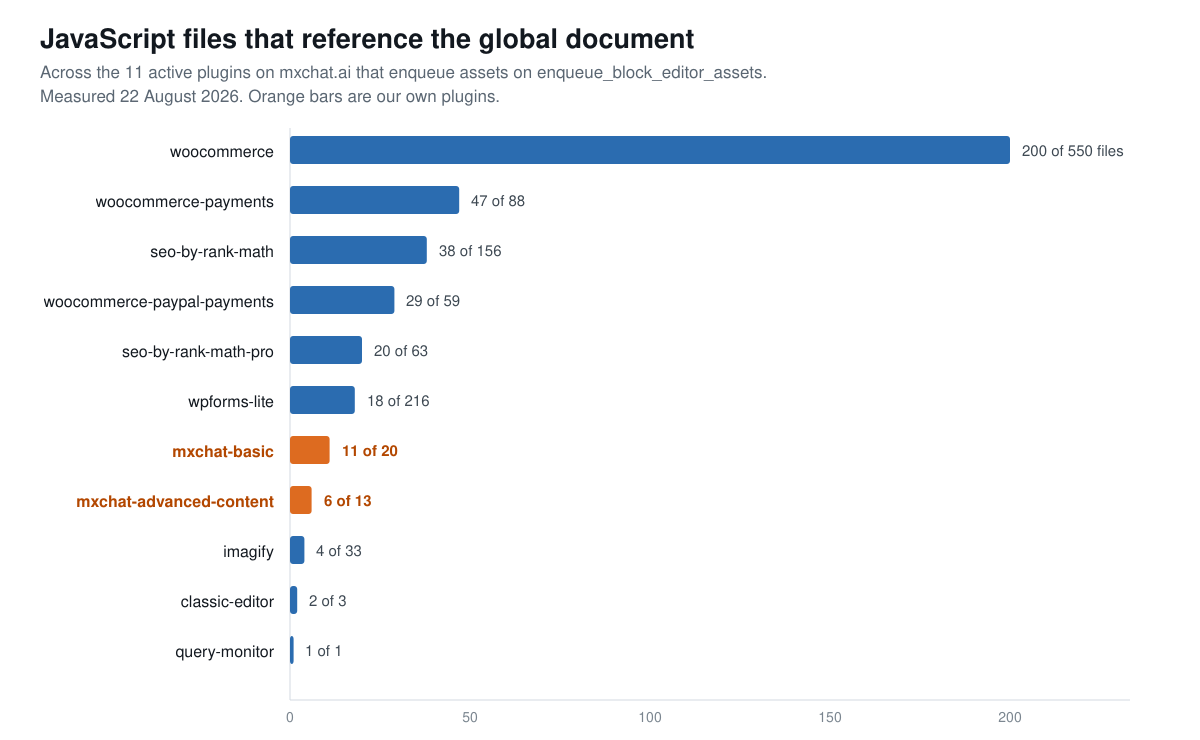
Now the important caveat, because a table like that is easy to misread into a panic. A file referencing document is a candidate, not a defect. Most of those 200 WooCommerce files are front-end cart and checkout scripts that never load in the editor at all. The grep is a net, not a verdict.
The verdict needs two follow-up questions, and they are the same two questions for every plugin on the list:
- Does the script actually load on an editor screen? Only the assets enqueued on
enqueue_block_editor_assets(or a block’seditorScript) are in scope. Everything else is noise. - Does it read block DOM, or only the admin chrome around it? The admin sidebar, the top toolbar, the document body and its classes all still live in the outer document. Only the canvas moved.
What I found in our own plugins
This is the part I could not hand-wave, so I checked it line by line. Our two plugins register four editor hooks between them:
mxchat-basic—class-mxchat-editor-assistant.phpandclass-mxchat-meta-box.phpmxchat-advanced-content—class-faq-block.phpandclass-editor-assist.php
Those four hooks load nine JavaScript files. Of the nine, exactly one references the global document: js/editor-assist.js, on two lines.
if (document.body && document.body.classList.contains('block-editor-page')) {
var isProduct = document.body && document.body.classList.contains('post-type-product');
Both read document.body.classList on the admin page — checking which screen the script landed on. The admin body is still in the outer document under 7.1, so both lines keep working. That is the good kind of global document access, and it is worth naming the difference plainly: reading the admin chrome is fine, reaching for .editor-styles-wrapper or a block node is not.
Worth adding: our plugins register no blocks at all. There is no block.json in either one. What they ship are editor sidebars and panels — which is the higher-risk category in general, since sidebars are exactly the sort of code that likes to reach into the canvas to read or highlight content. Ours happen not to. A plugin doing AI-assisted content work inside the editor is one refactor away from doing so, which is why this got checked rather than assumed.
The half of this nobody mentions: CSS
Almost all the 7.1 coverage is about JavaScript. The stylesheet side is quieter and breaks more visibly.
If you enqueue CSS on enqueue_block_editor_assets intending it to style block content — a custom heading treatment, a table style, a callout box — that CSS now lands in the admin document while the content it targets sits inside the iframe. It stops applying, silently. Nothing errors. The editor just stops matching the front end.
The correct home for content styles is add_editor_style(), or injecting them through block_editor_settings_all, both of which Core pipes into the canvas document deliberately. Our four editor hooks enqueue five stylesheets between them, and all five style sidebar and panel UI rather than block content, so they are unaffected. This site’s child theme calls add_editor_style() zero times, which is fine here only because it is not trying to style the canvas in the first place.
| What you are styling or scripting | Pre-7.1 approach | Still correct in 7.1? |
|---|---|---|
| Sidebar / panel UI | enqueue_block_editor_assets | Yes |
| Block content inside the canvas | enqueue_block_editor_assets | No — use add_editor_style() |
| Reading the admin body or toolbar | Global document | Yes |
| Reading or mutating block DOM | Global document | No — use ownerDocument |
| Event listeners on canvas nodes | document.addEventListener | No — use useRefEffect |
Run this on your own site
The whole audit is four commands over SSH, and it takes about a minute. Nothing here writes anything.
1. Count your blocks and their API versions.
find wp-content/plugins -name block.json -type f | wc -l

for f in $(find wp-content/plugins -name block.json -type f); do
  grep -o '"apiVersion"[[:space:]]*:[[:space:]]*[0-9]*' "$f" | grep -o '[0-9]*$' || echo ABSENT
done | sort | uniq -c
2. Find which plugins hook the editor. This is the list that matters.
grep -rl "enqueue_block_editor_assets" wp-content/plugins --include=*.php | cut -d/ -f3 | sort -u3. For each of those, find the files those hooks actually enqueue — read the wp_enqueue_script and wp_enqueue_style calls in the file that registers the hook, and note the paths. This step cannot be automated safely, and it is where the grep turns into an answer.
4. Check only those files for canvas access.
grep -nE "document\.(querySelector|getElementById|body|head|addEventListener)" path/to/that-script.jsThen apply the two questions. A hit on document.body.classList is almost always fine. A hit on document.querySelector('.editor-styles-wrapper'), .block-editor-block-list__layout, or any block class is the real thing, and the fix is to reach the canvas through a node you already hold — node.ownerDocument and node.ownerDocument.defaultView — instead of the globals.
Should you update?
Yes, and not because the risk is zero. Because the risk is legible: it is confined to a list you can enumerate in one grep, on a site you already control, and the failure mode is visual and immediate rather than silent and delayed. That is a far better position than the average WordPress upgrade.
Two honest caveats about this particular audit. First, it is one install. A site running Advanced Custom Fields, Meta Box, or a page builder with heavy editor integration has a much larger surface than mine, and those are the tools most often named as high-risk. Second, this site runs Classic Editor as its default (classic-editor-replace is set to classic), so 7.1’s iframe change does not reach our own default editing path at all — it reaches every person who uses our plugins in the block editor, which is why it got audited rather than shrugged off. The audit is only as good as the honesty about what it covered.
If you want the same treatment applied to the AI side of this release, we went through 7.1’s Abilities API hook by hook in WordPress 7.1 Abilities API: 7 New Hooks, Tested, and traced where 7.1 actually stores AI system prompts in WordPress 7.1 AI Guidelines: Where System Prompts Live. The longer argument about what core AI means for chatbot plugins is in WordPress 7.0 Put AI in Core. Do You Still Need a Chatbot Plugin?. And if you want a reminder that “we updated” and “the update installed” are different claims, our 7.0.4 security update never actually installed and we only found out by checking the file.
MxChat’s editor integration is documented in full in the MxChat documentation, and the AI editor assistant that owns the one flagged file ships with MxChat Pro.
Frequently asked questions
Does apiVersion 3 change how my block renders? No. It is a declaration that your block is iframe-safe, not a rendering switch. For most blocks the edit is one line in block.json; the work is testing that nothing in the edit component touches the global document.
Can I turn the iframe off? Core’s dev note documents no opt-out filter and no compatibility shim. Plan on adapting rather than deferring.
Is the site editor affected too? The site editor has been iframed for several releases. 7.1 brings the post editor in line with it, which is why the change is described as removing a branch rather than adding a behaviour.
My editor styles vanished after updating. Is that this? Almost certainly. Move content styles from enqueue_block_editor_assets to add_editor_style() and they will reappear inside the canvas.
How long does the audit take? On a 48-plugin install, under five minutes for the greps, plus however long it takes to read the enqueue calls in the handful of files step 2 surfaces. On this site that was four PHP files.