195 Outbound Calls: What My AI Plugins Send Off-Site
Buried in the AI Engine changelog for version 3.7.2, shipped on 20 August, is a one-line security note that deserves more attention than a changelog gives it: “A crafted URL could escape the uploads folder and send any server-readable file to the AI provider.”
Read that again slowly, because the interesting word is send. This is not the ordinary local-file-read bug, where an attacker persuades your server to cough up a file and reads it in the response. This is a bug where your plugin reads the file and posts it to a third party for you — on your account, with your API key, into a system you do not control and cannot subpoena.
That is a genuinely different shape of problem, and it is one that only exists because a whole category of plugin now has three things at once: a file-read primitive, an outbound pipe to a commercial API, and a billing relationship that keeps the pipe open. AI plugins have all three by design.
So I went and measured mine. Not a hypothetical, not a checklist from a security blog — the actual plugin source on the actual production install this site runs on. The number is 195 outbound HTTP call sites across 16 plugins, reaching 13 distinct third-party hosts. Here is what that looks like, what the dangerous version of it looks like, and the one control that separates them.
The bug class: read, then send
Most WordPress security advice is written about inbound authorisation — who is allowed to call this endpoint. I have written about that myself, at length, after auditing all 966 REST routes on this install. Inbound is the well-trodden half.
Egress is the other half, and it behaves differently. Consider what each participant needs for the AI Engine 3.7.2 bug to pay off:
| Ingredient | Ordinary plugin | AI plugin |
|---|---|---|
| A file-read primitive | Sometimes (imports, backups) | Always — PDFs, images, knowledge sources |
| An outbound pipe to a third party | Rarely, and usually to one vendor | Always, often to six or more |
| A funded account on the far end | Almost never | Yes — your own paid API key |
| Attacker gets the file back | Needs it in the HTTP response | Not required — it is already gone |
That last row is the one that matters. In a classic local file inclusion, the attacker has to get the bytes back to themselves, which usually means the file has to appear in a response they can read. In the egress version, the bytes leave regardless. The attacker may never see them. Your wp-config.php is simply now in someone else’s training-adjacent log retention, and the only trace on your side is a slightly larger bill.
What AI Engine actually shipped, stated fairly
Since this started with somebody else’s changelog, let me be careful about it. AI Engine is the most-installed AI plugin in the WordPress ecosystem, at over 100,000 active installations, and it is tested against WordPress 7.1. Over the last seven weeks it shipped three security fixes, and it documented every one of them in a public changelog with a plain-English description of the defect.
That is the good outcome, not the bad one. A plugin that patches quickly and says what it patched is behaving exactly as you want. The reason it is worth writing about is not that AI Engine is careless — it is that the surface these fixes keep landing on is the same surface every AI plugin now has, mine included.
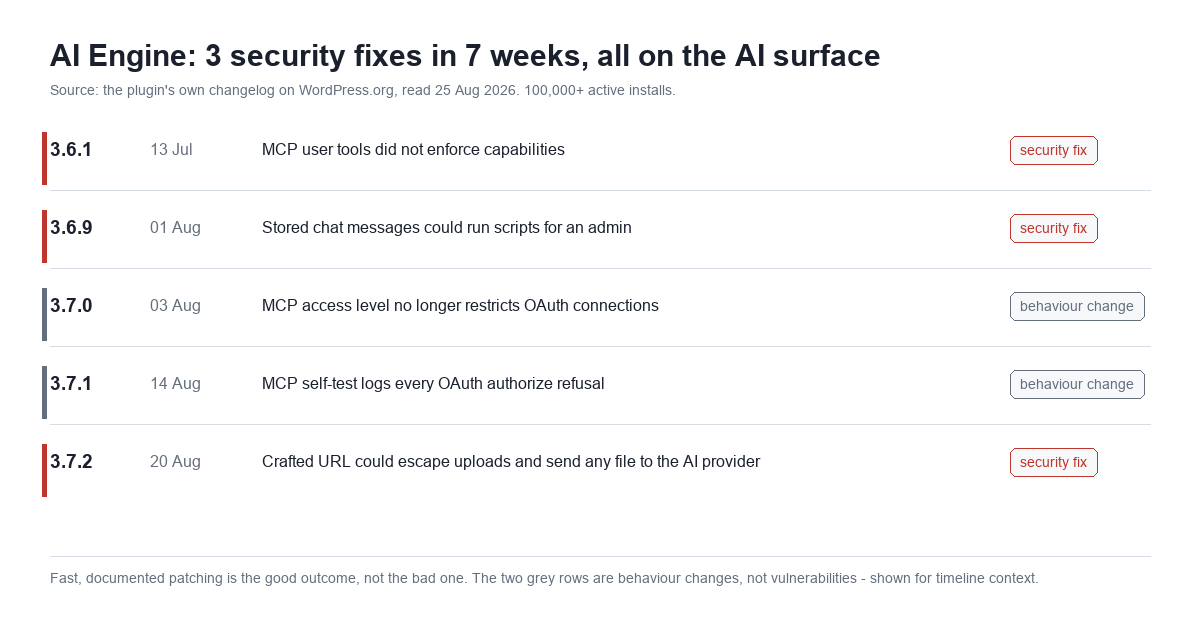
Two of those five rows are behaviour changes rather than vulnerabilities, and I have marked them grey rather than folding them into a scarier-sounding count. The honest summary is three security fixes in seven weeks, all touching how AI features authenticate or what they are allowed to read.
The audit: 195 outbound calls
Here is the same question asked of my own stack. This install runs 24 active MxChat plugins. Grepping every PHP file for wp_remote_post and wp_remote_request — the two functions WordPress plugins use to make outbound HTTP calls — returns 195 call sites spread across 16 of them.
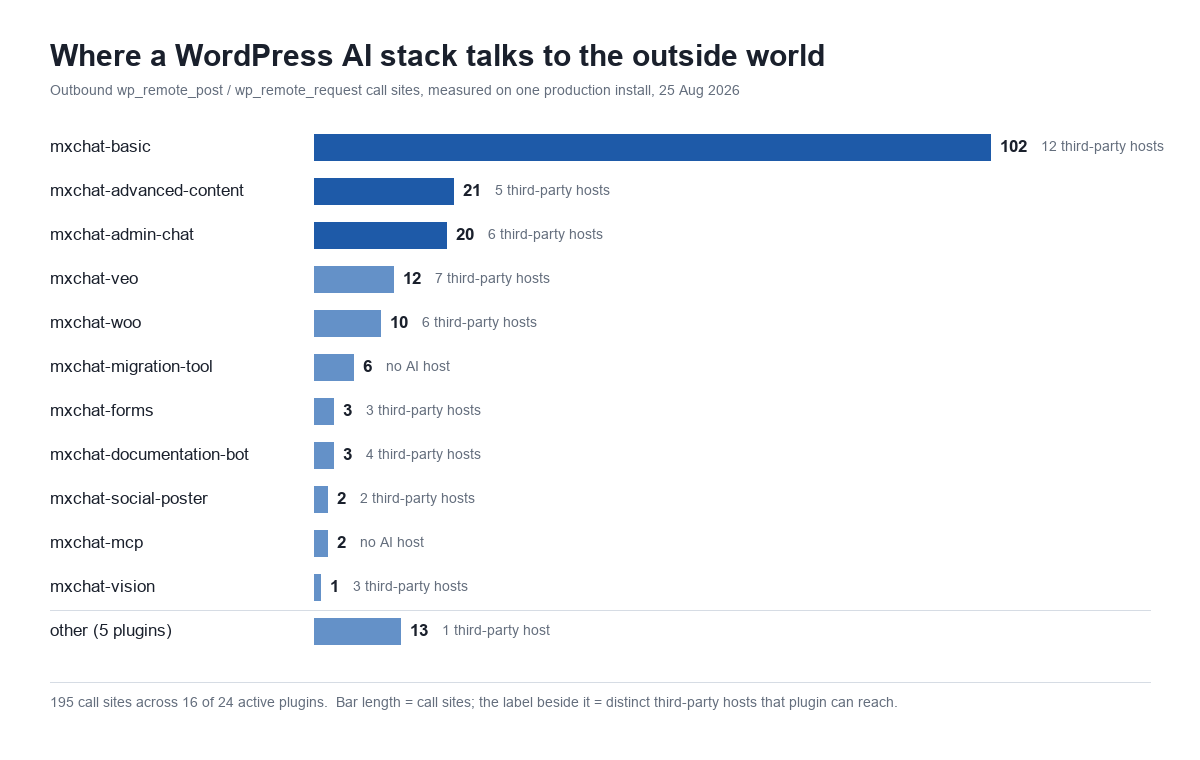
| Plugin | Outbound call sites | Distinct third-party hosts |
|---|---|---|
mxchat-basic | 102 | 12 |
mxchat-advanced-content | 21 | 5 |
mxchat-admin-chat | 20 | 6 |
mxchat-veo | 12 | 7 |
mxchat-woo | 10 | 6 |
mxchat-documentation-bot | 3 | 4 |
mxchat-forms | 3 | 3 |
mxchat-vision | 1 | 3 |
| 8 others | 23 | 3 |
| Total | 195 | 13 |
Two honest caveats before anyone quotes that 195 at me. First, a call site is a line of code, not a request; most of these never fire in a given day. Second, the count includes update checks and licence pings, which are outbound calls to my own domain and are not interesting. The interesting subset is the calls that carry your site’s content to somebody else’s server, and for that you want the host list rather than the call count.
Thirteen hosts, and the one nobody thinks about
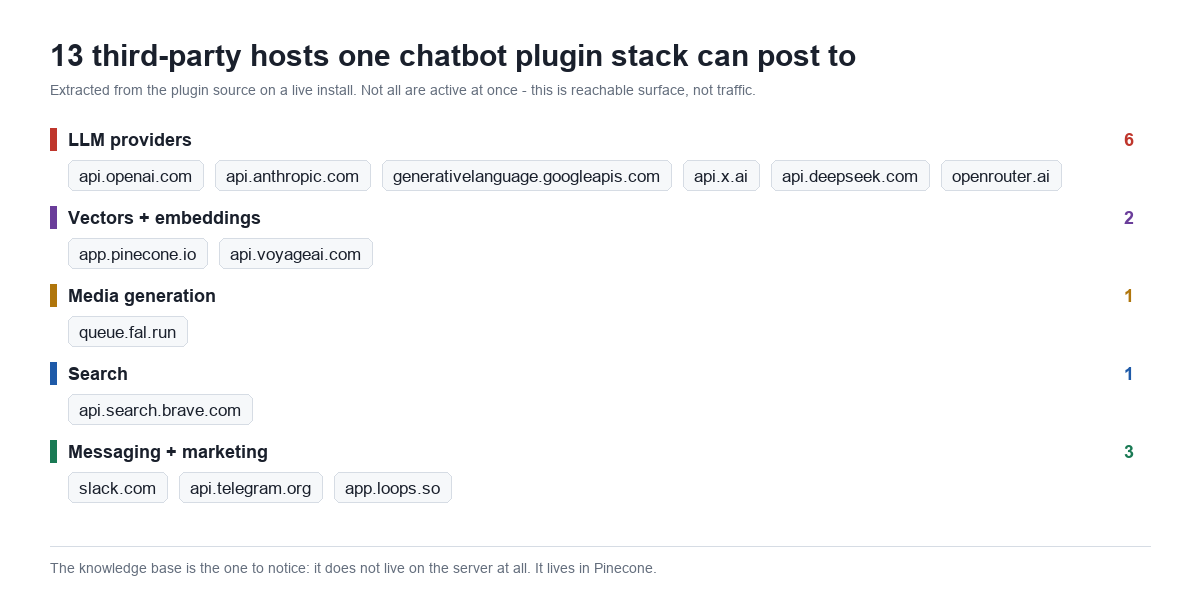
Six LLM providers is not profligacy, it is what “bring your own model” means in practice: the plugin has to speak to whichever vendor you configured. On this install the configured set is gpt-5.6-luna for chat, claude-sonnet-4-6 for content generation, gemini-3-pro-image-preview for images and text-embedding-3-small for embeddings. Four vendors, one site, and that is a fairly ordinary configuration.
But the host worth staring at is app.pinecone.io. The knowledge base does not live on the server at all. Every document you feed the chatbot is chunked, embedded, and stored in a vector database in someone else’s cloud. There is no “export my knowledge base” button that reads from your own disk, because your own disk was never the system of record.
I do not think that is wrong — it is how retrieval-augmented generation works, and running your own vector store is a real operational burden. But if you are answering a GDPR question, or a procurement questionnaire, or just trying to write an honest privacy policy, “our chatbot’s knowledge base is hosted by a US vector database provider” is a sentence you need to know is true. Most site owners do not. It pairs badly with retention policies that quietly never run.
The one control that prevents the 3.7.2 bug
So does my own code have the defect I have just spent 800 words describing? I checked all 27 file_get_contents() call sites. The ones that feed a provider share a pattern, and it is the pattern that matters:
$file_path = get_attached_file($attachment_id);
if (!$file_path || !file_exists($file_path)) { return new WP_Error(...); }
if (filesize($file_path) > 20 * 1024 * 1024) { return new WP_Error(...); }
$mime_type = get_post_mime_type($attachment_id);
if (!in_array($mime_type, array('image/jpeg','image/png','image/gif','image/webp'))) {
    return new WP_Error(...);
}
$image_data = file_get_contents($file_path);
The load-bearing line is the first one. The request supplies an attachment ID, not a path. WordPress resolves the ID to a path itself, from the database, and there is no string an attacker can pass that makes get_attached_file() return /home/user/public_html/wp-config.php. You cannot traverse out of a directory you were never allowed to name.
Everything after that line is belt-and-braces: a MIME allowlist that rejects anything that is not an image, a 20 MB ceiling, and a nonce check on the AJAX handler above it. The documentation bot’s file reader uses the same shape — is_file(), an extension allowlist, and a 100 KB cap.
| Control | What it stops | Present here |
|---|---|---|
| Resolve by ID, never by supplied path | Directory traversal entirely | Yes — get_attached_file() |
| MIME or extension allowlist | Sending non-media files | Yes — 4 image types |
| Size ceiling | Bulk exfiltration in one call | Yes — 20 MB / 100 KB |
| Capability + nonce on the handler | Anonymous invocation | Yes — check_ajax_referer() |
Where mine comes off badly
It would be convenient to stop there. But the same audit turned up something in the MCP add-on that I am not comfortable leaving unsaid, because it is the identical species of mistake as the AI Engine 3.6.1 fix even though it is not exploitable the same way.
The MCP server add-on authenticates with a bearer token. Minting one requires an administrator: both the GET and POST halves of the OAuth authorize endpoint check current_user_can('manage_options'), and the consent form carries a nonce. A subscriber cannot talk their way into a token. That is the check AI Engine was missing, and it is present.
But the capability is checked when the token is issued and never again when it is used. The token row records which user approved it; the bearer check looks the token up, finds a row, and returns true. It does not re-ask whether that user is still an administrator — or still exists. A token minted by an admin who is later demoted, or offboarded, keeps working until somebody revokes it by hand.
There is a second one. A legacy static bearer token is accepted alongside OAuth, and the option that enables it defaults to on. It does not expire.
Neither is a CVE. Both require an administrator to have been trusted and then to have stopped being trustworthy, which is a narrower scenario than “any subscriber”. But “check at issuance, never at use” is precisely the assumption that keeps producing these advisories across the ecosystem, and I would rather write it down than discover it in a changelog later. The fix — binding token validation to a live capability check on every request — is now filed as a build task.
Run this on your own install
None of this needs a security product. From the plugin directory, over SSH:
# every outbound call site, by plugin
grep -rc "wp_remote_post\|wp_remote_request" --include=*.php . | grep -v ":0$"

# every third-party host your plugins can reach
grep -rhoE "https://[a-zA-Z0-9.-]+\.[a-z]{2,}" --include=*.php . \
  | sed 's|https://||' | sort | uniq -c | sort -rn

# every file-read primitive, which is where you check for path vs ID
grep -rn "file_get_contents(\|fopen(\|readfile(" --include=*.php .
For each hit in the third command, answer one question: does the path come from a request parameter, or from an ID the database resolved? If it is a request parameter, read the validation above it very carefully. That single question is the whole audit.
What LLM data privacy actually means on a WordPress site
The phrase gets used as though it were about the model — whether OpenAI trains on your prompts, what the retention window is, which sub-processor sits where. Those matter, but they are downstream. LLM data privacy on a WordPress site is decided earlier, by which bytes your own code chooses to put on the wire. No provider policy protects you from a plugin that will read an arbitrary file and post it.
The practical version is unglamorous and short. Know which hosts your plugins can reach. Know that your knowledge base probably is not on your server. Grep your file-read call sites for supplied paths. And treat your AI provider key as what it is — a funded, outbound, always-open channel that several plugins can reach, which is why where that key is stored is a question worth its own audit.
Frequently asked questions
Is AI Engine unsafe to use?
No, and nothing here says so. It patched three issues in seven weeks and documented all of them. If you run it, update to the current release and move on — an unpatched plugin is the risk, not a patched one.
Does MxChat send my content to OpenAI?
It sends whatever the conversation needs: the user’s message, the system prompt, and retrieved knowledge-base context, to whichever provider you configured. Embeddings and vectors go to Pinecone. That is inherent to how a retrieval chatbot works, not a hidden extra.
Can I run this without a third-party vector database?
Not in the current architecture — the knowledge base is Pinecone-backed. If that is a blocker for your compliance posture, it is worth knowing before you build on it rather than after.
How do I know a plugin is not doing this badly?
You grep it. The three commands above take under a minute and the deciding question is always the same one: supplied path, or resolved ID?
The short version
A changelog line in a plugin with 100,000 installs described a bug where a crafted URL made the plugin read any server file and send it to an AI provider. That shape of bug is specific to a category that has a file-read primitive, an outbound pipe and a funded account all in the same process — which is every AI plugin, including mine.
Audited here: 195 outbound call sites across 16 plugins, 13 third-party hosts, 27 file-read call sites. The reads that feed providers resolve paths from attachment IDs rather than request strings, which is the control that makes the traversal impossible rather than merely difficult. The MCP add-on checks administrator capability when a token is minted but not when it is used, which is a real gap and is now queued to fix. The same principle applies to anything that injects itself into the page rather than the request: an accessibility widget rewrites your DOM at runtime, and is worth auditing on exactly these terms before you trust what it claims to fix.
If you take one thing: the agent surface on your site is not just about what can be called. It is about what can be sent. Both halves need looking at, and only one of them gets written about.