WordPress Security Update 7.0.4: Ours Never Installed
Update, 16 August 2026 — this site is on 7.0.4 now, and the updater is not why.
Core was replaced by hand on 15 August at 17:36 UTC: that is the mtime on wp-includes/version.php, matching the wp-content/upgrade/ directory to the minute. The automatic updater did not run. auto_core_update_notified still records version 7.0.3, type success, dated 7 August — the exact value this post was written around — and wp_maybe_auto_update is still absent from the schedule. Seven of the nine pending plugin updates went in at the same time, including Wordfence 8.2.2 to 9.0.0.
One thing did change on its own, and this post cannot explain it. Something began requesting /wp-cron.php at 02:17 UTC on 16 August, and the overdue-event count has fallen from 53 to 14. DISABLE_WP_CRON is still true and the account crontab is still empty. What is driving those requests has not been established, and no mechanism is invented for it here.
On 12 August 2026, WordPress shipped 7.0.4. It is a security release, and its announcement ends with a sentence almost nobody reads carefully: “Sites that support automatic background updates will begin updating shortly.”
Our production site supports automatic background updates. Every switch is on. Nothing is blocking them. They had worked five days earlier.
As of 07:56 UTC on 14 August, two days after the release, the site was still running 7.0.3 — and the WordPress dashboard still cheerfully reported that automatic updates were enabled. This post is the measurement of why, on a real commercial WordPress install, and the 30-second check that would have caught it.
The short version: a WordPress security update is not delivered by your settings. It is delivered by a scheduler — and ours had been dead for six days without a single warning.
What 7.0.4 actually fixes
WordPress 7.0.4 patches CVE-2026-65640 (GHSA-8vr3-7mxf-gx8w), reported responsibly by the team at pwn.ai. The release describes it as an authenticated Author+ remote code execution via malicious file upload, affecting sites that use Imagick and Ghostscript. Fixes are being backported through to the 4.7 branch and to the 7.1 RC3 release.
Two words in that description do most of the work, and most coverage of this release skated over both.
“Author+” means the attacker needs an account that can upload files. This is not an unauthenticated internet-wide worm. “Imagick and Ghostscript” means the vulnerable code path only exists if your server has a specific image stack installed. Plenty of WordPress hosts run GD instead and are simply not affected.
So before writing a word about our own exposure, the honest thing to do is check whether we have the preconditions at all — rather than assume that a scary CVE headline applies to us.
Do we even have the vulnerable stack?
We do. All of it.
| Precondition | Measured on our server | Present? |
|---|---|---|
| Imagick PHP extension | extension_loaded("imagick") → true | Yes |
| WordPress actually uses Imagick | _wp_image_editor_choose() → WP_Image_Editor_Imagick | Yes |
| Imagick chosen for PDF specifically | For application/pdf → WP_Image_Editor_Imagick | Yes |
| Ghostscript installed | /usr/bin/gs, version 9.54.0 | Yes |
| PDF/PostScript delegates registered | Imagick reports PDF, PDFA, PS, PS2, PS3 | Yes |
| PDF is an allowed upload type | get_allowed_mime_types() includes application/pdf | Yes |
That is a clean sweep. On paper, this install is exactly the configuration the advisory describes.
And now the part that keeps it honest
A vulnerability report is not a risk assessment. The next question is who could actually use it — and here the answer shrinks dramatically.
The site has 3,079 registered users. Of those, exactly three hold the upload_files capability: two administrators and one editor. There are zero users with the Author role. The other 3,074 accounts are e-commerce customers and forum participants, none of whom can upload a file at all. The site also has zero existing PDF attachments, so this code path is not part of any routine workflow here.
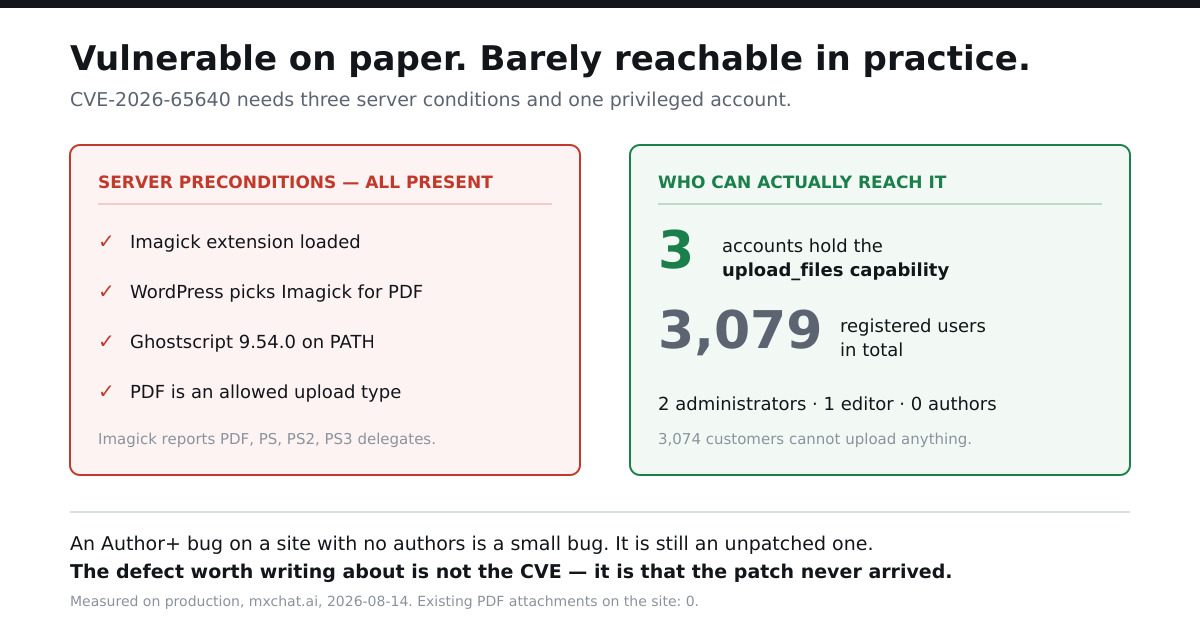
So: a genuine unpatched vulnerability, on a site where the number of accounts that could trigger it is three, all of them trusted. That is a small bug. It is worth stating plainly, because the alternative — writing “our site was vulnerable to remote code execution!” — would be technically defensible and practically dishonest.
The realistic threat model is not a stranger walking in. It is one of those three accounts being compromised through a reused password, at which point an attacker who already has editor access gains code execution as well. That is a real escalation, and it is the reason the patch still matters.
But the vulnerability is not the story. The delivery failure is.
Every switch said yes
Before blaming the scheduler, the boring explanations had to be eliminated. WordPress has roughly half a dozen ways to disable automatic updates, and any one of them would have been a mundane answer. We checked all of them.
| Control | Value on our install | Blocking updates? |
|---|---|---|
WP_AUTO_UPDATE_CORE | true | No — enables them |
auto_update_core_minor | enabled | No |
auto_update_core_major | enabled | No |
auto_update_core_dev | enabled | No |
DISALLOW_FILE_MODS | not defined | No |
AUTOMATIC_UPDATER_DISABLED | not defined | No |
automatic_updater_disabled filter | false | No |
allow_minor_auto_core_updates filter | true | No |
Nothing was switched off. One grep did turn up automatic_updater_disabled inside Rank Math’s helper class, which looks incriminating until you read the surrounding function: is_plugin_update_disabled() only reads those constants to decide what to show in its own UI. It does not set them. A grep finds candidates; only the surrounding code classifies them.
The control that turns this into a finding
Here is the measurement that makes the rest of the post possible. WordPress records the outcome of its last core auto-update in the auto_core_update_notified option. Ours says:
version = 7.0.3
type    = success
when    = 2026-08-07 10:50:41 UTC
Core auto-updates worked. On 7 August, this exact site downloaded and installed WordPress 7.0.3 by itself and logged a success. Whatever went wrong afterwards is not a permissions problem, not a file-ownership problem, and not a configuration problem — because seven days ago the identical machinery ran end to end.
That single option is what separates “this site can’t auto-update” from “this site stopped auto-updating,” and they have completely different fixes.

What actually stopped
WordPress’s automatic updates are triggered by WP-Cron. WP-Cron is not a real scheduler — it is a task list that only advances when something pokes it, normally a page view or a system cron job hitting wp-cron.php.
On this server:
DISABLE_WP_CRONistrueinwp-config.php— so page views no longer trigger the queue.crontab -lreturns a single empty line. There is no system cron job.- Nothing under
/etc/cron*referenceswp-cron.php.
That combination is the classic half-finished production setup: someone correctly disabled the traffic-triggered cron for performance, and the real cron job that was supposed to replace it either never got added or was lost. The result is a scheduler that accepts jobs and never runs them.
The queue tells the story. All 53 scheduled events on the site are overdue. Not most — all of them. The oldest is wordfence_processAttackData, due 2026-08-08 04:28:38 UTC and 6.14 days late at time of measurement.
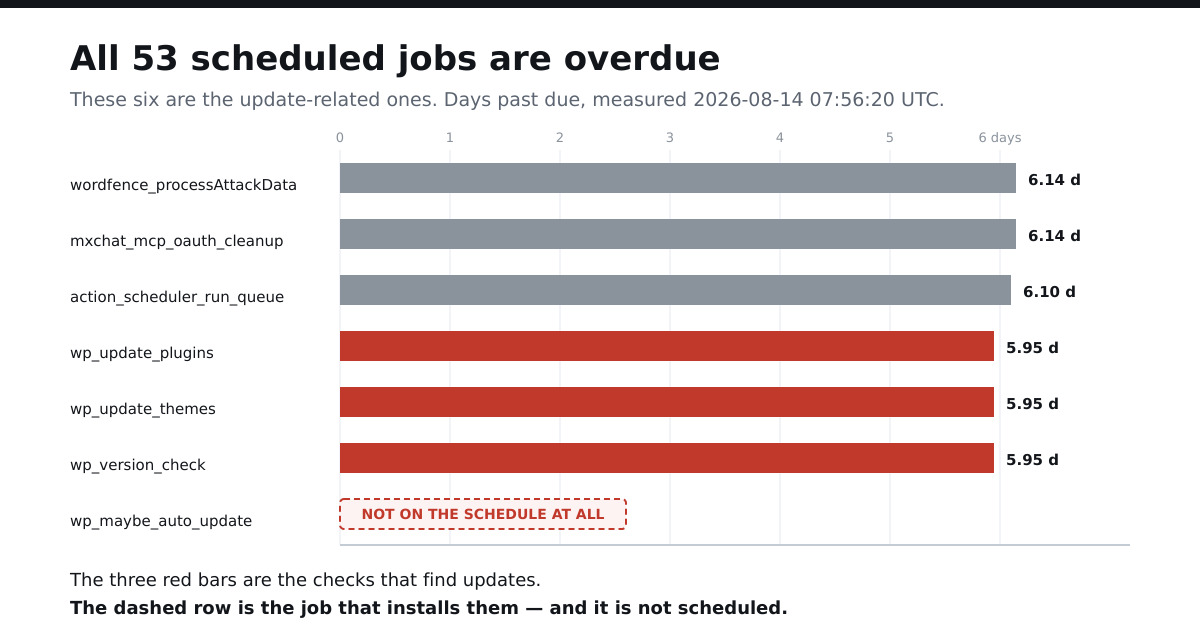
The three that matter here are wp_version_check, wp_update_plugins and wp_update_themes — all due 2026-08-08 09:15:17 UTC, all 5.95 days late. wp_version_check is the job that asks WordPress.org whether a new release exists. It has not asked since before 7.0.4 existed.
There is a second detail worth recording precisely because we cannot fully explain it: wp_maybe_auto_update — the event that performs the actual installation — is not on the schedule at all. Not overdue. Absent. We verified that with controls in the same query: wp_version_check returns one scheduled row, a deliberately nonsensical hook name returns zero, and wp_maybe_auto_update returns zero. So the absence is real rather than a broken search. Why it is absent, we did not establish, and we are not going to invent a mechanism to make the story tidier.
We have been here before with this same scheduler. When we audited what a dead cron job does to a GDPR data-retention policy, the finding was that a retention setting which says “delete after one month” is just a string in the database if nothing ever runs the deletion. This is the same failure wearing different clothes: a security setting that says “update automatically” is just a string in the database too.
The plugin layer has the same problem in a different shape. Where a plugin update would actually be fetched from decides whether the auto-update toggle does anything at all — and on this site one pending update has no download attached to it.
Why the dashboard tells you everything is fine
This is the part that generalises beyond our site.
WordPress’s admin screens report configuration. Site Health checks whether background updates are permitted — file permissions, constants, filters, whether the site can reach WordPress.org. Every one of those checks passes here, because every one of them is genuinely fine.
Not one of them verifies that the scheduler which delivers updates has run recently. The dashboard is answering “are automatic updates allowed?” while the question you actually care about is “did an automatic update happen?” Those are different questions, and only the first one is on screen.
It is the same gap we found when we measured how much of WordPress.org’s new plugin review actually covers a real site: the controls people trust are frequently measuring something adjacent to the thing they think is being measured. In that audit we noted that core auto-updates were fully enabled here and concluded that at least the most-reviewed component keeps itself current. That conclusion was wrong, and this post is the correction. Enabled is not the same as running.
Check your own site in 30 seconds
If you have WP-CLI, three commands answer it completely:
# 1. What version are you actually on, and is there a newer one?
wp core version
wp core check-update

# 2. Did the update machinery ever succeed, and when?
wp eval '$o = get_site_option("auto_core_update_notified");
  echo $o ? $o["version"]." ".$o["type"]." ".gmdate("Y-m-d H:i", $o["timestamp"]) : "never";'

# 3. Is the scheduler alive? Anything in the past is a job that did not run.
wp cron event list --fields=hook,next_run_relative
The tell is step 3. If more than a handful of events read now, your queue is backed up. If every event reads now, your scheduler is dead and every timed feature on the site — updates, backups, retention, abandoned-cart emails, subscription renewals — silently stopped with it.
No SSH access? Two weaker but usable substitutes: install a cron-viewer plugin and look for a wall of overdue events, or simply compare Dashboard → Updates against the current WordPress release. If a security release is more than a day or two old and your site has not taken it while claiming auto-updates are on, you have this problem.
How to fix it — and the trap in fixing it
The correct production setup is the one this site was trying to have: keep DISABLE_WP_CRON on, and drive the queue from a real system cron job.
*/5 * * * * cd /path/to/wordpress && /usr/local/bin/wp cron event run --due-now >/dev/null 2>&1That is better than hitting wp-cron.php over HTTP, because it does not depend on the web server, does not compete with visitor traffic, and fails loudly in cron logs instead of silently.
Now the trap, which is why we have not run it yet on our own site. Reviving a scheduler with 53 backlogged jobs fires all 53 more or less at once — deletions, syncs, email digests, payment retries — in an order nobody designed. On a site with real customers, “catch up on six days of queued work in one burst” is its own incident. The safe path is to run the due jobs deliberately, a few at a time, checking what each one does first:
# Inspect before executing. This is the read.
wp cron event list

# Then run specific hooks you have looked at, one at a time.
wp cron event run wp_version_check
Worth knowing: wp cron event run is a write, not a read — it executes the job. wp cron event list is the read. It is an easy pair to confuse when you are debugging quickly.
What we did about ours
We have not silently patched this. The findings — the dead scheduler, the unapplied 7.0.4, the ordering hazard — went to the site owner as a decision to make, because restoring cron on a live store with a six-day backlog is a judgement call about business risk, not a routine maintenance task. Quietly fixing it and then publishing a post about how our site was vulnerable would have made this article false at the moment it went live.
Everything above is time-anchored to 14 August 2026, 07:56 UTC. By the time you read it, our site is very likely on 7.0.4.
Update, 21 September: the next security release, 7.1.1 (published 17 September), did install itself here, three days late, and the mechanism is worth recording. At 08:14:02 UTC on 20 September a verification script checked that wp-cron.php still answered after an .htaccess change; that single GET from the server’s own address started the first cron pass since 13 September. wp_version_check ran, wp_maybe_auto_update ran inside the same pass, and wp-includes/version.php was rewritten at 08:28:35 UTC; the success notice (auto_core_update_notified, version 7.1.1, 08:28:38 UTC) went to the admin address. Nothing in the configuration changed between 7.0.4 not installing and 7.1.1 installing. Both times every switch said yes; the difference is that something requested wp-cron.php. The queue has not run since, and 42 of its 50 events were overdue again by the next morning.
The lesson worth keeping
We spend a lot of time here checking whether the things we believe about our own infrastructure survive measurement. Last week it was discovering that nearly half the “AI crawler” traffic in our logs was not AI crawlers at all — because a user agent is a text field, and we had been counting it as evidence. Before that it was auditing every REST route on the site rather than trusting the route count in our notes.
This one has the same shape. “Automatic updates are enabled” is a claim about a setting. “This site is running the current security release” is a claim about reality. For six days those two claims disagreed, and nothing on the site was designed to notice.
If you run WordPress, the check is three commands and it costs you half a minute. The thing you are looking for is not a red warning — there isn’t one. It is a list of scheduled jobs where every single entry says now.
WordPress 7.1 arrives on 19 August, which is a good reason to fix the scheduler above before it does. We also checked what 7.1 actually ships for AI, since the coverage disagrees with itself — the Guidelines feature is absent from the Field Guide.
We build MxChat, an AI chatbot for WordPress, and we run these audits on our own production install rather than a test site — which is how findings like this one turn up. Setup guides and technical references live in the documentation.
The same gap opens on the plugin side, and it is widening for a new reason. Automated pipelines can now surface more than 300 WordPress plugin zero-days in 72 hours at roughly $20 each, which makes the interval between a fix existing and a fix being installed the part that actually matters: the update lag I measured on this site.