A Guide to Help Desk Automation
Think of help desk automation as your support team's most reliable assistant—one that never sleeps. It's about using smart technology to take over the repetitive, time-consuming tasks like creating tickets, sorting them, and answering the same questions over and over again, all without needing a human to click a button.
Essentially, it’s a digital sorting system for all your customer inquiries. It instantly categorizes requests, sends them to the right agent, and can even resolve basic issues on the spot. This frees up your human experts to focus on the tricky problems that actually require their skills.
What Is Help Desk Automation

Picture your support team running a busy library. Every customer question is like a book that needs to be found, checked out, and re-shelved by hand. It works, sure, but it's slow, mistakes happen, and it quickly becomes overwhelming when more and more people walk through the door.
Help desk automation is like installing a state-of-the-art digital catalog and conveyor belt system in that library. It’s not about getting rid of the librarians; it's about giving them superpowers. The system instantly identifies, sorts, and delivers every request to the perfect specialist, making sure nothing gets lost in the shuffle.
From Manual Effort to Automated Workflows
At its core, help desk automation is about swapping out manual, repetitive chores for smart, rules-based workflows. Instead of an agent spending their first 15 minutes every morning just sifting through a messy inbox, an automated system has it all sorted and prioritized before they've even had their first sip of coffee.
This isn't just a "nice-to-have" anymore; it's becoming a necessity. The use of help desk software has seen a major uptick, with adoption among support teams climbing 11% since 2020 to hit 53% penetration in 2024. It's clear that businesses are moving toward smarter ways of managing customer support.
Automation tackles the backend processes that eat up an agent's day, like:
- Ticket Routing: Automatically assigning tickets based on keywords, the customer's history, or the type of issue.
- Status Updates: Sending out automatic notifications to customers as their ticket moves through the resolution process.
- Closing Inactive Tickets: Tidying up the queue by automatically closing tickets that have been inactive for a while.
- Answering FAQs: Deploying chatbots or knowledge base tools to give customers instant answers to common questions.
Why Automation Is a Game Changer
This isn't just about saving a few minutes here and there. It fundamentally changes the way a support team functions. By taking the routine tasks off their plate, agents can invest their energy and expertise into solving complex, high-value problems that demand human creativity and empathy. It’s the difference between a musician constantly tuning their instrument and actually composing a masterpiece.
This shift empowers businesses to scale their support operations effectively, improve customer satisfaction with faster responses, and manage a higher volume of inquiries without proportionally increasing headcount. Automation turns a reactive support center into a proactive, efficient engine for customer success.
For a deeper look at the core concepts, you can explore this guide on Smarter Support with Help Desk Automation. The right tools make all the difference, and you can learn more about how to discover the ultimate CX automation platform to see what’s possible for your business.
The True Benefits of Automating Support

While "automation" is a popular buzzword, its real worth shows up on your bottom line and in your customer reviews. Bringing help desk automation into your workflow isn't just about getting new software; it's about completely rethinking how you deliver support. The goal is to build a smarter, faster operation that boosts customer loyalty and keeps your team happy.
The proof is in the numbers. The global helpdesk automation market is already valued at USD 10.7 billion in 2024 and is expected to explode to USD 91.9 billion by 2033. This isn't just hype—it’s driven by businesses everywhere realizing they can cut costs while delivering a better experience. You can see what’s fueling this incredible 27% compound annual growth rate for yourself.
Slash Operational Costs
Let's be honest: your support center is vital, but it’s also expensive. Every time an agent has to manually open, categorize, and resolve a ticket, it costs you time and money. Help desk automation tackles this head-on by taking over the high-volume, low-effort tasks.
Think about all the simple, repetitive questions your team gets every single day. Password resets, order status checks, basic "how-to" guides—these are perfect candidates for automation. An automated system can handle them instantly, day or night, without an agent ever having to touch them.
By automatically resolving a huge chunk of these easy tickets, you dramatically lower your cost per interaction. That budget and brainpower can then be pointed toward bigger, more important projects instead of just trying to stay afloat in a sea of support requests.
Elevate the Customer Experience
We live in an on-demand world. Customers expect answers now, and making them wait in a queue for a simple question is a great way to lose them. Automation gives them what they want: an immediate, always-on first point of contact.
Self-service portals and AI-powered chatbots let customers solve their own problems, on their own schedule. This instant access doesn't just resolve their issue faster; it makes them feel empowered and in control. To see how this works in practice, explore the benefits of chatbots for business engagement. When customers can help themselves, it frees up your support agents for the people who truly need a human touch.
Here’s how the experience gets better:
- 24/7 Availability: Your customers get help when they need it, not just between 9 and 5. This is a game-changer for different time zones and schedules.
- Instant Resolutions: Simple questions get answered on the spot, cutting out frustrating wait times.
- Consistent Accuracy: Automation delivers the same correct, pre-approved answer every time, so there’s no room for human error.
This kind of reliable, immediate service builds serious trust and loyalty. Your help desk stops being a source of friction and becomes a reason customers stick around.
Boost Agent Productivity and Morale
Your support agents are skilled professionals, not robots. When they’re stuck handling the same boring, repetitive tasks all day, they burn out. Fast. Automation frees them from that grind.
When the routine tickets are handled automatically, your agents can finally focus their energy on the complex, messy problems where their expertise shines. They get to be detectives and problem-solvers, not just ticket-closers. This gives them more time to dig into tough issues, build real relationships with customers, and provide the kind of empathetic support that a machine never could.
Focusing on meaningful work makes for a much happier team, leading to better job satisfaction and less turnover. And a happy, engaged support team provides world-class service, which creates a positive feedback loop that benefits everyone—your agents, your customers, and your business.
The Tech Behind the Magic: What Powers Help Desk Automation?
So, what's really going on under the hood of a great automated help desk? It’s not just one single piece of technology, but a combination of smart tools working together. Think of it like a well-oiled machine where each gear has a specific job, turning in sync to create a smooth, efficient support experience.
Getting a handle on these core components is key to understanding how automation can take a messy, overflowing inbox and transform it into a streamlined support powerhouse. Let's break down the main players.
Workflow Automation: Your Digital Traffic Director
The most fundamental piece of the puzzle is workflow automation. This is the logic engine that directs traffic. Imagine a smart system that looks at every incoming ticket and instantly knows where it needs to go, who needs to see it, and how urgent it is—all without a human clicking a single button.
It operates on simple but powerful "if this, then that" rules. This isn't about deep thinking; it's about consistency, speed, and making sure nothing falls through the cracks.
Here are a few common examples:
- Smart Ticket Routing: A ticket with the word "invoice" or "refund" automatically gets sent straight to the billing team. No more manual sorting.
- Automatic Prioritization: If a message comes from a VIP account or contains phrases like "system down," the workflow instantly flags it as high-priority for immediate attention.
- Automated Status Updates: The system can fire off an email to a customer the moment their ticket's status changes, keeping them in the loop without an agent having to type a thing.
AI-Powered Chatbots: The 24/7 Frontline Crew
Next up are AI-powered chatbots. These are your always-on, first responders. Forget the clunky, keyword-based bots of the past that just left customers frustrated. Today’s chatbots use Natural Language Processing (NLP) to understand what people are actually asking, allowing for surprisingly natural conversations.
These bots are workhorses, capable of resolving a huge chunk of common questions on the spot. In fact, some studies show AI-driven chatbots can successfully handle up to 80% of routine customer inquiries, freeing up your human experts to focus on the tricky stuff. We dive deeper into the tech that makes this possible, like the OpenAI Assistants API, in some of our other guides.
A well-designed chatbot can do more than just answer FAQs. It can walk a customer through troubleshooting, pull up an order status, or even process a password reset—all in real-time, any time of day. That kind of instant support is a game-changer for customer satisfaction.
Machine Learning: The Proactive Problem-Solver
Where workflow automation follows rules, machine learning (ML) learns from experience. It's the brain of the operation, constantly analyzing past data to get smarter over time. If workflow automation is directing today's traffic, machine learning is the city planner using historical data to predict traffic jams and redesign the roads for a smoother commute tomorrow.
ML algorithms dig through your support history to find patterns a human might never spot. This gives your help desk a predictive edge.
Here’s where it shines:
- Predictive Ticket Tagging: Instead of just looking for keywords, ML can read an entire ticket and predict its category and urgency with far greater accuracy.
- Root Cause Analysis: By noticing a spike in tickets mentioning a certain feature, ML can flag a potential bug or a confusing part of your product long before it becomes a major fire.
To make these technologies clearer, let's compare them side-by-side.
Core Help Desk Automation Technologies Explained
This table breaks down how each piece of technology contributes to a more efficient support system.
| Technology | Primary Function | Common Use Case | Key Business Impact |
|---|---|---|---|
| Workflow Automation | Executes predefined rules | Routing tickets to the right department or agent | Increases speed and consistency; reduces manual sorting |
| AI-Powered Chatbots | Provides instant, 24/7 answers to common questions | Answering FAQs, guiding users, processing simple requests | Drastically reduces ticket volume and improves customer satisfaction |
| Machine Learning | Analyzes data to learn, predict, and improve processes | Predicting ticket categories, identifying issue trends | Enables proactive support and optimizes agent workloads |
| Knowledge Base | Acts as a central source of truth for all information | Powering chatbots and self-service portals with answers | Empowers customers to solve their own problems, reducing support dependency |
Each of these technologies builds on the others, creating a complete ecosystem for smarter support.
Knowledge Base Integration: The Single Source of Truth
Finally, none of this automation works without a solid foundation of information. That's where your knowledge base comes in. An effective customer self-service portal is the ultimate goal, and knowledge base integration is what makes it possible.
Think of your knowledge base as the brain that feeds your chatbot and automation rules. When a customer asks a question, the chatbot instantly searches this library of information to pull the perfect article, guide, or video. This creates a powerful self-service loop where customers get what they need immediately, often without ever needing to speak to an agent.
How to Implement Help Desk Automation
Jumping into help desk automation can feel like a massive undertaking, but it doesn't have to be. The secret isn't flipping a switch and automating everything at once. It’s about taking a smart, step-by-step approach that builds momentum and delivers real wins along the way.
Think of it as creating a smart filtering system for your support requests. The process below shows how different automated tools can work in harmony, handling initial questions and guiding users to answers before a human agent ever needs to step in.
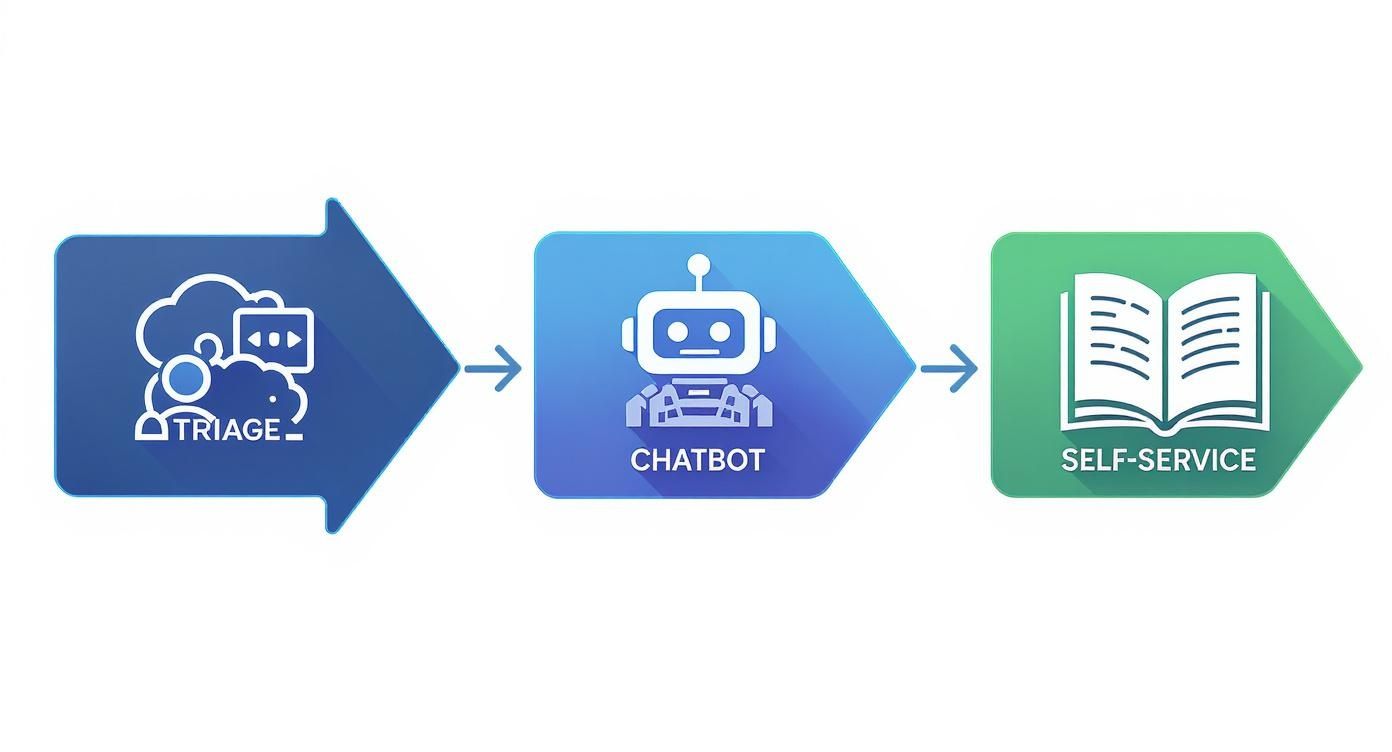
This kind of flow is designed to triage and resolve issues efficiently, saving your team’s time for the problems that truly need their expertise.
Identify Repetitive, High-Volume Tasks
First things first, you need to play detective. Dig into your team's ticket history and find the tasks that are consistently eating up the most time. These are your golden opportunities for the first phase of help desk automation.
You're looking for tasks that are:
- High-Volume: What questions are your agents answering over and over again, every single day?
- Low-Complexity: Which problems have a simple, formulaic solution that doesn't require creative problem-solving?
- Rule-Based: Can you map out the resolution process with a clear "if this happens, then do that" logic?
Things like password resets, account lockouts, checking on an order status, or explaining the return policy are perfect starting points. Automating these gives you an immediate, tangible victory.
Choose the Right Tools for the Job
Once you know what you want to automate, it’s time to figure out how. The market is packed with options, from simple workflow rules built into your current help desk software to powerful, standalone AI chatbot platforms.
Don't get distracted by the flashiest new tech. The right tool for you is one that plays nicely with your existing systems, fits your budget, and is easy enough for your team to manage. For example, if your business runs on WordPress, it makes sense to explore how to implement a WordPress AI chatbot to engage customers directly on your site.
The best automation strategy starts with the tools you already have. Many help desk platforms include powerful workflow builders that can handle ticket routing, categorization, and status updates without any additional investment.
Start with a Pilot Project
Instead of trying to overhaul your entire support system in one go, start small. Launch a focused pilot project to test the waters. This lets you work out any kinks on a smaller scale, prove the value to key stakeholders, and build confidence. Automating password resets is a classic, effective pilot for a reason—it works.
Remember, success isn't just about whether the technology functions. It’s about making life genuinely easier for both your customers and your agents. A successful pilot creates internal champions who will advocate for a wider rollout.
Build and Maintain a Robust Knowledge Base
Think of your knowledge base as the brain behind your automation. A chatbot, for instance, is only as helpful as the information it can access. Without a well-stocked, up-to-date library of articles, tutorials, and FAQs, your automation efforts will hit a wall fast.
Treat your knowledge base like a living product, not a dusty archive. You should be constantly reviewing and updating articles based on new support tickets and customer feedback. This ensures your self-service options give people the right answers, which in turn deflects a huge number of tickets from ever reaching your team.
Train Your Team to Work Alongside Automation
Finally, get your support agents ready for their new reality. Help desk automation isn’t about replacing people; it’s about freeing them up to do more meaningful work. When routine tasks are handled automatically, your agents can evolve from frontline responders into expert consultants who tackle the most complex and high-stakes customer issues.
This shift is more important than ever. In the wake of the pandemic, average ticket volumes have jumped by about 16%. To keep up, 37% of organizations are now using AI to help their agents perform better. After all, AI-powered chatbots can resolve up to 80% of routine inquiries, letting your team focus on adding that irreplaceable human touch. Training should be focused on managing escalations from bots, analyzing performance data, and spotting new opportunities to make your workflows even smarter.
Best Practices for Automation Success
Installing help desk automation feels like flipping a switch—but getting meaningful results takes more than just turning it on. You need to weave automation into your team’s daily routine so that every interaction feels smooth for customers and effortless for support staff.
Think of automation as a finely tuned engine under the hood. Your human agents are the drivers, applying judgment and empathy where algorithms can’t. Striking this balance unlocks genuine efficiency without sacrificing that personal touch.
Always Provide a Human Escalation Path
Even the smartest chatbot can hit its limits. When issues turn complex, customers need a clear shortcut to a live agent—no dead ends allowed. Without that safety net, people will walk away frustrated.
• Make your “escape hatch” visible at every step of the automated flow.
• Label options clearly—phrases like “Talk to a Specialist” work better than generic “Support” buttons.
A solid automation strategy hands customers the tools for self-help while reassuring them that a human expert is just one click away.
Continuously Monitor and Refine Your Workflows
Automated processes aren’t “set and forget.” They behave more like living systems, constantly shifting under real-world pressure. Once your workflows go live, the real work begins.
Watch your data for key signals:
- Resolution Rates: What percentage of tickets wrap up without human intervention?
- Escalation Points: Where are people flagging for a live agent? Those spots often point to confusing steps or missing information.
- Customer Feedback: Are users giving high satisfaction scores, or do they feel trapped in a loop?
Use these insights to tweak bot scripts, update decision trees, and sharpen knowledge base articles. Regular check-ins keep your help desk automation aligned with evolving customer needs.
Personalize the Automated Experience
Automation doesn’t have to feel cold. In fact, it can come across as surprisingly warm when you leverage customer data thoughtfully. Small details—like greeting users by name or mentioning their recent order—go a long way.
• Pull in profile information to reference loyalty status or purchase history.
• Offer tailored recommendations based on past interactions.
• Segment responses by customer tier to add a VIP touch.
These personal touches turn routine exchanges into conversations that resonate, showing each person they’re more than just a ticket number.
Keep Your Knowledge Base Evergreen
Your knowledge base is the fuel that powers smart automation. When articles lag behind product updates, bots start handing out stale answers—and support volumes spike.
Treat documentation as a living resource:
- Regularly Review Support Tickets to spot emerging questions.
- Update Articles Immediately whenever features or policies change.
- Incorporate Customer Feedback to clarify confusing topics and fill in gaps.
A fresh, accurate, and comprehensive knowledge base reduces escalations and lets your automation handle a broader range of inquiries—lightening the load on your support team.
What's Next for Customer Support?
Help desk automation is moving far beyond just reacting to problems. We're stepping into an era of proactive support, where intelligent systems act more like a watchful co-pilot than a simple ticket processor. The future is all about anticipating customer needs and solving issues before people even notice something is wrong.
Think about it: a system flags a common login error affecting a specific group of users. Instead of waiting for the inevitable flood of tickets, it automatically sends out a notification with a one-click fix. This shift from a reactive to a predictive model completely changes the customer service game, turning a moment of potential frustration into one of genuine relief.
The Human Touch of AI
A huge part of this evolution is generative AI. It's fundamentally changing chatbot interactions, moving them from stiff and transactional to something that feels empathetic and actually helpful. These newer AI models can pick up on nuance, understand sentiment, and write responses that feel personal and human. They can even act as a sidekick for your human agents, drafting thoughtful, complex replies in seconds to ensure your whole team communicates with a consistent, high-quality voice.
This technology is setting the stage for a much more connected future, a concept often called hyper-automation.
Hyper-automation is what happens when help desk systems don't just live in a silo. They integrate deeply with other parts of the business—sales, marketing, product development—to build a single, unified view of the customer journey. Information flows freely, giving the support AI a complete picture of a customer's history and what they actually need.
Becoming a Strategic Partner
This level of integration means automation stops being just another support tool. It becomes a strategic partner that actively helps the business grow. The market is already responding to this massive potential. The global helpdesk automation market was valued at USD 26.8 billion in 2024 and is expected to skyrocket to USD 130.9 billion by 2030. You can find more details about this expanding market potential and its drivers in recent reports. That kind of explosive growth is a direct result of customers demanding seamless, 24/7 support everywhere, and modern automation is perfectly built to deliver it.
Ultimately, the future of customer support isn't about replacing people. It's about giving them powerful AI tools. We're building a world where technology handles the routine, repetitive tasks, freeing up human agents to provide exceptional, high-touch service where it truly counts. That's how you build loyalty and drive real business success.
Frequently Asked Questions
Thinking about bringing automation into your help desk? It’s a big step, and it’s natural to have questions about how it will affect your team, your budget, and your day-to-day operations. Let's tackle some of the most common questions we hear from teams who are exploring this path.
Getting these answers straight is the best way to feel confident about your decision.
Will Automation Replace My Human Support Agents?
Not at all. The real goal here isn't replacement, but empowerment. Think of automation as a super-efficient assistant for your support team, one that happily takes on all the repetitive, time-consuming tasks.
By handing off the simple stuff, you free up your skilled agents to do what they do best: solve complex problems that require empathy, critical thinking, and a human touch. Their roles evolve from simply closing tickets to becoming true customer advocates and problem-solvers, which is far more fulfilling work.
How Much Does Help Desk Automation Cost?
The cost can vary quite a bit. It really hinges on the tools you select and how deeply you integrate them into your workflow. For instance, setting up some basic automated rules in your current help desk software might not cost you anything extra.
On the other hand, more advanced tools, like a sophisticated AI chatbot, will naturally come with a higher price tag. The important thing is to look beyond the initial cost and consider the return on investment (ROI). When you factor in the hours your agents save, the boost in overall efficiency, and happier customers, the value becomes much clearer.
Where Should I Start with Automation?
The best place to begin is with the low-hanging fruit. Take a look at your support tickets and identify the most common and straightforward requests that come in day after day.
A great starting point is to analyze your ticket data. Look for things like password resets, questions about order status, or basic "how-to" guides for your product. These are perfect candidates for your first automation project.
Automating these simple inquiries delivers immediate results without causing a major shakeup. It gives your team a chance to get comfortable with the new system while proving the value of automation right from the start. This builds momentum and makes it easier to expand your efforts later on.
And your customers? They're ready for it. In fact, 81% of users would rather try to solve an issue themselves before reaching out, and 60% want a response within an hour. You can discover more help desk statistics that show just how much automation aligns with what modern customers expect.
Ready to transform your WordPress support? With MxChat, you can deploy intelligent, no-code AI chatbots that resolve issues 24/7, boost conversions, and free up your team to focus on what matters most. https://mxchat.ai