How to Automate Customer Service with AI
Automating customer service is all about using smart tech, like AI chatbots, to handle the common, repetitive questions that flood your support team. This isn't about replacing your agents; it's about freeing them up to focus on the tricky, high-stakes problems where their expertise really shines. The whole process starts with figuring out what questions your customers ask over and over, picking a straightforward platform like MxChat, and then feeding your AI the information it needs to deliver instant, 24/7 answers.
Why Automate Customer Service Now

Before we jump into the "how-to," let’s talk about why this shift is happening so quickly. Customer expectations have shot through the roof. People want answers right now, not tomorrow, and they don't care what time it is. Trying to keep up with that demand using only human agents is a surefire recipe for long wait times and a burned-out team.
Think of automation as your front line. It’s there to filter out the noise. Imagine a support team buried under a mountain of "Where's my order?" tickets. Now, picture a scenario where a chatbot instantly resolves 80% of those, leaving your human experts to handle the complex, nuanced issues that actually require a human touch. That's a game-changer.
The Strategic Shift to AI-Powered Support
Moving to automation is a smart business decision, not just a tech upgrade. It turns your support department from a reactive cost center into a proactive, efficient powerhouse. The numbers speak for themselves. By 2025, it’s predicted that 85% of customer interactions will be handled without a human agent.
This isn't just a futuristic guess—it's happening now. In fact, 90% of companies that have already made the switch report significant savings in both time and money. On top of that, agents who have AI assistance can solve problems 47% faster, which dramatically improves first-contact resolution rates.
The core idea is simple: let bots handle the predictable, and let humans handle the exceptional. This balance leads to happier customers who get instant help and a more engaged support team focused on meaningful work.
Key Advantages of Automation
Automating customer service brings a host of benefits that go far beyond just speed. Here’s what you really gain:
- 24/7 Availability: Your digital doors are never closed. An AI chatbot is always on, ready to help customers in any time zone, day or night.
- Reduced Agent Workload: By handling the frequently asked questions, automation cuts down on ticket volume and prevents your team from getting overwhelmed. They can then focus on tasks that truly move the needle.
- Consistent and Accurate Answers: An AI gives the same, correct answer every single time. This eliminates the risk of human error on routine questions and ensures brand consistency.
To really see the difference, it helps to put the two approaches side-by-side.
Manual vs Automated Support: A Quick Comparison
Moving from a completely manual system to an automated one is a big step. This table breaks down what that change looks like in practical terms.
| Feature | Manual Support | Automated Support |
|---|---|---|
| Availability | Limited to business hours or shift schedules | 24/7/365, always on |
| Response Time | Varies, often with long wait times during peaks | Instant for common queries |
| Consistency | Varies by agent; potential for human error | Uniform and accurate every time |
| Cost | High labor costs; scales with headcount | Lower operational cost; scales efficiently |
| Agent Focus | Repetitive, low-level tasks and complex issues | Primarily complex, high-value problem-solving |
| Customer Experience | Can be frustrating due to delays | Immediate satisfaction for simple needs |
The comparison makes it clear: automation doesn't just make things faster, it fundamentally changes how your support function operates for the better.
For a deeper dive into the world of AI Customer Service, there are some great resources available. And when you're ready to get started, you can explore how to https://mxchat.ai/transform-your-business-with-ai-chatbots-benefits-implementation-strategies/.
Building Your Automation Game Plan
Jumping into automation without a strategy is like setting sail without a map. You’ll end up wasting time and effort. A solid game plan is what separates a truly helpful AI assistant from one that just creates more headaches.
The best place to start? Your own support tickets. This is where you'll find your "automation gold."
Look for the questions that pop up again and again. I'm talking about the high-volume, repetitive stuff like "Where's my order?" or "What's your return policy?" These are the perfect candidates for automation because they deliver the biggest, fastest win.
Defining What Success Looks Like
Once you know what to automate, you have to decide what a win actually looks like. A vague goal like "improve support" is useless. You need to set clear, measurable Key Performance Indicators (KPIs) that connect directly back to your business goals.
The goals you set will guide the entire project. For example, are you trying to:
- Slash First-Response Times? Maybe your goal is to take the average first-response time for common questions from a few hours down to just seconds.
- Reduce Agent Workload? A great target could be deflecting 30% of routine tickets within the first three months, freeing up your team for more complex issues.
- Boost Customer Satisfaction (CSAT)? You could aim to ensure that conversations handled by the bot meet or even beat your current CSAT scores.
A clear plan turns automation from a tech project into a business strategy. It helps you focus your efforts where they'll make the most impact and gives you a clear way to measure your return on investment.
Choosing the Right Tools and Tech
With your goals locked in, it’s time to pick your foundational technology. This is a huge decision. The tools you choose will determine how easy it is to build, launch, and manage your AI chatbot down the line. To get a sense of what's out there, it’s worth checking out reviews of the best AI-powered help center software.
For most businesses, a no-code platform is the way to go.
Tools like MxChat are built specifically for teams without a background in development. They let you build and deploy a sophisticated AI assistant through a simple, visual interface. This approach removes the technical hurdles and puts the power of automation right where it belongs: in the hands of your customer support experts who know your customers inside and out.
Making the right choice here is critical, and using a good chatbot evaluation checklist to choose the best AI solution can really help you weigh your options.
Launching Your First AI Chatbot
Now that you've got a solid strategy, it's time for the fun part: bringing your AI chatbot to life. This is where all the planning turns into real-world results, and you'll see just how quickly an AI can start resolving customer issues on its own. Getting your first bot up and running is a lot less complicated than most people think, especially with the no-code tools available today.
The first thing your chatbot needs is a brain. I like to think of it as a new hire's first day—you have to give them training materials so they can learn the ropes. The quickest way to get started is by uploading the resources you already have.
You can create a surprisingly smart knowledge base almost instantly by feeding the AI:
- Your existing FAQ page
- Help desk articles and internal guides
- Product documentation or your official return policies
This technique is often called Retrieval-Augmented Generation (RAG), and it's a game-changer. It lets the AI pull answers directly from your trusted content, which means it can give accurate, consistent responses from day one without you having to write a single script.
Building Smart Conversation Flows
Once your bot has its core knowledge, the next move is to map out conversation flows for common customer journeys. These aren't just one-off questions; they're the multi-step tasks your customers frequently need help with, like checking an order status or starting a return. A well-designed flow guides the customer straight to a solution, no human agent required.
This visual guide breaks down the foundational process of analyzing your needs, defining your goals, and picking the right tools before you even start building.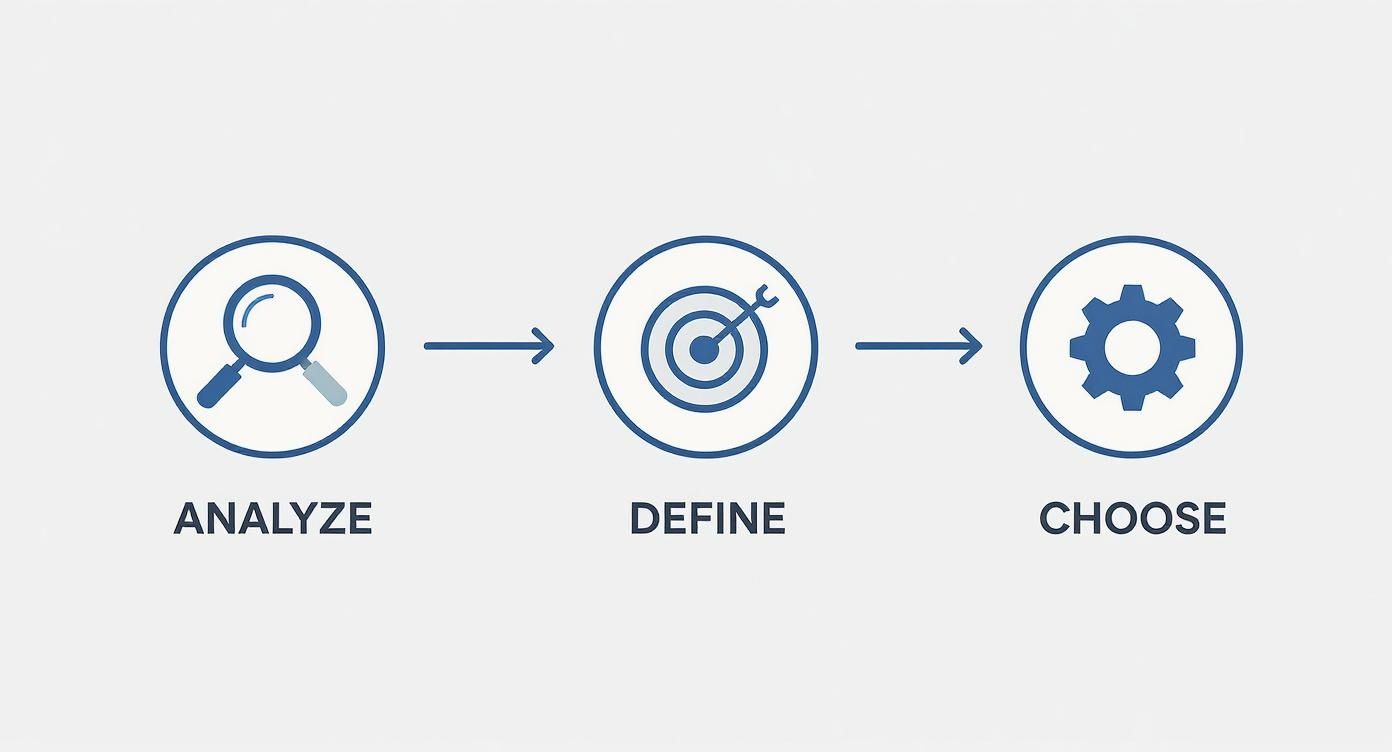
Following a simple framework like this ensures you’re building a chatbot with a clear purpose, which I've found is the single biggest factor in a successful launch.
A user-friendly platform like MxChat makes this incredibly simple. You can visually map out the entire conversation, telling the bot what info to collect and what actions to perform at each step. For a really detailed walkthrough on this, you can learn more about how to build a bot and enhance your website with MxChat.
The goal isn't just to answer questions but to solve problems. A good chatbot flow feels less like a Q&A and more like a helpful, guided process that gets the customer exactly what they need.
Configuring Automated Responses and Escalations
A critical piece of the puzzle is setting up your automated responses and, just as important, your escalation paths. Your bot needs to know when to gracefully hand a conversation over to a human. This isn't a failure; it's a feature of a well-designed system.
You can set up simple rules that trigger a handover based on specific keywords (like "speak to an agent") or if the bot can't find an answer after a couple of tries.
The move toward AI in customer service is happening fast. By 2025, it's expected that 80% of companies will be using or planning to use AI chatbots. This shift is driven by the technology's ability to slash inquiry volumes by up to 70% and seriously boost agent productivity.
By taking these practical steps—training your AI, designing key conversation flows, and setting up smart handoffs—you can launch a chatbot that provides immediate value to your customers and your team. This initial setup is the foundation of a winning customer service automation strategy.
Designing an Automated Experience That Doesn't Feel… Robotic

Just plugging in a chatbot and calling it a day is a recipe for disaster. We've all been on the receiving end of a frustrating, dead-end bot conversation. The real magic happens when you build an automated experience that feels genuinely helpful and intuitive, not like a roadblock to a real person.
It all starts with giving your chatbot a clear persona. Think of it as casting a character for your brand. This personality dictates the bot's tone and language, ensuring it aligns perfectly with how you communicate everywhere else. Are you playful and witty? Formal and professional? Figure this out first, and you'll write messages that feel authentic and make the whole interaction more engaging.
Set the Stage Immediately
One of the quickest ways to annoy a customer is to be vague. Nothing is more frustrating than thinking you're talking to a human, only to hit a wall when the bot can’t grasp your problem. Honesty is always the best policy.
Being upfront builds trust and manages expectations right from the get-go. A simple, friendly opening can make all the difference in the world.
- Don't do this: "Hello, how can I help you today?" This is too ambiguous and sounds like a human agent.
- Do this instead: "Hi there! I’m the MxChat support bot. I can help with order tracking, returns, and FAQs. How can I assist you?"
This second approach instantly clarifies who (or what) the user is talking to and what it can do. It guides them toward a successful outcome instead of letting them guess.
Master the Handoff to a Human
Look, no matter how advanced your AI is, some problems will always need a human touch. And if the process of getting to that human is a clunky, repetitive nightmare, you'll undo all the goodwill your bot has built. A recent survey found that a staggering 86% of customers believe it's critical to be able to contact a real person easily.
The goal here is a seamless handover. The agent picking up the conversation should have the full context—no "let me get you up to speed" moments for the customer. There is truly nothing worse than making a frustrated person repeat their entire story.
The quality of your human handoff process is just as important as the AI itself. A smooth transition shows you value the customer's time and are committed to resolving their issue, no matter who—or what—is handling it.
Make sure your chatbot platform integrates directly with your live chat or help desk software. When an agent steps in, they should see the complete chat history. That includes the customer's name, order number, and the problem they've already described.
Finally, keep iterating. Your bot's messages should be clear, concise, and genuinely helpful. Dive into your chat logs regularly to see where people are getting stuck or confused. This data is gold for refining responses and making the experience better. You can learn more by exploring the best practices for chatbot testing to boost engagement and user satisfaction. A human-first mindset is what turns a simple tool into a true customer service asset.
Measuring What Matters for Automation Success
https://www.youtube.com/embed/VedPb88qa4s
Getting your AI chatbot live is a huge step, but the real work starts now. You've got to measure its impact to figure out what's working, what’s not, and where you can make things even better. If you want to really understand how to automate customer service effectively, you need to look past the surface-level numbers and focus on what actually moves the needle for your business.
So many businesses fall into the trap of only tracking the total number of conversations. While that’s a nice number to look at, it doesn't tell you if the bot is truly solving problems or just kicking the can down the road for your human agents. You've got to dig deeper and track the right Key Performance Indicators (KPIs).
Key Metrics for Automation Success
To really get a feel for how your chatbot is performing, you need to zero in on a few specific, actionable metrics. These are the KPIs that tell the real story of how automation is affecting your customers and your team's workload.
Here’s a look at the essential KPIs we track to gauge the performance and ROI of any customer service automation project.
| Metric | What It Measures | Why It's Important |
|---|---|---|
| Deflection Rate | The percentage of inquiries fully resolved by the chatbot without any human intervention. | This is the clearest indicator of ROI, showing how many tickets are being taken off your agents' plates. |
| Containment Rate | The percentage of conversations that stay entirely within the chatbot from start to finish. | A high containment rate means your bot is successfully handling entire customer journeys on its own. |
| First-Response Time | The average time it takes for a customer to get an initial answer (now measured in seconds, not hours). | Automation drastically cuts this down, which is a massive driver of customer satisfaction. |
| CSAT Score | Customer satisfaction scores for conversations handled exclusively by the AI. | This tells you if your automated support is creating a positive experience, not just a fast one. |
Tracking these numbers gives you a clear, data-backed picture of your chatbot’s value, helping you justify the investment and plan for future improvements.
From Data to Actionable Insights
Think of your analytics dashboard less like a report card and more like a treasure map. It points you directly to where customers are getting stuck or confused.
For example, if you see a high number of escalations right after the bot answers a question about your return policy, that’s a massive clue. It probably means the information in your knowledge base on that topic is either unclear or incomplete.
Don’t just track metrics—use them to diagnose problems. High escalation rates aren't a failure; they're an opportunity to improve your bot's training and knowledge base, making it smarter with every interaction.
This is the cycle of continuous improvement that separates a decent chatbot from a truly great one. Make it a regular habit to review the chat logs where the bot couldn't find an answer. These "unanswered questions" are your roadmap for future content updates. By consistently feeding your AI better information based on real customer conversations, you create a powerful, self-improving system that delivers more and more value over time.
Clearing Up Common Questions About AI in Customer Service
Jumping into any new technology naturally brings up some questions. When I talk to business owners about automating customer service, I hear the same worries time and again. It's smart to tackle these concerns head-on before you build out your strategy.
Most of the uncertainty boils down to a few key areas: the impact on the human team, the technical skills needed, and the fear of creating a clunky, frustrating experience for customers. Let's walk through them.
Will Automating Customer Service Replace My Human Agents?
Not a chance. This is probably the biggest misconception out there. The real goal of AI automation is to make your human team more effective, not obsolete.
Think of an AI chatbot as a tireless assistant. It takes on all the repetitive, straightforward questions that clog up your support queue and eat away at your team's valuable time. This frees your experienced agents to focus on what humans do best—handling complex problems that require empathy, critical thinking, and a personal touch.
Their roles actually become more specialized and valuable, shifting from basic Q&A to high-impact problem-solving. In my experience, this leads to much higher job satisfaction and, more importantly, better resolutions for customers with truly challenging issues.
How Much Technical Skill Is Needed for Setup?
Here's the good news: with modern no-code platforms like MxChat, you don't need to be a developer. These tools are built specifically for business users. If you can write an email, you can build a powerful AI assistant.
The setup is surprisingly simple. You'll typically start by feeding the bot your existing knowledge base—think FAQs, help center articles, or product documentation. From there, you use a visual, point-and-click interface to customize how it behaves. The whole process is designed to be intuitive right out of the box.
The best automation isn't built by a team of engineers. It's built by people who genuinely understand your customers—and that's your support team. Today's tools finally put the power directly in their hands.
How Do I Make Sure the Chatbot Doesn't Frustrate My Customers?
This is the most important question of all. The answer is simple: design your bot with people in mind and always, always give them an out. A well-built bot knows its own limitations.
Here are a few non-negotiable rules I always follow:
- Be Upfront. The bot should introduce itself as an AI right away. Managing expectations from the first message prevents a lot of frustration down the line.
- Offer an "Escape Hatch". Make it incredibly easy for a customer to ask for a human agent at any point in the conversation. A simple "talk to a person" command should do the trick.
- Learn and Adapt. Constantly review chat transcripts. See where the bot gets stuck or where customers get confused. This is gold. Use that feedback to refine its knowledge and improve its responses over time.
Ready to see how simple it is to build an intelligent, helpful AI assistant for your WordPress site? With MxChat, you can launch a no-code chatbot in minutes, reduce support tickets by up to 80%, and provide 24/7 answers to your customers. Get started with MxChat today.