GPT-Live Pricing: What a Voice Support Call Costs
GPT-Live pricing is a clock: $0.05 for every minute a voice session is active and $0.02 for every minute on standby, billed by the second, with the backend model’s tokens on top. OpenAI shipped GPT-Live-1.1 on 19 November with better multilingual transcription and a new standby mode, at the same rates as GPT-Live-1. A per-minute price is easy to read and hard to compare, because the older voice option, gpt-realtime-2.1, bills tokens instead. So we placed real calls.
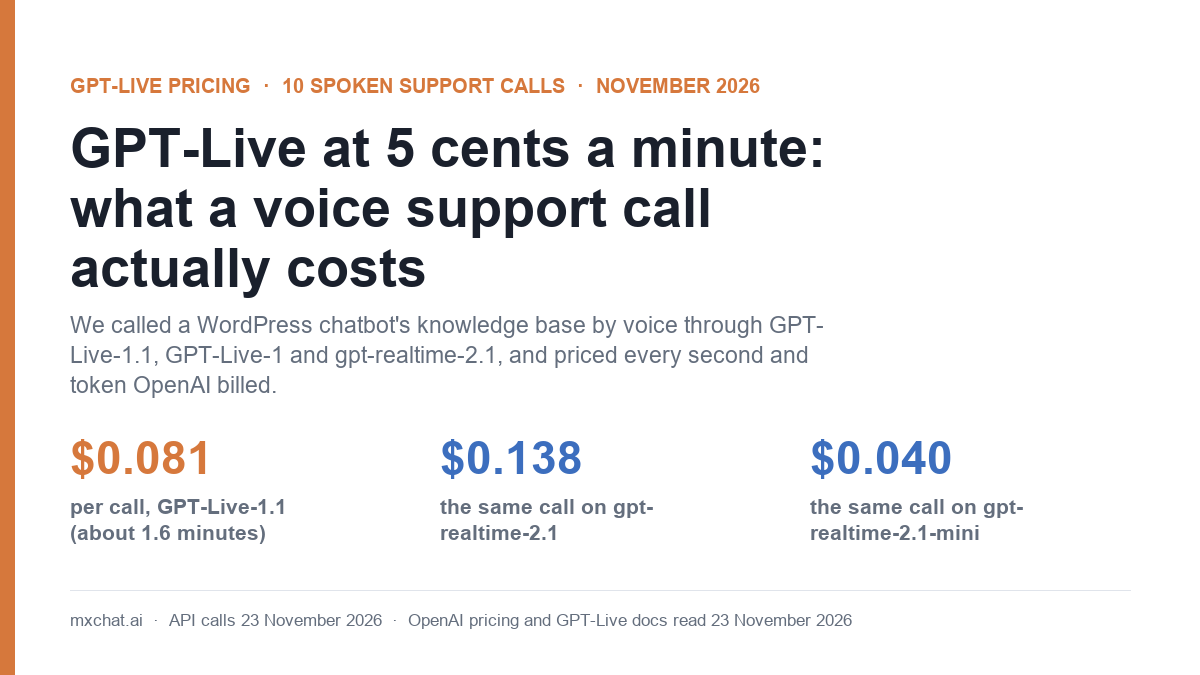
On 23 November we ran ten spoken support calls against the knowledge base behind this site’s own chatbot: five questions per call, two calls per setup, through GPT-Live-1.1, GPT-Live-1, gpt-realtime-2.1 and gpt-realtime-2.1-mini. Then we priced every second and token OpenAI reported. Short version: a 1.6-minute call cost $0.081 on GPT-Live-1.1, $0.138 on gpt-realtime-2.1 and $0.040 on gpt-realtime-2.1-mini. All of them answered every knowledge-base question correctly. Which one is cheapest for you depends less on the rate card than on how long your callers stay connected without saying anything.
GPT-Live pricing at a glance
These are OpenAI’s list prices as published on 23 November 2026. GPT-Live has no per-token rate for its own audio. The voice session is billed by duration, and whatever the session hands to a backend model is billed at that model’s normal token rates.
| Model | How it bills | Rate |
|---|---|---|
GPT-Live-1.1 (gpt-live-1.1) | Session duration, per second | $0.05 / minute active, $0.02 / minute standby |
GPT-Live-1 (gpt-live-1) | Session duration, per second | $0.05 / minute active, $0.02 / minute standby |
| GPT-6 Luna (as a GPT-Live backend) | Tokens | $0.10 input, $0.01 cached, $0.125 cache write, $0.50 output per 1M |
gpt-realtime-2.1 | Tokens | Audio $32 in / $64 out, text $4 in / $24 out, cached $0.40 per 1M |
gpt-realtime-2.1-mini | Tokens | Audio $10 in / $20 out, text $0.60 in / $2.40 out, cached $0.30 audio / $0.06 text per 1M |
Three details in OpenAI’s GPT-Live documentation matter for cost:
- Active time includes silence. Speech, pauses before the idle timeout, and time spent waiting for backend work all count as active. Muting the microphone does not pause billing.
- Standby is WebRTC only. You turn it on with
session.wake_policy.type: "speech"and anidle_timeout_sbetween 5 and 60 seconds. After that many seconds without a transcript, inference pauses and the $0.02 rate applies until someone speaks again. - Creating a WebRTC session bills 15 seconds up front. Those 15 seconds are credited against the call once it starts. A session the caller never uses still costs 15 seconds, so opening sessions speculatively on page load is not free.
How we tested
MxChat is a text chatbot plugin for WordPress, and it has no voice mode today. To make the test useful for a site owner deciding whether to add voice, we reused the plugin’s actual inputs: the system prompt this site runs, and the knowledge-base excerpts its search returns for four real support questions (about WooCommerce order lookups, Pinecone, handoff to Slack or Telegram, and bringing your own API key). We put about 24,500 characters of excerpts (roughly 6,000 tokens) in MxChat’s ===== knowledge-base markers.
The caller was synthetic. We recorded the four questions, plus a fifth that asks the assistant to recall which of those features needs a paid plan, with OpenAI’s text-to-speech in the cedar voice, as 24 kHz PCM. Each question is about 5.4 to 6.1 seconds long. A Python script streamed that audio to the API in real time, 100 ms per chunk, then streamed silence while the assistant answered, waited until the reply had finished playing, paused 1.5 seconds and asked the next question. Every setup heard the same audio in the same order.
| Setup | Where the knowledge base goes | Connection |
|---|---|---|
| GPT-Live-1.1, knowledge base in instructions | Live session instructions (limit 16,384 tokens), client delegation, told not to delegate | WebSocket, /v1/live/sessions |
| GPT-Live-1.1, Luna backend | Backend instructions on Responses delegation with gpt-6-luna; GPT-Live told to delegate product questions | WebSocket |
| GPT-Live-1, Luna backend | Same as above, older voice model | WebSocket |
gpt-realtime-2.1 | Session instructions, server voice activity detection | WebSocket, /v1/realtime |
gpt-realtime-2.1-mini | Same as above | WebSocket |
For GPT-Live we used the billed seconds from the final session.closed event, plus the backend usage OpenAI reported for each delegated response. For Realtime we added up the token counts from every response.done event, split into text, audio and cached. Everything is priced at the list rates above. The ten calls, plus a smoke test and two trial calls, cost under $1.50.
The results: cost per call
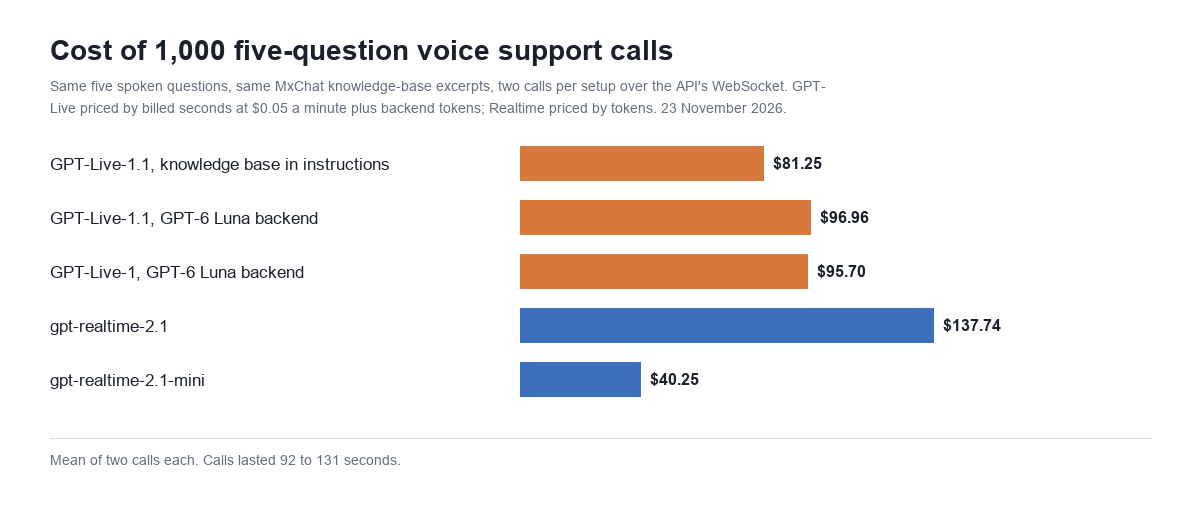
| Setup | Mean call length | Cost per call | Per 1,000 calls | Per minute |
|---|---|---|---|---|
| GPT-Live-1.1, knowledge base in instructions | 97.5 s billed | $0.081 | $81.25 | $0.050 |
| GPT-Live-1.1, Luna backend | 114.5 s billed | $0.097 | $96.96 | $0.051 |
| GPT-Live-1, Luna backend | 113.0 s billed | $0.096 | $95.70 | $0.051 |
gpt-realtime-2.1 | 108 s | $0.138 | $137.74 | $0.076 |
gpt-realtime-2.1-mini | 126 s | $0.040 | $40.25 | $0.019 |
The two calls in each setup landed within 11% of each other. The two mini calls differed by a tenth of a cent.
Three things stand out.
GPT-Live costs what the clock says. The billed seconds came within 0.3 to 1.5 seconds of the wall time we measured from session.started to close, so a GPT-Live budget is minutes multiplied by five cents. Nothing else on the voice side moves it. The Luna backend added about $0.0015 per call, under 2% of the total, even though each call sent it around 28,000 input tokens. About 73% of those were cache hits, because the knowledge base sits at the start of the backend instructions.
Delegation made calls longer, and length is the cost. With the knowledge base in its own instructions, GPT-Live-1.1 answered directly and the calls averaged 97.5 seconds. Given a backend, it delegated all four product questions (and answered the recall question itself). It nearly always opened with a filler such as “Let me check that”, waited for Luna, and then answered. That added about 17 seconds per call, which is $0.014 at the active rate. That is nine times what the backend’s tokens cost. If your knowledge base fits in 16,384 tokens of instructions, putting it there is both cheaper and faster.
On Realtime, output audio is most of the bill. On gpt-realtime-2.1, the 1,172 output audio tokens per call cost $0.075, 55% of the total. On mini, output audio was 76% of the total. The text side was cheap, because after the first answer the roughly 6,000-token instructions came from the cache at $0.40 (or $0.06) per million. Mini also talked more: about 15 seconds of audio per answer against 12 for the full model, which made its calls the longest in the test. Shorter answers are the main lever on a Realtime bill.
Cost per minute, and why it isn’t the whole story
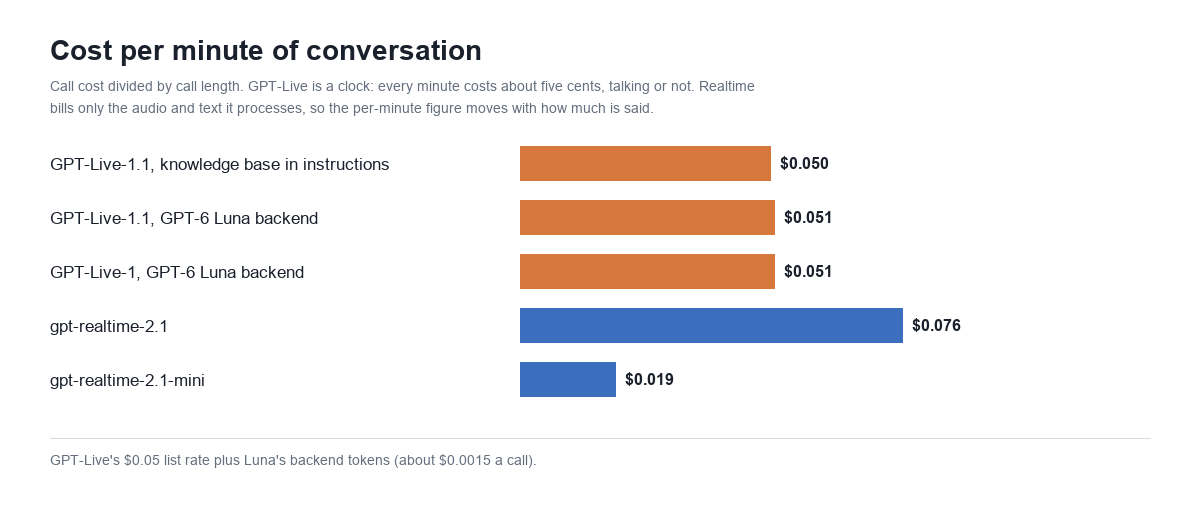
Divided by call length, the full Realtime model cost $0.076 a minute and mini $0.019, against GPT-Live’s $0.050 to $0.051. But Realtime’s per-minute figure is an average, not a rate. It moves with how much the caller and assistant say. Our calls were dense: five questions in under two minutes with no small talk. In a call with more silence, Realtime’s cost per minute falls and GPT-Live’s does not.
That leads to the comparison a site owner should actually make, which is about idle time. A website visitor who starts a voice chat, gets an answer and then reads the page for three minutes with the microphone still open is not unusual. The table below prices that case with list rates, starting from our measured 97.5-second GPT-Live-1.1 call. These rows are arithmetic, not measurements. Our WebSocket test could not use standby, and its session.closed event reported total seconds only (active_seconds and paused_seconds were null).
| Same call, then 3 minutes of idle microphone | Cost | How it’s worked out |
|---|---|---|
| GPT-Live-1.1, no standby (WebSocket, or WebRTC without a wake policy) | $0.231 | 277.5 s × $0.05 / 60 |
| GPT-Live-1.1, WebRTC standby, 10 s idle timeout | $0.146 | 107.5 s active at $0.05 + 170 s standby at $0.02 |
| GPT-Live-1.1, your app closes the session after 10 s of silence | $0.090 | 107.5 s active; a new session (15 s minimum) if the visitor comes back |
gpt-realtime-2.1, server voice activity detection | about $0.138 | Silence is never committed as a turn, so no extra tokens are billed |
gpt-realtime-2.1-mini | about $0.040 | As above |
Our Realtime calls already streamed silence between questions, during every answer and in every pause. Voice activity detection committed exactly five turns per call, and the silence added nothing we could see in the token counts. That is the structural difference. Realtime charges for what is said. GPT-Live charges for how long the line is open. Standby softens that: idle time drops to 40% of the active rate. But it still costs money, and only over WebRTC.
Speed and answer quality
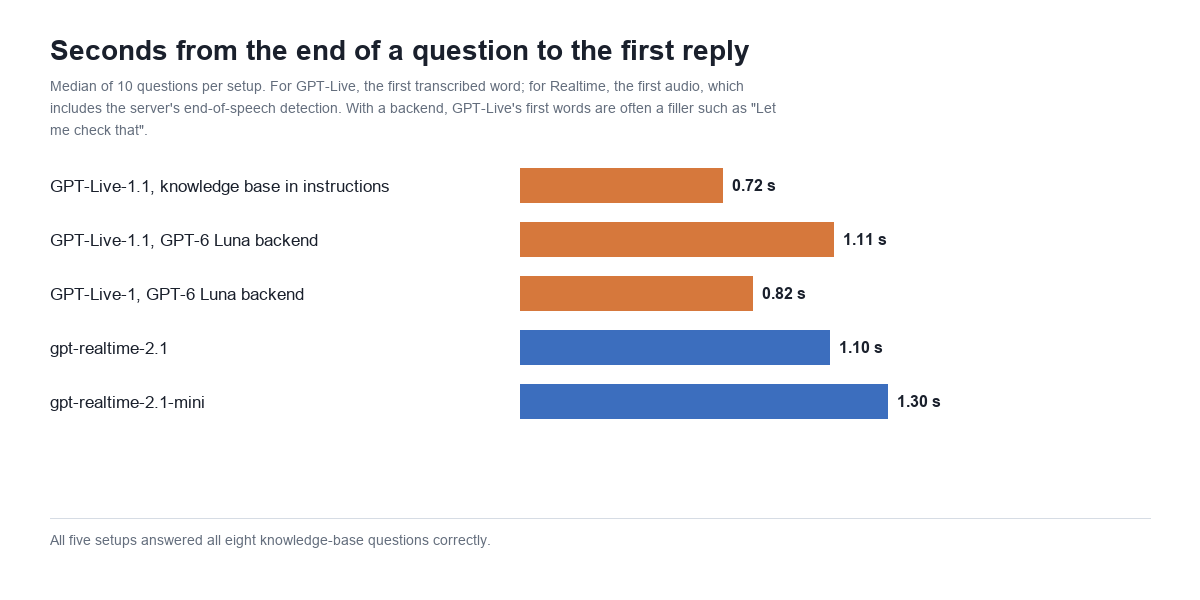
| Setup | Median seconds to first reply | Knowledge-base questions correct | Session ready |
|---|---|---|---|
| GPT-Live-1.1, knowledge base in instructions | 0.72 s | 8 of 8 | 1.7–1.9 s |
| GPT-Live-1.1, Luna backend | 1.12 s (often a filler line) | 8 of 8 | 1.4–2.0 s |
| GPT-Live-1, Luna backend | 0.83 s (often a filler line) | 8 of 8 | 1.2–1.5 s |
gpt-realtime-2.1 | 1.10 s | 8 of 8 | 1.2–1.7 s |
gpt-realtime-2.1-mini | 1.31 s | 8 of 8 | 1.4–1.5 s |
The latency columns are not measured the same way, so treat them as rough. For GPT-Live we timed the first transcribed word after the question ended. For Realtime we timed the first audio, which includes the server waiting to decide the caller has stopped speaking. GPT-Live is full duplex and decides for itself when to talk. In practice, both felt immediate at this scale.
Every setup got all eight knowledge-base answers right (four questions, two calls each). WooCommerce order history needs a Pro license, Pinecone is optional, handoff goes to Slack or Telegram, and you can bring your own OpenAI or OpenRouter key. The differences were in tone:
- GPT-Live with the knowledge base in its instructions gave the shortest, most specific answers. On the recall question it was the only setup to name which features need Pro and which are in the free core plugin, consistent with the excerpts.
- GPT-Live with a Luna backend hedged more (“I’m not sure whether it hands off automatically”) and spent the first second of each answer saying it was checking. The hedges were accurate, since the excerpts describe visitor-requested handoff, but they read as less sure.
- Realtime answered at greater length. On the recall question, two of the four Realtime calls said they couldn’t tell which model or provider needed a paid plan, which answers a slightly different question. The other two said, more generally, that add-ons need a Pro or Agency license.
- GPT-Live-1 against 1.1 made no difference to cost (same rate, 1.5 seconds apart in call length). 1.1’s changes are transcription accuracy and a steadier accent across languages, which an English-only test of clean synthetic speech cannot show.
Which voice setup should a WordPress site use?
| If your calls look like this | Cheapest option in our test | Why |
|---|---|---|
| Short, dense Q&A; sessions closed promptly | gpt-realtime-2.1-mini | $0.019 a minute of real talk; silence is free |
| You need the stronger model’s answers on Realtime | GPT-Live-1.1 (knowledge base in instructions) | $0.081 a call against $0.138 on gpt-realtime-2.1 |
| Long sessions with idle stretches | Realtime, or GPT-Live over WebRTC with standby | GPT-Live without standby bills the idle minutes in full |
| Agent-style work: look up an order, run a tool while talking | GPT-Live with a backend | Delegation is what it is built for; the backend’s tokens cost little next to the session time |
A worked monthly figure: 500 voice calls like ours would cost about $40.63 on GPT-Live-1.1 with the knowledge base in its instructions, $48.48 with a Luna backend, $68.87 on gpt-realtime-2.1 and $20.13 on mini. For comparison, a text chat in MxChat costs a fraction of a cent per answer on most models. Our GPT-6.2 pricing test measured $5.30 per 1,000 answers on GPT-6.1 Terra and $0.56 on GPT-6 Luna. So voice is roughly two orders of magnitude more expensive per question than text. Add it where callers expect to talk, not as a default.
Practical tips if you build voice on top of a WordPress chatbot
- Close idle sessions yourself. On GPT-Live, an open microphone is billed at the active rate. Use WebRTC with
wake_policyand a shortidle_timeout_s, or end the session when the visitor goes quiet and start a new one when they come back. - Don’t open sessions on page load. Each WebRTC GPT-Live session bills 15 seconds up front ($0.0125). Across 10,000 page views, that is $125 for calls nobody made.
- Keep spoken answers short. On Realtime, output audio was 55% to 76% of the cost. Our instruction to answer “in two or three short spoken sentences” still produced 12 to 15 seconds of audio per answer, so it is worth tightening further.
- Put the knowledge base first and keep it stable. Cached input made the 6,000-token knowledge base nearly free after the first turn on both Realtime and the Luna backend. If the excerpts change every turn, as they do in a retrieval-based text chatbot, you lose that discount. Our prompt-caching test covers the same effect on Claude.
- Reuse what you already have for text. The same knowledge base, system prompt and handoff rules that run your text chatbot worked unchanged for voice here. If you only need speech on top of a text bot (speech in, text answer, speech out), the separate pieces are priced in our Whisper transcription test and OpenAI TTS test.
Limits of this test
Two calls per setup is a small sample, though within each setup the calls were close. The caller was a clean synthetic voice in English, which is the easiest case for every model and hides GPT-Live-1.1’s main improvement. We used WebSocket, not WebRTC, so standby and the 15-second initialization charge were not exercised. The idle-time table is computed from list prices and the documentation. Latency was measured from a single client machine, and the two families were timed at slightly different points. Prices are OpenAI’s list prices on 23 November 2026, with no Batch, Flex or regional premium applied.
MxChat runs text chat today, on your own API key, with the knowledge base, WooCommerce and live-agent handoff we tested here. If you want to see how the text side is set up, start with the documentation or MxChat Pro.
FAQ
How much does GPT-Live cost?
GPT-Live-1.1 and GPT-Live-1 cost $0.05 per minute while a session is active and $0.02 per minute on standby, billed per second. Backend models and tools that the session calls are billed separately at their own token rates.
Is GPT-Live-1.1 more expensive than GPT-Live-1?
No. Both have the same active and standby rates. In our test the two calls on each model cost $0.097 and $0.096 on average, a difference that came from call length, not price.
Is GPT-Live cheaper than the Realtime API?
Cheaper than gpt-realtime-2.1 in our test ($0.081 against $0.138 per 1.6-minute call). More expensive than gpt-realtime-2.1-mini ($0.040). With long idle periods, Realtime gets relatively cheaper, because silence is not billed as tokens and GPT-Live’s clock keeps running.
What does GPT-Live standby do to the price?
It drops idle time from $0.05 to $0.02 a minute. It is only available on WebRTC sessions configured with wake_policy type speech. Inference pauses after an idle timeout of 5 to 60 seconds and resumes when someone speaks.
Does the backend model add much to a GPT-Live call?
Very little on a small model. GPT-6 Luna added about $0.0015 per call in our test. The bigger cost of delegation was time: GPT-Live waited and filled the gap, which added about 17 seconds of billed session per call.
Do I pay for silence on GPT-Live?
Yes, at the active rate, unless the session is on standby. OpenAI’s documentation says active time includes speech, silence before the idle timeout, and time spent waiting for backend work. Muting the microphone does not pause billing.
Does MxChat support voice?
Not today. MxChat is a text chatbot for WordPress. We ran this test on MxChat’s knowledge base and system prompt to price what adding voice would cost a site already running it.
How many tokens does a Realtime voice call use?
Our 108-second calls on gpt-realtime-2.1 billed about 29,300 text input tokens (80% cached), 900 audio input tokens, 600 text output tokens and 1,170 audio output tokens. The audio output alone cost $0.075 of the $0.138 total.