GPT-6.2 Pricing: Sol and Astra Tested on a Chatbot
GPT-6.2 pricing comes in two parts. GPT-6.2 Sol costs $2 per million input tokens and $10 per million output tokens, exactly what GPT-6.1 Sol costs. GPT-6.2 Astra costs $8 and $40, which is 20% below GPT-6 Astra’s $10 and $50, and its cached input fell 60%, from $1.00 to $0.40. OpenAI released both on 17 November 2026 under the model IDs gpt-6.2-sol and gpt-6.2-astra, along with a new discount for background jobs that can wait two or eight hours.
A rate card tells you the price of a token, not the price of an answer. So on 18 November 2026 we sent the same WordPress chatbot request from our own server to both new models, the two models they replace, and OpenAI’s two cheaper models, then timed and priced every answer. That came to 262 API requests and cost about $2.30.
The short answer:
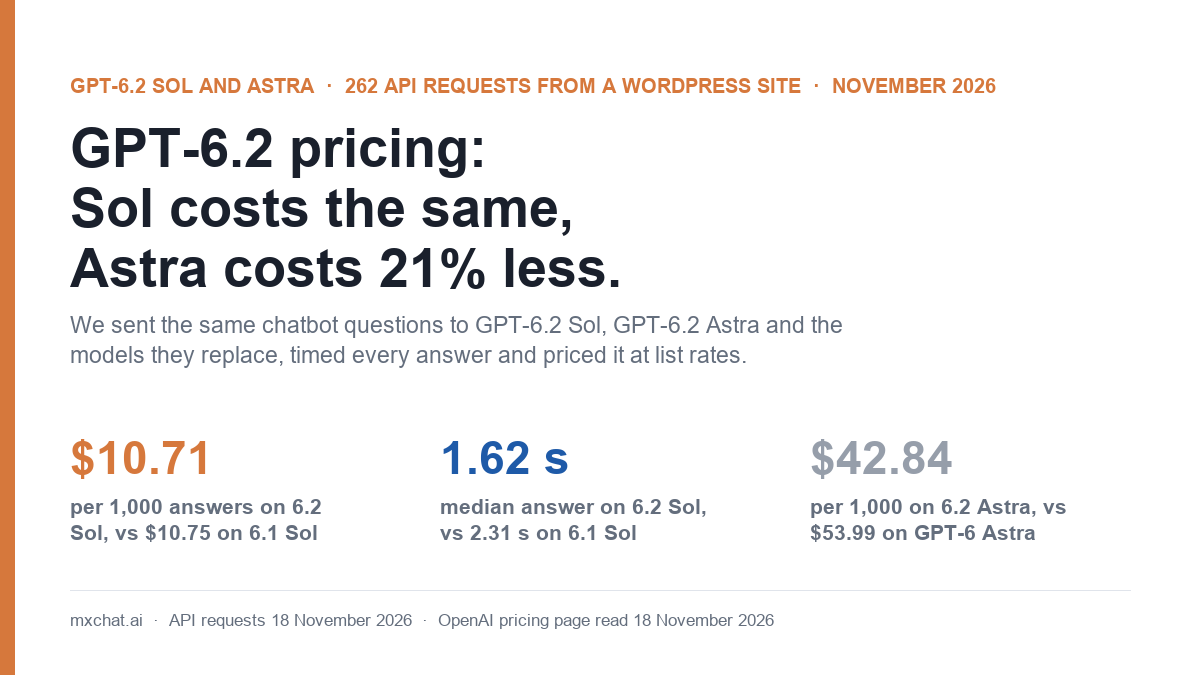
- GPT-6.2 Sol costs the same per answer as GPT-6.1 Sol and is 30% faster. 1,000 new chatbot answers cost $10.71 against $10.75, with a median answer time of 1.62 seconds against 2.31.
- GPT-6.2 Astra is 20.7% cheaper per answer than GPT-6 Astra ($42.84 against $53.99 per 1,000) and a third faster (2.22 seconds against 3.30).
- Every model answered all of our questions correctly when the knowledge base was sent the way MxChat sends it: 117 of 117.
- GPT-6.2 Sol is stricter about your prompt than GPT-6.1 Sol. When we labelled the knowledge base differently from what our system prompt describes, GPT-6.2 Sol refused 4 of 6 answers at its default effort and 6 of 6 at
high. GPT-6.1 Sol refused none. - The background discount is real but not for live chat. Our two-hour jobs came back in a little over five minutes.
GPT-6.2 pricing: the rate card
These are the Standard rates on OpenAI’s pricing page, read on 18 November 2026, in US dollars per million tokens.
| Model | Input | Cached input | Cache write (30 min) | Cache write (12 hours) | Output |
|---|---|---|---|---|---|
| GPT-6.2 Sol | $2 | $0.10 | $2.50 | $5 | $10 |
| GPT-6.1 Sol | $2 | $0.10 | $2.50 | $5 | $10 |
| GPT-6.2 Astra | $8 | $0.40 | $10 | $20 | $40 |
| GPT-6 Astra | $10 | $1 | $12.50 | $25 | $50 |
| GPT-6.1 Terra | $1 | $0.05 | $1.25 | $2.50 | $5 |
| GPT-6 Luna | $0.10 | $0.01 | $0.125 | $0.25 | $0.50 |
GPT-6.2 Sol’s row is identical to GPT-6.1 Sol’s. On Astra, input, output and cache writes each fell 20% and cached input fell 60%. Cached input on GPT-6.2 Astra is now 5% of the input rate, the same ratio Sol and Terra already had; on GPT-6 Astra it was 10%.
The other ways to buy the two new models, from the same page:
| Option | GPT-6.2 Sol (input / output) | GPT-6.2 Astra (input / output) | What it is for |
|---|---|---|---|
| Standard | $2 / $10 | $8 / $40 | Normal API requests |
| Background, 2-hour window | $1.40 / $7 | $5.60 / $28 | 30% off for jobs that can wait up to two hours (public beta) |
| Background, 8-hour window | $1.20 / $6 | $4.80 / $24 | 40% off for jobs that can wait up to eight hours (public beta) |
| Batch | $1 / $5 | $4 / $20 | Half price, asynchronous |
| Fast | $4 / $20 | $16 / $80 | Twice Standard for faster output |
| Ultrafast (promotion) | $6 / $30 | $24 / $120 | Three times Standard through 28 February 2027 |
| Ultrafast (from 1 March 2027) | $12 / $60 | $48 / $240 | Six times Standard |
The background rows are our arithmetic from OpenAI’s statement that token rates are 30% and 40% lower than Standard; the rest are printed on the page. Four more details matter if you run a chatbot:
- There is no Flex price for GPT-6.2. GPT-6.1 Sol, GPT-6.1 Terra, GPT-6 Astra and GPT-6 Luna all have one. The two new models don’t.
- Long prompts cost more. Above 272,000 input tokens the whole request is billed at twice the input and cache rates and 1.5 times the output rate. A chatbot answer is nowhere near that.
- The context window is 1,050,000 tokens with up to 128,000 output tokens on both models, the same as the models they replace.
- Nothing was retired. OpenAI’s deprecations page lists no shutdown date for GPT-6.1 Sol or GPT-6 Astra as of 18 November, and their prices have not changed.
How we tested it
The test runs on our own WordPress site, from the server that hosts it, with the request MxChat sends when a visitor asks a question:
- System message: our site’s real chatbot instructions (about 750 tokens), followed by the retrieved knowledge base between the
===== OFFICIAL KNOWLEDGE DATABASE CONTENT =====markers MxChat uses. - Knowledge base: four excerpts from our own documentation and blog, about 4,000 characters each, chosen the way retrieval would choose them for the question.
- Questions: three real support questions: whether the bot can look up a WooCommerce order status, whether Pinecone is needed for the knowledge base, and whether a visitor can be handed to a human on Slack or Telegram.
- Setups: GPT-6.2 Sol at its default effort and at
lowandhigh; GPT-6.2 Sol in Fast mode; GPT-6.1 Sol at default andlow; GPT-6.2 Astra and GPT-6 Astra at default andlow; GPT-6.1 Terra and GPT-6 Luna. Each setup answered all three questions three times, so nine answers each. No answer was cut off. - Endpoint: Chat Completions on OpenAI’s own API, not streamed, from a US server.
- Timing: wall-clock seconds from sending the request to receiving the complete answer.
- Cost: the token counts in each response’s
usagefield, multiplied by the list prices above.
The whole request averaged 4,114 input tokens, and all six models counted it identically, so the tokenizer did not change with GPT-6.2.
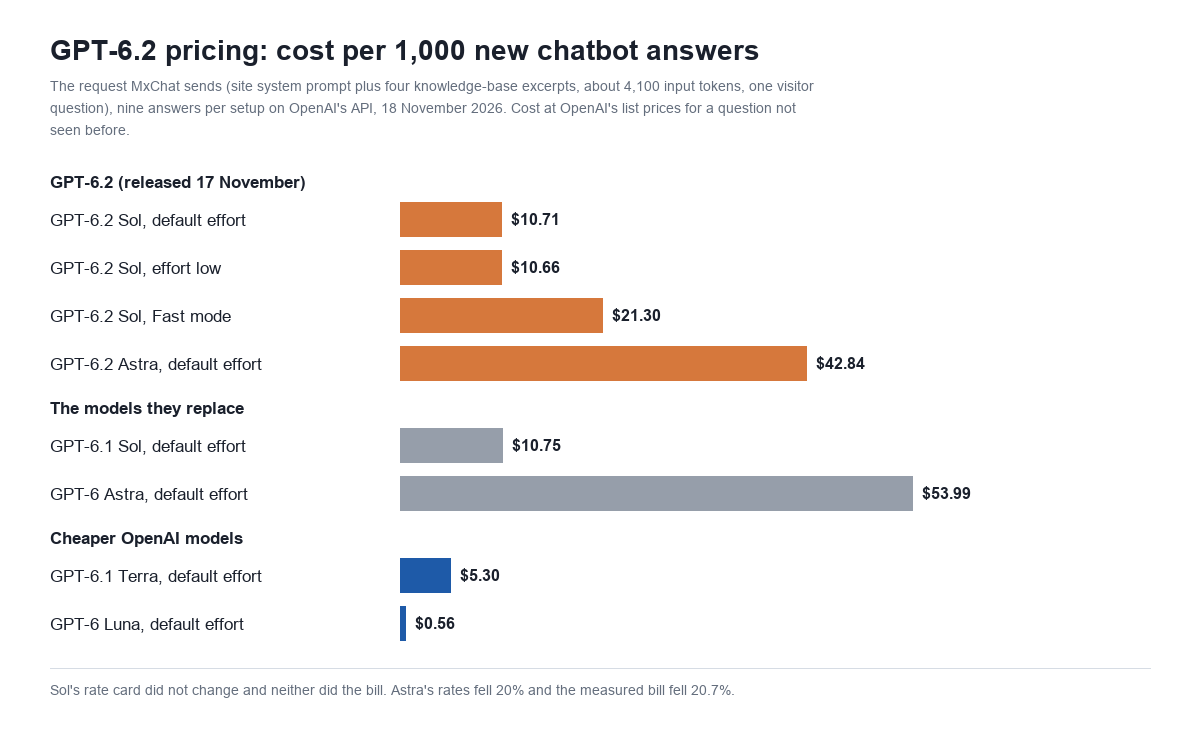
One thing about OpenAI’s billing shapes every number below. Since the GPT-6 generation, OpenAI writes a new prompt to its cache automatically and bills that write at 1.25 times the input rate. A question the model has not seen before, with freshly retrieved context, is therefore billed almost entirely at the cache-write rate. We report that as the cost of a new answer. An exact repeat inside 30 minutes is read from the cache instead, and we report that as a repeat. We explained the mechanics in our OpenAI prompt caching test.
Results: cost and speed per chatbot answer
| Model and effort | Per 1,000 new answers | Per 1,000 exact repeats | Median time | Output tokens per answer |
|---|---|---|---|---|
| GPT-6.2 Sol, default | $10.71 | $0.84 | 1.62 s | 42 |
| GPT-6.2 Sol, effort low | $10.66 | $0.80 | 1.45 s | 38 |
| GPT-6.2 Sol, effort high | $10.72 | $0.85 | 1.55 s | 43 |
| GPT-6.2 Sol, Fast mode, effort low | $21.30 | $1.57 | 1.16 s | 37 |
| GPT-6.1 Sol, default | $10.75 | $0.88 | 2.31 s | 47 |
| GPT-6.1 Sol, effort low | $10.79 | $0.92 | 2.59 s | 50 |
| GPT-6.2 Astra, default | $42.84 | $3.37 | 2.22 s | 43 |
| GPT-6.2 Astra, effort low | $42.77 | $3.30 | 2.34 s | 41 |
| GPT-6 Astra, default | $53.99 | $6.71 | 3.30 s | 51 |
| GPT-6 Astra, effort low | $53.93 | $6.66 | 3.56 s | 50 |
| GPT-6.1 Terra, default | $5.30 | $0.37 | 2.36 s | 33 |
| GPT-6 Luna, default | $0.56 | $0.09 | 1.94 s | 97 |
Sol. The bill did not move, as the rate card said it wouldn’t: $10.71 against $10.75 per 1,000 new answers, a difference of four cents that comes from GPT-6.2 Sol writing slightly shorter replies (27 words on average against 31). Of that $10.71, about $10.28 is the cache write on the prompt and $0.42 is the answer. Without the automatic cache write the same tokens would cost $8.65.
Astra. The rate card fell 20% and the measured bill fell 20.7%, from $53.99 to $42.84. The extra 0.7 points are GPT-6.2 Astra’s shorter replies. On exact repeats the saving is larger, 50%, because cached input took the 60% cut: $3.37 against $6.71.
Reasoning. On these questions it barely happened. GPT-6.2 Sol used reasoning tokens on 1 of 9 answers at its default effort (6 tokens) and on 2 of 9 at high (16 and 26 tokens). GPT-6.2 Astra, GPT-6 Astra, GPT-6.1 Sol and GPT-6.1 Terra used none. Only GPT-6 Luna reasoned regularly, on 8 of 9 answers with a mean of 51 tokens, which is why its output count is double the others’. That is why effort made almost no difference to cost here: when the answer is sitting in the context, these models don’t stop to think about it.
GPT-6.2 Sol is faster, and Fast mode adds little
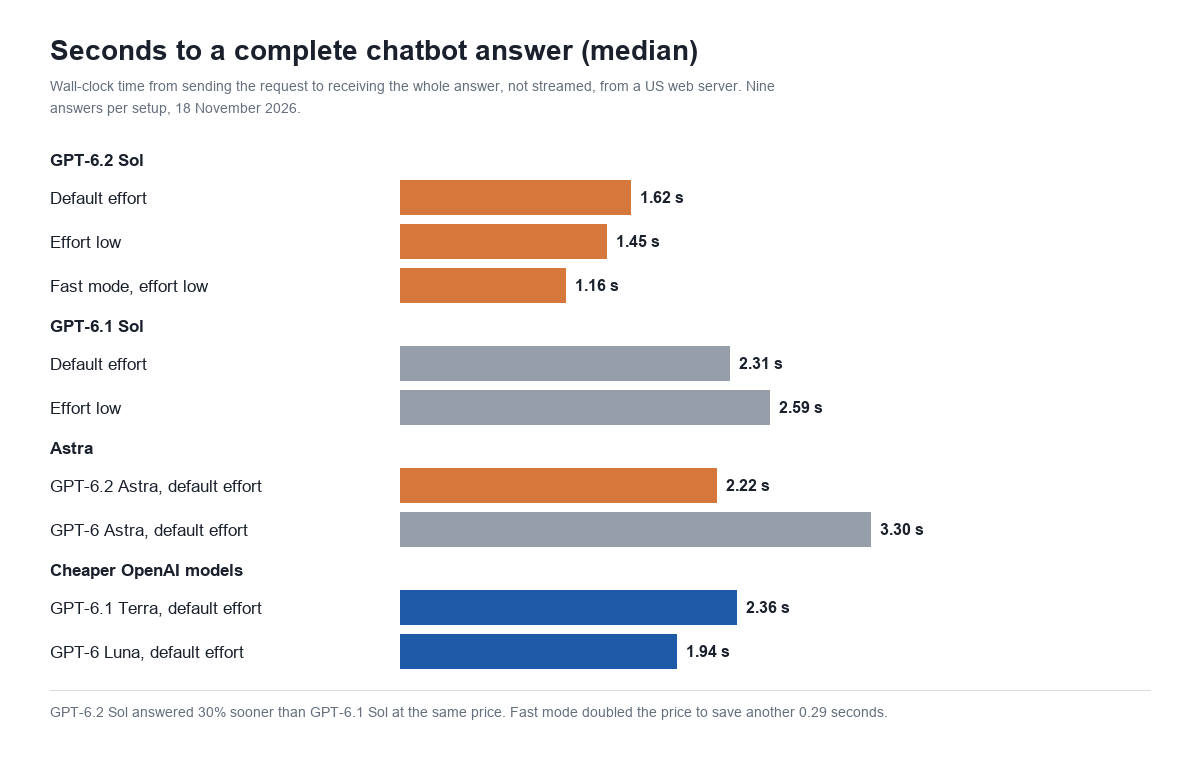
Speed is the one thing GPT-6.2 Sol changes for a chatbot. Its median answer arrived in 1.62 seconds at default effort and 1.45 at low. GPT-6.1 Sol took 2.31 and 2.59 seconds on the same requests. That makes the new model 30% faster at default and 44% faster at low, at the same price. Its slowest answer of nine at default took 1.76 seconds; GPT-6.1 Sol’s fastest took 2.16.
GPT-6.2 Astra was faster than its predecessor by a similar margin: 2.22 seconds against 3.30. It is now quicker than GPT-6.1 Sol was.
Fast mode costs twice as much and on this request bought 0.29 seconds: a median of 1.16 seconds against 1.45 at the same effort, for $21.30 against $10.66 per 1,000 answers. Fast mode speeds up generation, and a 25-word answer has very little generation to speed up. We measured the same pattern on GPT-6.1 Sol in our OpenAI Ultrafast and Fast mode test. Two practical notes: Chat Completions accepted "service_tier": "fast", and it also accepted the older value "priority" and reported the tier back as fast.
GPT-6.2 Sol reads your prompt more literally than GPT-6.1 Sol
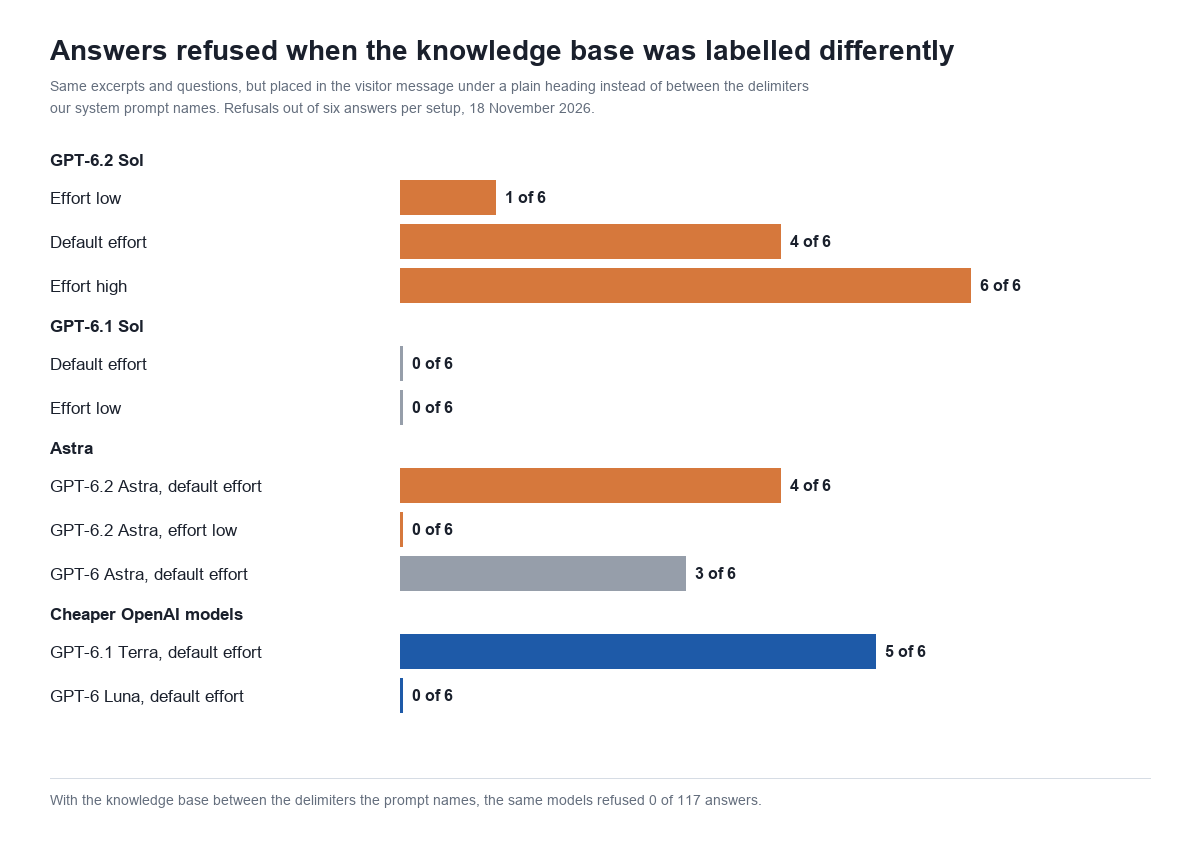
This part of the test started as a mistake. Our first pass put the knowledge base in the visitor’s message under a plain # Knowledge base heading. Our system prompt, though, tells the model to answer only from content inside sections marked with ===== delimiters, and to say “I don’t have enough information in my knowledge base to answer that question accurately” otherwise. The excerpts and questions were the same. Only the label was wrong.
GPT-6.1 Sol and GPT-6 Luna answered anyway. GPT-6.2 Sol, both Astra models and GPT-6.1 Terra often did what the prompt literally says and refused:
| Model and effort | Refused, knowledge base mislabelled (of 6) | Refused, labelled as the prompt says (of 9) |
|---|---|---|
| GPT-6.2 Sol, effort low | 1 | 0 |
| GPT-6.2 Sol, default | 4 | 0 |
| GPT-6.2 Sol, effort high | 6 | 0 |
| GPT-6.1 Sol, default | 0 | 0 |
| GPT-6.1 Sol, effort low | 0 | 0 |
| GPT-6.2 Astra, default | 4 | 0 |
| GPT-6.2 Astra, effort low | 0 | 0 |
| GPT-6 Astra, default | 3 | 0 |
| GPT-6 Astra, effort low | 3 | 0 |
| GPT-6.1 Terra, default | 5 | 0 |
| GPT-6.1 Terra, effort low | 3 | 0 |
| GPT-6 Luna, default | 0 | 0 |
On GPT-6.2 Sol the refusals rose with effort: 1 of 6 at low, 4 of 6 at default, 6 of 6 at high. The models also thought harder about the mislabelled request. GPT-6.2 Sol at default spent a mean of 40 reasoning tokens per answer on it, against 1 on the correctly labelled one, and GPT-6.1 Sol’s median time went from 2.31 to 4.45 seconds even though it answered every time.
Six answers per setup is a small sample, and the counts would shift on a rerun. The direction is consistent, though, and the fix worked completely: with the knowledge base between the delimiters the prompt names, every setup answered all nine questions, 117 of 117 counting the Fast mode run.
If you move a chatbot from GPT-6.1 Sol to GPT-6.2 Sol, the lesson is to read your own system prompt the way a literal-minded reader would. If it describes where the reference material is, how it is marked or what it is called, the request has to match that description exactly. A prompt that worked on GPT-6.1 Sol through goodwill can start returning “I don’t have enough information” on GPT-6.2 Sol with no error and no change in price. A sudden rise in that sentence after a model switch is the symptom to look for.
What the API accepts and rejects
We sent both new models a set of small requests to find the edges. Both behaved the same way:
| Request | GPT-6.2 Sol and GPT-6.2 Astra |
|---|---|
reasoning_effort: low, medium, high, xhigh | Accepted |
reasoning_effort: none, minimal, max | HTTP 400: unsupported value |
temperature other than 1 | HTTP 400: only the default is supported |
max_tokens | HTTP 400: use max_completion_tokens |
| Function tools on Chat Completions | HTTP 400, with or without a reasoning effort |
| Function tools on the Responses API | Accepted; both returned a function call |
service_tier: fast on Chat Completions | Accepted (tested on Sol) |
Two of these catch people out. The error for function tools on Chat Completions says to use the Responses API “or set reasoning_effort to ‘none'”, but none is itself rejected on both models, so the Responses API is the only route. GPT-6.1 Sol has the same restriction. And GPT-6.1 Sol accepted max as an effort value according to OpenAI’s model page; GPT-6.2 stops at xhigh.
The new background discount
The second announcement on 17 November was a cheaper way to run jobs that are not urgent. In the Responses API you set "background": true and choose a completion window of 2h or 8h. OpenAI bills the model’s token rates 30% lower for the two-hour window and 40% lower for the eight-hour one. It is a public beta and works on GPT-6.2 Sol, GPT-6.2 Astra, GPT-6.1 Terra and GPT-6 Luna.
We submitted eight background requests with our chatbot content at 09:09 UTC. Seven were accepted:
| Model | Window | Result |
|---|---|---|
| GPT-6.2 Sol | None (run as soon as possible) | Completed 16 seconds after submission |
| GPT-6.2 Sol | 2 hours | Completed after 5 min 18 s |
| GPT-6.2 Sol | 2 hours | Completed after 5 min 16 s |
| GPT-6.2 Astra | 2 hours | Completed after 5 min 19 s |
| GPT-6.2 Sol | 8 hours | Still queued 15 minutes after submission |
| GPT-6.2 Sol | 8 hours | Still queued 15 minutes after submission |
| GPT-6.2 Astra | 8 hours | Still queued 15 minutes after submission |
| GPT-6.1 Sol | 2 hours | HTTP 400: “Background completion windows are not supported for this model.” |
The three two-hour jobs all finished between 5 minutes 16 seconds and 5 minutes 19 seconds after submission, which looks like a scheduler running on a clock more than a busy queue. The three eight-hour jobs were still queued 15 minutes after submission, when we finished this article; we will add their completion times here. The response for a discounted job looks the same as a standard one: the service tier reads default and nothing in it states the discount, so the invoice is the only place to confirm the rate.
At the discounted rates our request would cost $7.50 per 1,000 answers on GPT-6.2 Sol in the two-hour window and $6.43 in the eight-hour window, against $10.71 on Standard and $5.36 on Batch. A visitor will not wait five minutes for a reply, so none of this helps live chat. It fits the jobs around a chatbot: summarising yesterday’s transcripts, tagging conversations, drafting knowledge-base articles from support tickets. OpenAI’s guide notes one catch: a Standard request cannot read a cache entry written by a two-hour or eight-hour request.
What GPT-6.2 costs a real WordPress site
Scaling the measured cost of a new answer, for a site whose chatbot answers 10,000 new questions a month from a retrieved knowledge base:
| Model | Per month (10,000 answers) | Per year | Median wait |
|---|---|---|---|
| GPT-6 Astra, default | $539.90 | $6,478.80 | 3.30 s |
| GPT-6.2 Astra, default | $428.40 | $5,140.80 | 2.22 s |
| GPT-6.2 Sol, Fast mode | $213.00 | $2,556.00 | 1.16 s |
| GPT-6.1 Sol, default | $107.50 | $1,290.00 | 2.31 s |
| GPT-6.2 Sol, default | $107.10 | $1,285.20 | 1.62 s |
| GPT-6.1 Terra, default | $53.00 | $636.00 | 2.36 s |
| GPT-6 Luna, default | $5.60 | $67.20 | 1.94 s |
All seven gave correct answers to our three questions on all nine attempts. For a knowledge-base chatbot that is the uncomfortable fact about this launch: GPT-6 Luna answered the same questions for $5.60 a month where GPT-6.2 Astra would charge $428.40. Three support questions with the answer in the context is an easy test, and it says nothing about harder work such as multi-step agents, long documents or code, which is what OpenAI built Astra for. Our GPT-6 Luna pricing test and GPT-6.1 Terra pricing test cover the two cheaper models in more depth.
Should you switch to GPT-6.2?
- From GPT-6.1 Sol to GPT-6.2 Sol: yes, after one check. Same price, same token counts, 30% faster on our request, and it accepts the same parameters apart from the
maxeffort. The check is your system prompt: send a dozen real questions through the new model and look for refusals before you move traffic. See our GPT-6.1 Sol pricing test for the model you would be leaving. - From GPT-6 Astra to GPT-6.2 Astra: yes. About 21% cheaper on new answers, 50% cheaper on repeats and a third faster, with the same prompt check. Our GPT-6 Astra pricing test has the older model’s figures.
- If you use Flex on GPT-6.1 Sol: stay until OpenAI lists a Flex price for GPT-6.2, or move those jobs to the background windows or Batch.
- If you send function tools through Chat Completions: neither new model accepts them. Use the Responses API.
- If cost matters more than the model name: GPT-6.1 Terra halves the bill and GPT-6 Luna cuts it by 95% on questions like ours.
If you are choosing between vendors, Anthropic cut its flagship by the same 20% eight days earlier. On a similar request Claude Fable 5.2 cost $57.47 per 1,000 answers and took 5.12 seconds, because it thinks before every answer; the details are in our Claude Fable 5.2 pricing test.
Does MxChat support GPT-6.2?
MxChat connects to OpenAI with your own API key, and you pay OpenAI directly at the rates above. In MxChat 3.2.28, the version this site runs, the built-in OpenAI list goes up to GPT-6.1 Sol and GPT-6 Astra; GPT-6.2 is not in it yet. MxChat sends retrieved content inside the system message between ===== OFFICIAL KNOWLEDGE DATABASE CONTENT ===== markers, which is the layout that produced 117 correct answers out of 117 in this test. If you have written a custom system prompt that describes the knowledge base some other way, that is the part to recheck before changing models. MxChat Pro adds the WooCommerce, knowledge-base and live-agent features we asked about in this test; see MxChat Pro.
GPT-6.2 pricing: frequently asked questions
How much does GPT-6.2 Sol cost?
$2 per million input tokens and $10 per million output tokens, with cached input at $0.10 and cache writes at $2.50 (30 minutes) or $5 (12 hours). That is the same as GPT-6.1 Sol.
How much does GPT-6.2 Astra cost?
$8 per million input tokens and $40 per million output tokens, with cached input at $0.40 and cache writes at $10 or $20. GPT-6 Astra costs $10 and $50, with cached input at $1.
Is GPT-6.2 cheaper than GPT-6.1?
Sol is not: the rates are identical, and our chatbot request cost $10.71 per 1,000 answers on 6.2 against $10.75 on 6.1. Astra is 20% cheaper per token than GPT-6 Astra and was 20.7% cheaper per answer in our test.
Is GPT-6.2 Sol faster than GPT-6.1 Sol?
On our request, yes: a median of 1.62 seconds to a complete answer against 2.31 at default effort, and 1.45 against 2.59 at low.
What reasoning effort values does GPT-6.2 accept?
low, medium, high and xhigh. The API rejects none, minimal and max with HTTP 400 on both models.
What is the background completion discount?
In the Responses API, a background request with a two-hour completion window is billed 30% below Standard token rates and one with an eight-hour window 40% below. It is a public beta on GPT-6.2 Sol, GPT-6.2 Astra, GPT-6.1 Terra and GPT-6 Luna. Our two-hour jobs finished in just over five minutes.
Did the tokenizer change in GPT-6.2?
Not on our request. All six OpenAI models we tested counted it as the same 4,114 input tokens on average.
Is GPT-6.2 worth it for a WordPress chatbot?
GPT-6.2 Sol is a free speed upgrade over GPT-6.1 Sol if your prompt passes a refusal check. GPT-6.2 Astra is more model than a support bot needs: GPT-6.1 Terra and GPT-6 Luna answered the same questions correctly for an eighth and a seventy-sixth of its price.
Method note: 262 API requests from our WordPress server on 18 November 2026 (239 answered, 23 rejected by design while probing parameters), OpenAI Chat Completions and Responses APIs, not streamed, costs from the usage the API returned at list prices read the same day. Per-setup figures are means of nine answers (six for the mislabelled layout); times are medians. Prices change; check OpenAI’s pricing page before you budget.