Who Runs Your WP-Cron? Ours Was a Vulnerability Scanner
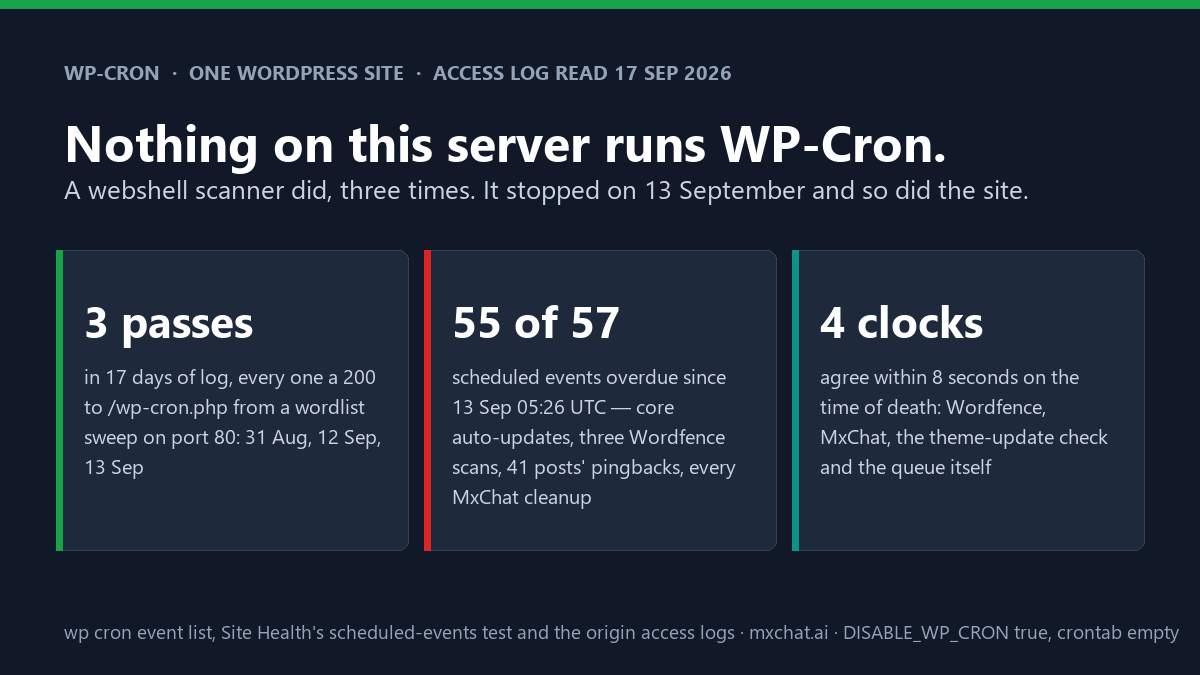
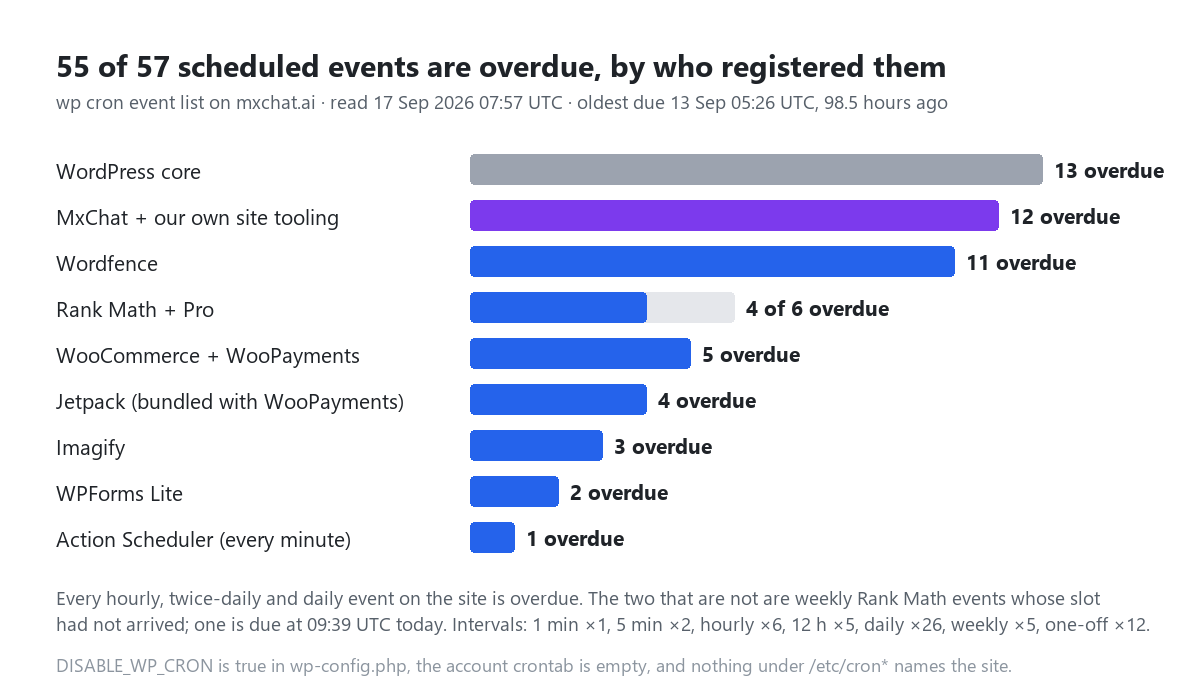
WP-Cron is the scheduler inside WordPress: the queue of things a site does on its own, such as checking for updates, deleting expired transients, sending pingbacks, and running whatever its plugins registered. It has no clock. It runs when something requests wp-cron.php, and on a stock install the something is the next visitor. Set DISABLE_WP_CRON to true in wp-config.php, as this site did (the file’s timestamp says March), and nothing requests it unless you add a real cron job to do so. This site never added one. The fourth Site Health flag I measured this week, “A scheduled event has failed”, is the result: 55 of the 57 scheduled events are overdue, the oldest since 13 September at 05:26 UTC, 98.5 hours before I read the queue this morning.
I set out to do two things: date the stall properly, and list what stopped. Both are below. The third question, what had been running the scheduler until the 13th, was supposed to be a footnote, because nothing on this account does. The access log answered it anyway. In the seventeen days the port-80 log covers, WP-Cron ran exactly three times, and every one of those times it ran because a vulnerability scanner’s wordlist has wp-cron.php in it, between m.php and wawan.php.
This is the seventh post this month built from the site’s own log or database (yesterday’s measured the 1.6 s bootstrap; the admin-ajax count is where the Action Scheduler numbers below come from). Same method: read the instrument, then the code that wrote it, then the log.
What Site Health’s test does, and the one thing it gets wrong here
The scheduled-events test lives in WP_Site_Health. Its constructor sets two thresholds. On a site where DISABLE_WP_CRON is not defined, an event is late the moment its time passes and missed after five minutes. On a site that has defined it, WordPress assumes a system cron with a coarser tick and relaxes both: late after 15 minutes, missed after an hour. has_missed_cron() then walks the queue in time order and stops at the first event past the threshold, and that hook name is what the description prints:
recommended | A scheduled event has failed
The scheduled event, action_scheduler_run_queue, failed to run. Your site still works,
but this may indicate that scheduling posts or automated updates may not work as intended.
Every word of that is true, and the example is the one event on the list that is fine. action_scheduler_run_queue is WooCommerce’s Action Scheduler asking WP-Cron to tick it every minute, and Action Scheduler does not depend on the answer: it also spawns its own runner from admin-ajax.php on the shutdown of any admin request. That runner has fired between 411 and 438 times a day here since 3 September, and in the 24 hours before I read the queue it completed 447 actions with one past due. The scheduler that Site Health names as failed is the only one still running. The 54 events behind it in the queue are the ones that are not, and the description does not mention them because it was written to name one.
One more turn of the screw: the weekly wp_site_health_scheduled_check, which recomputes the numbers on the dashboard’s Site Health widget, is itself in the overdue set (due 14 September 21:15 UTC). The widget still shows the cached count, 20 good / 6 recommended / 1 critical. Run the direct tests now and there are 8 recommended, including the four I measured this week and one from WooCommerce’s own tests, plus one critical, also WooCommerce’s, which is a separate post.
Dating the stall from the queue itself
wp cron event list prints each event’s next scheduled time, and those times encode when the queue last ran. When WordPress runs a recurring event it reschedules it from the current time, not from the slot it missed: the next run becomes now plus whatever remains of the interval, so the shortest-interval event on the site pins the last pass to within its own interval. Here that is the every-minute Action Scheduler tick:
| Event | Interval | Next scheduled (UTC) | So the last pass was |
|---|---|---|---|
action_scheduler_run_queue | 1 minute | 13 Sep 05:26:49 | between 05:25:49 and 05:26:49 |
jetpack_sync_cron | 5 minutes | 13 Sep 05:28:22 | between 05:23:22 and 05:28:22 |
wordfence_hourly_cron | 1 hour | 13 Sep 05:37:50 | between 04:37 and 05:37 |
wp_version_check | 12 hours | 13 Sep 09:15:17 | between 12 Sep 21:15 and 13 Sep 09:15 |
mxchat_cleanup_old_transcripts | daily | 14 Sep 03:00:00 | between 13 Sep 03:00 and 14 Sep 03:00 |
Four independent clocks agree with the one-minute event. The theme-update check stores the time it last ran: 05:28:29. Wordfence records the start of its scheduled scan and its daily cron: 05:28:31 and 05:28:35. MxChat’s model-liveness check writes the time it checked: 05:28:37. Every one of them is on 13 September, every one within eight seconds of the others, and none has moved since. That is the death certificate: 13 September 2026, 05:26 to 05:29 UTC.
The trap in this section is the update transients. update_core shows a last check at 07:53 this morning, which looks like a scheduler at work. It is not; my own wp core check-update refreshed it, and any visit to the Updates or Plugins screen does the same. The update checks are the one part of the queue that also runs outside cron, so their freshness says nothing about cron. Read the plugins’ own timestamps instead, or the shortest interval in the list.
Who had been running it
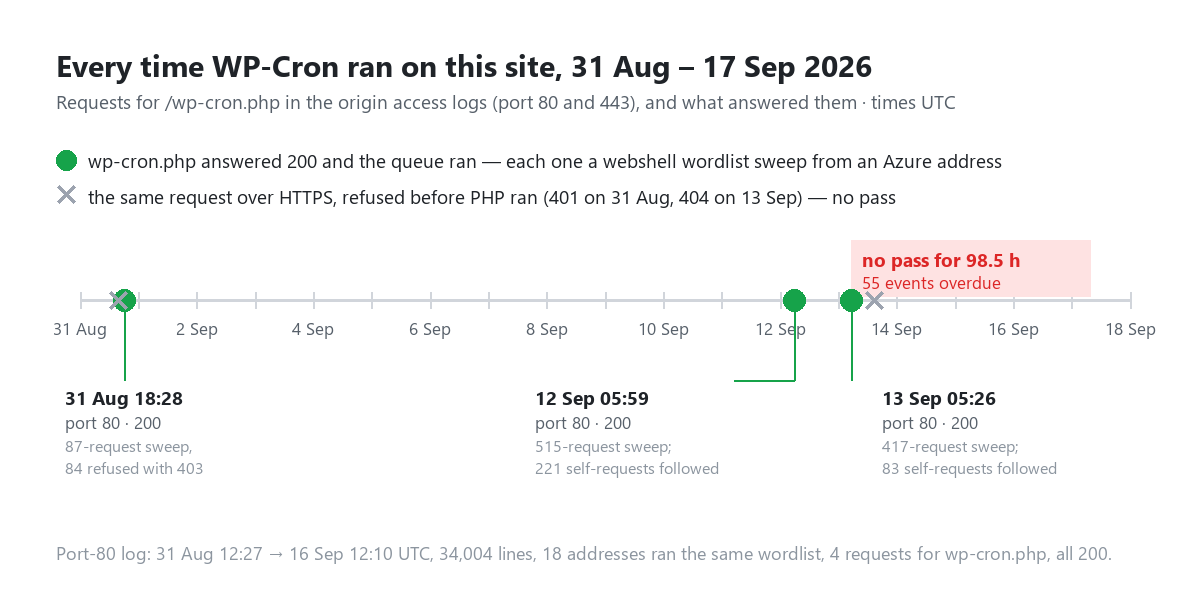
With DISABLE_WP_CRON true, the only way the queue runs is a direct request for wp-cron.php (or WP-CLI, which leaves no trace in the web log and which nobody here schedules). So I grepped for it. The HTTPS log has two hits in the window, and both were refused before PHP saw them: a 401 on 31 August, a 404 on 13 September. The plain-HTTP log, which I had not thought to read, has four hits, all 200, and three of them line up to the second with the passes above:
| Pass (UTC) | Address | User agent | The sweep it was part of | What followed |
|---|---|---|---|---|
| 31 Aug 18:28:57 | 20.63.x.x (Microsoft Azure) | none | 87 requests: c4.php, xmini4.php, reop3.php, lock360.php, wp-login.php…; 84 refused with 403, wp-cron.php answered 200 | the queue ran (Wordfence attack-data sync at 18:29) |
| 12 Sep 05:59:25 | 4.224.x.x (Microsoft Azure) | none | 515 requests: 406 × 404, 100 × 301, 9 × 200; the list runs min.php, n30n.php, m.php, wp-cron.php?, wawan.php, gigi.php, bnmtp.php | 221 self-requests over six minutes; Wordfence scan started |
| 13 Sep 05:26:27 | 52.141.x.x (Microsoft Azure) | none | 417 requests: 268 × 404, 134 × 301, 14 × 200; the identical list in the identical order | 83 self-requests over three minutes; the last pass to date |
Eighteen distinct addresses ran that wordlist against port 80 in the window (I counted the ones that asked for wp_filemanager.php, a file no honest client wants). Three of them reached wp-cron.php and got a 200, and the reason is not subtle: the other names on the list either do not exist here (404) or are refused by a filter on suspicious file names (403, on 31 August), and wp-cron.php is a real core file, so it answers. The same request class over HTTPS got a 401 and a 404, and the queue’s own clocks confirm neither ran anything: the every-minute event would have moved. So for at least seventeen days, the thing that decided whether this site’s housekeeping ran was which port a scanner chose.
Update, 18 September: the port itself turned out to be the larger story. The site address has been https for years, and WordPress still answered 34,847 plain-HTTP requests in eighteen days, redirecting exactly three routes and serving the rest, because the one Cloudflare toggle that closes port 80 was off. It stays off until a real cron job exists, for the reason this post explains.
I cannot tell you what the scanner wanted from wp-cron.php; a wordlist is a wordlist. I can tell you what it got: every scheduled task on the site, executed on its schedule rather than ours. The fourth 200 in the port-80 log is a POST from the server’s own address 25 seconds after the 12 September hit, with the kind of random user agent Wordfence uses for its loopbacks; I have not attributed it and it is not needed for the timeline.
What one pass does when it finally runs
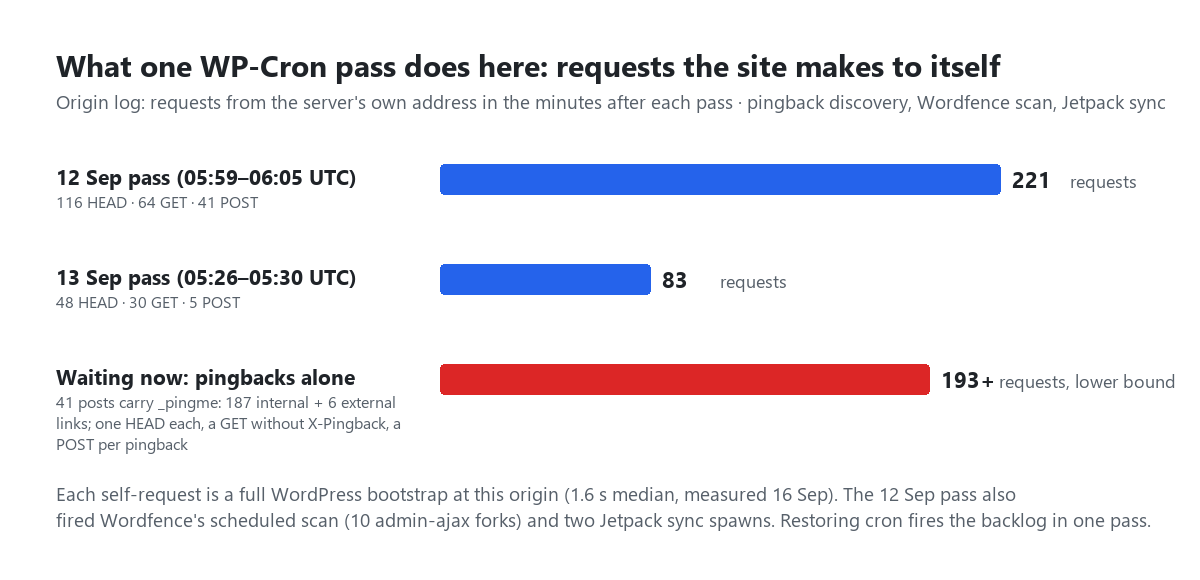
The log shows the pass as a burst of requests from the server to itself. On 13 September, from 05:26:30 to 05:29:47, there were 83: 48 HEAD, 30 GET and 5 POST. Most of the HEADs and GETs are do_pings, WordPress’s pingback client, discovering pingback endpoints for every link in every post published or edited since the previous pass, and since our posts link mostly to each other, that is the site fetching its own pages through its own front door, one full 1.6-second bootstrap per fetch. The POSTs are the pingbacks themselves, sent to our own xmlrpc.php, which returns 404 here because XML-RPC is off. Then Wordfence starts its scheduled scan and forks it about ten times through admin-ajax.php, and Jetpack spawns two sync requests. The 12 September pass, with more edits queued behind it, made 221 such requests over six minutes.
That is what a cron pass costs on this site, and it is the number to keep in mind when reading the fix section: restoring the scheduler does not run 55 events gently. It runs them in one pass, in queue order.
What stopped: the inventory
Fifty-five events, grouped by what is actually waiting on them. I checked each one’s side effects rather than taking the hook name’s word for it.
| Event(s) | Owner | Interval | What is waiting, measured this morning |
|---|---|---|---|
wp_version_check | core | 12 h | WordPress 7.1.1 is scheduled to ship today (bug-fix release: 16 tickets, 22 Gutenberg PRs). WP_AUTO_UPDATE_CORE is true here, but wp_version_check() only fires wp_maybe_auto_update when wp_doing_cron() is true (wp-includes/update.php), so the release will sit until someone installs it by hand. The 7.0.4 security release did exactly this in August. |
wp_update_plugins, wp_update_themes | core | 12 h | 17 plugins have updates on the update server. auto_update_plugins is unset on this install, so none would auto-install regardless; the count refreshes on admin visits and WP-CLI anyway. The channels post covers which plugins here update themselves. |
do_pings | core | one-off, queued 13 Sep 08:23:56 | 41 posts carry _pingme and _encloseme: the four posts published since the 13th and 37 older posts edited since (WordPress re-queues a post’s pings on every save). 187 internal and 6 external links to discover. Pingbacks unsent, enclosures unscanned. |
delete_expired_transients | core | daily | 186 of the 230 transient timeouts in wp_options are expired (81%), 2.3 KB of timeout rows. Trivial in bytes; expired transients are also deleted on read. It is the counter that shows the sweep is not running. |
wp_site_health_scheduled_check | core | weekly | The dashboard widget’s count is stale (see above). |
wp_scheduled_delete, wp_scheduled_auto_draft_delete, wp_privacy_delete_old_export_files, wp_privacy_personal_data_cleanup_requests, recovery_mode_clean_expired_keys, wp_delete_temp_updater_backups, wp_update_user_counts | core | hourly–weekly | Nothing to do. 0 posts in trash (EMPTY_TRASH_DAYS is 7 here), 0 auto-drafts older than a week, no export files, no recovery keys. Seven of core’s thirteen events would have been no-ops. |
wordfence_start_scheduled_scan ×3, wordfence_daily_cron, wordfence_hourly_cron, six one-offs | Wordfence | hourly, daily, one-off | The last scheduled scan began 13 Sep 05:28:31 UTC; three scan starts are queued for the 13th, 14th and 15th at 17:22. The firewall is inline and does not need cron; the scan does. Attack-data reporting and the activity email are the one-offs. |
jetpack_sync_cron, jetpack_sync_full_cron, jetpack_clean_nonces, jetpack_v2_heartbeat | Jetpack, bundled with WooPayments | 5 min – daily | The scheduled path of the sync to WordPress.com. Jetpack Sync also sends on request shutdown, which I did not measure, so I will not claim the connection is stale. |
wc_admin_daily, wc_admin_process_orders_milestone, wc_admin_unsnooze_admin_notes, woocommerce_marketplace_cron_fetch_promotions, validate_woopay_compatibility | WooCommerce | hourly – daily | Admin housekeeping. Note what is not here: woocommerce_cleanup_sessions moved to Action Scheduler years ago and ran: 31 sessions in the table, 1 expired. |
rank_math/links/internal_links, rank_math/redirection/clean_trashed, rank_math_cleanup_exports, rank_math/content-ai/update_prompts | Rank Math | daily | Internal-link counts in the post list, trashed-redirect cleanup, export cleanup. Two weekly events (orphaned link status, Content AI plan) are the only ones not yet overdue. |
imagify_sync_files, imagify_rating_event, imagify_update_library_size_calculations_event | Imagify | daily, weekly | Moot: the account has been out of quota since August. |
wpforms_email_summaries_cron, wpforms_weekly_entries_count_cron | WPForms Lite | one-off, 14 Sep 00:00 | The weekly summary email did not go out. |
mxchat_model_liveness_check | MxChat | daily | checked_at 13 Sep 05:28:37 UTC. The check that confirms each configured model still answers is four days stale (last result: nothing missing). |
mxchat_cleanup_old_transcripts, mxchat_cleanup_old_images, mxchat_forms_wizard_cleanup, mxchat_forms_prune_webhook_log, mxchat_mcp_oauth_cleanup, mxchat_adv_truncation_scan | MxChat core and four add-ons | daily, weekly | Retention and cleanup. On this install the transcript retention option is unset and the table holds 7 rows, so nothing was due for deletion; on a customer site with a 30-day retention set, this is the event that applies it, and it has not run since the 13th. |
mxchat_core_docbot_sync_cron, mxchatpe_cleanup_sessions | our own site tooling | daily | An mu-plugin that re-syncs the documentation bot’s index, and a session cleanup for an internal editor tool. Neither ships to customers. |
mxchat_daily_cleanup, mxchat_transcript_review_daily | nobody | daily | Orphans. has_action() returns false for both: no file on disk registers a callback any more (the plugin versions that scheduled them have moved on). WordPress will keep firing them into silence every day until someone runs wp cron event delete. Worth a look on any site that has been through a few plugin versions. |
mxchat_session_store_maintenance | MxChat | daily | Ran anyway. mxchat_session_store_last_trim is 17 Sep 01:02 UTC: the add-on trims on an ordinary request when it is overdue. Same for the click-log sweep (16 Sep 08:22). Two of the twelve have a request-time fallback; the rest wait. |
What did not stop
It matters to say this precisely, because “cron is dead” sounds like “the site is dead” and it is not. The page cache serves anonymous visitors without PHP. The chat widget, checkout, the REST API and the admin all run inside requests and do not care about the queue. Wordfence’s firewall inspects every request inline; only its scan is scheduled. Action Scheduler, which WooCommerce uses for everything from session cleanup to webhook delivery, has its own runner and is current to the minute. And two of MxChat’s cleanups checked their own timestamp and ran when a visitor came by, which is the pattern I would like the other ten to adopt.
What is dead is everything that trusts WP-Cron alone: core auto-updates, pingbacks, the security scan, the transient sweep, the plugin summaries, and every retention job. Those are exactly the things nobody notices for a week.
The fix, and why it is not a one-liner here
The right shape is the one wp-cron.php‘s own header comment describes: keep DISABLE_WP_CRON true so page views never spawn it, and have the operating system request it on a schedule. On a cPanel account that is one crontab line:
*/5 * * * * cd /home/ACCOUNT/public_html && /usr/local/bin/wp cron event run --due-now >/dev/null 2>&1
WP-CLI is better than curl-ing the URL because it does not depend on the web server letting the request through, which, as the 401 and 404 above show, is not guaranteed even for your own requests. Five minutes is as fine as anything here needs: the two Jetpack syncs run on five, and Action Scheduler’s one-minute tick has its own runner.
The reason it has not been done yet on this site, and the reason I am not doing it from this post, is the burst. The first pass would run 55 events back to back: pingback discovery for 41 posts (at least 193 self-requests at 1.6 s each), three queued Wordfence scan starts, a Jetpack full sync, the WPForms summary, the transient sweep and every retention job, in whatever order the queue holds them. On a shared host with no OPcache that is several minutes of the origin talking to itself, and the order is not one anyone chose. Draining it deliberately is cheap: list the queue, run the harmless ones by name (wp cron event run wp_version_check), run the scans at night, and decide whether 41 posts’ worth of pingbacks to a 404 endpoint are worth sending at all (wp cron event delete do_pings and clear the _pingme rows if not). Then add the crontab line and let the queue settle into its intervals. Once cron is real, it is also worth stopping Action Scheduler’s admin-ajax runner with add_filter( 'action_scheduler_allow_async_request_runner', '__return_false' ), which retires one of the most frequent callers in the admin-ajax log (about 420 requests a day here).
Two small things while you are in wp-config.php. define( 'WP_CRON', false ), which sits on the line above DISABLE_WP_CRON here, does nothing: no file in core reads a constant by that name, and it looks like someone trying to disable the scheduler twice. And WP_CRON_LOCK_TIMEOUT at 120 seconds is fine as it is.
Three commands to run on your own site
1. Read the queue. wp cron event list --fields=hook,next_run_gmt,next_run_relative,recurrence. If next_run_relative says “now” for an event whose recurrence is an hour, the scheduler has not passed in at least an hour. The shortest-interval event’s next run, minus its interval, is the last pass to within that interval. Without WP-CLI, the WP Crontrol plugin shows the same table.
2. Find the trigger. grep 'wp-cron.php' access_log, on both the HTTPS and the plain-HTTP log if your host keeps them separately. The timestamps that sit a few seconds before your plugins’ “last run” values are your real scheduler. If they belong to nobody you recognise, you have found the same thing I did.
3. Check who is supposed to run it. grep DISABLE_WP_CRON wp-config.php; crontab -l. If the first says true and the second is empty, your site is where ours was.
For chatbot sites specifically
A chatbot plugin accumulates things on purpose: transcripts, sessions, uploaded images, a model catalogue that needs re-checking, a documentation index that needs re-syncing. MxChat and its add-ons register daily and weekly events to keep those bounded (on this site, three from the core plugin and five from add-ons; the other four of the twelve mxchat_* rows are our own tooling and two orphans), and on a site with DISABLE_WP_CRON and no system cron, those events run when a stranger asks for wp-cron.php. The two that already run on an ordinary request when overdue, the session-store trim and the click-log sweep, kept working through the stall; the transcript retention did not, and that is the one with a privacy consequence, so whether it should carry the same fallback is now an open question on the product side. Meanwhile the operator’s check is the three commands above; the retention settings themselves live in the plugin’s settings screens, and the documentation is the place to start if you have never looked at them.
A WordPress site with WP-Cron disabled and no system cron is a site whose housekeeping happens whenever someone else asks for it. That is not a figure of speech. It is what the log says, three times, to the second.