WordPress Force HTTPS: What Still Answers on Port 80
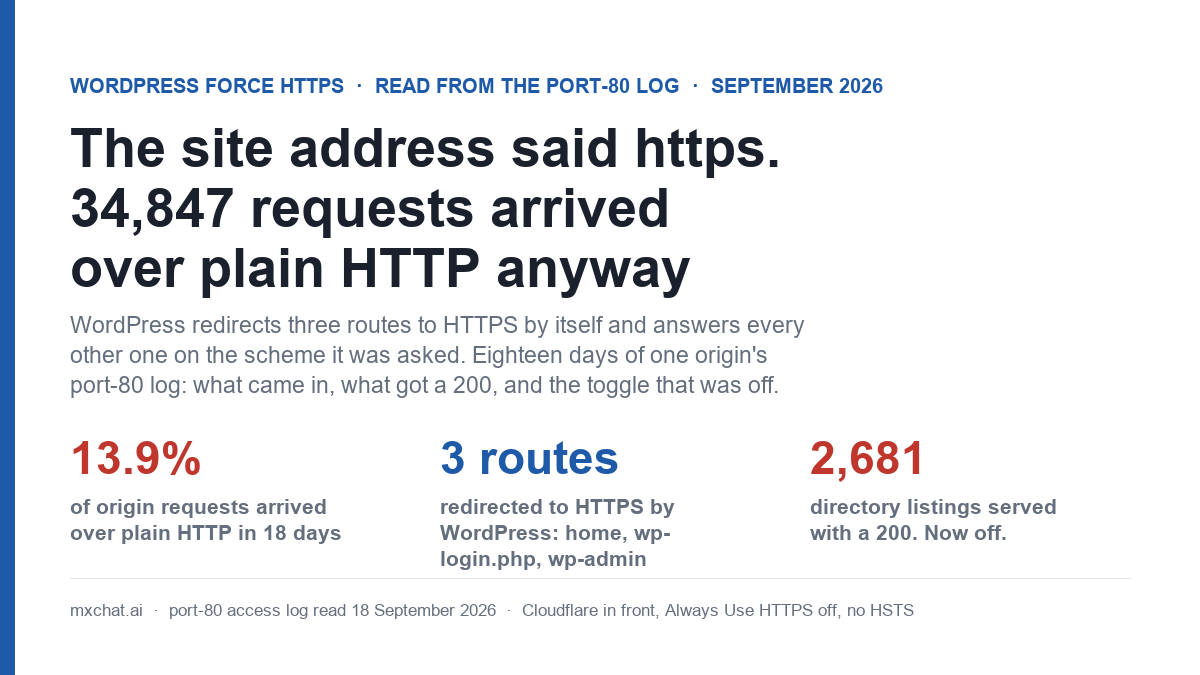
Every guide to forcing HTTPS on WordPress starts the same way: go to Settings → General, change both addresses to https://, save. This site did that years ago. Its certificate is fine, its canonical tags say https, and Cloudflare sits in front of it. Then I read the access log that Apache keeps for port 80, which I had never opened, and found 34,847 requests in eighteen days that arrived over plain HTTP and were answered over plain HTTP. That is 13.9% of everything the origin served in the window. The site address said https. The site did not enforce it.
This post is what those requests were, what WordPress did with them, why it redirected exactly three routes and nothing else, and which switch was off. The measurements are from one production install: WordPress 7.1 on cPanel, Apache, PHP 8.2, Cloudflare on the Pro plan with SSL mode Full. If you run anything similar, the same log is on your server and the same probe takes five minutes.
Nineteen routes, one scheme: what plain HTTP actually got
Before reading the log I asked the site directly. Nineteen requests, each to http:// rather than https://, through Cloudflare like a visitor’s browser would go, with a query string so that no cache could answer for WordPress. Three routes redirected. Sixteen did not.
| Route over plain HTTP | Response | Who decided |
|---|---|---|
/ (front page) | 301 → https | WordPress, X-Redirect-By: WordPress |
/wp-login.php | 302 → https | WordPress |
/wp-admin/ | 302 → https | WordPress |
| A blog post (the most-linked page on the site) | 200, full page | nobody |
/documentation/, /blog/, /shop/ | 200 | nobody |
/my-account/ (the WooCommerce login form) | 200 | nobody |
/feed/ | 200 | nobody |
/wp-json/ and /wp-json/wp/v2/posts | 200, JSON | nobody |
/wp-admin/admin-ajax.php (POST) | 200 | nobody |
/sitemap_index.xml, /post-sitemap1.xml | 200 | nobody |
/robots.txt, an uploaded image | 200 | Apache, never reaches PHP |
/xmlrpc.php | 404 | a deny rule in .htaccess |
/product/…, /cart/, /checkout/ | 403 | a Cloudflare managed challenge, which answers curl with a 403 on either scheme |
The three redirects are not a policy. They are three separate lines of core that happen to check the scheme, and once you read them you can predict the other sixteen.
wp-login.phpandwp-admin.wp-includes/default-constants.php(lines 353–360 in 7.1) definesFORCE_SSL_ADMINas true whenever the site URL starts with https.wp-login.phpline 15 then doesif ( force_ssl_admin() && ! is_ssl() )and redirects; every admin screen goes throughauth_redirect(), which does the same. This is the only scheme enforcement WordPress ships, and it covers logging in and the dashboard. It does not coveradmin-ajax.php, which is loaded by the same directory but never callsauth_redirect().- The front page. This site uses a static page as its front page.
redirect_canonical()inwp-includes/canonical.php(line 264) has a branch for exactly that: when the page on front is requested, redirect tohome_url( '/' ).home_url()builds from the https site address, so the requestedhttp://mxchat.ai/and the canonicalhttps://mxchat.ai/differ and a 301 goes out. It is an accident of the static-front-page rule. A site with a posts index as its front page would not get it. - Everything else.
redirect_canonical()starts (line 71) by building the requested URL from the scheme the request came in on, and every canonical comparison keeps that scheme. Posts, pages, archives and feeds are canonicalised for slashes, capitalisation and query arguments, never for http versus https. The REST API exits atparse_request, beforetemplate_redirectever fires, so canonical redirects do not apply to it at all. Static files never reach PHP.
So the honest summary of “WordPress forces HTTPS when the site address is https” is: it forces it for the login form and the dashboard, and by coincidence for a static front page. The rest is your web server’s job, or your CDN’s. On this site neither had been told.
The switch that was off
Cloudflare has a zone setting called Always Use HTTPS. It answers every plain-HTTP request at the edge with a 301 to the https version, before the request reaches the origin. I read the zone through the API this morning: always_use_https: off, ssl: full, automatic_https_rewrites: off. No page rules, no redirect rules. There is no RewriteCond %{HTTPS} block in .htaccess either, and the origin sends no Strict-Transport-Security header, so a browser that has been to the site over HTTPS has not been told to stop trying HTTP.
With SSL mode Full, Cloudflare connects to the origin on the same scheme the visitor used, so every plain-HTTP visitor and bot lands on port 80 at the origin and gets logged there. That log is the rest of this post.
Eighteen days of port 80: 34,847 requests, 1,764 addresses
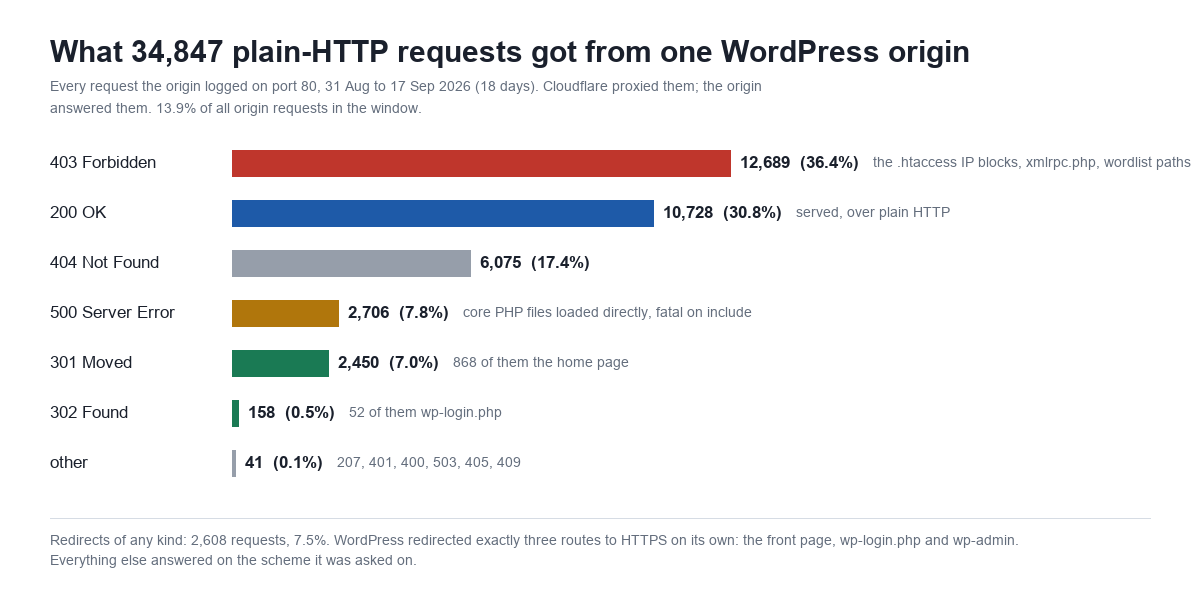
cPanel keeps two access logs per site, one for port 443 and one for port 80. Yesterday’s post on who was running this site’s WP-Cron was the first time I opened the second one, because the answer to that question was in it. Today I read the whole thing: 31 August 08:27 to 17 September 23:45, 34,847 requests from 1,764 distinct addresses. The HTTPS log for the same window holds 215,487, so plain HTTP was 13.9% of what the origin handled.
By status, 36.4% were refused with a 403, mostly by the IP-block and xmlrpc.php rules already in .htaccess. 30.8% got a 200. 17.4% were 404s, 7.8% were 500s (more on those below), and 7.5% were redirects of any kind. Of the 2,450 permanent redirects, 868 were the front page doing its accidental https redirect; of the 158 temporary ones, 52 were wp-login.php doing its deliberate one. Those two numbers are the whole of WordPress’s contribution to the problem.
Update, 20 September: the 17.4% of 404s on this port, and their 14,898 counterparts over HTTPS, got their own reading: 20,993 full Page not found renders in twenty days, 24% of them one scanner’s /ip probe, and a block that now stops 47.8% of them before PHP starts. It is in the WordPress 404 errors post.
By user agent, 42.1% sent none at all, 32.0% sent a browser string, 23.1% identified as some crawler or tool, and 2.7% were Cpanel-HTTP-Client, which is the server checking its own certificate-validation files (they have to be reachable over port 80, and they were: 878 ACME challenge requests, every one a 200, every one legitimate). Verified Googlebot, by address range and reverse DNS rather than by the string it sends, accounts for 48 requests, against 3,207 over HTTPS in the same 18 days. Google does hold http:// URLs for this host; it just uses them rarely. Thirty-one of the 48 came on 17 September, when Googlebot asked for http://mxchat.ai/, took the 301, and then fetched 29 stylesheets and scripts over plain HTTP anyway, because the redirect only moved the document, not the assets it was rendering.
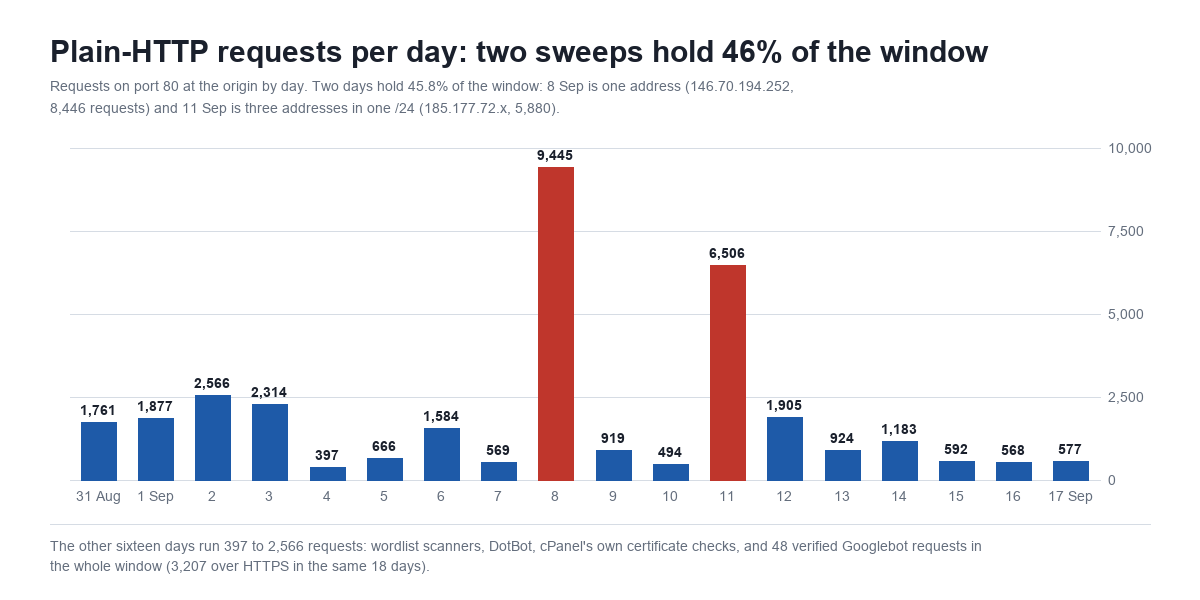
Two days carry 45.8% of the window. On 8 September one address, 146.70.194.252, made 8,446 requests; on 11 September three addresses in 185.177.72.0/24 made 5,880 between them. Neither was looking for pages. They were working through WordPress core’s file list, which brings us to the 200s.
Where the 10,728 plain-HTTP 200s went
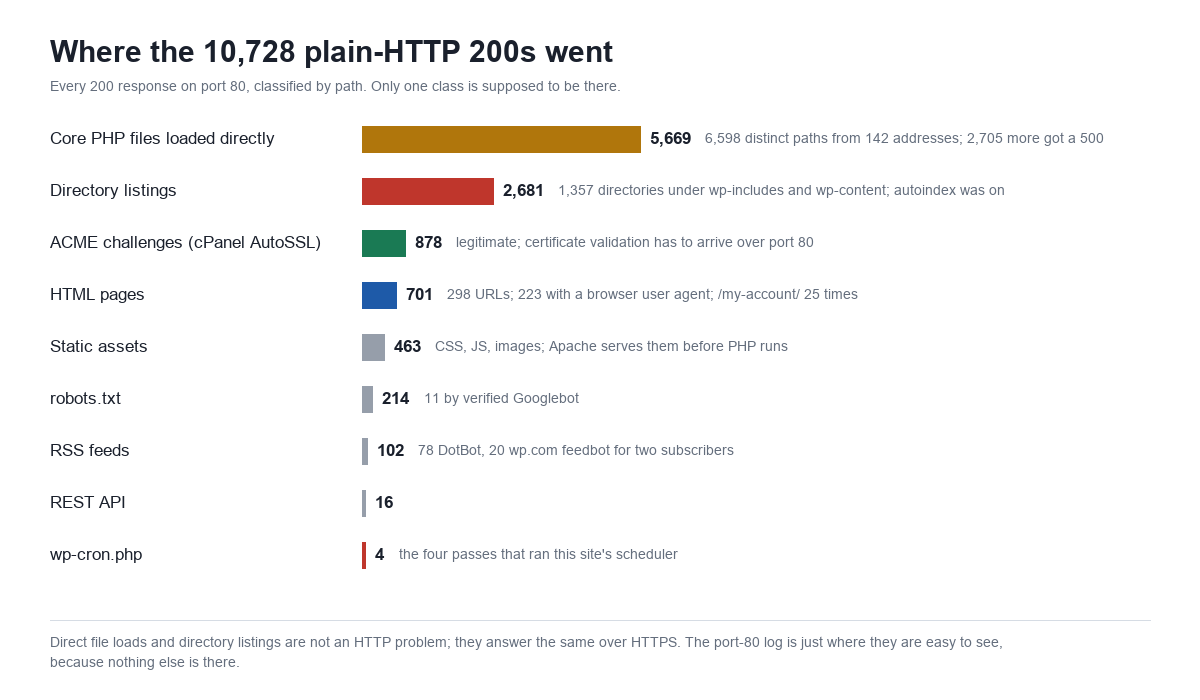
5,669 of the 200s were core PHP files requested directly: /wp-includes/PHPMailer/POP3.php, /wp-includes/fonts/class-wp-font-face.php, /wp-admin/install.php, 6,598 distinct paths from 142 addresses, 15,535 requests in all. Ask Apache for a class file and PHP runs it on its own, outside WordPress. Most such files just declare a class and exit, which is an empty 200. Some reference a parent class that was never loaded, which is a fatal error and a 500: 2,705 of those, each one written to the PHP error log, which is now 27 MB and has 516 entries for class-wp-widget-block.php alone. The scanner does not care which; the pattern of 200s and 500s across a few thousand files is a version fingerprint, and one sweep of it is what 8 September looks like.
2,681 were directory listings. Request /wp-includes/js/jquery/ and, on this server until this morning, Apache answered with an Index of page listing every file. The scanners walked 1,357 directories under wp-includes and wp-content that way, and /wp-content/uploads/ 47 times. I confirmed it over HTTPS before touching anything: /wp-content/uploads/2025/01/ rendered an 11 KB listing of every image uploaded that month, and the plugin directories listed their source files. This is not an HTTP problem and it is not new. It is the Options -Indexes line from the WordPress hardening guide, missing, and the port-80 log is simply where it showed up first because scanners prefer port 80 and nothing else is in that file to hide it.
Update, 22 September: what the listings were used for is now measured. Amazonbot reached one plugin’s root by asking for the parent directory of a spinner image linked from the contact page, got an index, and walked 4,198 directories and 1,270 PHP files from it; a second client walked every WooCommerce file the same way in 29 minutes. The read, and the deny that followed it, are in WordPress hardening: 5,476 plugin file loads, 1,939 fatals.
701 were HTML pages, 298 distinct URLs, of which 223 requests carried a browser user agent, and 25 of those were for /my-account/. That is the WooCommerce login form, served over plain HTTP, with a password field. Anyone who typed the address without the scheme and had not visited before, on a browser without HTTPS-first defaults, got exactly that. Cloudflare re-encrypts the hop to the origin under Full mode, so the plaintext leg is visitor-to-edge, but the visitor’s password crossed it. The rest of the page class is what you would expect: /add-ons/, /documentation/, /about/, the terms and privacy pages, the blog index.
102 were RSS feeds, 78 of them to DotBot and 20 to wp.com feedbot, which is Jetpack’s subscription service polling the feed over http on behalf of its two subscribers. 214 were robots.txt, 11 of them from verified Googlebot. 16 were the REST API, and 4 were wp-cron.php, which is the part that stops me from fixing this today.
What this costs, and to whom
The security cost is concentrated in one row of that chart: a login form over plain HTTP, 25 times in 18 days, plus 223 other page loads with browser user agents that may have carried a session cookie. WordPress sets its auth cookie with the secure flag only when the login happened over HTTPS, which on this site it always did, so an existing session would not have leaked; a new login typed into the plain-HTTP form is the exposure. The scanning traffic is not a scheme problem. The direct file loads, the 500s and the directory listings answer identically over HTTPS, and after last week’s audit of what this install keeps in plaintext a file listing of the uploads directory is the mildest thing on the list. It is still a listing.
The SEO cost is small and real. Google holds http:// versions of this site’s URLs, fetches them occasionally, follows the front page’s 301, and then fetches assets over http. Every page carries a canonical tag pointing at https, so nothing is being indexed twice, but 48 crawl requests in a fortnight went to a scheme the site does not want, on a site where five of the last thirteen posts were never fetched at all. The sitemap, the feed and the REST index all answering on http means every discovery surface the site has is also duplicated on http. None of that is fatal. All of it is unnecessary.
The operational cost is the error log. 2,705 fatal errors from direct file loads in 18 days is 150 a day of noise in the one file you read when something is actually wrong, and on a host where every PHP request costs 1.6 seconds of bootstrap, 15,535 direct file loads are 15,535 PHP processes started for a scanner’s benefit.
The fix ladder, and the rung I did not climb
| Fix | Where | What it closes | Status here |
|---|---|---|---|
Options -Indexes | top of .htaccess | the 2,681 directory listings; directories now return a 404 | done today, verified over HTTPS and HTTP |
| Always Use HTTPS | Cloudflare, SSL/TLS → Edge Certificates | every plain-HTTP request from a visitor or bot, answered with a 301 at the edge; the origin never sees it | deliberately not yet, see below |
| HSTS | Cloudflare, same screen, or a header from the origin | return visitors’ browsers stop trying http at all; a downgrade on first visit becomes the only window | after Always Use HTTPS, with a short max-age first |
RewriteCond %{HTTPS} off → 301 | .htaccess, before the WordPress block | plain-HTTP requests that reach the origin without going through Cloudflare, which the edge toggle cannot see | after the crontab line, same reason |
Deny direct loads in wp-includes | .htaccess, the hardening guide’s block | the 5,669 200s (almost all of them empty) and the 2,705 fatals; scanners get a 403 without starting PHP | next; needs a test against the few files legitimately loaded directly (ms-files.php, wp-tinymce.php) |
define( 'FORCE_SSL_ADMIN', true ) | wp-config.php | nothing new here; core already sets it from the https site address | not needed |
Always Use HTTPS is a single toggle and the correct fix, and I am not flipping it today for a reason that only makes sense if you read the previous post. This site’s wp-config.php has DISABLE_WP_CRON set and no crontab entry to replace it, so nothing on the server runs the scheduler. The only requests for wp-cron.php that reached PHP in eighteen days were the four in that chart, all from webshell scanners working a wordlist over plain HTTP, and each one ran the queue. Turn on Always Use HTTPS, or add the rewrite rule at the origin, and those four become 301s, the scheduler never runs again, and 55 overdue events become 57. The order has to be: a real crontab line first, then the redirect. That is a two-line change and it is the site owner’s, not mine, so the redirect waits, and the login form stays on http for now, and I have said so in writing rather than quietly.
The directory listings did not have to wait. Options -Indexes touches nothing the scheduler depends on, so it went in this morning at the top of .htaccess with a backup beside it. Every directory URL that returned an Index of page yesterday returns the theme’s 404 now, checked at the origin and through the CDN. The one side effect worth naming: a scanner walking directories used to get a cheap autoindex response from Apache, and now gets WordPress’s 404 template, which is a full bootstrap. At 150 directory requests a day that is noise; the wp-includes deny rule, when it goes in, will make it a 403 before PHP starts.
Update, 19 September: the deny rule went in, and the sentence above was wrong in an instructive way. On this cPanel host an Apache 403 was itself handed to WordPress, which rendered the theme’s 404 for it at the same 1.7-second cost, so the directory listings and the denied core files were both full bootstraps until an ErrorDocument 403 line went in above them. The measurement, the mechanism and the line are in the .htaccess deny post; the 150 directory requests a day now cost nine bytes each.
How to read your own port-80 log in five minutes
On cPanel the file is ~/access-logs/<domain>, with the HTTPS log beside it as <domain>-ssl_log, and the previous month is under ~/logs/ gzipped. Note that the port-80 file is written with a delay of several minutes on a quiet site: my own probe requests took twelve minutes to appear, which nearly convinced me they had not reached the origin at all. Three commands answer the three questions this post asked:
- How much arrives over plain HTTP?
wc -lon both files. Anything above a few percent means nothing upstream is redirecting. - What does WordPress do with it?
awk '{print $9}' | sort | uniq -cfor the status mix, thenawk '$9==200 {print $7}' | sort | uniq -c | sort -rn | head -50for what was actually served. If you see paths ending in/underwp-includeswith a 200, you have listings. If you see.phpfiles underwp-includeswith a 200 or a 500, you have direct loads. - Who is Google here? Filter on
^66\.249\.and a Googlebot user agent, not on the user agent alone; on this site a third of the “Googlebot” strings come from other addresses. Then checkcurl -sI http://yourdomain/some-post/yourself. If it is a 200 rather than a 301, Google is getting the same.
Then the one toggle, unless you also have a scheduler that is being run by strangers, in which case fix that first. If you are running MxChat on the site, nothing in the plugin cares which scheme the request arrives on; the chat endpoint answers on both, which is one more reason to close the plain one, and the documentation assumes you have.
Frequently asked questions
My WordPress address is https. Doesn’t that force HTTPS?
It forces the login form and the admin screens, through FORCE_SSL_ADMIN, which core sets automatically from the https address. It does not redirect posts, pages, feeds, the REST API, admin-ajax.php or static files. Those need a rule at the web server or the CDN.
Why did the front page redirect but the posts did not?
Because the front page on this site is a static page, and redirect_canonical() has a special case that sends requests for the page-on-front to home_url('/'), which carries the https scheme. Every other canonical comparison preserves the scheme the request arrived on. A site whose front page is the posts index would not get even that redirect.
Cloudflare’s SSL mode is Full. Isn’t the connection already encrypted?
The hop from Cloudflare to your origin is, on either scheme. The hop from the visitor to Cloudflare is only encrypted if the visitor used https, and with Always Use HTTPS off, Cloudflare passes plain-HTTP requests through to the origin on port 80 rather than redirecting them. Full mode protects the back half. The toggle protects the front half.
Does serving pages on both schemes hurt rankings?
Not directly, as long as the canonical tag and the sitemap point at https, which they do here. It spends crawl on URLs you do not want indexed, and it gives Googlebot a working http version of every discovery surface. On a site that already struggles to get new posts fetched, that is crawl budget going to the wrong scheme.
Why not just add the .htaccess redirect and be done?
On most sites, do exactly that, or flip the CDN toggle, which is cheaper still. On this site the only process running WP-Cron for the last six weeks has been a scanner arriving over plain HTTP, so closing plain HTTP before adding a real cron job would stop the scheduler entirely. The order matters here and probably nowhere else.