Pinecone Pricing Tested on a Live WordPress Chatbot
Pinecone pricing in October 2026 has four self-serve tiers: Starter is free, Builder is a flat $20 a month, Standard has a $50 monthly minimum and then bills by usage, and Enterprise has a $500 minimum. On Standard, a million read units cost $16 to $18 depending on cloud and region, a million write units cost $4 to $4.50, storage is $0.33 per GB per month, and data returned to you (egress) is $0.10 per GB after the first 100 GB.
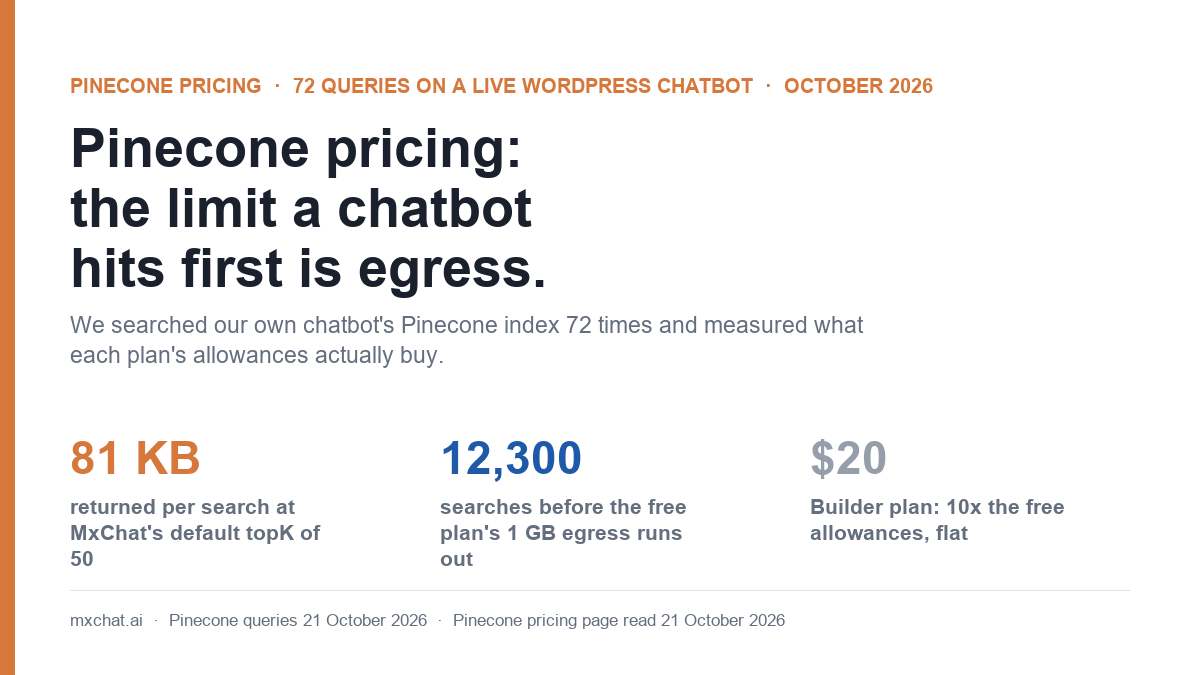
Those are the list prices. To see which allowance a website chatbot actually runs into, we measured our own. On 21 October 2026 we searched the Pinecone index behind the MxChat chatbot on this site 72 times, with six real support questions at three different result counts. Every search cost the same read units. What changed was the amount of data each search sent back: 7.9 KB at 5 results, 81.2 KB at 50 results, which is MxChat’s default. At 81 KB a search, the free plan’s 1 GB monthly egress allowance runs out after about 12,300 searches, while its 1 million read units would last for roughly a million.
- For a small chatbot, egress is the limit you hit first, not read units. On the free plan, at MxChat’s default settings, egress ran out about 80 times sooner than read units in our test.
- The number of results per search sets the egress bill. Each result carries its chunk of text (about 1.6 KB on our index). Fifty results with text is ten times the data of five.
- Storage is a rounding error for a typical site. Our 417-record knowledge base takes about 3.3 MB, roughly a tenth of a cent a month at Standard rates. The free plan’s 2 GB would hold about 250,000 records of the same shape.
- Pinecone was fast. The median search took 37.5 milliseconds from our server in the US. Turning the visitor’s question into an embedding with OpenAI took 440 milliseconds, about twelve times as long.
Pinecone pricing plans in October 2026
These figures come from Pinecone’s pricing page and its cost documentation, both read on 21 October 2026. Starter and Builder have hard limits: once you use up an allowance, the relevant requests are refused until the next billing period rather than billed. Standard and Enterprise have no caps and charge for usage beyond the monthly minimum.
| Starter | Builder | Standard | Enterprise | |
|---|---|---|---|---|
| Price | Free | $20 a month, flat | $50 monthly minimum, then usage | $500 monthly minimum, then usage |
| Storage | Up to 2 GB | Up to 10 GB | $0.33 per GB per month | $0.33 per GB per month |
| Read units | Up to 1M a month | Up to 2M a month | $16 to $18 per million | $24 to $27 per million |
| Write units | Up to 2M a month | Up to 5M a month | $4 to $4.50 per million | $6 to $6.75 per million |
| Egress | Up to 1 GB a month | Up to 10 GB a month | 100 GB included, then $0.10 per GB | 100 GB included, then $0.10 per GB |
| Indexes | Up to 5 | Up to 10 per project | No plan cap listed | No plan cap listed |
| Backups | Not included | Not included | $0.10 per GB per month; restore $0.15 per GB | Same as Standard |
The unit prices on Standard and Enterprise are now ranges because they vary by cloud provider and region. Our index runs on AWS in us-east-1. Starter is also limited to one project, two users and 100 namespaces per index. Standard adds HIPAA compliance for $190 a month if you need it.
Pinecone also sells hosted models, billed separately from the database:
| Pinecone Inference | Standard and Enterprise price | Included on Starter |
|---|---|---|
| llama-text-embed-v2 (embeddings) | $0.16 per million tokens | 5M tokens a month |
| multilingual-e5-large (embeddings) | $0.08 per million tokens | 5M tokens a month |
| pinecone-sparse-english-v0 | $0.08 per million tokens | 5M tokens a month |
| bge-reranker-v2-m3 (reranking) | $2 per 1,000 requests | 500 requests a month |
| pinecone-rerank-v0, cohere-rerank-4-fast | $2 per 1,000 requests or rerank units | Not on Starter |
MxChat does not use Pinecone’s hosted models. It creates embeddings with the provider you choose in its settings (OpenAI’s text-embedding-3-small on our site) and uses Pinecone only to store and search them. We compared embedding prices in our Gemini Embedding 2 vs OpenAI test.
How Pinecone meters a chatbot
Pinecone bills in units, so the price list only makes sense alongside the rules for counting them. From Pinecone’s cost documentation:
| Operation | What it costs | What it means for a chatbot |
|---|---|---|
| Query (search) | 1 read unit per GB of namespace, minimum 0.25 read units | A knowledge base of a few MB pays the minimum on every search. The number of results and whether text is included do not change the read units. |
| Fetch by ID | 1 read unit per 10 records, minimum 1 | Not part of a normal chatbot reply. |
| Upsert (add or update) | 1 write unit per KB, minimum 5 per request; overwriting also counts the old record | Paid when you add or re-sync content, not when visitors chat. |
| Storage | Records x (ID + metadata + dimensions x 4 bytes) | A 1,536-dimension vector is 6 KB before any text. |
| Egress | GB of response data returned by queries, fetches and lists | Grows with every result and every byte of text the search returns. |
That last row is the one to watch. Read units are priced by the size of the namespace you search, which for a website is tiny. Egress is priced by what comes back, and a chatbot asks for text, because the AI model needs the text to write its answer.
What we measured
The index is the production knowledge base for the chatbot on mxchat.ai: a serverless Pinecone index on AWS us-east-1 with 417 records, 1,536 dimensions and cosine similarity, filled with text-embedding-3-small embeddings of our documentation, FAQ and product pages. Each record stores its chunk of text and a few small fields (source URL, type, dates) as metadata, about 1,657 bytes on average.
We wrote six questions of the kind visitors ask our bot, about WooCommerce order lookups, whether Pinecone is required, handing a chat to a human on Slack or Telegram, the price of MxChat Pro, adding a sitemap or PDF, and which AI models are supported. Each was embedded once with OpenAI and then searched from our WordPress server with topK set to 5, 10 and 50, once with metadata (the text) and once without, and the whole set was run twice. That is 72 searches, plus 6 embedding calls. Nothing was written to the index.
All 72 searches returned HTTP 200 and the right material: the top result for the WooCommerce question was our WooCommerce page, for the Pinecone question our FAQ entry on whether Pinecone is required, and for the live-agent question our FAQ entry on live agent handoff. The ranking was identical on both runs.
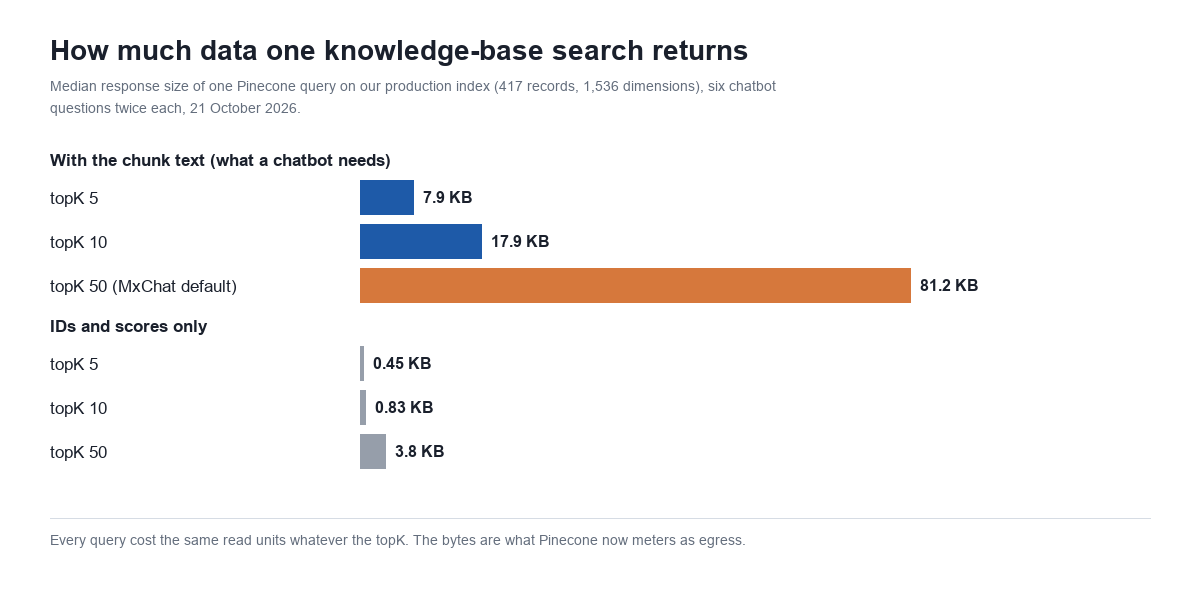
| Results per search (topK) | Response size with text | Without text | Read units reported | Median time |
|---|---|---|---|---|
| 5 | 7.9 KB | 0.45 KB | 1 | 34 ms with text, 44 ms without |
| 10 | 17.9 KB | 0.83 KB | 1 | 58 ms with text, 36 ms without |
| 50 (MxChat default) | 81.2 KB | 3.8 KB | 1 | 47 ms with text, 33 ms without |
One detail did not match the documentation. Pinecone’s API reported 1 read unit on every one of the 72 searches, while the cost documentation says a namespace under 1 GB pays a minimum of 0.25. The figure in the API response may be rounded up. We cannot see the invoice for this index from the API, so the cost estimates below show both.
Why egress runs out before read units
On the free plan you get 1 million read units and 1 GB of egress a month. Even at the higher read-unit figure, a million read units cover about a million searches on an index like ours. The egress allowance covers far fewer:
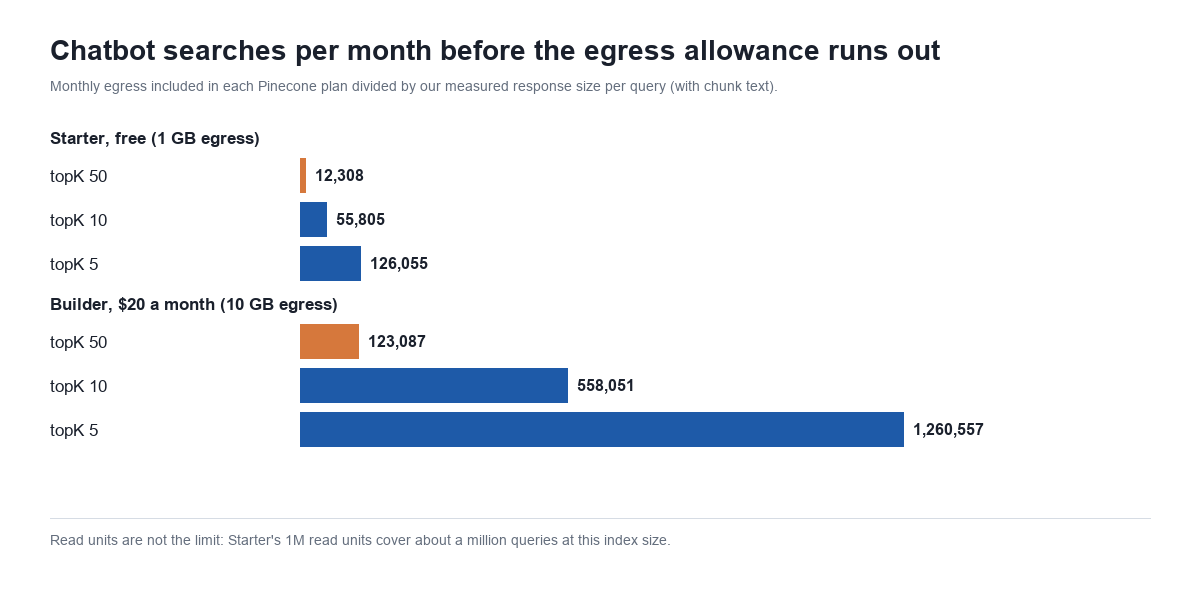
At topK 50 with text, 1 GB lasts about 12,300 searches. If your chatbot searches the knowledge base once per visitor message, that is around 400 messages a day. A busy WooCommerce store can pass that. When the free plan’s egress is used up, Pinecone’s documentation says searches return a RESOURCE_EXHAUSTED (429) error until the next billing period, and a chatbot that cannot search its knowledge base answers without it.
Two caveats on these numbers. They are uncompressed JSON sizes as our server received them; if Pinecone meters compressed bytes, the allowance goes further. And they depend on chunk size: an index with longer chunks returns more data per result, and one with shorter chunks less.
What MxChat does with 50 results
MxChat asks Pinecone for 50 results by default so that it has enough candidates left after its own filtering. It drops any result below the similarity threshold, drops content the visitor’s user role is not allowed to see, takes at most five chunks from any one page, and stops at 15 chunks in total (the default, adjustable from 8 to 20). On our site, all 50 results cleared the 0.20 similarity threshold for all six questions, so at least 35 of the 50 records each search downloaded were never sent to the AI model.
The setting is Results Per Query (topK), on MxChat’s Knowledge page in the Pinecone card, and it accepts any value from 1 to 1,000. Lowering it cuts egress in proportion, at about 1.6 KB per result on our index. The trade-off is fewer candidates for the filters: if you use role restrictions or have many chunks per page, a topK below 20 or so can leave the bot with fewer usable chunks than its limit allows. We have not changed ours; if you are on the free plan and close to the egress allowance, it is the first setting to look at.
What a WordPress chatbot costs on each plan
This table applies our measured response sizes to different monthly volumes, assuming one knowledge-base search per visitor message. Storage is left out because a knowledge base of a few thousand records costs a fraction of a cent.
| Searches a month | Egress at topK 50 | Cheapest plan at topK 50 | Egress at topK 10 | Cheapest plan at topK 10 |
|---|---|---|---|---|
| 3,000 (about 100 a day) | 0.24 GB | Starter, free | 0.05 GB | Starter, free |
| 10,000 | 0.81 GB | Starter, free (81% of the allowance) | 0.18 GB | Starter, free |
| 30,000 (about 1,000 a day) | 2.44 GB | Builder, $20 | 0.54 GB | Starter, free |
| 100,000 | 8.1 GB | Builder, $20 | 1.8 GB | Builder, $20 |
| 500,000 | 40.6 GB | Standard, $50 minimum | 9.0 GB | Builder, $20 |
| 2,000,000 | 162 GB | Standard, $50 minimum (usage about $14 to $38) | 35.8 GB | Standard, $50 minimum |
Two things stand out. Builder covers a much wider range than its price suggests, because its 10 GB egress allowance is ten times Starter’s. And on Standard, a website chatbot rarely uses enough to pass the $50 minimum: at 2 million searches a month, our usage estimate is $8 to $32 in read units (at 0.25 or 1 read unit per search, $16 per million) plus about $6 for the 62 GB of egress above the included 100 GB. Below roughly 2.5 million searches a month, even at the higher read-unit figure, the $50 minimum is likely to be the whole bill.
The rest of a knowledge-base search
Pinecone is one of three bills behind a chatbot answer. Before searching, the visitor’s question has to be turned into an embedding, and after searching, an AI model writes the reply.
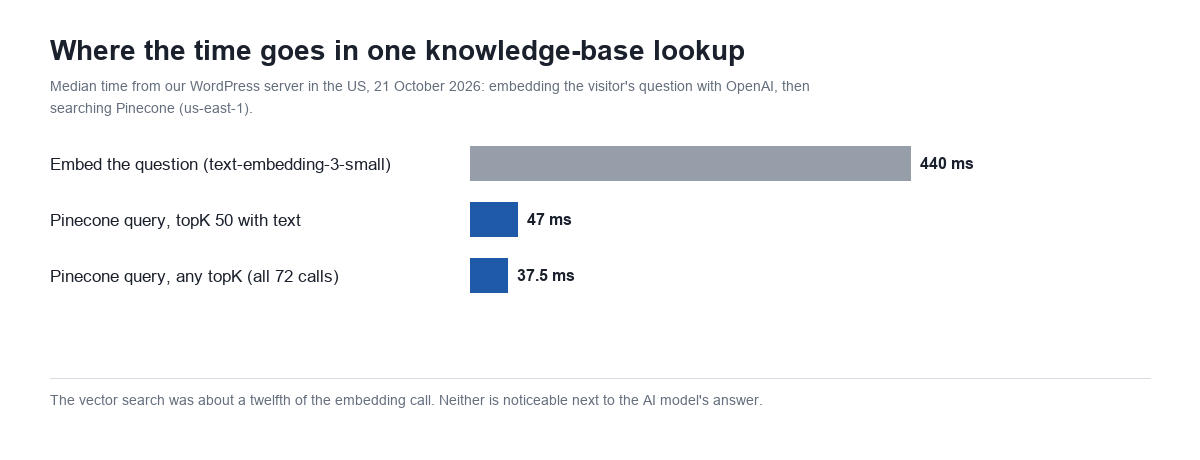
| Step | What we measured | Cost per 1,000 visitor questions |
|---|---|---|
| Embed the question (OpenAI text-embedding-3-small, $0.02 per million tokens) | 16.5 tokens per question, 440 ms median | About $0.0003 |
| Search Pinecone (Standard rates, past the minimum) | 1 read unit reported, 81.2 KB at topK 50, 37.5 ms median | $0.004 to $0.016 in read units, plus $0.008 in egress past 100 GB |
| Write the answer (AI model) | Measured in our model tests | $0.78 on Claude Haiku 5.5 to $66 on Claude Fable 5.1 |
Per answer, the AI model is by far the largest cost; we measured seven Claude models in our Claude API pricing test. Pinecone’s cost is mostly a question of which plan you are on, and on the free plan, of whether you stay inside its allowances.
Do you need Pinecone at all?
Not for most WordPress sites. MxChat stores the knowledge base, both the text and the embeddings, in your WordPress database by default, at no extra cost. Its Knowledge screen recommends moving to Pinecone once you have more than 500 knowledge entries, because the WordPress database is not designed for vector search at that size. Our FAQ on whether Pinecone is required covers the three storage options, and how RAG works explains what the search step does.
If you move an existing knowledge base to Pinecone, the content is embedded and uploaded once, which costs write units at 1 per KB of request. A record like ours is about 8 KB stored and larger as JSON in transit, so count on somewhere between 8 and 40 write units per record. Even at the high end, 1,000 records is 40,000 write units, 2% of the free plan’s 2 million. The Pinecone migration tool handles the move, and the knowledge base documentation covers the settings. Pinecone works with the free MxChat plugin; see MxChat Pro for what the paid plan adds.
Which Pinecone plan to pick
- Starter (free) suits a site that does not need Pinecone yet but wants to try it, or a chatbot handling up to a few hundred messages a day. At MxChat’s default topK, watch the egress allowance rather than the read units.
- Builder ($20 a month) is the plan for most busy WordPress chatbots: ten times Starter’s egress and storage, with no surprise charges because usage over the limits is blocked rather than billed. It does not include backups.
- Standard ($50 minimum) makes sense when you need no hard caps, backups, HIPAA, or more than 10 GB of egress a month. For most chatbots the minimum will be the bill.
- Enterprise ($500 minimum) is for organisations that need its support and compliance terms; nothing about a single site’s chatbot calls for it.
Frequently asked questions
Is Pinecone free?
Pinecone’s Starter plan is free and includes 2 GB of storage, 1 million read units, 2 million write units and 1 GB of egress a month, with up to five indexes. It has hard limits: requests that need an exhausted allowance are refused until the next billing period.
How much does Pinecone cost per month?
Starter is free, Builder is $20 a month flat, Standard has a $50 monthly minimum and Enterprise a $500 minimum. On Standard and Enterprise you pay whichever is higher, the minimum or your usage.
What is a read unit in Pinecone?
A read unit is how Pinecone meters searches. A query costs 1 read unit per GB of the namespace searched, with a minimum of 0.25. The number of results and whether metadata is included do not change it.
Does topK affect Pinecone pricing?
Not the read units, but it does affect egress. In our test, a search with 50 results and their text returned 81.2 KB, against 7.9 KB with 5 results. On plans with an egress allowance, that difference decides how many searches you get.
How much storage does a chatbot knowledge base use in Pinecone?
Each record takes its vector (4 bytes per dimension, so about 6 KB at 1,536 dimensions) plus its ID and metadata. Our 417-record knowledge base, with about 1.6 KB of text per record, uses about 3.3 MB.
Is Pinecone required for MxChat?
No. MxChat stores embeddings in the WordPress database by default and recommends Pinecone once a knowledge base passes 500 entries. Pinecone is supported in the free plugin.
Method: 72 Pinecone queries and 6 OpenAI embedding calls from the mxchat.ai WordPress server on 21 October 2026, against the site’s production serverless index (AWS us-east-1). Read-only; no records were written or changed. Prices from Pinecone’s pricing page and cost documentation, read 21 October 2026. Monthly scenarios are calculated from the measured median response sizes.