OpenAI Prompt Caching: Cache Writes Now Cost 25% More
OpenAI prompt caching used to be free money. Send a long prompt, send a similar one a minute later, and the shared opening was billed at a tenth of the input rate with nothing charged for storing it. That changed with the GPT-5.6 and GPT-6 generation. OpenAI’s pricing page now carries a fourth column next to input, cached input and output: cache writes, billed at 1.25 times the input rate. On 22 September 2026, alongside GPT-6 Sol and GPT-6 Luna, OpenAI also shipped explicit cache breakpoints, a 30-minute cache lifetime and a caching dashboard. Most of the coverage led with “up to 90% off cached input.”
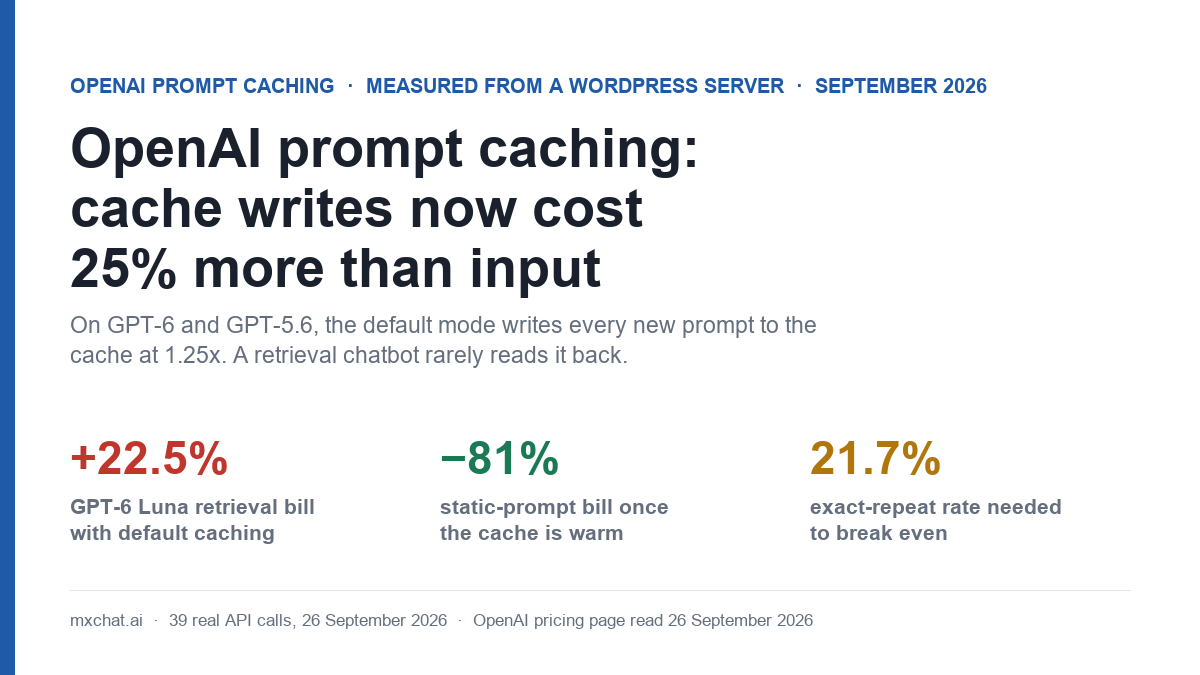
Both halves are true. Which half you get depends on what your prompt looks like, and a WordPress chatbot that answers from a knowledge base has the unlucky shape. We measured it: 39 real API calls from a production WordPress server on 26 September 2026, across GPT-6 Luna, GPT-6 Sol and GPT-5.6 Luna, with the same system prompt, the same retrieved documents and the same visitor questions in every mode. Three findings.
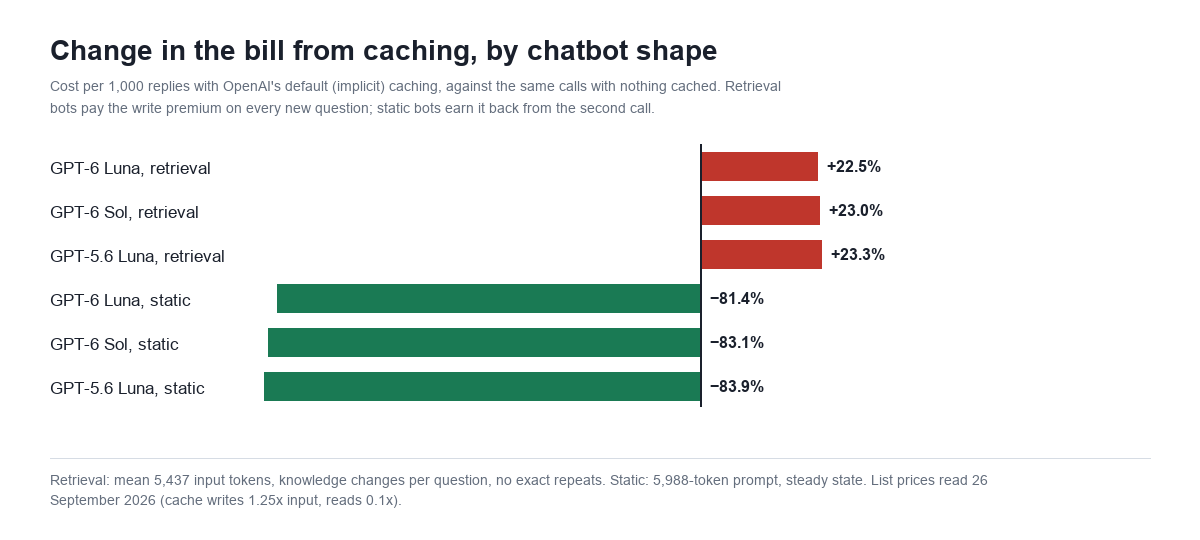
- With default (implicit) caching, a retrieval chatbot pays 22.5% to 23.3% more than with nothing cached. Every new question writes the whole prompt to the cache at 1.25x, and almost none of it is ever read back.
- A static prompt gets the headline discount: 81% to 84% off once the cache is warm.
- Explicit mode fixes the retrieval case, but only if the part you mark is at least 1,024 tokens long. Marked correctly, the same retrieval bot came out 24.6% cheaper than no caching and 38.9% cheaper than the default.
The OpenAI cache pricing, as published
This is OpenAI’s API pricing page as it read on 26 September 2026, standard processing, short context, per million tokens. The cache-write column is the new one. On every model in it the write rate is exactly 1.25 times input and the cached (read) rate exactly 0.1 times input.
| Model | Input | Cached input (read) | Cache write | Output |
|---|---|---|---|---|
| GPT-6 Astra | $10.00 | $1.00 | $12.50 | $50.00 |
| GPT-6 Sol | $2.00 | $0.20 | $2.50 | $10.00 |
| GPT-6 Luna | $0.10 | $0.01 | $0.125 | $0.50 |
| GPT-5.6 Sol | $4.00 | $0.40 | $5.00 | $20.00 |
| GPT-5.6 Terra | $2.00 | $0.20 | $2.50 | $12.00 |
| GPT-5.6 Luna | $0.20 | $0.02 | $0.25 | $1.20 |
OpenAI’s prompt caching guide spells out the rest of the mechanics. On GPT-5.6 and later, a prompt needs at least 1,024 visible input tokens before any of it can be cached. The cache lives 30 minutes after it was last written or read, and prompt_cache_options.ttl accepts only "30m". Older models (GPT-5.5 and earlier) keep the previous arrangement: no write charge, and a choice between in-memory retention and "24h". The discount on reads is real. The write charge is also real, and it lands on every prompt the cache stores, whether or not anything ever reads it.
How we tested
We used the setup a WordPress chatbot actually runs. The system prompt is the live one from this site’s own chatbot, 3,478 characters, which counts as about 750 tokens. The knowledge base is six real pages from this site, pulled the way a retrieval step would pull them for each question, trimmed to 3,200 characters each. The three questions are ones visitors ask: whether the bot works with WooCommerce order lookups, whether Pinecone is required for the knowledge base, and whether a chat can be handed to a human on Slack or Telegram.
Each model ran the same four-call sequence in three modes, 36 calls in all: question A, B, C, then A again word for word. We read usage.input_tokens_details.cached_tokens and cache_write_tokens from each Responses API reply. Three further calls tested a longer system prompt in explicit mode (below). The three modes:
- Implicit, retrieval. The default. The system prompt is the developer message; the retrieved documents and the question are the user message. OpenAI places the breakpoint itself, at the end of the latest eligible message.
- Explicit, retrieval. The same prompt, with
prompt_cache_options: {"mode": "explicit"}and aprompt_cache_breakpointon the system prompt, the only part that stays the same between questions. - Implicit, static. A bot with no retrieval: the system prompt and one fixed knowledge block together in the developer message, only the question changing.
What the default mode does to a retrieval chatbot
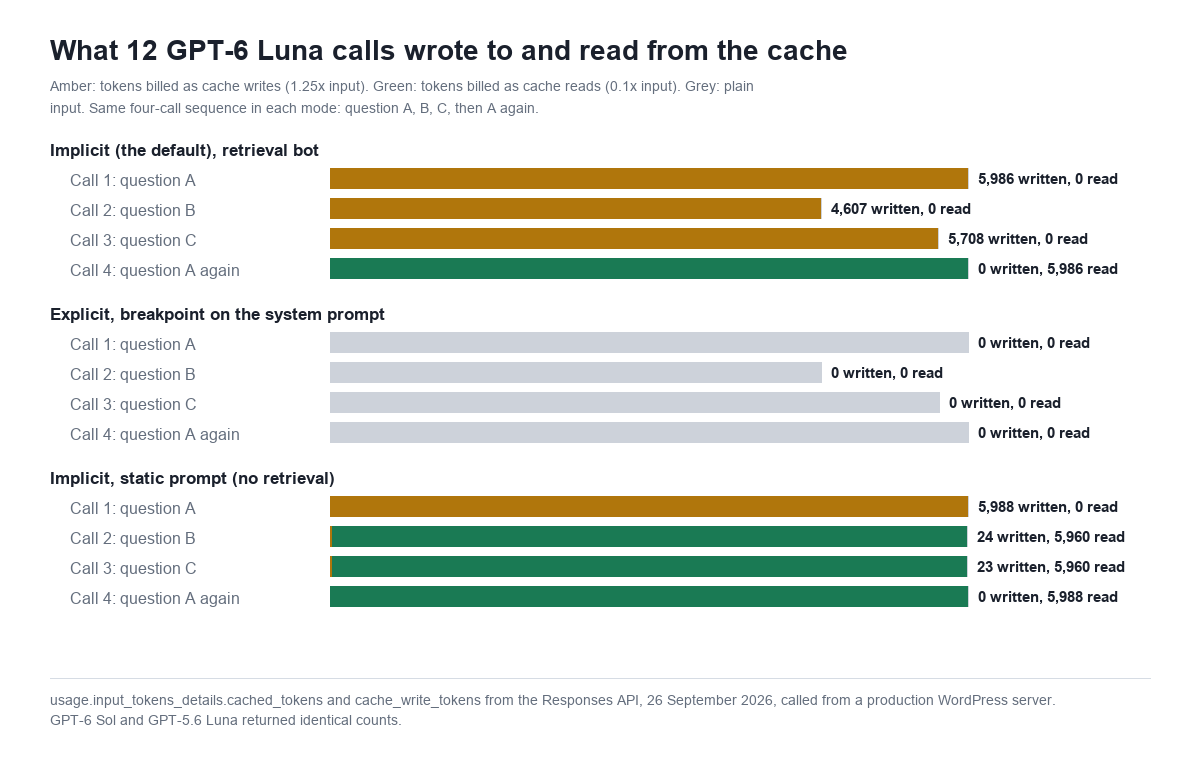
In implicit mode, OpenAI puts the breakpoint at the end of the prompt, so the cached prefix is the whole prompt: system prompt, retrieved documents and the question. A retrieval chatbot changes the retrieved documents with every question, which is the point of retrieval. So every new question is a new prefix, and a new prefix is a cache write.
That is exactly what the counts show. On GPT-6 Luna, question A wrote 5,986 of its 5,989 input tokens to the cache. Question B wrote 4,607 of 4,610. Question C wrote 5,708 of 5,711. None of them read a single token, because none of them shared a 1,024-token opening with anything before it. The system prompt they did share is about 750 tokens, under the minimum. Only the fourth call, question A again, word for word, read the cache: 5,986 tokens at the 0.1x rate. GPT-6 Sol and GPT-5.6 Luna returned the same counts, token for token.
The bill follows directly. Here is the cost of 1,000 replies at the mean measured shape (5,437 input tokens) with each model’s own mean output, comparing nothing cached against the default with no exact repeats.
| Model | Output tokens per reply (mean) | No caching | Implicit caching | Change |
|---|---|---|---|---|
| GPT-6 Luna | 119.6 | $0.603 | $0.739 | +22.5% |
| GPT-6 Sol | 92.7 | $11.80 | $14.52 | +23.0% |
| GPT-5.6 Luna | 66.8 | $1.17 | $1.44 | +23.3% |
The increase is a little under 25% because output is untouched. Input is 90% to 93% of these bills, so a 25% surcharge on input comes out at 22% to 23% of the total.
The static chatbot gets the headline discount
The picture flips when the prompt stays still. With the knowledge block fixed in the developer message, the first call wrote 5,988 tokens. The second and third calls, with different questions, read 5,960 tokens each and wrote only 23 or 24, the tail of the question. The repeat read all 5,988.
| Model | Static prompt, nothing cached | Static prompt, cache warm | Change |
|---|---|---|---|
| GPT-6 Luna | $0.659 | $0.123 | −81.4% |
| GPT-6 Sol | $12.90 | $2.19 | −83.1% |
| GPT-5.6 Luna | $1.28 | $0.21 | −83.9% |
That is where “up to 90%” comes from. The one write per 30 minutes is spread over every question that arrives in that window. A busy FAQ bot with a fixed prompt re-writes the cache perhaps once or twice an hour and reads it on every other call. It does not have to be busy, either. Two questions in 30 minutes are enough to come out ahead, because one read saves 0.9x and the write costs only 0.25x extra.
The break-even: 21.7% exact repeats
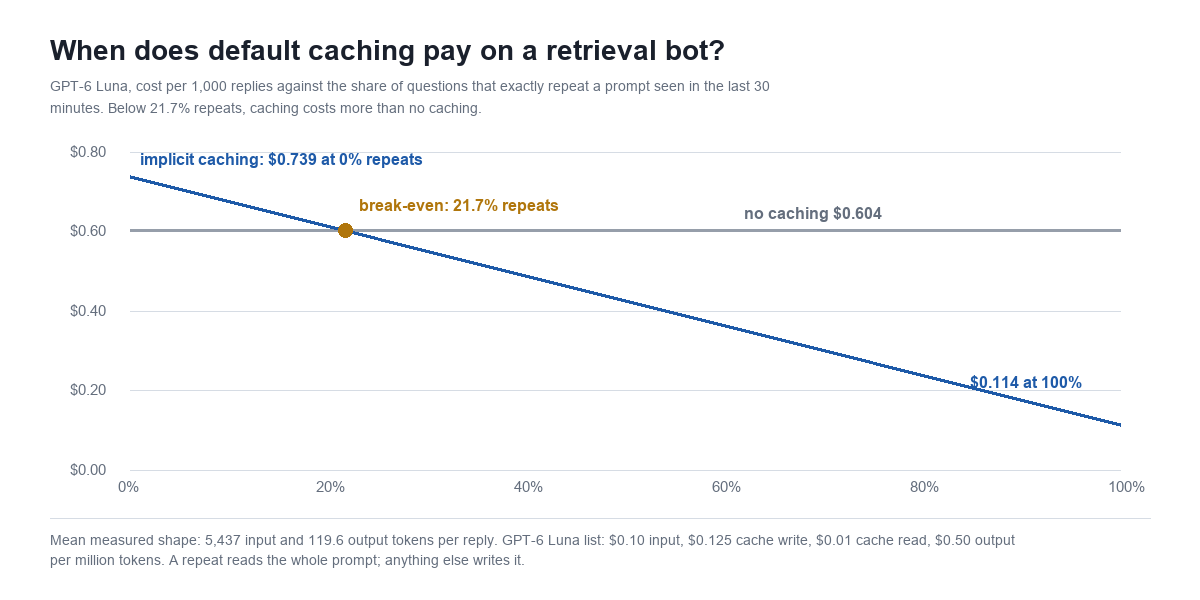
A retrieval bot does get cache hits, but only when the whole prompt repeats: the same question, which retrieves the same documents, inside 30 minutes. So the question for a retrieval bot on default caching is simple. What share of your questions are exact repeats?
Each write costs 0.25x input more than not caching; each repeat that reads instead of writing saves 1.15x relative to a write. Break-even is 0.25 ÷ 1.15 = 21.7% of calls. The ratio is the same on every model in the table, because OpenAI prices write and read as fixed multiples of input.
| Exact-repeat share | GPT-6 Luna, per 1,000 replies | GPT-6 Sol, per 1,000 replies | vs no caching |
|---|---|---|---|
| 0% (no caching) | $0.603 | $11.80 | — |
| 0% (implicit) | $0.739 | $14.52 | +22 to 23% |
| 10% | $0.677 | $13.27 | +12% |
| 21.7% | $0.603 | $11.80 | break-even |
| 30% | $0.552 | $10.77 | −9% |
Our own chatbot’s transcripts cannot settle what a typical repeat rate is, and we will not pretend they can: the table holds 9 visitor messages since 17 August, and none repeated another within 30 minutes. What we can say is structural. Real visitors phrase the same question differently (“does it work with Woo”, “WooCommerce support?”), and a one-character difference is a different prefix. Sites that see bursts of one identical question, such as a pinned “Track my order” button that sends fixed text, are the exception, and those can clear 21.7%.
Explicit breakpoints: the fix, with one catch
Explicit mode is the tool OpenAI shipped for this. You set prompt_cache_options to {"mode": "explicit"} and mark where each cached prefix should end with a prompt_cache_breakpoint on a content part. Up to four breakpoints per request. For a retrieval bot, the right place is the end of whatever stays identical between questions: the system prompt, plus any fixed instructions or tool definitions that come before the retrieved text.
The catch showed up in our first run. Our live system prompt is about 750 tokens. With a breakpoint on it, all twelve explicit-mode calls on all three models wrote nothing and read nothing, including the word-for-word repeat. The marked prefix was under the 1,024-token minimum, so there was nothing eligible to cache, and explicit mode does not add an automatic breakpoint of its own. That is a legitimate result: explicit mode with an ineligible breakpoint is how you switch caching off and stop paying for writes. It is not a discount, though.
So we ran it again with a longer system prompt: the same instructions plus a block of store policy text, 1,956 tokens in all, which is a realistic length once a site adds its returns policy, tone rules and escalation instructions. On GPT-6 Luna, question A wrote 1,956 tokens (just the system prompt, not the documents). Questions B and C each read 1,956 and wrote nothing. The retrieved documents and the question were billed at the plain input rate, as they should be.
| Model | No caching | Implicit (default) | Explicit, breakpoint on 1,956-token system prompt | Explicit vs default |
|---|---|---|---|---|
| GPT-6 Luna | $0.714 | $0.880 | $0.538 | −38.9% |
| GPT-6 Sol | $14.29 | $17.61 | $10.77 | −38.9% |
| GPT-5.6 Luna | $1.45 | $1.78 | $1.10 | −38.4% |
Per 1,000 replies at the measured mean of 6,642 input and 100.3 output tokens, steady state. Sol and GPT-5.6 Luna are priced from the Luna token counts, since the earlier runs showed identical counts across the three models. The explicit column is 24.6% below no caching, and the saving grows with the share of the prompt that is fixed. If your system prompt is 700 tokens and your retrieved context is 6,000, there is not much to cache, and explicit mode is mostly useful as the off switch.
What to change, by chatbot type
- Retrieval chatbot, system prompt under 1,024 tokens. Default caching is costing you about 23%. Use explicit mode with no eligible breakpoint to stop the writes, or call a model without a write charge (GPT-5.5 and earlier). Do not pad the system prompt just to reach 1,024 tokens: you would pay full input on the padding for every call to save a tenth on it.
- Retrieval chatbot, system prompt over 1,024 tokens. Use explicit mode with a breakpoint at the end of the fixed part. Put everything that never changes (instructions, policies, tool definitions) before the retrieved text, and nothing that changes (the date, the visitor’s name, the page URL) before the breakpoint.
- Static FAQ bot. Leave the default on. You are the case the discount was designed for, and two questions in 30 minutes are enough to come out ahead.
- Any bot. Log
cache_write_tokensnext tocached_tokens. A write column that tracks your input column almost one for one, with a read column near zero, is the signature of the retrieval case.
Two more things change the picture for the rest of the bill. First, the model price itself: GPT-6 Luna at $0.10 input is half GPT-5.6 Luna’s $0.20, a bigger lever than any caching mode (see our GPT-5.6 Luna cost-per-reply breakdown and the GPT-5.6 Sol numbers). Second, for work that can wait, the Batch API halves everything. Anthropic prices this differently: its cache write premium is also 1.25x for five-minute caching, but you always choose what to cache, and in our Opus 5.5 test the same retrieval shape put 83% of the bill on fresh knowledge that no cache can discount.
Where MxChat sits
We make MxChat, so we checked our own plugin too. MxChat 3.2.22 sends OpenAI requests through the Chat Completions endpoint with no cache options set, which means it gets the default behaviour described above. We confirmed that endpoint reports the same write-then-read counts on GPT-5.6 Luna: 3,162 tokens written on the first call, 3,162 read on the identical second. The live bot on this site answers from retrieved knowledge with a system prompt of about 750 tokens, so it is in the first row of the list above. If you run MxChat on an OpenAI model, the practical levers today are the model choice and how much fixed instruction text sits in your system prompt. For provider settings, see the documentation; MxChat Pro covers the full feature set, including bots on Claude, Gemini and Grok models if another provider’s caching suits your prompt better. For keeping the whole bill bounded regardless of caching, rate limits matter more than any discount; here is what an unmetered chatbot endpoint can cost.
Caveats
- 36 calls plus 3, one day, one server. Token counts were identical across repeated calls and across three models, so the cache mechanics are not in doubt. The output means are small samples, and output is only 7% to 10% of these bills.
- Prices are OpenAI’s list prices as published on 26 September 2026, standard tier, short context. Data-residency endpoints add 10%, and Batch and Flex are cheaper.
- We tested a 30-minute window by sending calls seconds apart. A cache that expires between visitors behaves like a retrieval cache even on a static bot, so a static bot with fewer than two questions per 30 minutes pays the premium too.
- Implicit caching is best-effort: OpenAI does not guarantee a hit on an eligible repeat. All six of our repeats hit.
FAQ
How much does OpenAI prompt caching cost?
On GPT-5.6 and GPT-6 models, cache reads cost 0.1x the input rate and cache writes cost 1.25x. On GPT-6 Luna that is $0.01 per million tokens read and $0.125 per million written, against $0.10 for plain input. GPT-5.5 and earlier models have no write charge.
Is OpenAI prompt caching automatic?
Yes, by default. In implicit mode OpenAI places the cache breakpoint at the end of the latest eligible message, so the whole prompt is cached once it reaches 1,024 tokens. Explicit mode lets you choose the breakpoints instead, up to four per request.
Does prompt caching save money on a RAG chatbot?
Not with default settings, on our test. Each question retrieves different documents, so each prompt is new and is written to the cache at 1.25x input. GPT-6 Luna, GPT-6 Sol and GPT-5.6 Luna all came out 22.5% to 23.3% more expensive than with nothing cached. An explicit breakpoint on a system prompt of 1,024 tokens or more turned that into a 24.6% saving.
How long does the OpenAI prompt cache last?
On GPT-5.6 and later, 30 minutes after the cache was last written or read; prompt_cache_options.ttl accepts only "30m". Earlier models use in-memory retention of roughly 5 to 10 minutes, or "24h" when requested.
What is the minimum prompt length for OpenAI caching?
1,024 visible input tokens on GPT-5.6 and later. A breakpoint that marks a shorter prefix caches nothing. In our test, a breakpoint on a 750-token system prompt produced zero writes and zero reads across 12 calls.