WordPress Tags SEO: 1,305 Archives, 421 Posts, 7 Clicks
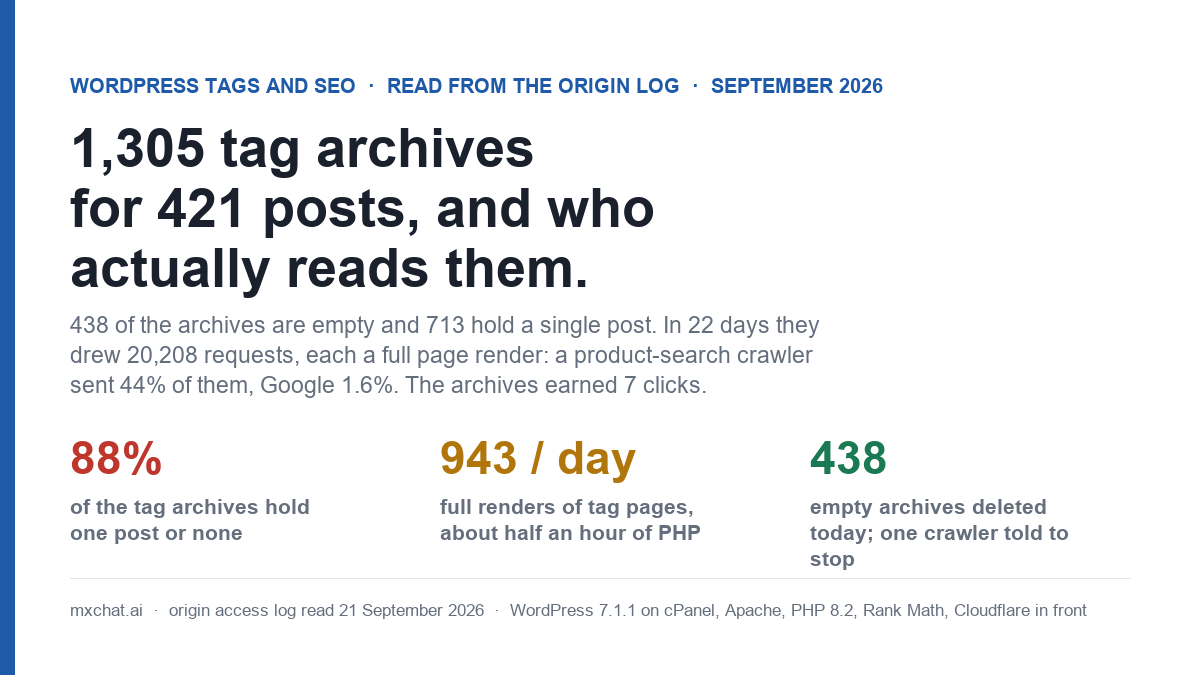
Most advice on WordPress tags SEO is written from the outside: tags are “good for organisation”, tag archives are “thin”, set them to noindex and move on. I wanted the inside view, so I counted every tag on this site and then read what the access log says about who asks for the archives and what Google does with them. The short version: 1,305 tag archives exist for 421 published posts. 438 of them are empty and 713 hold exactly one post. In 22 days the archives drew 20,208 requests, every one a full page render, and earned 7 clicks. Nearly half of those requests came from a single product-search crawler that walked 869 of the tags from 257 addresses; Google was 1.6% of the traffic, and one Google fetch in five for an HTML page on this site was a tag archive.
This post is the inventory, the cost, who was actually reading the archives, what Search Console shows for them, what I deleted this morning and what I deliberately left alone. The site is WordPress 7.1.1 on cPanel with Apache and PHP 8.2, Rank Math for SEO and Cloudflare in front, the same install as the 404 renders and Discovered, currently not indexed posts. Every number is from its own database and its own origin log, 31 August to 21 September 2026, my own probes excluded.
1,305 tags for 421 posts: where they came from
The tag count is not a mystery once you look at the distribution of tags per post. Of the 421 published posts, 68 have no tags at all, 342 carry exactly five, and eleven carry some other number. Five is the count you get when a content generator is told to “add relevant tags” and does so on every post without ever checking what already exists. Each of those five is usually a fresh phrase (ai-chatbot-for-moms, parenting-tools-and-resources, backwpup-features) rather than a reused one, so the tags accumulate at nearly the rate of the posts. The result is 1,753 post-to-tag relationships spread across 1,305 terms: 1.3 posts per tag.
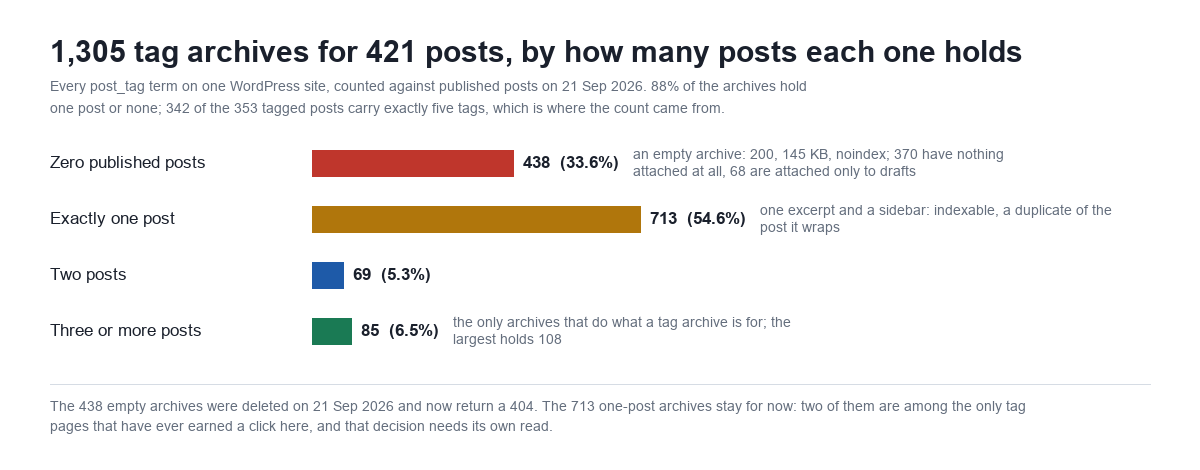
| Published posts in the archive | Tags | Share | What the archive page is | Robots meta (Rank Math) |
|---|---|---|---|---|
| 0 | 438 | 33.6% | A 200 with the theme’s “nothing found” message, 145 KB; 370 have nothing attached, 68 are attached only to draft posts | follow, noindex (the “noindex empty archives” setting) |
| 1 | 713 | 54.6% | One excerpt, one featured image, the sidebar: a lower-quality copy of the post | index, follow |
| 2 | 69 | 5.3% | Two excerpts | index, follow |
| 3 or more | 85 | 6.5% | A real archive; the largest (mxchat) holds 108 posts across 11 pages | index, follow |
Two mechanical facts matter for everything below. First, the archives are not in the sitemap (Rank Math’s tag sitemap is off here), so crawlers do not find them from the index file. They find them because the theme prints every tag under every post as a rel="tag" link: 1,753 links across the site, five per tagged post, each pointing at an archive that in 88% of cases holds that post alone or nothing. Second, the empty archives were not 404s. WordPress returns a 200 for a term that exists and has no posts; Rank Math marks the page noindex, and the theme renders its full template around a “nothing found” line. An empty tag archive costs exactly what a populated one costs.
The post on Discovered, currently not indexed ended with Google having plenty of crawl to spend on this site and choosing not to spend it on new posts. Here is one of the places it spends it instead.
Twenty thousand requests, each one a full render
The HTTPS origin log for the window has 227,412 requests after my own are removed. 20,208 of them, 8.9%, were for a /tag/ URL. 19,270 got a 200, 876 a 301 (tags redirected earlier this year as cannibalisation fixes, still being asked for), 61 a 404 (pagination that no longer exists, of which more below). Page caching is off on this host for shop-and-chat reasons, so every one of those 19,270 responses was a WordPress bootstrap, a query and a template. Timed from the host, three runs each: an empty archive 1.76 to 2.31 seconds at 145,694 bytes; one-post archives 1.69 to 2.83 seconds at about 148,700 bytes; the 108-post mxchat archive 1.78 to 2.05 seconds at 184,820 bytes. A tag archive is a post-sized request whatever it holds.
Over the twenty complete days, 1 to 20 September, the archives averaged 943 requests a day. At the timed cost that is about half an hour of PHP a day and, at 566 MB of compressed HTML across the window, a gigabyte a month of output for pages the site’s own readers almost never open. Split by what was asked for:
| Archive requested | Requests | Share |
|---|---|---|
| A one-post archive | 15,039 | 74.4% |
| An archive with two or more posts, first page | 3,995 | 19.8% |
| An archive with two or more posts, a later page | 847 | 4.2% |
| An empty archive | 308 | 1.5% |
| A tag that no longer exists (redirected or deleted earlier) | 19 | 0.1% |
Three quarters of the load is the one-post archives. That is simply their share of the tag space multiplied by crawlers that walk every link they see: 943 of the 1,305 archives were requested by somebody in the window, and the two most thorough visitors each covered more than 840 of them.
Who was reading the archives
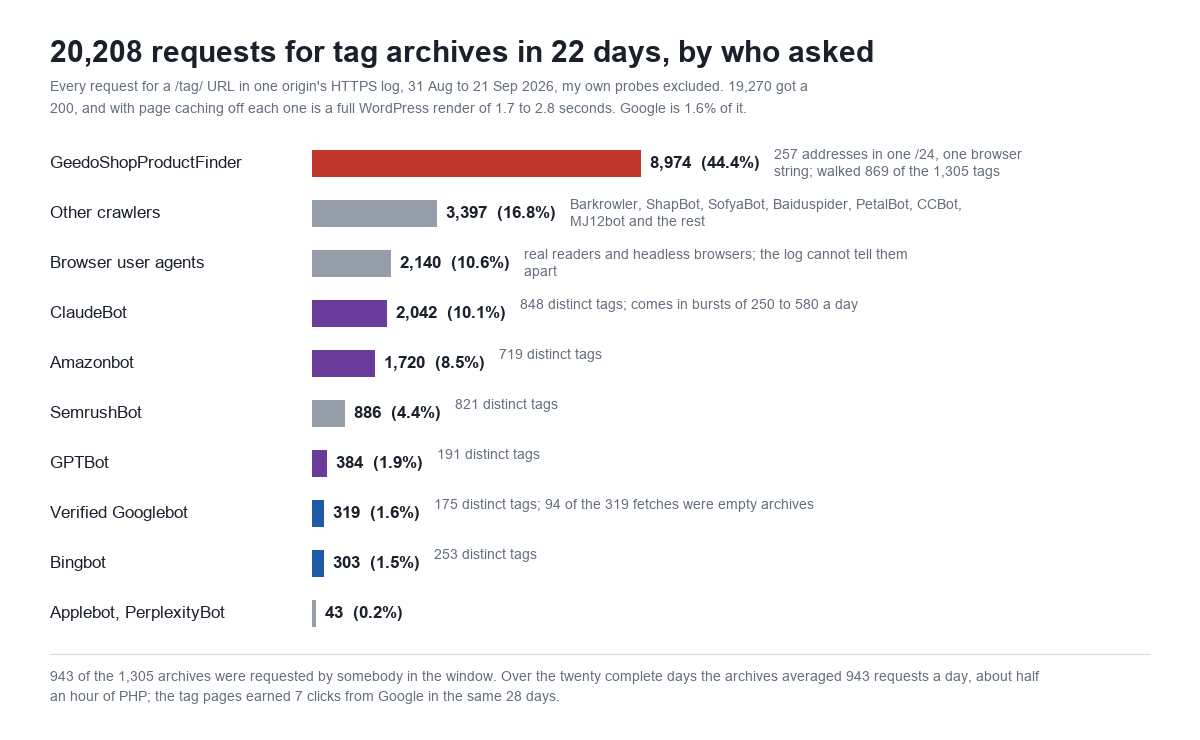
The largest reader of this site’s tag archives is a crawler I had never heard of. GeedoShopProductFinder made 16,033 requests to the origin in 22 days, 7% of everything the server did, from 257 addresses that are the whole of one /24 (reverse DNS product-search-83-99-206-x.geedo.com), all sending the same Linux Chrome user-agent string with the crawler’s name tucked inside it. It read robots.txt ten times. It fetched 8,974 tag archives covering 869 distinct tags, and 10 product pages. Whatever a shop product finder is looking for, it spent 56% of its visit on the taxonomy of a blog. It came every day but one and never above 671 tag requests in a day, which is why it never showed up as a spike; it shows up as a floor.
| Client | Tag requests | Distinct tags | All requests to the site | Notes |
|---|---|---|---|---|
| GeedoShopProductFinder | 8,974 | 869 | 16,033 | 257 addresses in 83.99.206.0/24; 10 robots.txt reads, 10 product pages |
| Other crawlers (Barkrowler, ShapBot, SofyaBot, Baiduspider, PetalBot, CCBot, MJ12bot…) | 3,397 | 861 | — | the long tail of SEO tools and search engines that are not Google or Bing |
| Browser user agents | 2,140 | 784 | 121,095 | real readers plus headless browsers; the log cannot separate them |
| ClaudeBot | 2,042 | 848 | 5,376 | bursts: 321, 293, 577, 346, 251 on five of the 22 days, near zero otherwise |
| Amazonbot | 1,720 | 719 | 13,699 | steady, 40 to 250 a day |
| SemrushBot | 886 | 821 | 1,796 | half of its whole visit was tag archives |
| GPTBot | 384 | 191 | 8,433 | 5% of its visit |
| Verified Googlebot (66.249.x.x) | 319 | 175 | 3,859 | 19.6% of its HTML fetches; see below |
| Bingbot | 303 | 253 | 3,303 | 9% of its visit |
Two things stand out in that table. The AI crawlers (ClaudeBot, Amazonbot, GPTBot) together made 4,146 tag requests, more than Google and Bing combined by a factor of six; this site chooses to let them in because the traffic they ground is real, but what they are grounding on, in a fifth of their visits, is one-post archives that duplicate posts they already have. And the two search engines that actually send this site visitors are at the bottom of the list. Google’s 319 fetches are 1.6% of the tag traffic. The cost of the archives is almost entirely paid to clients that will never send a click.
What Google does with them
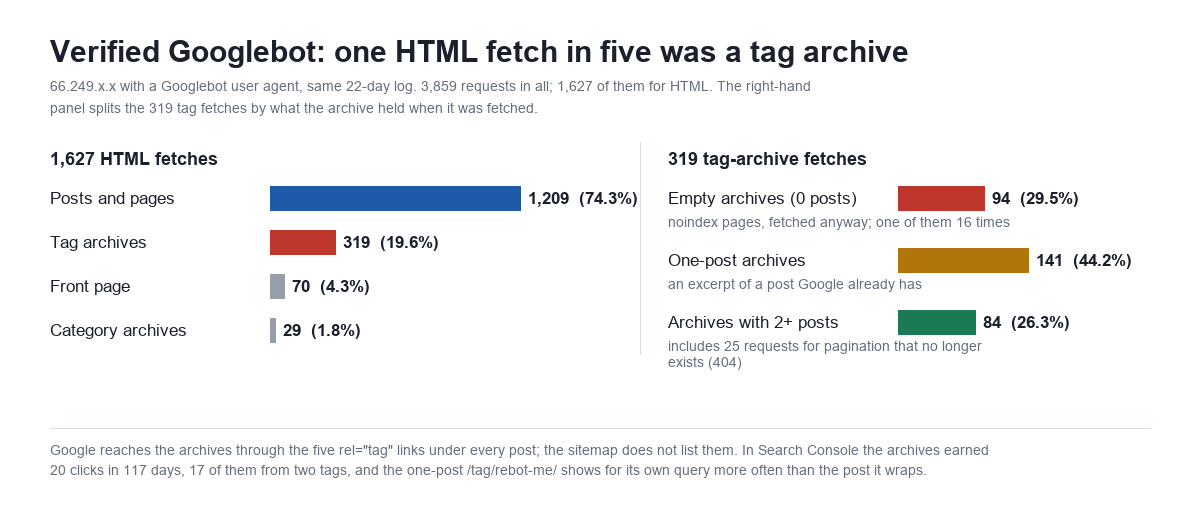
Verified Googlebot made 3,859 requests in the window: 933 sitemap reads, 855 static assets, 350 admin-ajax and REST calls made while rendering, 88 for robots.txt, and 1,627 for HTML. 319 of the 1,627 HTML fetches, 19.6%, were tag archives, against 1,209 for posts and pages, 70 for the front page and 29 for category archives. Inside the 319: 94 fetches (29.5%) were of empty, noindexed archives, one of which (/tag/best-free-backup-plugin-for-wordpress/, whose only post is a draft) was fetched sixteen times; 141 (44.2%) were one-post archives; 84 were archives with two or more posts, and 25 of those were requests for pagination that no longer exists, /tag/mxchat/page/12/ and /tag/enhance-user-engagement/page/3/, pages that existed when those tags had more posts and that Google still checks. Those 25 are the “verified Googlebot 404s” that the 404 post counted as correct and left alone.
The obvious question is whether any of this earns anything. Search Console, page filter /tag/, 25 May to 18 September (117 days): 2,230 impressions and 20 clicks across about 190 tag archives, a 0.90% click-through rate. The last 28 days: 736 impressions and 7 clicks. For scale the site did 59,641 impressions and 463 clicks in the same 28 days, so the archives are 1.2% of impressions and 1.5% of clicks. Not nothing, and the “not nothing” is concentrated: two archives account for 17 of the 20 clicks.
| Tag archive | Posts in it | Impressions (117 d) | Clicks | Avg. position |
|---|---|---|---|---|
/tag/mxchat-pro/ | 5 | 408 | 8 | 6.1 |
/tag/rebot-me/ | 1 | 356 | 9 | 11.1 |
/tag/chatbot-comparison/ | — | 88 | 0 | 33.7 |
/tag/mxchat-review/ | — | 76 | 0 | 19.8 |
/tag/divi-review/ | — | 51 | 0 | 45.1 |
/tag/botsonic-wordpress/ | — | 48 | 0 | 33.5 |
| All other tag archives (~184) | 1,203 | 3 |
/tag/rebot-me/ is the specimen worth staring at. It holds one post, an old piece about the Rebot.me chatbot builder. For the query rebot.me Search Console shows the tag archive with 123 impressions at position 8.6 and the post itself with 14 impressions at 7.3. The archive, a page that consists of the post’s excerpt and a sidebar, is being shown nine times more often than the post for the post’s own subject. That is what a one-post tag archive does when it “works”: it takes the query from the page that deserved it. Noindexing that archive would probably hand the impressions back to the post, and it would also cost the nine clicks the archive collected in the meantime, which is why “noindex all tags” is a decision and not a default. The mxchat-pro archive is the other kind: five product posts under a brand-plus-product tag, ranking at position 6 for its own name, doing the job a tag archive is for.
Tags against categories on the same site
The tags-versus-categories question usually gets a taxonomy answer (categories are hierarchical and required, tags are flat and optional). The log gives a different one. This site also has 100 categories; 24 are empty and 50 hold one post, so the category space has the same disease in a smaller body, but it drew 29 verified-Googlebot fetches in the window against the tags’ 319. The difference is not the taxonomy, it is the link count: the theme prints far fewer category links per post than tag links, and the tag names never repeat. Crawl follows links, and the taxonomy that gets five links per post with a fresh term every time gets the crawl.
What I did this morning, and what I did not
Deleted the 438 empty tags. The list came from a join, not from the count column (which was accurate here, but is not always): every post_tag term with zero relationships to a published post. 370 of them were attached to nothing at all; 68 were attached only to draft posts, and deleting the term removes it from those drafts, which I noted and accepted. The full inventory, with every term’s name, slug, count and attached object IDs, went into the repository first, so any of them can be recreated. Then wp term delete post_tag in batches of fifty. 438 deleted, 867 remain, none with zero posts. Before, /tag/best-free-backup-plugin-for-wordpress/ returned a 200 at 145,694 bytes with a noindex tag; after, a 404 at 143,754 bytes. Note what that does and does not change: the render cost is the same, because a WordPress 404 is a full render on this host. What changes is the status. Google re-fetches a noindexed 200 indefinitely (94 times in 22 days across these empties); it drops a 404 from the schedule after a few confirmations, and the other crawlers do the same or stop following the links, which no longer exist anywhere.
Told GeedoShopProductFinder to stop, in robots.txt. It reads the file, so it gets the polite version first: a User-agent: GeedoShopProductFinder block with Disallow: /, added through Rank Math’s robots.txt editor, verified at the origin and purged at the Cloudflare edge. One thing to know about that editor: its content replaces the generated file, including the Sitemap: line Rank Math normally appends, so the sitemap line has to be put back by hand or it silently disappears. I diffed the live file against a copy taken beforehand to catch exactly that. Whether the crawler obeys is tomorrow’s log read; if it does not, an .htaccess rule on the user-agent string is the fallback, written the way the ErrorDocument post describes so that a denied request costs nine bytes rather than a render.
Left the 713 one-post archives indexable, on purpose. They are three quarters of the request load and the clearest thin-content case on the site, and the fix is one filter: hook rank_math/frontend/robots (or the equivalent in Yoast) and return noindex when is_tag() and the queried term’s count is below two. I did not ship it today because the two archives that earn clicks are a one-post archive and a five-post one, and because a change that touches 713 URLs at once needs its own before-and-after window rather than sharing one with a deletion and a robots change. It is the next read. If your site has no rebot-me, the decision is easier than mine.
One check before deleting tags on a site that runs a chatbot: MxChat can map WordPress post tags to user roles on its Role Restrictions screen, so that knowledge-base entries synced from tagged posts are only answered for those roles. The mapping is stored in the mxchat_tag_role_mappings option and keyed by tag slug; a tag used there is not empty in any sense that matters, and deleting it would silently widen who the chatbot answers. This site has no mappings, which I confirmed before the delete. The documentation covers the screen.
Reading your own tag archives in twenty minutes
- Count tags by published posts, not by the count column.
wp term list post_tag --fields=term_id,slug,count --format=csvis the quick version; the accurate one is a query joiningterm_taxonomy,term_relationshipsandpostsfiltered topost_status = 'publish'. Bucket the result: zero, one, two, three or more. - Look at the tags-per-post distribution. If one number dominates (five, here) you are looking at a generator’s habit, not an editorial choice, and the fix belongs upstream too.
- Pull the origin log for
/tag/.awk '$7 ~ /^\/tag\//' access_loggives the requests; count status codes, then classify the user-agent field only (not the whole line, or a referrer containing “bot” will inflate your crawler count). Verify Googlebot by address range or reverse DNS; a third of “Googlebot” requests on this site come from addresses that are not Google. - Time one archive from the host.
curl -o /dev/null -w '%{http_code} %{size_download} %{time_total}\n'against an empty, a one-post and a large archive. If they cost the same as a post, every crawler request for an archive is a post-sized request. - Filter Search Console to
/tag/. Sixteen months if you have them. Note which archives, if any, earn clicks, and for each one check whether the query it wins belongs to a post it contains. - Delete the empties, after exporting them. Empty archives are 200s with noindex; deletion turns them into 404s that crawlers eventually stop requesting. Export first, check any plugin that keys behaviour on tag slugs, then
wp term delete post_tag <ids>. - Decide the one-post archives with the numbers in front of you. Noindex below a threshold via your SEO plugin’s robots filter, merge tags into a smaller vocabulary, or stop printing tag links in the theme. Change one thing, read the log and Search Console two weeks later, then change the next.
Frequently asked questions
Are WordPress tags good or bad for SEO?
Neither by nature. A tag archive that gathers several related posts under a name people search for is a useful page (/tag/mxchat-pro/ here, at position 6 for its own name). A tag archive that holds one post is a weaker copy of that post, and a tag archive with none is a noindexed page that still costs a render. On this site 88% of the archives were the second and third kind. The question is not “tags or no tags” but how many of yours hold more than one post.
Should tag archives be noindexed?
Empty ones already are in Rank Math and Yoast by default; the better fix for those is deletion, since noindex still leaves a 200 that crawlers keep checking. For one-post archives noindex is usually right, with one caution: check Search Console for any that earn clicks first, because a noindexed archive that was ranking hands its query back to the post only if the post can hold it. Archives with several posts are ordinary pages; index them if the name is something people search for.
Is it better to delete empty tags or noindex them?
Delete, after exporting the list. A noindexed empty archive is a 200 that Google fetched 94 times in 22 days on this site; a deleted one is a 404 that drops out of the crawl and out of every crawler’s link graph, because the rel="tag" links that pointed at it are gone with the term. The render cost of the 404 itself is the same as before on a host without page caching, so the saving is in the requests that stop coming, not in the ones that arrive.
Do the 404s from deleted tags hurt rankings?
No. Google’s position for years has been that 404s for pages you removed on purpose are the correct signal and do not affect the rest of the site. The empty archives were noindex already, so nothing that was indexed has been lost. The one case to handle differently is a tag archive that has inbound links from other sites or clicks in Search Console; that one gets a 301 to the best post, not a delete.
How many tags should a post have?
As many as it shares with other posts, which is usually zero to three. A tag that only ever appears on one post is not a tag, it is a second slug. The habit to break is the one this site had, five fresh tags on every post from a generator; the vocabulary should be a short list you reuse, and a tag should exist because a second post needed it.
Data: origin HTTPS access log for mxchat.ai, 31 August 08:16 to 21 September 03:57 EDT 2026, with requests from my own address and the server itself removed; tag counts from the site’s database on 21 September 2026; Search Console page filter /tag/, 25 May to 18 September 2026. Response times are single-host curl timings, three runs each, at the origin with Cloudflare bypassed.