WordPress Hardening: 5,476 Plugin File Loads, 1,939 Fatals
Open the PHP error log on a WordPress site that has been on the public internet for six months and you will find the same line thousands of times: PHP Fatal error: Uncaught Error: Class "WP_REST_Controller" not found in .../wp-content/plugins/.... The plugin is not broken. Nobody on the site saw an error. What the line records is a request that asked the web server for a plugin’s PHP file by its path, with no WordPress in front of it, and the file falling over at the first function it tried to call. This post reads 22 days of one origin’s access logs and six and a half months of its error log to answer three questions: who does this, what they learn from the answer, and what it costs to stop. It is the plugin-directory half of a job that started with the core-include files three days ago.
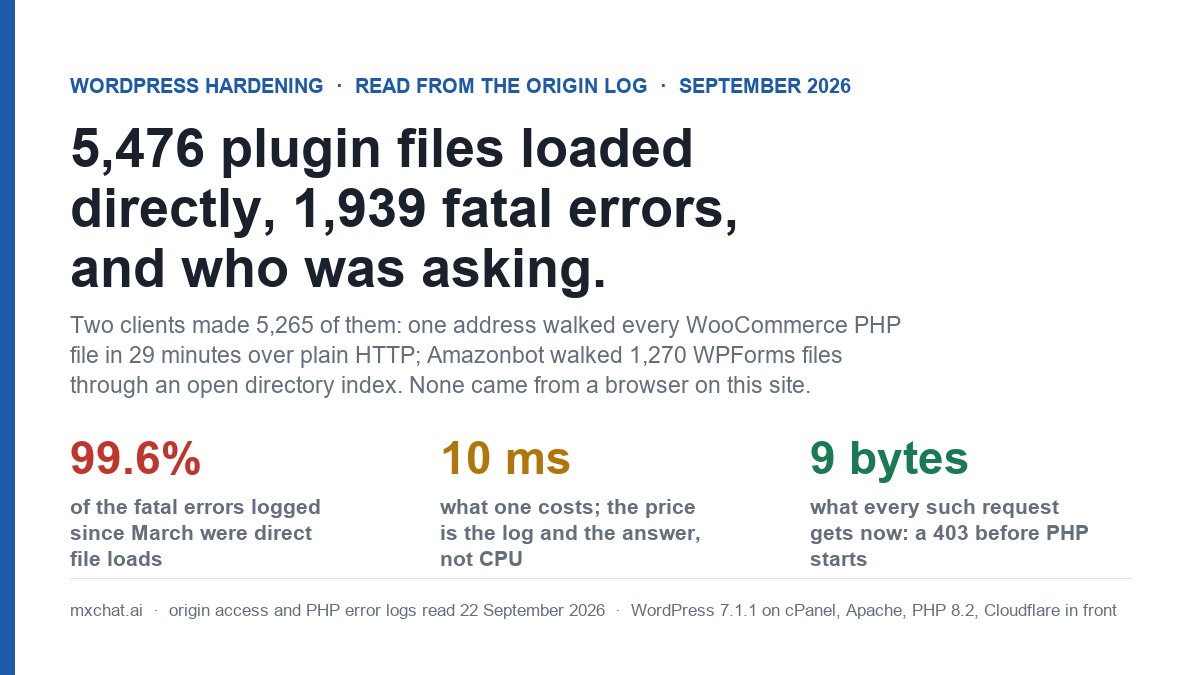
The short version. In 22 days, 5,476 requests asked for a PHP file under /wp-content/plugins/ directly. 3,347 got a 200 with an empty body, 1,939 got a 500 and wrote a fatal error to the log, 103 were WordPress 404 renders for plugin files that do not exist here. Two clients made 5,265 of the 5,476: one address that loaded every one of WooCommerce’s 3,994 PHP files in 29 minutes over plain HTTP, and Amazonbot, which walked 1,270 WPForms files it found through a directory index that was open until the 18th. Not one of the 5,476 came from a browser with a page on this site as the Referer. In the error log, 42,750 of the 42,934 fatal errors since 3 March, 99.6%, are this class of request, against 184 fatals the site produced on its own.
What the access log said
The instrument is the same one as the 404 read and the tag-archive read: cPanel’s origin access logs for both ports, the archived gzip plus the live file, 31 August 00:00 to 22 September 04:05 EDT, with my own address and the server’s loopback requests removed. That leaves 280,759 requests. The filter is a request path matching ^/wp-content/plugins/[^/]+/.*\.php, with or without a query string.
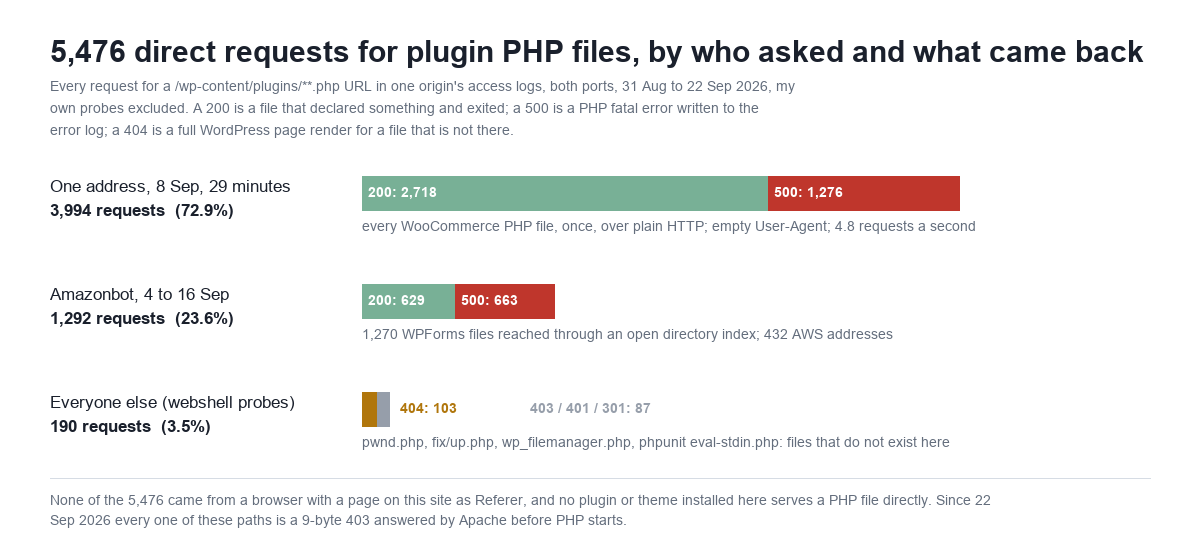
| Client | Requests | 200 | 500 | 404 | 403 / 401 / 301 | What it asked for |
|---|---|---|---|---|---|---|
| One address, 8 Sep 05:40 to 06:09 EDT | 3,994 | 2,718 | 1,276 | 0 | 0 | 3,994 distinct WooCommerce PHP files, each once; port 80; empty User-Agent; no Referer |
| Amazonbot, 4 to 16 Sep (432 addresses) | 1,292 | 629 | 663 | 0 | 0 | 1,270 distinct WPForms Lite PHP files; port 443; no Referer |
| Everyone else (browser and typo user agents, about 50 addresses) | 190 | 0 | 0 | 103 | 87 | Files that do not exist here: hellopress/wp_filemanager.php (103), fix/up.php (15), pwnd/pwnd.php, phpunit/.../eval-stdin.php under four plugin names, and 14 more |
| Total | 5,476 | 3,347 | 1,939 | 103 | 87 |
Three populations, and they are not the same kind of thing. The third row is the familiar one: webshell names and a 2017 PHPUnit remote-code-execution path, tried against plugin directories that are not installed. Those are the probes every WordPress site gets, and because the file is not there, each one that reached PHP was a full WordPress “page not found” render of 141 KB and about 1.9 seconds (80 of the 103; the other 23 were answered by the host’s firewall first). The first two rows are different. Every file they asked for exists. They were not guessing; they had the list.
Why a plugin file answers 200 or 500 when you load it directly
WordPress plugins are loaded by WordPress: the plugin’s main file is included from wp-settings.php after core is up, and the plugin includes its own class files from there. Nothing in the normal life of a site requests /wp-content/plugins/woocommerce/includes/class-wc-brands.php over HTTP. But the file is inside the web root, Apache will hand it to PHP if asked, and what happens next depends entirely on what the first executable line does.
- If the file starts with the Plugin Handbook’s guard,
if ( ! defined( 'ABSPATH' ) ) exit;, PHP starts, sees noABSPATH, and exits. 200, zero bytes. - If the file only declares a class with no parent, or an interface, or returns an array (WooCommerce’s
*.asset.phpmanifests), PHP compiles it and reaches the end. 200, zero bytes. - If the file declares a class that
extendssomething WordPress would have loaded (WP_REST_Controller,WP_Widget,WP_List_Table), or callsadd_action(),__()orapply_filters()at the top level, or doesrequire ABSPATH . '...', PHP throws an uncaught Error. 500, zero bytes here, one fatal line in the error log.
How many files carry the guard is a per-plugin decision, and it varies more than I expected. I grepped every PHP file under /wp-content/plugins/ for ABSPATH, WPINC or WP_UNINSTALL_PLUGIN:
| Plugin | PHP files | With a guard string | Share |
|---|---|---|---|
| WooCommerce 11.1.1 | 4,044 | 1,370 | 34% |
| WPForms Lite 2.0.2 | 4,057 | 245 | 6% |
| Rank Math SEO 1.0.278 | 1,028 | 475 | 46% |
| Wordfence 9.0.1 | 469 | 31 | 7% |
| W3 Total Cache 2.10.6 | 3,875 | 239 | 6% |
| MxChat 3.2.22, own files | 41 | 40 | 98% |
| MxChat 3.2.22, vendored PDF parser | 45 | 0 | 0% |
| Every plugin directory on the site | 22,660 | 4,324 | 19% |
The low numbers are mostly vendored libraries: Composer packages under vendor/ and vendor_prefixed/ that were never written for WordPress and have no reason to know what ABSPATH is. WPForms Lite ships 4,057 PHP files and its own code is a small fraction of them. That is not a defect in the plugin. It is why the guard, on its own, was never going to be the fix: 81% of the PHP files on this site do not have one, and a web server that hands any of them to PHP on request will keep producing the pattern above.
The answer does carry information, and that is the part worth being precise about. A 200 or a 500 for a path, against a 404 for another, tells the requester which files exist. Plugin releases add and remove files, so a handful of well-chosen paths yields the plugin’s version without reading readme.txt. On this host display_errors is off, so the 500 body is empty and the fatal message with its full filesystem path goes to the log, not the client; on a host where it is on, every one of those 1,939 responses would have printed /home/<account>/public_html/wp-content/plugins/... to whoever asked. Check yours: php -i | grep display_errors from the account’s shell, or a phpinfo page you delete afterwards.
The 8 September sweep: 8,446 requests in 29 minutes over plain HTTP
One address, in a RIPE-registered range, from 05:40:48 to 06:09:53 EDT on 8 September. 8,446 requests, all GET, all on port 80, User-Agent empty, Referer empty, 4.8 requests a second. It started at /wp-content/uploads/ and read the Apache directory index there, then each year, then each month; it walked /wp-content/plugins/woocommerce/ the same way, every subdirectory’s index (3,097 directory requests in all) and then every PHP file the indexes listed, once each: 3,994 of WooCommerce’s 4,044. It requested nothing else. No .js, no .css, no readme.txt, one stray .sh. Then it did /wp-admin/includes/, which is the set denied since the 19th, tried /wp-admin/ (a 403) and left.
A client that requests only executable files, from a listing, at that rate, is not indexing anything. The plausible reading is a search for a PHP file that does something when loaded on its own: an installer left behind, an upload handler with no nonce, a debug endpoint. It found 2,718 files that exit and 1,276 that crash. The point for an operator is not what it found but what it needed to get there: an open directory index and a web server that executes anything under the plugins tree. The first was closed on 18 September; the second, today.
It also was not the first visit. The PHP error log goes back to 3 March, and the WooCommerce fatals in it arrive as discrete sweeps of 1,114 to 1,299 lines each: 23 March, 9 April, 29 April, 7 May, 9 May, 31 May, 20 June, 24 June, 13 July, 15 July, 8 September. Eleven in six months, roughly one every two or three weeks, the count rising as WooCommerce adds files. The 8 September one is simply the sweep that falls inside the current access-log window; the log rotation ate the addresses for the other ten.
Amazonbot walked a plugin directory because one SVG was linked from the contact page
The second walker is Amazon’s crawler, identified by its published user agent and by 432 addresses in AWS ranges, and it did nothing hostile. It did what a crawler does when a web server gives it a page of links.
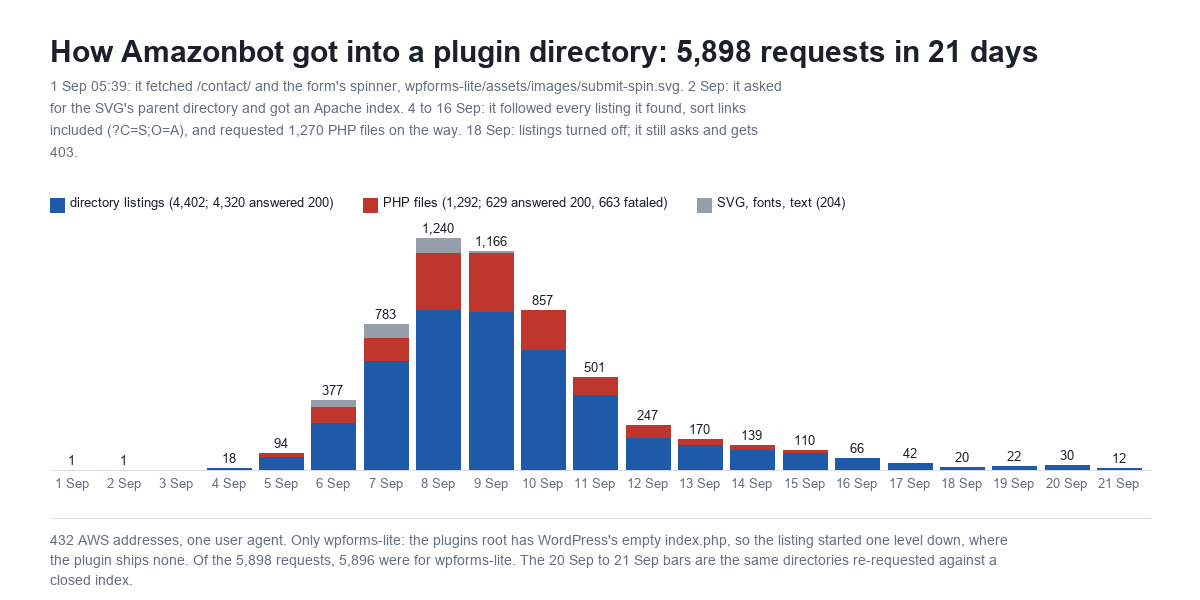
The sequence, from the log. 1 September, 05:39:24: Amazonbot fetches /contact/. Six seconds later it fetches /wp-content/plugins/wpforms-lite/assets/images/submit-spin.svg, the spinner the contact form shows while it submits, linked from the page’s CSS. 2 September, 21:14: it asks for /wp-content/plugins/wpforms-lite/, the plugin’s root, a URL nothing links to. That is a parent-directory guess, and it worked, because WPForms Lite ships no index.php in its directory and Apache’s autoindex was on: 200, 561 bytes, a list of every file and folder in the plugin. From the 4th it followed the list. Every subdirectory, 4,198 distinct ones, plus Apache’s column-sort links (?C=S;O=A, ?C=M;O=A, ?C=N;O=D) as separate URLs, and every PHP file on the way: 1,292 requests, 629 answered 200 and 663 answered 500. It peaked at 1,240 requests on the 8th and tailed off by the 16th. Since Options -Indexes went in on the 18th it has come back for those directory URLs 61 times, 19 to 22 September, and received a 403 each time.
Why only WPForms? Because /wp-content/plugins/ itself was safe: WordPress ships an empty index.php there, so a request for the plugins root returns nothing and no list. The listing only existed one level down, in a plugin that does not ship its own index file, and the only link into that level was an image. WooCommerce’s directories are open the same way, which is what the 8 September client used, but no page on this site links to a WooCommerce file that a crawler would climb from. Amazonbot is a well-behaved crawler that honours robots.txt; it is also 8.5% of the requests for this site’s tag archives, per yesterday’s read, and it will fetch anything it is given a URL for. The fix for this one is not blocking Amazon. It is not handing out the list.
Six months of the error log
The access logs rotate; the PHP error log does not. It is 25.8 MB, 237,005 lines, 3 March to this morning, and it holds the longer version of the story.
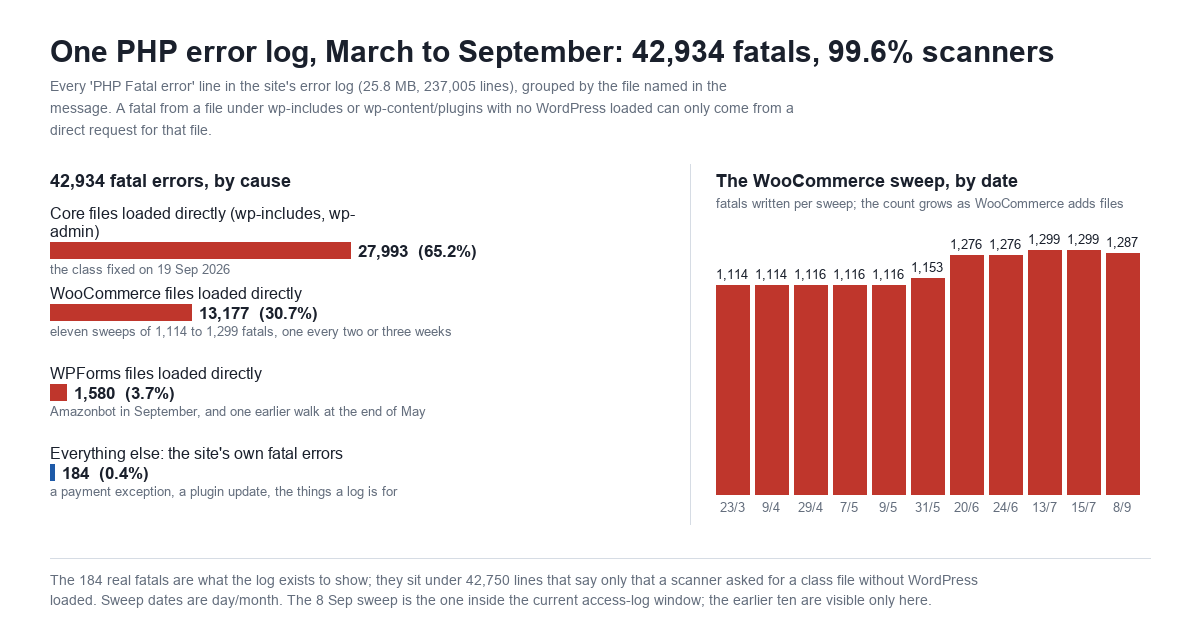
42,934 lines begin PHP Fatal error. Grouped by the file the message names: 27,993 are core files under wp-includes/ or wp-admin/includes/ loaded directly (the class the 19 September rule closed), 13,177 are WooCommerce files, 1,580 are WPForms files, and 184 are everything else, which is to say the fatal errors the site actually produced in six and a half months: a PayPal order exception in March, a couple of plugin-update collisions, the things a log exists to show. The top messages are what you would predict from the guard table: Class "WP_REST_Controller" not found 2,183 times, Call to undefined function _deprecated_file() 2,025, Class "WpOrg\Requests\Exception\Http" not found 1,881, Class "WP_Widget" not found 1,728, Undefined constant "ABSPATH" 828. A monitoring rule that alerts on fatals would have fired on every sweep and on nothing that mattered. A person grepping for the March payment exception had 42,750 lines to read past.
What one of these requests costs, measured
I want to be careful here, because the 404 post was about requests that each cost a 1.8-second page render, and this class does not. A PHP file that exits or crashes on its first line never loads WordPress. From the server, against its own public address, three runs each:
| Request | Answer | Body | Time |
|---|---|---|---|
woocommerce/woocommerce.php (guarded, exits) | 200 | 0 B | 10.6 to 13.6 ms |
woocommerce/assets/.../style.asset.php (returns an array) | 200 | 0 B | 10.3 to 10.8 ms |
wpforms-lite/uninstall.php (guarded by WP_UNINSTALL_PLUGIN) | 200 | 0 B | 9.9 to 11.8 ms |
woocommerce/includes/class-wc-brands.php (calls apply_filters()) | 500 | 0 B | 10.3 to 11.9 ms, plus one fatal line |
woocommerce/assets/css/woocommerce.css (a static file, for scale) | 200 | 92,125 B | 10.8 to 15.6 ms |
/.env (denied by the 20 September rule) | 403 | 9 B | 9.3 to 10.2 ms |
/wp-content/plugins/pwnd/pwnd.php (does not exist: WordPress 404) | 404 | 143,754 B | 1,853 ms |
| A published post, for scale | 200 | 207,332 B | 1,949 ms |
So the 5,286 requests for files that exist cost the server about a minute of PHP across 22 days, and denying them saves nothing you could measure in CPU: a deny is 9 bytes and 10 ms, and so was the thing it replaces. What the deny buys is the two things above. The error log stops filling with lines that are not errors, and the server stops answering the question “does this file exist” for anyone who asks. The 103 requests for plugin files that do not exist are the exception: those were WordPress renders, and under the new rule they are 403s as well, because the rule matches the path, not the file.
What changed today, and the checks that ran first
The rule is two lines. The work is establishing that nothing legitimate matches them, and the 19 September post set the bar: no deny goes in without a pass over the whole log for a request that would have been wrongly refused.
- The log. All 5,476 requests: 0 answered 200 to a browser user agent; 0 carried a page on this site as Referer. Same pass for
/wp-content/themes/**.php(34 requests, all forindex.phpor files from themes not installed) and/wp-content/mu-plugins/(0 requests). - The HTML. The front page, a post, the product page, the shop and the documentation hub reference no
.phpunderwp-content: every enqueued asset is.css,.js, a font or an image, and the rule does not touch those. - The code. A grep of every plugin, theme and mu-plugin for a
requireofwp-load.phporwp-blog-header.php, the signature of a file written to be requested directly, finds one: a developer tool in WooCommerce’s blueprint package. W3 Total Cache’s minify and page cache are off, so itspub/endpoints are not in play (0 requests in the window regardless). The one mu-plugin that reads$_GET, a host’s SSO helper, runs on WordPress hooks and fatals if loaded directly, so nothing legitimate reaches it that way either. - Uploads. 27 PHP files exist under
/wp-content/uploads/; all 27 are emptyindex.phpfiles plugins drop to prevent listings. Nothing should execute from uploads, and the standard hardening line covers it.
# BEGIN BLOCK DIRECT PLUGIN/THEME/MU-PLUGIN/UPLOADS PHP - 2026-09-22
<IfModule mod_rewrite.c>
RewriteEngine On
RewriteRule ^wp-content/(plugins|themes|mu-plugins)/.+\.php$ - [F,L,NC]
RewriteRule ^wp-content/uploads/.+\.php$ - [F,L,NC]
</IfModule>
# END BLOCK DIRECT PLUGIN/THEME/MU-PLUGIN/UPLOADS PHP
It sits above the 19 and 20 September blocks in the root .htaccess, under the ErrorDocument 403 "Forbidden" line that makes a deny a 9-byte string instead of a page render. NC makes it case-insensitive, because Apache on this host serves WooCommerce.PHP as happily as the lowercase path. The script that applied it took a backup, ran 24 must-answer-200 URLs (the front page, a post, the product page, the REST API, the sitemap, robots.txt, the login page, the chat widget’s stylesheet, WooCommerce’s cart script, the child theme’s CSS and JS, an uploaded image, and wp-tinymce.php, the one core file that stays reachable), 3 must-answer-404 URLs (an ACME challenge path has to stay a 404, not a 403, or certificate renewal breaks), a POST to admin-ajax.php that must return 400, and 16 must-answer-403 URLs, and would have restored the backup on any failure. All held.
| Request | Before | After |
|---|---|---|
woocommerce/woocommerce.php | 200, 0 B | 403, 9 B |
woocommerce/includes/class-wc-brands.php | 500, 0 B, one fatal logged | 403, 9 B |
wpforms-lite/uninstall.php | 200, 0 B | 403, 9 B |
plugins/pwnd/pwnd.php (not installed) | 404, 143,754 B, 1.9 s | 403, 9 B |
themes/kadence-child/functions.php | 500, 0 B, one fatal logged | 403, 9 B |
uploads/2026/222.php (not there) | 404, 143,754 B, 1.9 s | 403, 9 B |
plugins/Woocommerce/WooCommerce.PHP | 404, 143,754 B | 403, 9 B |
plugins/woocommerce/assets/css/woocommerce.css | 200, 92,125 B | 200, 92,125 B |
plugins/mxchat-basic/css/chat-style.css | 200, 55,941 B | 200, 55,941 B |
/wp-content/plugins/ (WordPress’s empty index.php) | 200, 0 B | 403, 9 B |
The last row is a side effect worth knowing about: a request for the plugins root used to be served by the empty index.php, and Apache’s directory-index subrequest now trips the rule. A 403 for a URL nothing links to is fine. If your host runs a health check against a path like that, add an exception before the deny.
What this does not fix
- It does not stop the scanners. The 8 September client will be back in two or three weeks and will make 3,994 requests again; each will now be a 403. The log entry moves from the error log to the access log, which is where a scan belongs.
- It does not save CPU, for the 5,286 requests that hit real files. It does for the 103 that did not, and for whatever the next webshell name is.
- It does not clean the error log. The 42,750 lines are still there. Rotate or truncate it deliberately; on cPanel,
~/logs/<domain>.php.error.logis not rotated for you. - It does not fix the guard. Plugin authors should still put
if ( ! defined( 'ABSPATH' ) ) exit;at the top of their own files, because not every host is Apache and not every operator has this rule. MxChat’s own 41 files have it in 40; the one that does not is on the list for the next release. The 45 files of the PDF parser it vendors do not, and a library is a library. - It is Apache-only. On nginx the equivalent is a
location ~* ^/wp-content/(plugins|themes|mu-plugins|uploads)/.+\.php$ { return 403; }block placed before the PHP handler, and it needs the same legitimacy pass first.
How to run this read on your own site
- Get the raw access log, not a summary. On cPanel:
~/access-logs/<domain>-ssl_logand~/access-logs/<domain>for the live files,~/logs/*.gzfor the archives. Read both ports; the 8 September sweep was entirely on port 80. - Filter for direct plugin loads:
grep -E '"GET /wp-content/plugins/[^ ]+\.php' access.log | awk '{print $1, $9}' | sort | uniq -c | sort -rn. Then by status:awk '$7 ~ /^\/wp-content\/plugins\/.*\.php/ {print $9}' access.log | sort | uniq -c. - Count the fatals in the error log by path:
grep 'PHP Fatal' error.log | grep -oE '/wp-content/plugins/[^/]+' | sort | uniq -c | sort -rn, and compare the total againstgrep -c 'PHP Fatal' error.log. The gap between the two numbers is your real error rate. - Check the discovery path.
curl -sI https://yoursite/wp-content/plugins/<any-plugin>/. A 200 withContent-Type: text/htmland noindex.phpin that directory is an open listing;Options -Indexesin the root.htaccesscloses all of them at once. - Run the legitimacy pass before the deny. Browser user agents with your own pages as Referer, requesting a
.phpunderwp-contentand getting a 200, are the requests a deny would break. Thengrep -rl 'wp-load.php' wp-content/plugins wp-content/themesfor files designed to be hit directly, and read each one. - Apply the rule with a check script that has a must-200 list (your real assets, your REST routes, your sitemap, an ACME path that must stay 404), a must-403 list, and a restore-on-failure branch. Never write to
.htaccesswithout a copy beside it. - Confirm the 500s stopped. The next sweep shows up as a block of 403s in the access log and nothing in the error log. If a plugin feature breaks in the following week, the access log will show a browser user agent hitting a
.phppath and getting a 403, and that path is your exception.
FAQ
Is a plugin file without an ABSPATH guard a vulnerability?
Not by itself. A class declaration that fatals because its parent is not loaded does nothing but write a log line. The guard matters when a file does real work at the top level, reads input, or would print a path with display_errors on. The deny rule makes the question moot for the files under it; the guard remains good practice for the file’s author because it works on every host.
Why did the scanner get a 200 on 2,718 files if they did nothing?
Because “did nothing” is a successful PHP execution. A file that declares a class and reaches its last line exits with status 0, and Apache reports that as 200 with an empty body. The 500s are the files that threw. Both answers confirm the file is there; a 404 would have said it was not.
Will this break plugins that use admin-ajax.php or the REST API?
No. admin-ajax.php lives in wp-admin/, the REST API is routed through index.php, and WooCommerce’s ?wc-ajax= endpoints are query strings on ordinary pages. None of them requests a PHP file under wp-content. The rule only matches paths that begin wp-content/plugins/, themes/, mu-plugins/ or uploads/ and end in .php.
Should I block Amazonbot instead?
Blocking a crawler that followed links you published fixes the symptom on one crawler. Closing the directory index fixes it for every crawler, and for the 8 September client, which sent no user agent to block. If you do not want Amazonbot at all, robots.txt works for it; it is one of the crawlers that reads the file. Which AI and search crawlers to allow is a separate decision, covered in the crawler post.
Does this apply to the chatbot plugin’s own files?
Yes, and it is the reason a chatbot plugin is a reasonable place to think about it. MxChat stores API keys in the options table and reads them inside WordPress, never from a file a browser could request; the documentation covers where keys live. But the plugin ships a PDF parser for the knowledge base, that library’s 45 files carry no guard, and until today a request for any of them would have been executed. After today it is a 403 like everything else in the tree. The one first-party file without the guard is a Word-document handler; it fatals harmlessly when loaded directly and gets the guard in the next release.
Method notes. Access logs: cPanel origin logs for ports 80 and 443, gzip archive plus live file, 31 Aug 00:00 to 22 Sep 04:05 EDT, 280,759 requests after excluding my own address and the server’s loopback. Client classification by the User-Agent field; Amazonbot identified by user agent and AWS address ranges, not verified by reverse DNS. Error log: ~/logs/mxchat_ai.php.error.log, 3 Mar to 22 Sep, “PHP Fatal error” and “PHP Parse error” lines, grouped by the first path in the message; my own checks today added 4 fatals to it before the rule went in and are included in the totals. Guard counts by grep for ABSPATH, WPINC or WP_UNINSTALL_PLUGIN anywhere in the file, which overcounts slightly (a comment mentioning ABSPATH counts). Timings: curl from the server to its own public address, n=3, best and worst shown.