Choosing Chatbot Development Frameworks A Guide to Building Smarter AI
So, you're ready to build a chatbot. Before you write a single line of code or design a conversation, you have one critical decision to make: choosing the right development framework. Think of it as the toolkit you'll use to build, deploy, and manage your conversational AI. It’s the single most important choice you'll make, and it will define your project's success from day one.
What Exactly Are Chatbot Development Frameworks?

Imagine trying to build a car from scratch. Not from a kit, but from piles of raw steel, rubber, and wires. You'd have to engineer the engine, figure out the transmission, and weld the chassis yourself. It’s a monumental task. That’s what building a chatbot without a framework is like.
A chatbot development framework is your pre-built chassis and engine. It gives you the core structure and all the heavy-duty components—things for understanding language, managing dialogue, and connecting to platforms like Facebook Messenger or your website. This lets you skip the foundational engineering and focus on what makes your car (or chatbot) special: its design, performance, and the experience it delivers to the driver.
Some frameworks are like a reliable sedan chassis from a major manufacturer—they're easy to work with and get you on the road fast. Others are more like a custom kit-car chassis, giving you the freedom to tweak every single component for maximum performance.
Why This Choice Is a Game-Changer
The framework you pick will directly shape your chatbot’s intelligence, scalability, and, most importantly, the user experience. A bad choice leads to a clunky, frustrating bot that constantly misunderstands users. The right one, however, becomes the launchpad for a genuinely helpful and seamless assistant.
Thanks to huge leaps in natural language processing (NLP), the market for these tools has exploded.
The global chatbot market hit an estimated value of $8.4 billion in 2024, and it's not slowing down. This growth is fueled by powerful and flexible frameworks that have put sophisticated AI within reach for businesses of all sizes.
Choosing a framework isn't just about the tech; it's a business strategy. It dictates your launch speed, your budget, how much you can customize, and how well your bot can evolve with your company. If you're just getting started, it's worth getting a handle on the underlying tech. You can learn more about the engine driving these tools in our detailed guide on conversational AI.
This guide will walk you through everything, starting with these core ideas and moving on to more advanced strategies. The goal is to give you the confidence to pick the perfect framework, ensuring your chatbot is built for success from the ground up.
Exploring The Different Types Of Chatbot Frameworks
Picking a chatbot development framework is a lot like choosing a vehicle for a road trip. Are you looking for a rugged, custom-built machine you can modify for any terrain? Or maybe a reliable, fully-serviced rental car that's ready to go right off the lot? Both get you where you're going, but the experience, cost, and control are completely different.
Chatbot frameworks generally fall into three main families, each with its own philosophy and designed for a specific type of user. Getting to know these categories is the first step to making a smart decision that fits your tech resources, budget, and ultimate business goals.
Open-Source Frameworks For Ultimate Control
Open-source frameworks are the custom-built off-roaders of the chatbot world. Tools like Rasa give you the complete source code, handing developers total control over every single component. You’re not just driving the vehicle; you're building the engine, tuning the suspension, and deciding exactly where every wire goes.
This level of control is a huge plus for businesses with very specific needs or strict data privacy requirements. Because you host the entire system on your own servers, all conversational data stays right where it is—in your environment. For industries like finance and healthcare, this is often a dealbreaker.
But all that freedom comes with a healthy dose of responsibility. You're in charge of everything:
- Infrastructure Management: It's on you to set up, manage, and scale the servers your chatbot runs on.
- Model Training: The AI doesn't just work; your team has to gather training data and fine-tune the Natural Language Understanding (NLU) models.
- Maintenance: You'll handle all the updates, security patches, and bug fixes yourself.
The perfect fit for an open-source framework is a company with a dedicated development team, especially one with solid Python and machine learning skills.
Cloud-Based Frameworks For Scalable Power
Think of cloud-based platforms as the reliable rental cars. Services like Google Dialogflow, Amazon Lex, and Microsoft Bot Framework offer a powerful, pre-built chassis managed by the biggest names in tech. You don't have to worry about what's under the hood; you just get in and drive, knowing the provider is handling all the maintenance.
These platforms provide sophisticated NLU and dialogue management as a ready-to-use service. You get to tap into years of research and massive training datasets without needing a big in-house AI team. Scalability is another massive win—as your user traffic grows, the platform handles the load automatically. This pay-as-you-go model makes top-tier AI accessible without a huge upfront investment in hardware.
This cloud-first approach is incredibly popular. In fact, cloud deployment now powers over 78% of the market share in 2024, largely because it's so flexible and secure. Still, many large companies opt for on-premise solutions to keep a tight grip on sensitive data. You can dive deeper into these trends in this detailed industry report from Mordor Intelligence.
The main trade-off with cloud frameworks is giving up some control. While they are highly configurable, you're ultimately working within a proprietary system. You can’t tweak the core NLU algorithms, and your data is processed on the provider's servers, which might be a concern for some organizations.
These platforms are a great match for businesses of all sizes that want to launch intelligent, scalable bots without the headache of managing the underlying AI infrastructure.
No-Code Builders For Speed And Simplicity
No-code builders are the electric scooters of the chatbot world. They are designed for one thing: getting you from point A to point B as quickly and easily as possible. These platforms are built for business users, marketers, and support teams—not developers.
With a visual, drag-and-drop interface, you can map out conversation flows, connect to a knowledge base, and launch a fully functional chatbot in hours, not weeks. This incredible speed makes them perfect for small businesses, marketing campaigns, or just testing out a chatbot idea before committing a ton of resources. To see what's possible, check out our guide on how no-code AI agent builders work.
The primary limitation here is flexibility. You're working within the sandbox the platform provides. While many offer great integrations, you’ll eventually hit a ceiling if you need deep, custom logic or connections to unique internal systems. They're fantastic at specific tasks like lead generation and FAQ automation but aren't built for creating highly complex, enterprise-level virtual assistants. They are the perfect starting point for any business that values speed and ease of use over deep customization.
Comparing Chatbot Framework Categories
To help you see the differences at a glance, here’s a quick breakdown of how these framework types stack up against each other.
| Framework Type | Primary User | Level of Control | Speed of Deployment | Ideal Use Case |
|---|---|---|---|---|
| Open-Source | Developers & AI Teams | Total Control | Slow (Months) | Complex, data-sensitive applications |
| Cloud-Based | Developers & IT Teams | High (Configurable) | Moderate (Weeks) | Scalable, enterprise-grade assistants |
| No-Code | Business & Marketing Teams | Limited (Pre-built) | Fast (Hours/Days) | Lead gen, FAQs, simple support bots |
Each category serves a distinct purpose. Your choice will ultimately come down to a balance between the technical resources you have, how fast you need to move, and how much control you need over the final product.
How To Select The Right Framework For Your Business
Alright, let's turn all this theory into a practical decision. Picking a chatbot development framework isn't just a tech task—it's a strategic move that affects your budget, your timeline, and what you'll be capable of down the road. Nail this choice, and you've built a valuable asset. Get it wrong, and you're looking at wasted money and a chatbot that frustrates customers more than it helps.
To make the right call, you have to look past the shiny features and get real about what your business actually needs. The "best" framework is simply the one that clicks perfectly with your goals, your team's skills, and your vision for growth.
Define Your Core Business Objectives
Before you even start comparing platforms, stop and ask "why?" What specific problem is this chatbot meant to solve? A clear objective is your north star for this entire process. Vague goals like "improve customer service" are useless here.
You need to get granular. Are you trying to:
- Cut down support ticket volume by 25% by having the bot handle the top 10 most-asked questions?
- Generate more leads by capturing contact info from 15% of visitors who chat with the bot?
- Automate all "where's my order?" inquiries to free up two support agents for tougher problems?
Each of these goals points to a different kind of tool. A simple FAQ bot can be built in a weekend on a no-code platform. But a bot that needs to dig into your order system requires a framework with serious integration power.
Assess Your Technical Resources And Expertise
This is where you need to be brutally honest with yourself, as it's one of the most common stumbling blocks. What can your team actually do? Do you have developers on staff who live and breathe Python or Node.js, ready to build and babysit a custom solution? If the answer is yes, then an open-source framework like Rasa gives you ultimate power and control.
But if your team is made up of marketing pros or support specialists who don't code, that same powerful tool becomes a massive headache. For them, a no-code or low-code platform is the only sensible choice. It empowers them to build and tweak the bot themselves, without having to file a ticket with the engineering department for every little change.
The right tool for an expert developer is often the wrong tool for a marketing manager. The key is to match the framework's complexity to your team's skill set, not the other way around. This prevents project delays and ensures you can actually maintain the bot after launch.
Evaluate Integration And Scalability Needs
A chatbot doesn't live on an island. To be truly useful, it needs to talk to the other software that runs your business. Start by making a list of your non-negotiable connections.
- CRM Systems: Does the bot need to push new leads or update existing contacts in your CRM?
- eCommerce Platforms: If you run a store, integrating with WooCommerce or Shopify is a must for checking orders, stock levels, or product details.
- Helpdesk Software: How smoothly can the bot create a support ticket and hand off a conversation to a human?
Now, think about the future. Do you expect your website traffic to explode in the next year? Cloud-based frameworks are built to handle sudden spikes without breaking a sweat. A self-hosted open-source bot, on the other hand, puts the responsibility of managing server capacity squarely on your shoulders. Picking a framework that can't grow with you just means you'll be facing a painful and expensive migration later on.
This simple flowchart helps visualize that high-level choice between framework types.
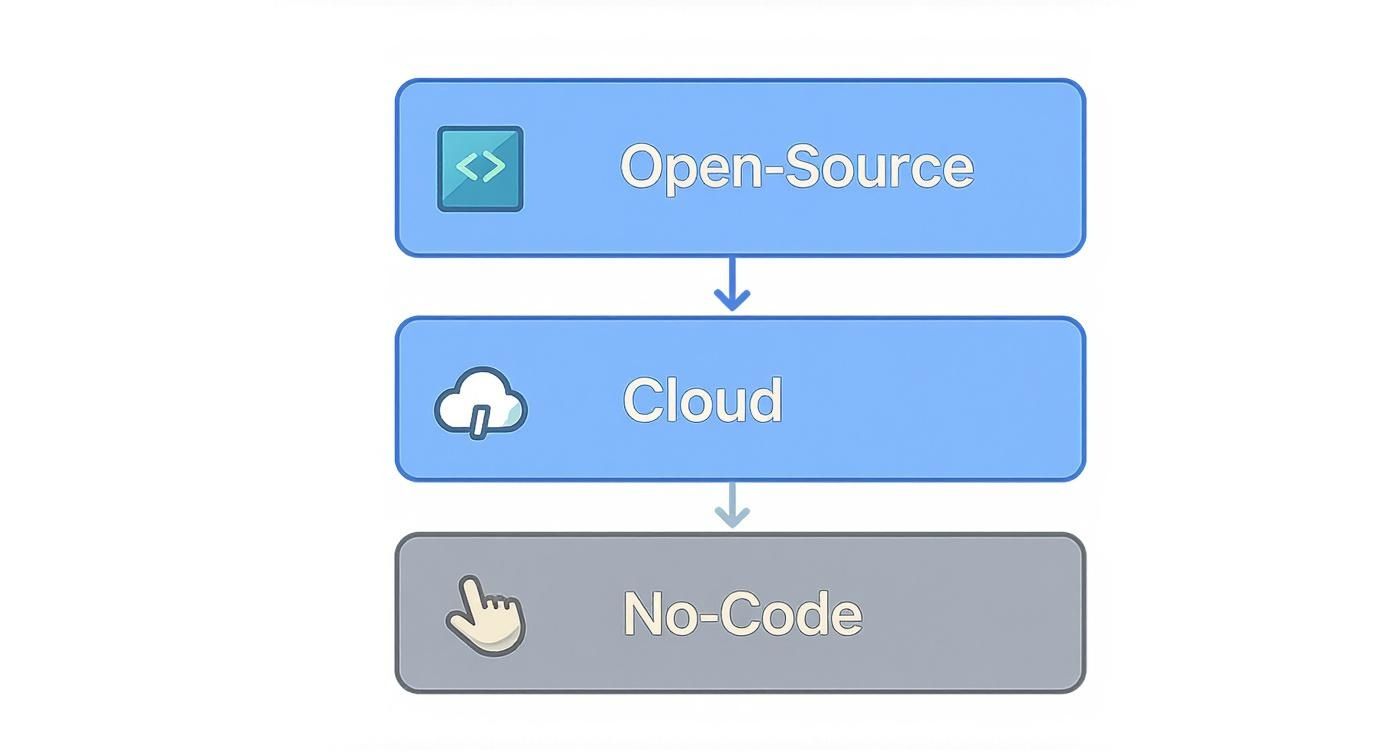
As you can see, the path you take is a direct trade-off. More control and customization means more technical work, while ease of use often means less flexibility.
Calculate The Total Cost Of Ownership
Finally, it's time to talk money—and I don't just mean the price tag. A "free" open-source framework is never truly free. You have to look at the Total Cost of Ownership (TCO), which includes all the hidden expenses.
- Development Costs: The salaries for the developers who will build and customize the bot.
- Infrastructure Costs: The monthly bill for servers and hosting, especially if you're managing it yourself.
- Maintenance Costs: The ongoing time and money spent on updates, bug fixes, and keeping the bot's training fresh.
- Subscription Fees: For cloud platforms, this is your recurring monthly or annual cost, which can scale with usage.
Lay these costs out for your top contenders. A managed platform with a clear monthly fee might look more expensive at first glance, but it could easily have a lower TCO than an "open-source" solution once you factor in developer salaries and server headaches. For WordPress and WooCommerce sites, a platform like MxChat changes the game with a lifetime-based model, which gets rid of those endless recurring fees and gives you a predictable, one-and-done cost.
Building Smarter Chatbots With Advanced Integrations
A basic chatbot is fine for answering simple questions, but its real power is unlocked when you connect it to your business's core systems. Advanced integrations are what turn a chatbot from a glorified FAQ page into a dynamic, problem-solving tool.
Think about the difference between a bot that says, "Our return policy is 30 days," and one that says, "I see your order #12345 was delivered last week, so you have 21 days left to start a return. Would you like me to begin that process for you?" That second response is infinitely more helpful, and it’s only possible through integration.
The right chatbot development framework makes these connections possible, turning your chatbot into a true extension of your team. By tapping into databases, CRMs, and your eCommerce platform, the bot gets the context it needs to provide personalized, actionable support that actually drives business results.
Giving Your Chatbot a Brain With RAG
One of the most powerful integration patterns available today is Retrieval-Augmented Generation (RAG). Imagine your chatbot has its own private, expert library. Instead of just guessing answers based on its general training data, it can instantly look up the exact information it needs from your own trusted documents—like product manuals, support articles, or internal policies.
This approach is a game-changer for accuracy and reliability. A standard large language model might "hallucinate" or simply invent an answer if it doesn't know something specific to your business. A RAG-powered bot, on the other hand, first retrieves relevant facts from its knowledge base and then uses those facts to generate a precise, trustworthy response.
RAG eliminates guesswork. It ensures your chatbot's answers are grounded in your company's actual data, providing a consistent and accurate user experience every single time. This is critical for building user trust and making your bot a reliable first point of contact.
To get the most out of your chatbot, exploring various AI integrations can provide a roadmap for connecting different systems effectively. Understanding the mechanics of RAG is a great place to start, and you can get a deeper technical overview by exploring our complete guide on what is Retrieval-Augmented Generation at https://mxchat.ai/what-is-retrieval-augmented-generation/.
This is a great way to visualize how a RAG system processes a user's question—it first searches a knowledge base for relevant information before crafting an answer.

The key takeaway is the two-step process: the "Retriever" finds the right documents, and the "Generator" uses them to formulate a coherent answer. It's the perfect blend of external knowledge and language fluency.
Real-World Examples of Powerful Integrations
Theory is one thing, but seeing how it works in practice is what really matters. Advanced integrations can automate complex tasks and create the kind of seamless experiences that customers remember. They allow your bot to do things, not just say things.
Here are a few concrete examples of what becomes possible:
- eCommerce Integration: A chatbot connected to your WooCommerce or Shopify store can give live updates on an order's status, check product inventory in real-time, and even help customers manage their shopping carts directly in the chat. This alone can slash the number of "where is my order?" tickets your support team handles.
- Helpdesk Integration: When a chatbot integrates with helpdesk software (like Zendesk or Freshdesk), it can automatically create a support ticket if it can't solve an issue. Better yet, it can perform a seamless handoff to a human agent, providing them with the full chat transcript so the customer never has to repeat themselves.
- CRM Integration: By connecting to your CRM, a chatbot can capture new leads, qualify them with a few quick questions, and add them right into your sales pipeline—no manual data entry required. It can also pull up a customer's history to have a more personal conversation, acknowledging their past purchases or support issues.
- Inventory Management: For businesses with physical products, a bot can check stock levels across multiple locations. A customer could ask, "Do you have the blue running shoes in size 10 at your downtown store?" and get an instant, accurate answer.
These integrations are what create real operational efficiency. Studies show that businesses using AI-powered chatbots can reduce their customer service costs by as much as 30%. Every task you automate gives your human team more time to focus on the high-value, complex problems where their expertise is truly needed. That's a direct impact on your bottom line and a big boost for employee satisfaction.
Managing Implementation And Future Migration

Picking the right chatbot framework is a huge step, but it’s really just the beginning. The real work starts when you bring that chatbot to life and begin thinking about its long-term future. A great launch isn't as simple as flipping a switch; it's the result of a deliberate process, from sketching out intuitive conversation flows to testing relentlessly so your bot is a genuine help, not a frustrating dead end.
At the same time, you need to have one eye on the horizon. What happens in a year or two when your business has doubled in size and your chatbot needs to handle far more complex tasks? Thinking about future migration from day one is your best defense against getting stuck with a system you’ll inevitably outgrow. It's how you build a conversational AI strategy that's built to last.
Charting The Course For A Successful Launch
A smooth rollout all comes down to careful planning and execution. Think of it as a phased journey that takes your idea and turns it into a reliable tool that your customers can count on. Rushing this stage is a recipe for disaster, leading to confusing user experiences and a bot that completely misses the mark.
To make sure your chatbot launch hits the ground running, nail these key steps:
- Design Intuitive Conversation Flows: Start by mapping out the entire user journey. You need clear, logical paths that anticipate common questions and guide people to answers efficiently. Don't forget to include "escape hatches"—graceful ways to hand off to a human agent when the bot is stumped.
- Gather Quality Training Data: A chatbot is only as smart as the data it learns from. Dig into your real-world customer inquiries, support tickets, and chat logs to build a solid library of training phrases for every user intent.
- Perform Rigorous User Testing: Before you go live, put the bot in front of actual users. This is the only way to uncover awkward dialogue, find gaps in its knowledge, and see where the user experience falls short.
- Monitor And Iterate Continuously: Your launch day is just the starting line. Use analytics to keep a close eye on performance, pinpoint where conversations are failing, and learn from user behavior. Robust monitoring is essential, which is why many teams use tools like LangSmith for LLM observability to debug and fine-tune their bot’s performance over time.
Planning For A Future-Proof Migration Strategy
It’s a classic story. A business starts with a simple, no-code chatbot that's perfect for their needs at the time. But as they scale, they find themselves needing deeper integrations and more custom logic than the platform can handle. Suddenly, the tool that was once a perfect fit becomes a major bottleneck.
This is exactly why a migration strategy is so important. By planning for the possibility of moving to a more powerful framework down the road, you save yourself a world of pain. A forward-thinking approach means you can scale without torching your valuable data or wrecking your customer experience.
Migrating a chatbot isn't just about moving code; it's about preserving the intelligence and history you've built. Your conversation logs and user interaction data are invaluable assets that contain years of learning and refinement.
When you're ready to make the jump, a successful migration hinges on a few key things:
- Exporting Conversation Data: Can you easily get your existing chat logs, user history, and intent training data out of your current system? This historical data is gold for training your new chatbot and making the transition seamless.
- Mapping Intents and Entities: Your core intents (like "track_order" or "reset_password") will need to be mapped to the new framework's structure. This ensures the new bot understands the same things your old one did.
- Rebuilding Integrations: Any connections to your CRM, helpdesk, or other business software will have to be reconfigured in the new environment. Documenting all your current integrations will make this process a lot less painful.
- Minimizing User Disruption: Plan the switchover for a low-traffic period to keep the impact to a minimum. A well-run migration should be almost invisible to your users.
For businesses running on WordPress, this can be a particularly tricky transition. If you’re moving from a basic chatbot plugin to a more sophisticated solution, a dedicated tool can be a lifesaver. For instance, the MxChat migration tool is designed specifically to help you transfer your existing conversational data with minimal friction. It preserves the hard-won knowledge your bot has accumulated and ensures a smooth upgrade path. By planning ahead, you build an AI strategy that can grow right alongside your business.
Got Questions About Chatbot Frameworks? Let's Clear Things Up.
As you start digging into the world of chatbot frameworks, it's completely normal for a few questions to pop up. This is where we'll tackle the most common ones head-on, giving you clear, straightforward answers to help you make your decision with confidence. Think of this as the quick-reference guide you can turn to when things get a bit confusing.
We’ll cut through the jargon and address the practical concerns, making sure you feel ready to move forward.
What’s The Real Difference Between A Chatbot Framework And A Platform?
This is easily one of the most common points of confusion, and getting it right is crucial. Let’s use a cooking analogy.
A chatbot development framework is like being given a professional chef’s kitchen. You get all the high-quality, raw ingredients, a top-of-the-line stove, and professional-grade knives. You have everything you need—the APIs, SDKs, and libraries—to create any dish imaginable. The catch? You have to be the chef. You need the skills to write the recipes and cook the meal from scratch. This path offers maximum control and customization.
A chatbot platform, on the other hand, is like getting one of those meal-kit delivery boxes. Everything is pre-measured, pre-chopped, and comes with a simple, step-by-step instruction card. You just assemble the parts using a visual, often no-code, interface and have a great meal ready in minutes. It's incredibly fast and easy, but you're limited to the recipes in the box.
In short: Frameworks give you the raw power and tools to build from the ground up, but they demand real development skills. Platforms give you a ready-made environment for quick assembly, trading deep customization for ease of use.
How Much Does It Really Cost To Build A Chatbot With A Framework?
Honestly, the cost of building a chatbot with a framework can swing wildly from almost nothing to tens of thousands of dollars. The final bill is a mix of several factors, not just a simple subscription fee. You really need to think about the Total Cost of Ownership (TCO).
Here's a realistic breakdown of where the money goes:
- Open-Source Frameworks (like Rasa): The software itself is free, which sounds great. But your actual costs are developer salaries—which are significant—plus the monthly bills for hosting, scaling, and maintaining the servers it all runs on.
- Cloud-Based Frameworks (like Google Dialogflow): These run on a pay-as-you-go model. You're billed for what you use, like the number of chat sessions or API calls. This can be super cheap for a bot with light traffic but can easily climb into thousands per month if it becomes popular.
- Ongoing Maintenance: This is the hidden cost everyone forgets. A chatbot isn't a "set it and forget it" tool. It needs constant training, software updates, and bug fixes to stay sharp and effective, which means more developer hours.
Can I Actually Build A Chatbot Without Knowing How To Code?
Absolutely. This is exactly why no-code and low-code chatbot platforms exploded in popularity. These tools are built from the ground up for people who aren't programmers—think marketers, entrepreneurs, and support team leaders.
They use intuitive, visual drag-and-drop interfaces that let you map out conversations, connect to your documents, and launch a chatbot without ever touching a line of code. They are perfect for businesses that need to get a functional bot live fast for things like capturing leads or answering FAQs.
But it's important to be realistic about their limits. While they're powerful, they just can't match the deep customization or handle the complex integrations that a developer-centric framework can. If your chatbot needs to tap into unique business logic or connect to proprietary internal systems, a coded solution is almost always the right call.
How Do I "Train" A Chatbot To Understand My Specific Business?
Training is how you teach your chatbot to understand the world from your business's point of view. It's not a one-and-done task; it's an ongoing process to make your bot smarter and more helpful over time. It boils down to two key steps.
First, you have to define user intents. An intent is just the goal a person has when they type something. For example, check_order_status or request_refund. For each of these intents, you feed the bot dozens, or even hundreds, of real-world examples of how someone might ask for that. This trains the bot's Natural Language Understanding (NLU) model to recognize what users want, no matter how they word it.
Second, you give the bot a knowledge base to study. This can be a collection of your support articles, product manuals, policy documents, or even the entire text from your website. The chatbot uses this information—often with a smart technique like RAG—to pull precise, verified answers. This ensures it’s always speaking with your brand's official voice and using up-to-date information.
Ready to build a powerful AI assistant without the monthly fees or coding headaches? MxChat offers a lifetime-based platform specifically for WordPress and WooCommerce, giving you all the tools you need to launch an intelligent, no-code chatbot that reduces support load and drives sales. Get started with MxChat today.