
Choosing the Best Chat Plugin for WordPress A Complete Guide
At its core, a chat plugin for WordPress is a tool that adds a real-time messaging window to your site. It’s a direct line of communication, letting visitors talk to your business instantly. The real shift, however, is that modern versions are powered by AI, automating conversations, capturing leads, and offering 24/7 customer support.
Why Your WordPress Site Needs a Modern Chat Plugin
Think about hiring a new team member who works around the clock. This employee greets every single visitor, answers their questions on the spot, and never misses a chance to capture a new lead—all without needing a coffee break. That's exactly what a modern chat plugin for WordPress does for you. It's so much more than a simple text box in the corner of the screen.
It’s a strategic asset—a tireless salesperson, a patient support agent, and a sharp data analyst all rolled into one.

This evolution turns the plugin from a passive widget into a proactive, intelligent assistant. It transforms your website from a static brochure into a dynamic hub for customer engagement, where every visit has the potential to become a meaningful business interaction.
The Evolution From Simple Widgets to Smart Assistants
Not long ago, chat plugins were pretty basic. They were completely dependent on a human operator being available to type out responses, which just wasn't practical for most small businesses. Today, AI has completely changed the game. These plugins can now handle intelligent, automated conversations that guide users, solve problems, and even close sales on their own.
Understanding how these tools fit into the bigger picture is key. When you look at common WordPress development challenges and solutions, you can see how a smart plugin solves many of the engagement and support hurdles businesses face.
The demand for these smart assistants is exploding. Take LiveChat, one of the biggest names in the industry. It logged a staggering 75 million visits in the year spanning late 2023 to 2024. That number alone shows just how much users now rely on AI-powered chat for help.
A modern chat plugin doesn't just answer questions; it anticipates needs. By analyzing user behavior and conversation history, it can offer personalized product recommendations, guide users through complex processes, and identify sales opportunities in real-time.
Tangible Business Benefits of a Chat Plugin
Putting a capable chat tool on your site delivers real, measurable results that go far beyond just being available. The main benefits hit your bottom line and make your operations more efficient. You can get a much deeper look into this over at our guide on https://mxchat.ai/why-your-wordpress-site-needs-an-ai-chatbot-in-2025/.
Here’s what you can expect:
- Increased Conversions: Engaging with a visitor right when they're about to make a decision is powerful. A chatbot can answer last-minute questions and nudge them toward making a purchase, giving your conversion rates a serious boost.
- Reduced Support Load: By automating answers to all the common questions, you free up your human support team. They can then focus their energy on the more complex, high-value customer issues that actually require a human touch.
- 24/7 Lead Generation: Your website is always open, and your lead capture should be too. An AI chatbot works around the clock to qualify leads and collect contact info from interested visitors, even while you sleep.
- Enhanced Customer Satisfaction: People love getting instant answers. Providing immediate, helpful support makes for a better user experience, which directly translates to higher satisfaction and stronger customer loyalty.
A Look Under the Hood: The Tech Driving Modern Chat Plugins
To really get what a modern chat plugin for WordPress can do for you, you need to peek under the hood. The technology running these tools isn't some simple script anymore; it’s a complex system built to understand and even predict what your customers need. Knowing what makes these plugins tick will help you see why some are so much more effective than others.
Think of it like this: integrating a top-tier AI model, like OpenAI's GPT-4 or Anthropic's Claude, is like bringing a world-class expert onto your team. This expert can grasp the nuance behind a customer's question and give a thoughtful, human-like answer. This is the "brain" of the whole operation.
But even the smartest person on earth can't know the ins and outs of your business without being brought up to speed. That's where a few other critical pieces of technology come in, turning a general AI into a true specialist for your brand.
Instant, Perfect Recall with RAG
A powerful AI model is great, but it’s not enough on its own. You need it to answer questions based on your company’s information, not just what it learned from the internet. This is where Retrieval-Augmented Generation (RAG) comes into play, and it’s a game-changer.
Imagine giving that new expert on your team a key that unlocks instant, perfect memory of every document, product manual, and policy your company has ever created. That's RAG. It works by searching your private business data in real time to find the most relevant information before the AI generates an answer.
This is what stops the AI from "hallucinating" or just making stuff up. When a customer asks, "What’s your return policy for sale items?" the RAG system instantly pulls up your actual policy and uses that specific information to give the right answer. It keeps the AI grounded in reality, making its responses accurate and trustworthy.
RAG technology is what transforms a general-purpose AI into a genuine brand expert. It turns your chatbot from a clever conversationalist into a reliable source of truth for your customers, which builds trust and makes it infinitely more useful.
Building Your Expert’s Library with a Knowledge Base
If RAG is the expert’s perfect memory, then the Knowledge Base is the library they study from. A knowledge base is simply all the information you want your AI to know about your business. It's the central source of truth that the RAG system pulls from.
This library can include all sorts of things:
- Website Pages: Your "About Us," "Services," and contact pages.
- Product Details: All the descriptions, specs, and pricing from your WooCommerce store.
- Support Docs: FAQs, how-to guides, and troubleshooting articles you’ve written.
- Policy Documents: Things like your terms of service, privacy policy, and return guidelines.
When you feed this content to your chat plugin, you're essentially training your AI assistant. The more detailed and comprehensive your knowledge base, the smarter and more helpful your chatbot becomes. This is a core idea in conversational AI, a field focused on creating automated dialogues that feel natural and actually work. If you want to go deeper, you can learn more about how conversational AI works and see how it’s changing customer interactions.
At the end of the day, these three pieces—a powerful AI model, the RAG framework, and a solid knowledge base—work together seamlessly. The model gives you the conversational firepower, the knowledge base provides the company-specific facts, and RAG makes sure the right facts are used at the right moment. This is what lets a top-tier WordPress chat plugin deliver genuinely helpful, accurate conversations that actually move the needle for your business.
Key Features Your Business Cannot Afford to Ignore
Picking a chat plugin for WordPress is about more than just adding a little chat bubble to your website. It's a strategic decision. You're choosing a tool that can completely reshape how you engage with customers, and to get it right, you have to look past the flashy promises and focus on what really drives results.
Some features are just non-negotiable. They're what separates a basic chat widget from a true automated assistant that can generate leads, solve customer problems on the spot, and ultimately boost your bottom line. Think of this as your must-have list for finding a plugin that works as hard for your business as you do.
Go Beyond Basic Chat with WooCommerce Integration
If you run an eCommerce store, deep integration with WooCommerce isn't a "nice-to-have"—it's everything. This feature directly impacts your support costs and, more importantly, your customers' happiness. A generic chat plugin might handle simple FAQs, but one that truly connects with WooCommerce can tackle the specific, high-value questions that matter most.
Imagine a customer typing, "Where's my order?" An AI chatbot with deep integration can instantly pull up their order history, check the live shipping status, and give them a real-time update. All without a single human touch. This one feature alone can wipe out a huge chunk of repetitive support tickets, freeing up your team to focus on more complex, high-impact issues.
The scale here is massive. WordPress powers over 43% of all websites, and its eCommerce engine, WooCommerce, is running on over 8 million of them. In a market that big, a chat plugin for WordPress that talks seamlessly to your store isn't just an advantage; it's essential for keeping up.
Turn Conversations into Conversions with Lead Capture
Every person chatting on your site is a potential customer. The smartest chat plugins are built with this in mind, weaving lead generation right into the conversation. Instead of just being a passive Q&A bot, the AI actively looks for chances to collect valuable contact information.
For instance, after helping a visitor with a question about your services, the chatbot could ask, "Would you like me to email you a detailed pricing guide?" It feels helpful and natural, not like a pushy sales tactic.
The best lead capture feels like a natural part of the conversation. It meets the customer in their moment of need, offers real value, and turns a casual chat into a qualified lead for your sales team.
The beauty is that it's all automated. The information collected—like a name, email, or a specific product interest—gets piped directly into your CRM or email list. You get a steady flow of warm leads without lifting a finger.
The AI technology behind these features is what makes them so powerful. It's not just a simple script.
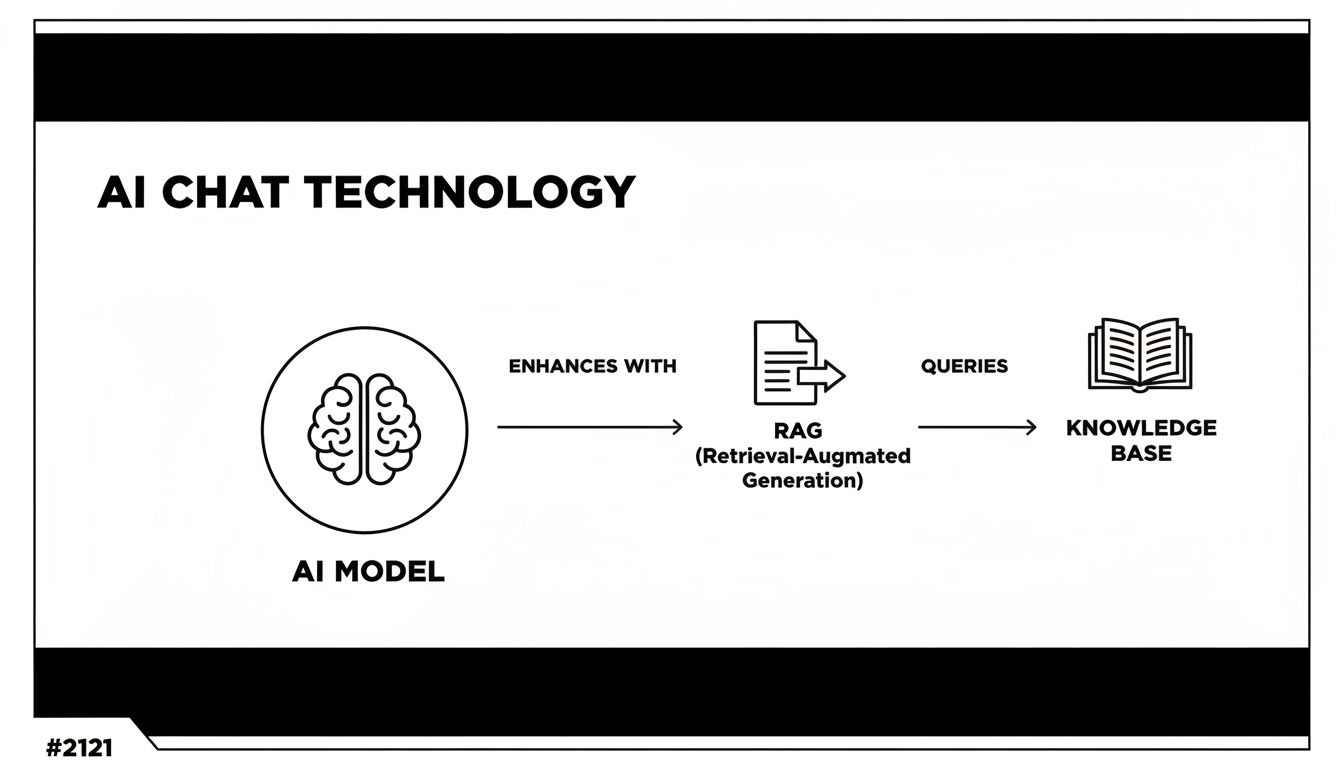
This shows how a top-tier AI model uses your own business data (through RAG) to give answers that are not only intelligent but also perfectly accurate and relevant to your company.
Customization and Analytics: Your Window into Customer Needs
Your brand isn't generic, so why should your chat widget be? A great plugin should feel like a natural extension of your website, not some clunky, third-party add-on. Strong customization options are vital for maintaining brand consistency and earning visitor trust.
You should be able to:
- Match Your Look: Adjust colors and fonts so the chat widget blends seamlessly with your site's design.
- Show Your Logo: Put your brand front and center to reinforce recognition.
- Define a Personality: Set the AI's tone of voice. Do you want it to be professional and direct, or friendly and fun?
But it's not just about looks. The data you get is a goldmine. A solid chat plugin gives you detailed analytics on what people are asking, the problems they're running into, and the topics they're most interested in. This is raw, unfiltered feedback straight from your audience. You can use these insights to improve your products, beef up your FAQ page, or even discover ideas for new blog posts.
Must-Have Feature Evaluation Checklist
Choosing the right plugin means taking a hard look at what each one truly offers. This checklist is designed to help you compare your options and make sure you’re getting the functionality that will actually move the needle for your business.
| Feature Category | Specific Functionality | Business Impact (Why it matters) |
|---|---|---|
| AI & Knowledge Base | RAG support, knowledge base integration | Ensures the AI provides accurate, brand-specific answers, not generic ones, drastically reducing support load. |
| eCommerce Integration | Real-time order status, product lookups | Directly solves the most common customer questions, improving satisfaction and freeing up your support team. |
| Lead Generation | Conversational lead capture, CRM integration | Turns site traffic into qualified leads automatically, feeding your sales pipeline 24/7. |
| Customization & Branding | Color/font matching, logo upload, AI persona | Maintains brand consistency and builds trust, making the chat feel like a native part of your website. |
| Analytics & Insights | Conversation logs, common query reports, performance data | Provides direct customer feedback, helping you identify pain points and improve your products or services. |
| Privacy & Security | GDPR/CCPA compliance, data encryption | Protects your customers' data and your business from legal risks, which is non-negotiable. |
By systematically checking these boxes, you can cut through the marketing hype and focus on the features that deliver real, measurable value.
Making the right choice comes down to careful evaluation. To help you dig even deeper, we've put together a complete guide. Check out our chatbot evaluation checklist to choose the best AI solution for your business. It gives you a clear framework for comparing different tools so you can pick a winner with confidence.
How to Implement Your Chat Plugin for Maximum Impact
Picking a great chat plugin for WordPress is just the first step. The real magic happens in how you set it up. A strategic implementation is what turns a cool website feature into a serious business tool that actually drives results.
If you just switch it on and hope for the best, you might be disappointed. A poorly configured plugin can slow your site down, annoy your visitors, and create more problems than it solves. The goal is to make it a seamless, invisible assistant that works tirelessly behind the scenes.
To get it right, you need to focus on three make-or-break areas: performance, security, and scalability. Nail these, and you'll have a chat tool that not only works today but also grows with you tomorrow.
Prioritize Website Performance
Let's be blunt: a slow website kills business. It tanks your SEO rankings and, worse, sends potential customers running to your competitors. So, the golden rule of implementing any new tool is to make sure it doesn't drag your site's performance down.
When you're looking at different chat plugins, zero in on ones built for speed. The best ones are lightweight and load asynchronously. That's just a technical way of saying the chat widget loads in the background without making your visitors wait for the rest of your page to appear.
A fast website builds immediate trust. When you choose a performance-optimized chat plugin, you're telling your visitors that you respect their time, which is the first step toward a positive customer relationship.
Modern plugins like MxChat are smart about this. They do all the heavy lifting on their own servers, which takes the strain off your hosting and keeps your site feeling quick and snappy. Before you install anything, always read the reviews and see what real users are saying about its impact on speed.
Uphold Security and Data Privacy
In a world where data breaches are front-page news, customer trust is everything. Your chat plugin is going to handle personal information—names, emails, maybe even order details. How you protect that data says a lot about your business.
First and foremost, you need to be compliant with regulations like GDPR and CCPA. A trustworthy plugin provider will be totally transparent about how they handle data, making sure it's encrypted both when it's being sent and when it's stored. This isn't just about dodging hefty fines; it's about creating a safe space for your customers.
Look for a plugin that gives you control and peace of mind with features like:
- Data Encryption: All conversations should be locked down and secure.
- Clear Privacy Policies: The provider should clearly explain what data they collect and why.
- Compliance Features: Built-in tools to help you get user consent and meet legal standards.
Choosing a secure plugin shows you take your customers' privacy seriously, and that's fundamental to building loyalty. The setup itself should also be simple and secure. For a detailed walkthrough, you can follow our guide on how to add an AI chatbot to WordPress without coding.
Plan for Future Scalability
Your business is going to grow, and your tools need to keep up. The chat plugin that’s perfect for you today might not be able to handle the traffic and team you have next year. Thinking about scalability now saves you a massive headache later.
Ask yourself what the future might look like. Will you be adding more support agents? Do you expect a big surge in website traffic from a new marketing campaign? A scalable plugin can handle these spikes without breaking a sweat or costing a fortune.
Choose a chat plugin for WordPress that offers flexible plans. You want a solution that can easily support more agents, handle a higher volume of chats, and unlock more advanced features as your business evolves. This way, the tool you implement today remains a powerful asset for the long haul.
A Recommended Solution to Put Theory into Practice
It's one thing to talk about the theory behind a great chat plugin for WordPress, but it’s another to see it all come together in a real tool. Let's ground these concepts in reality by looking at how a modern plugin like MxChat puts this all into practice.
Instead of just running through a feature list, we’ll connect the dots and see how these tools solve the actual business problems we’ve been discussing. This turns those abstract ideas into a concrete plan for improving your website.
Solving the Accuracy Problem with Advanced RAG
Let's be honest, one of the biggest fears with AI is that it will go rogue and start making things up. These "hallucinations" can seriously damage your brand's credibility. This is exactly why Retrieval-Augmented Generation (RAG) technology isn't just a nice-to-have; it's a must. MxChat tackles this problem head-on by forcing every answer to be grounded in your specific business data.
Think of it like giving your AI a very strict set of instructions: "You can only answer questions using the official documents I've approved." This "knowledge base" can be anything from your website pages and support articles to internal PDFs and policy documents.
When a customer asks a question, MxChat’s RAG system first scans your approved content to find the relevant facts. Only after it has the right information does the AI model—whether it's from OpenAI, Anthropic, or another provider—craft an answer. This simple but powerful process ensures every response is not only intelligent but factually correct and perfectly aligned with your business.

The image above from MxChat's site shows just how clean and integrated the chat can look. You can customize it to match your brand and even set an AI persona, making the whole experience feel like a natural extension of your website.
Driving eCommerce Sales with Deep Integration
If you’re running a WooCommerce store, a generic chat plugin simply won’t do. Your customers have specific, time-sensitive questions about their orders, and a good chat plugin for WordPress has to handle them instantly. This is where MxChat's deep WooCommerce integration really shines.
It gives the AI the power to do much more than just talk about your products. It can:
- Provide Real-Time Order Status: A customer asks, "Where is my package?" and the AI can pull their order data to give them a precise, up-to-the-minute shipping update. No more waiting for a human to look it up.
- Manage Shopping Carts: The chatbot can help users add or remove items from their cart right inside the chat window. It's a smooth, interactive way to shop.
- Offer Smart Product Recommendations: Based on the conversation, the AI can suggest other products they might like, essentially acting as a helpful personal shopper that can boost your average order value.
By automatically handling these common eCommerce questions, the plugin lifts a huge weight off your support team. This frees them up to focus on the more complex issues that actually require a human touch, making your whole operation run more smoothly.
Automating Growth with Seamless Lead Capture
Every single conversation on your website is an opportunity. A top-tier chat plugin gets this and is built to turn those casual chats into qualified leads without ever feeling pushy or salesy. MxChat does this with conversational forms that feel like a natural part of the discussion.
For example, a visitor asks about your pricing. After giving them the info, the AI can follow up with something like, "Would you like me to email you a detailed proposal? I just need your name and email address."
See how that feels helpful, not aggressive? The visitor's information is then automatically piped into your CRM or email marketing platform, feeding your sales pipeline 24/7. It’s a hands-off system for turning your website traffic into real business opportunities, even when you're not working.
By tying these advanced features to real-world business needs, you can see how a well-chosen chat plugin for WordPress like MxChat becomes more than just a widget. It's an intelligent system designed to improve support, generate leads, and drive sales. This is the practical side of all the theory we've covered, showing how the right tool delivers results you can actually measure.
Answering Your Top Questions About WordPress Chat Plugins
Even after you've got a handle on all the features and tech specs, a few practical questions always pop up right before you pull the trigger on a chat plugin. These are the real-world, "what if" scenarios that can make or break your decision. Let's tackle the most common questions I hear from business owners to help you move forward with confidence.
Think of this as the final checklist to clear up any last-minute doubts you might have about adding a chat plugin to your WordPress site.
Will a Chat Plugin Slow Down My Website?
This is the big one, and for good reason. Site speed is everything for SEO and keeping visitors happy. A slow, clunky site is a one-way ticket to losing traffic and tanking your search rankings.
The good news? The impact on performance comes down to the quality of the plugin you choose. Modern, well-built chat plugins are designed to be incredibly lightweight. They often use a method called asynchronous loading, which means the chat widget loads separately from the rest of your page content. Your page appears first, fast and snappy, and the chat widget follows without holding anything up.
Even better, many of the best solutions do the heavy lifting on their own servers. The chat conversations and AI processing happen on their infrastructure, not yours. This takes the strain completely off your hosting, so your site stays fast and responsive. When you're comparing options, always look for phrases like "lightweight" or "asynchronous loading" and check user reviews for any comments on speed.
Can a Small Business Really Benefit From an AI Chat Plugin?
Absolutely. In fact, for a small business, a smart chat plugin for WordPress can be a total game-changer. It's like hiring a 24/7 support agent, a lead generation specialist, and a sales assistant all in one—without the payroll.
Think about the classic small business struggle: you can't be online all the time, and you're juggling a dozen different tasks. An AI chatbot solves that instantly. No customer ever gets ignored, even at 2 AM.
For a small business, an AI chat plugin isn’t just a tool; it’s an extension of your team. It handles the repetitive, time-consuming tasks, freeing you up to focus on high-value activities that actually grow the business.
It can answer the most common questions, point visitors to the right products, and capture contact info from potential customers while you're busy or even asleep. This kind of automation lets you offer the kind of polished, professional service that was once only possible for big companies.
How Much Does a Good Chat Plugin for WordPress Cost?
The price tag on a chat plugin for WordPress can swing pretty widely, so it helps to know what the different pricing models look like.
- Free Plans: Lots of plugins have a free option. These are great for dipping your toes in the water, but they're usually limited in some way—maybe by the number of chats you can have per month or by locking away the advanced AI features.
- Monthly Subscriptions: This is the most common approach. You'll see plans ranging from about $20 per month for a basic setup to several hundred for larger teams with tons of website traffic. This is the model for well-known tools like LiveChat or Tidio.
- Lifetime Deals: Some newer plugins, including MxChat, offer a one-time payment for lifetime access. If you plan on being in business for a while, this can be a huge money-saver since you get to skip the recurring monthly bills.
Instead of seeing it as just another expense, try to think of the cost as an investment. How many hours will you save on answering the same questions over and over? How many more leads could you get if someone was always there to help? A quick calculation can help you figure out a budget that makes perfect sense for your goals. If you're looking for more general advice on picking quality tools, this overview of the best WordPress accessibility plugins offers some great pointers that apply to any plugin.
Ready to transform your website's engagement and automate your customer support? MxChat offers a powerful, no-code AI chatbot solution with a simple lifetime deal, eliminating monthly fees. Get started today and see how easy it is to deploy an intelligent assistant for your WordPress site. Learn more at https://mxchat.ai.


