building an ai chatbot: Quick Ways to Transform Interactions
Building an AI chatbot used to feel like a massive coding project, but that's just not the case anymore. Today, it’s a smart business move that can have a huge impact on your growth. With the right tools, you can get a smart assistant up and running on your website to handle support, grab new leads, and keep visitors engaged 24/7. It completely changes the game for how you connect with people online.
Why Your Website Needs an AI Chatbot

It’s easy to think of a chatbot as just a simple Q&A box, but that's a huge misstep. When done right, an AI assistant becomes a tireless member of your team, fundamentally changing how your website works and how users feel about it. This isn't just some flashy gadget; it's a workhorse that delivers a real return on investment.
Think about it from an e-commerce perspective. How many sales are lost because shoppers can't get a quick answer after business hours? They just abandon their carts. Building an AI chatbot trained on your product catalog can offer instant recommendations, clear up shipping questions, and nudge people toward checkout, saving sales you would have otherwise lost.
Drive Growth and Efficiency
For a service business, the same logic applies. A chatbot can screen potential clients by asking the right questions, book meetings directly on your calendar, and send the hottest leads straight to your sales team. This frees up your people from answering the same basic questions over and over, letting them focus on closing deals and solving complex problems.
The benefits are concrete and measurable:
- 24/7 Customer Support: Give people instant answers whenever they need them. This is a game-changer for customer satisfaction, and you don't have to hire more staff to do it.
- Automated Lead Generation: Your chatbot can engage every single visitor, capturing their info and qualifying them around the clock. You literally never miss a lead.
- Increased User Engagement: Instead of leaving visitors to wander, a chatbot can guide them, suggest relevant content, and create an interactive experience that keeps them on your site longer.
The real power of an AI chatbot lies in its ability to scale personal interactions. It allows a small business to offer the kind of immediate, helpful service that was once only possible for large corporations with massive support departments.
The financial impact is pretty staggering, too. The global AI chatbot market was valued at around $7.76 billion and is expected to climb to $27.29 billion by 2030. That's because businesses are seeing real results—some are reporting over 148% ROI and saving hundreds of thousands a year just by automating routine conversations. You can dig deeper into these powerful AI chatbot statistics and their market growth. This isn't just a fleeting trend; it’s a direct response to proven outcomes. Adding an intelligent assistant is simply a smart, strategic way to stay competitive.
Key Benefits of AI Chatbot Implementation
To put it all together, here’s a quick summary of the advantages you can expect when you bring an AI chatbot onto your team.
| Business Area | Immediate Impact | Long-Term Benefit |
|---|---|---|
| Customer Support | Reduces response times and handles common queries instantly. | Increases customer satisfaction and loyalty while lowering support staff costs. |
| Sales & Marketing | Captures and qualifies leads 24/7, never missing an opportunity. | Builds a stronger sales pipeline and provides valuable insights into customer behavior. |
| Operational Costs | Automates repetitive tasks, freeing up human agents. | Lowers overhead and allows the team to focus on high-value, strategic work. |
| User Experience | Provides immediate assistance and personalized guidance. | Boosts on-site engagement, reduces bounce rates, and improves brand perception. |
Ultimately, integrating a chatbot is about making your business more efficient and accessible, which pays dividends in both customer happiness and your bottom line.
Alright, let's get your chatbot set up for success. The first, and honestly most important, part of building a great AI chatbot has nothing to do with the AI itself. It's all about the knowledge you feed it.
Think of it this way: a brilliant AI with a bad knowledge base is like hiring a genius and giving them a phone book to solve customer problems. The quality of your source material will make or break the user experience.
This isn't just a matter of uploading every blog post and page on your site. The real groundwork starts with a single, sharp question: What is this chatbot's primary job? Are you building it to generate leads? Is it meant to deflect common support tickets? Or is its mission to onboard new users? Trying to make it a jack-of-all-trades usually results in a master of none.
First, Nail Down Your Chatbot’s Main Goal
Before you collect a single document, you need to define its purpose. A good starting point is to look at the most common, repetitive questions your human team already answers day in and day out.
For an e-commerce brand, that's almost always about shipping times, return policies, and order tracking. For a SaaS company, it's the classic "how do I reset my password?" or other basic troubleshooting steps.
- Lead Capture: The bot’s job is to qualify visitors and gather their contact details.
- Customer Support: The goal is to instantly resolve frequently asked questions, freeing up your support agents.
- User Onboarding: The bot acts as a friendly guide, walking new customers through the essential first steps.
Picking one core function focuses your efforts and makes it much easier to decide what information is actually important.
Now, Gather and Structure Your Knowledge Base
Once you know the bot’s mission, you can start gathering the ammo. You probably have a ton of great content already. It's just a matter of collecting it from the right places.
Comb through your existing assets and pull information from:
- Your website’s FAQ page
- Help docs and knowledge base articles
- Key product and service pages
- Even internal training materials can be a goldmine
As you pull this information together, keep it organized. You don't need anything fancy; a clean text file or a well-structured document works perfectly for uploading into a platform like MxChat. The goal is to make every piece of content clear, direct, and focused on answering a specific user question. This is also where knowing some strategies to get your content cited by AI chatbots can give you an edge, as it helps the AI pull from your sources more effectively.
The secret to a successful chatbot isn't some black-box algorithm. It's a well-organized, curated library of answers. I've seen simple, clean content outperform a massive, messy data dump every single time.
This careful preparation is what allows the AI to give grounded, accurate answers. Modern chatbots don't just "think" up responses; they reference the documents you provide to find the correct information. If you want to get into the technicals, this process is what makes Retrieval-Augmented Generation works so reliable.
Bottom line: The time you invest in prepping your content now will pay off tenfold when you have a helpful, accurate chatbot that your customers actually love using.
Alright, let's move from theory to action. This is where you get your hands dirty and start building your very own chatbot with MxChat. The good news? It's far more intuitive than you might think. The whole process is designed around a single, powerful idea: give your AI the right information, and it will give your customers the right answers.
Once you're in the MxChat dashboard, your first move is to create a new chatbot. Give it a name, and you'll be taken straight to its "brain"—the knowledge base. Seriously, don't rush this part. The quality of what you put in here directly dictates how smart and helpful your chatbot will be on the other side.
Building Your Chatbot’s Brain: The Knowledge Base
MxChat gives you a few different ways to feed information to your bot, and you don't need to know a single line of code. The real goal is to build a well-rounded source of truth for your AI. Think of it like this: define what you want the bot to do, gather the content it needs, and then load it in.
This visual breaks down that foundational workflow. It’s all about getting your content strategy right before you even touch the chatbot settings.
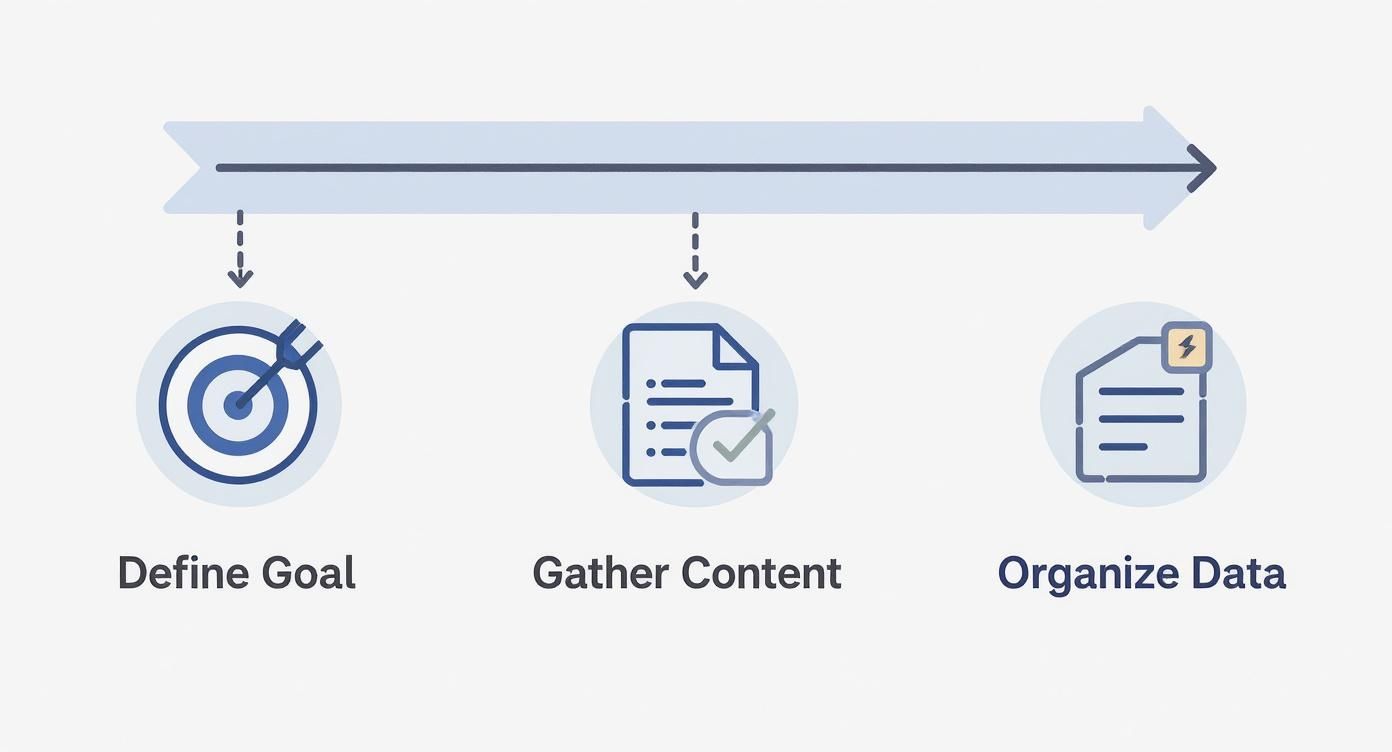
Stick to this sequence, and you'll end up with a bot that has a clear purpose and the right info to get the job done.
You’ve got three main tools at your disposal for this:
- Website Crawling: This is the easiest place to start. Just drop in the URLs for key pages on your website—think 'About Us,' 'Services,' or 'Pricing.' MxChat will automatically scan and learn from the content that's already there.
- Document Uploads: Got more detailed info that isn't on a public webpage? Upload it directly. This is perfect for internal FAQs, detailed product manuals, or support scripts your team already uses.
- Direct Q&A Pairs: For those tricky, specific questions, this is your best friend. You can manually type in a question and provide the perfect, pre-written answer. It's the best way to handle things like, "What's your exact refund policy?" where you need absolute precision.
By blending these three methods, you create a really solid foundation for your chatbot's understanding of your business.
A Quick Training Example
Let's say you run a small digital marketing agency. To train your bot, you'd probably start by having it crawl your homepage and services page. Easy enough.
Next, you could upload a PDF of your standard service packages and maybe a simple text file with your top 10 most frequently asked questions.
Finally, you’d add a few specific Q&A pairs for those questions that need a perfect answer every time:
- Question: "Do you offer a free consultation?"
Answer: "Yes, we offer a free 30-minute strategy call to discuss your business goals. You can book one directly from our contact page." - Question: "What is your average turnaround time for a new website?"
Answer: "A standard business website typically takes 4-6 weeks from initial concept to launch, depending on the complexity of the project."
This layered approach is what makes a chatbot truly intelligent. While we're focused on MxChat here, it can be helpful to see how others approach this. Looking at resources like BookedIn's platform tutorials can offer a broader perspective on general chatbot-building principles.
The real magic happens when you combine broad knowledge from your website with the laser-focused accuracy of direct Q&A. This layering technique prevents generic answers and ensures your chatbot is genuinely helpful, not just a glorified search bar.
And make no mistake, users expect a helpful bot. A staggering nearly 987 million people now use chatbots around the world. While giants like Meta AI serve 500 million users, the underlying technology is dominated by models like ChatGPT, which holds a massive 81.35% market share. This just goes to show how critical it is to build a bot that meets modern expectations.
For more hands-on guidance, we've put together a dedicated walkthrough on making a bot from scratch.
Crafting Your Chatbot's Brand Personality
A powerful knowledge base is what makes your chatbot smart, but its personality is what actually connects with your audience. Think of your AI assistant as a frontline ambassador—it's a direct extension of your brand. Just dropping a generic bot onto your site isn't enough; you need to make sure it speaks, acts, and looks like it truly belongs on your team.
This goes way beyond picking a color scheme. We're talking about defining the bot's core identity so that every single interaction reinforces your brand voice. Is your company professional and straight-to-the-point, or more friendly and informal? A small detail like conversational tone can completely change how a user feels about their experience.
Defining Your Chatbot's Voice with a Base Prompt
The simplest and most effective way I've found to shape a chatbot's personality is by giving it a clear "base prompt." This is just a short set of instructions that tells the AI who it is, what its job is, and how it should behave. Essentially, it's a mini job description that guides every single response.
This one instruction becomes the foundation for its entire conversational style. A well-written prompt keeps the AI from sounding robotic and aligns it perfectly with how you communicate as a brand.
Here are a few real-world examples to get you started:
- For a Tech Startup: "You are a friendly and knowledgeable support assistant for a SaaS company. Your tone is helpful, patient, and slightly informal. Use clear, simple language and avoid overly technical jargon."
- For a Creative Agency: "You are an inspiring and energetic assistant for a design studio. Your tone is creative, encouraging, and witty. You should get users excited about their projects."
- For a Law Firm: "You are a professional and concise virtual assistant for a corporate law firm. Your tone must be formal, precise, and strictly informational. Do not use slang, emojis, or contractions."
A chatbot's personality isn't just a fun extra; it's a strategic choice. A consistent voice builds trust and makes an automated experience feel more human and less transactional. It's the difference between a tool and a genuine team member.
Choosing the right persona is crucial, and it's closely tied to the bot's name. For a deeper dive, check out our guide on the best practices for naming your AI chatbot.
Customizing the Visuals to Match Your Brand
Once you’ve nailed down its voice, it’s time to make it look the part. Visual consistency is what makes the chatbot feel like a natural part of your website, not some third-party widget that was just dropped in. Inside the MxChat dashboard, you have full control over the look and feel.
Here’s what I recommend focusing on first:
- Widget Colors: Adjust the primary and secondary colors of the chat window. This small change makes a huge difference in making it blend seamlessly with your site's design.
- Company Logo: Upload your brand's logo to the chat header. This is a quick win for reinforcing brand recognition from the moment someone opens the chat.
- Welcome Message: Craft a greeting that reflects the personality you just defined. A generic "How can I help you today?" works, but something like, "Ready to bring your creative ideas to life? Ask me anything!" is far more engaging for that design agency we talked about.
By aligning both the personality and the visuals, you create a cohesive, professional experience that builds user trust from the very first click.
Putting Your Chatbot to the Test and Going Live on WordPress
Alright, you've built a solid knowledge base and sculpted a unique personality for your bot. Now comes the most important part: making sure it actually works in the wild. This is your quality control phase, and frankly, it can make or break the user experience.
Think of it as a final dress rehearsal. You need to be sure your chatbot can handle real questions from real people before you let it interact with your customers. A buggy or unhelpful bot can do more harm than good, chipping away at the trust you've built.
So, how do you test it properly? Start by acting like your most demanding customer. Don't just ask the easy questions you already know the answers to. Try to trip it up. Get creative and see how it handles pressure.
A Smart Way to Test Your Bot
To make sure you're covering all your bases, your testing should hit a few key areas. I’ve found this approach works best:
- Check the Facts: Start with the basics. Ask for specific details from your knowledge base, like "What are your business hours on Saturday?" or "Can you explain your refund policy?" You need to know it can pull the correct information every single time.
- Throw Some Curveballs: Real customers rarely ask neat, simple questions. Combine a few ideas into one query. For instance, "I need to return an item I bought on sale, and can you tell me how long shipping takes to New York?" This tests its ability to unpack complex requests.
- Explore the Unknown: What happens when it gets a question it can't answer? Ask something vague like "help" or something completely random. A well-designed chatbot won't just freeze up; it will politely explain its limitations and perhaps offer to connect the user with a human.
This process will almost certainly show you where the gaps are. You might realize you need to add more specific Q&As or upload a document you overlooked. That’s the whole point.
A chatbot’s intelligence isn't just about what it knows; it's about how it handles what it doesn't know. A successful test isn't one where the bot answers everything perfectly, but one that reveals its weaknesses so you can fix them before going live.
The reason these platforms are so capable is the incredible amount of investment pouring into the field. Private AI investment in the United States alone has hit $109.1 billion, which is what’s funding the creation of these powerful generative models. This is what allows us to build such smart tools so easily. You can see more on the growth of AI model development.
Getting Your Chatbot onto WordPress
Once you’re happy with how the bot performs, it's time for the big debut. Getting it onto your WordPress site is surprisingly simple. Inside MxChat, you'll look for an "Embed" or "Publish" section. This will give you a small snippet of code—that’s all you need.
The best and safest way to add this to your site is with a simple, free plugin. This way, you're not messing with your theme's code directly, which can save you a lot of headaches.
- First, install and activate a plugin like Insert Headers and Footers.
- Go to the plugin's settings page in your WordPress dashboard.
- Head back to your MxChat account and copy the embed code it gave you.
- Paste that code into the box labeled "Scripts in Footer."
- Hit save, and you're done.
That's it! Your new AI assistant will pop up on your site, ready to help your visitors. Using a plugin is the professional approach, and it’s something we cover in our guide on choosing the best WordPress chatbot plugin. This method also means that if you ever decide to change your WordPress theme, your chatbot will stick around without you having to do a thing.
Got Questions? We've Got Answers
Even after you've built and launched your AI chatbot, you're going to have questions. That's not just normal; it's a sign you're paying attention to its performance and looking for ways to make it better. Let's walk through some of the most common things people ask after getting their bot up and running.
How Often Should I Update My Chatbot's Knowledge?
This is probably the number one question I hear. It's tempting to think of the knowledge base as a "set it and forget it" task, but that's a missed opportunity. Your knowledge base should be a living, breathing part of your business.
A good starting point is to check your chat logs once a month. Look for the questions your bot couldn't answer or where users seemed frustrated. Those conversations are gold—they give you a clear, user-generated roadmap for what to add next. This simple monthly check-in is how you turn a good bot into a great one.
What About Different Languages or When the Bot Gets Stuck?
If your audience is diverse, you're probably thinking about language support. Most modern platforms, including MxChat, are designed to be multilingual. The bot will typically respond in the same language the user types in.
For the best possible experience, feed it source documents in the languages you need. If you have Spanish-speaking customers, upload your FAQ page in Spanish. Relying on auto-translation can work in a pinch, but nothing beats giving the AI authentic content to learn from.
But what happens when the bot truly doesn't know the answer? You absolutely need a plan for a smooth handoff to a human. This is non-negotiable.
- Set up keyword triggers. When a user types something like "talk to a person" or "human," the bot should immediately offer a way to connect.
- Create a failure rule. My personal rule of thumb is this: after two failed attempts in a row to answer a question, the bot should proactively offer help from the team.
This simple setup prevents users from getting stuck in a frustrating loop. The escalation can be as simple as providing an email address, linking to a contact form, or integrating with your live chat software.
The single biggest mistake I see people make is not defining their chatbot's purpose. A bot designed to do everything will fail at everything. Start with one, clear job and nail it before you even think about expanding.
Is its primary job to answer support questions? Or is it to capture leads? A laser-focused goal makes training infinitely easier and provides a much cleaner user experience. You can always add more skills later, but you have to get the foundation right first.
Ready to build a smarter, more efficient website experience? Get started with MxChat today and deploy a powerful AI assistant that works for you 24/7. Create your chatbot now.