Kimi K3 Pricing: We Tested 9 Hosts on a WordPress Chatbot
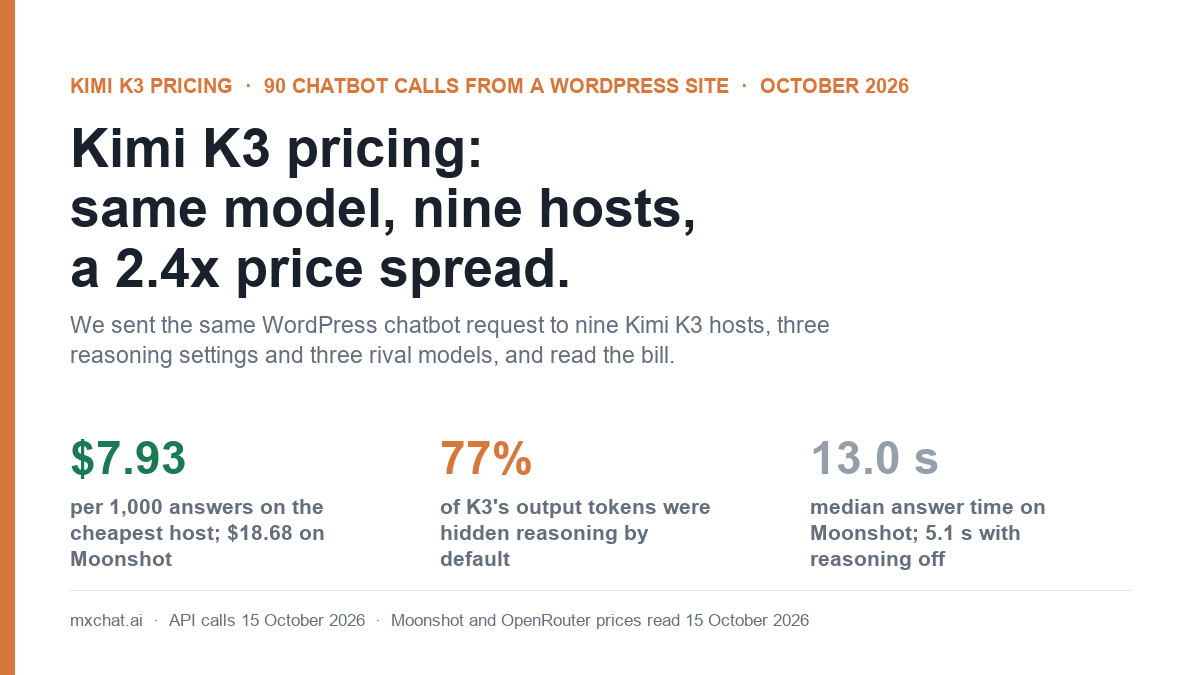
Kimi K3 pricing on Moonshot’s own API is $3 per million input tokens and $15 per million output tokens. That is the list price, not what you have to pay. On 15 October 2026 OpenRouter listed 25 endpoints serving Kimi K3, with input prices from $0.31 to $4.50 per million. We sent the same WordPress chatbot request to ten of those routes from our own server. At each host’s list price with no cache, 1,000 answers cost $7.93 on the cheapest host we tested and $19.24 on the dearest. Same model, same prompt, same answers.
The host isn’t the only thing on the bill. Kimi K3 reasons at its highest effort unless you tell it otherwise. In our test, about three quarters of every output token went on reasoning the visitor never sees. This post covers what Kimi K3 costs per chatbot answer on each kind of host, what turning reasoning down saves, how K3 compares with GPT-6.1 Sol and Claude Sonnet 5.5 on the same request, and which settings to use if you run K3 behind a WordPress chatbot.
Kimi K3 pricing in October 2026
Moonshot AI released Kimi K3 in July 2026. It is an open-weight model with a context window of 1,048,576 tokens. These are the rates on Moonshot’s pricing page, read on 15 October 2026:
| Moonshot model | Input / 1M (cache miss) | Cached input / 1M | Output / 1M | Context |
|---|---|---|---|---|
Kimi K3 (kimi-k3) | $3.00 | $0.30 | $15.00 | 1,048,576 |
| Kimi K2.7 Code | $0.95 | $0.19 | $4.00 | 262,144 |
| Kimi K2.7 Code Highspeed | $1.90 | $0.38 | $8.00 | 262,144 |
| Kimi K2.6 | $0.95 | $0.16 | $4.00 | 262,144 |
Moonshot also charges for writing to its prompt cache: $3.00 per million tokens for the default five-minute cache and $6.00 for the one-hour cache. A cache hit refreshes the entry without another write charge. For a chatbot that sends the same system prompt and knowledge-base context over and over, that cached rate matters more than anything else on the page. We come back to it below.
There is no free hosted API tier. You can download the weights and serve K3 yourself, but it is a very large model. Self-hosting it is a GPU-cluster project, not something you run next to a WordPress site.
Kimi K3 on other hosts
Because the weights are open, many inference companies host K3 and set their own prices. Here are the routes we tested, with the prices OpenRouter showed for each on 15 October 2026. The quantisation column shows how each host stores the model’s weights. Lower-precision formats such as fp4 are cheaper to serve and can, in principle, lose some quality.
| Host (as listed on OpenRouter) | Weights | Input / 1M | Cached input / 1M | Output / 1M |
|---|---|---|---|---|
| Moonshot AI (first party) | mxfp4 | $3.00 | $0.30 | $15.00 |
| Together | not stated | $3.00 | $0.30 | $15.00 |
| Amazon Bedrock (us-east-2) | not stated | $3.00 | $0.30 | $15.00 |
| DeepInfra | mxfp4 | $2.85 | $0.285 | $14.25 |
| Parasail | fp4 | $2.60 | $0.26 | $13.00 |
| Chutes | mxfp4 | $1.85 | $0.185 | $9.50 |
| InferenceNet | fp4 | $0.45 | $0.28 | $15.00 |
| Relace | fp4 | $0.32 | $0.30 | $14.00 |
| Wafer | not stated | $0.31 | $0.30 | $24.00 |
Two different pricing strategies are at work. Chutes cuts both input and output. Relace, InferenceNet and Wafer cut input by about 90% and keep output near list, or in Wafer’s case well above it. OpenRouter’s model page shows the cheapest input price as K3’s headline rate, which is why some guides quote Kimi K3 at around $0.45 input. Which kind of host is cheaper for you depends on how many output tokens your requests produce. For K3 on default settings, that is more than you might expect.
How we tested
We built the request the way MxChat builds it for a chatbot reply. The system message holds the site’s own system prompt plus four knowledge-base passages from mxchat.ai pages, and the user message is the visitor’s question. That came to about 4,200 input tokens per request. The three questions were ones our own chatbot gets:
- Does MxChat work with WooCommerce, and can the bot look up an order status for a logged-in customer?
- Do I need Pinecone to use the knowledge base, or can I store embeddings in WordPress?
- Can a visitor be handed over to a human on Slack or Telegram when the bot cannot answer?
Each question went twice to each of 15 routes: nine Kimi K3 hosts pinned one at a time with fallbacks turned off, K3 with OpenRouter choosing the host, two reduced-reasoning settings on Moonshot, and three comparison models. That is 90 calls, sent through OpenRouter from our WordPress server in the US on 15 October 2026. All 90 returned HTTP 200 on the first try. We recorded OpenRouter’s billed cost, the token counts including reasoning tokens, cached tokens, and the time to a complete (non-streamed) answer.
Repeating identical requests warms each host’s prompt cache, which makes billed costs hard to compare. So the main cost figures below are modelled at each host’s list price from the measured token counts, with no cache. That is what a first-time question costs. We show the warm-cache numbers separately.
What Kimi K3 costs per 1,000 chatbot answers, by host
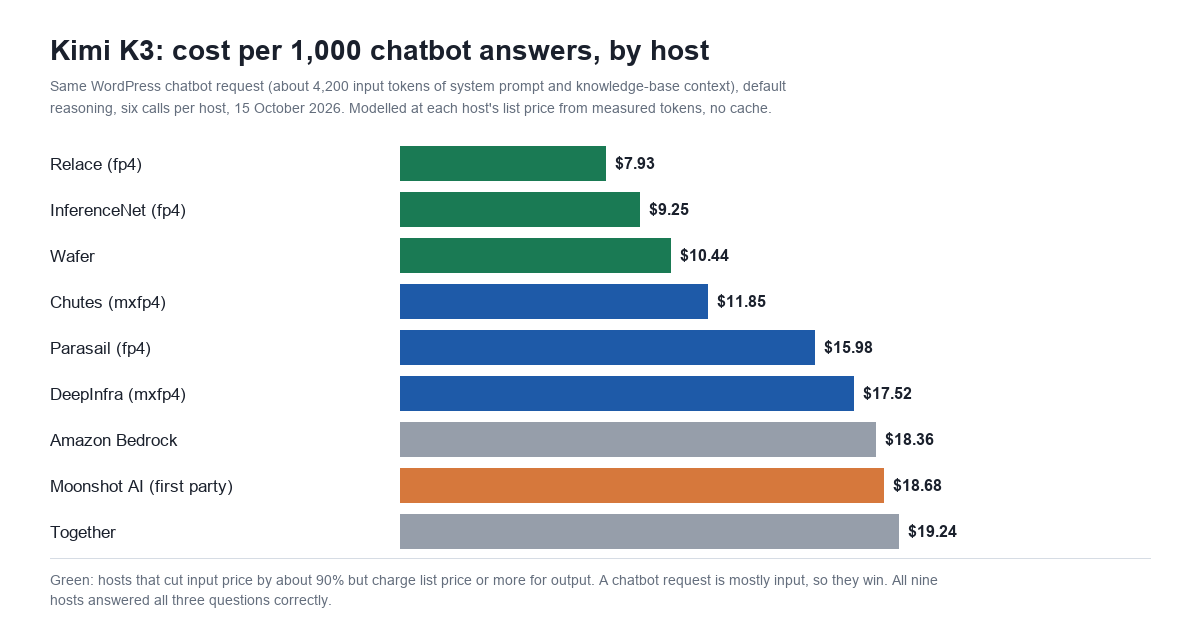
With reasoning left at its default, every host produced about the same number of tokens: roughly 4,200 in and 380 to 490 out, of which 290 to 480 were reasoning. Price per token is the only thing that changes the bill.
| Route | Cost per 1,000 answers, no cache | Output share of the bill | Median time to answer | Slowest call |
|---|---|---|---|---|
| Relace (fp4) | $7.93 | 81% | 4.37 s | 115.6 s |
| InferenceNet (fp4) | $9.25 | 76% | 7.38 s | 14.3 s |
| Wafer | $10.44 | 86% | 5.94 s | 7.4 s |
| Chutes (mxfp4) | $11.85 | 33% | 18.75 s | 38.8 s |
| Parasail (fp4) | $15.98 | 30% | 4.71 s | 8.9 s |
| DeepInfra (mxfp4) | $17.52 | 30% | 9.21 s | 20.1 s |
| Amazon Bedrock | $18.36 | 30% | 3.36 s | 5.0 s |
| Moonshot AI (first party) | $18.68 | 31% | 13.04 s | 20.7 s |
| Together | $19.24 | 32% | 6.21 s | 10.0 s |
The cheapest host was 2.4 times cheaper than the dearest for the same answers. The low-input hosts win because a chatbot request is mostly input: the knowledge-base context dwarfs the reply. On Relace, 81% of a much smaller bill was output. On the list-price hosts, input was about 70% of the bill.
Wafer shows the limit of that strategy. Its input is the cheapest of all, but at $24 per million output it came third. A reply with more reasoning, or a longer answer, would push it past Chutes.
When we let OpenRouter pick the host, it sent our six requests to Moonshot, Amazon Bedrock and Parasail, three of the four most expensive. OpenRouter’s default routing weighs price, uptime and latency. It does not always pick the cheapest endpoint. If price is what you care about, sort by price or pin a host in the request’s provider settings. We covered how that routing works in our OpenRouter pricing test.
Did the cheaper hosts give worse answers?
Not on this test. All nine hosts answered all three questions correctly in both runs. Each said the WooCommerce add-on comes with MxChat Pro and that order lookups are limited to logged-in customers. Each said Pinecone is optional, with embeddings stored in the WordPress database by default. And each said live-agent handoff to Slack and Telegram is available. The fp4 hosts read the same as Moonshot’s own endpoint.
Three questions answered from supplied context is an easy test, though. It shows the cheap hosts are fine for a knowledge-base chatbot. It does not show they match the first-party endpoint on long reasoning, maths or code, where reduced-precision weights are more likely to show.
Latency
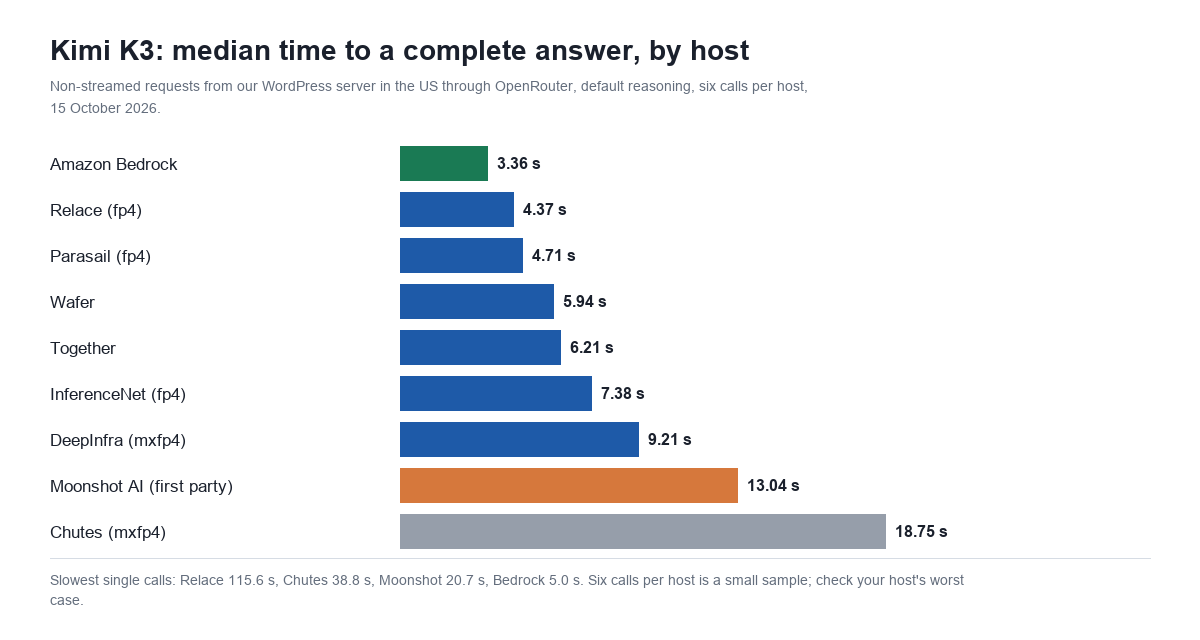
Amazon Bedrock was the fastest K3 host at a median of 3.36 seconds, and its slowest call took 5.0 seconds. Moonshot’s own endpoint took a median of 13 seconds on default settings, and Chutes took almost 19. Relace had a good median but one call took 115.6 seconds. In a chat window, that is the kind of call a visitor gives up on. Six calls per host is a small sample, so treat these as a rough guide. Do check your chosen host’s worst case before you put it in front of visitors.
Kimi K3 reasons at maximum effort by default
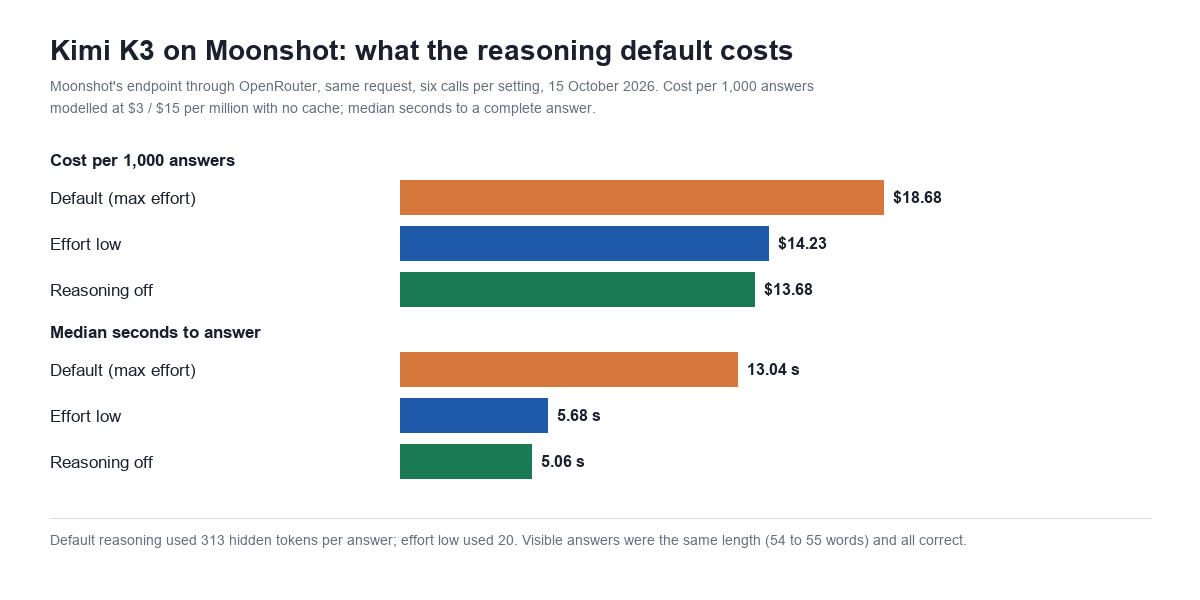
Moonshot’s K3 guide says reasoning effort is set with a top-level reasoning_effort field that accepts low, high and max, and that the default is max. A request that doesn’t mention reasoning gets the most expensive setting. We tested two alternatives on Moonshot’s own endpoint through OpenRouter: reasoning: {effort: "low"}, and reasoning: {enabled: false}, which returned zero reasoning tokens.
| Moonshot endpoint | Output tokens (of which reasoning) | Cost per 1,000, no cache | Median time | Visible answer length |
|---|---|---|---|---|
| Default (max) | 406 (313) | $18.68 | 13.04 s | 55 words |
| Effort low | 108 (20) | $14.23 | 5.68 s | 54 words |
| Reasoning off | 85 (0) | $13.68 | 5.06 s | 54 words |
Turning reasoning down cut output tokens by about three quarters, the bill by about a quarter, and the wait by more than half. The answers were just as long and just as correct. A question that is answered from a passage in front of the model doesn’t need 300 tokens of thinking first.
The saving is bigger on the low-input hosts, where output is most of the bill. We did not run reduced reasoning on Relace. Modelled from its prices and Moonshot’s reasoning-off token counts, though, it would come to about $2.50 per 1,000 answers before caching. That’s under a seventh of Moonshot’s default cost.
We saw the same pattern with Gemini 3.8 Flash’s thinking tokens and GPT-6 Luna’s reasoning effort. For a chatbot, the reasoning default is usually the largest setting on the bill you can change.
Caching: the other half of a K3 bill
Cached input on K3 costs $0.30 per million, a tenth of the full input rate. Every K3 host we tested cached at least part of our repeated requests automatically, without any cache markers in the request. On Moonshot with reduced reasoning, the second run of each question cost $3.04 to $3.15 per 1,000 answers, down from about $12.70 to $13.00 the first time.
On a live site, how often you get that rate depends on whether consecutive requests share a long identical prefix. A fixed system prompt helps. Knowledge-base passages that change with every question help much less, because the cache only covers the identical start of the request. Our OpenAI prompt caching test covers how to order a request so more of it gets cached.
One caution about the cheap-input hosts: their cached rate is close to Moonshot’s. Relace charges $0.32 for fresh input and $0.30 for cached input, so caching saves almost nothing there. Once caching is doing its job, the hosts’ input prices converge and output price decides the bill. Chutes, with the lowest output price, comes out ahead.
Kimi K3 vs GPT-6.1 Sol and Claude Sonnet 5.5
We sent the same 6 requests to GPT-6.1 Sol and Claude Sonnet 5.5, both listed at $2 per million input and $10 output, and to GPT-6 Luna at $0.10 and $0.50, all at their default settings.
| Model (default settings) | Cost per 1,000, no cache | Second run (warm cache), billed | Median time | Output tokens |
|---|---|---|---|---|
| Kimi K3, Moonshot | $18.68 | $8.02 | 13.04 s | 406 |
| Kimi K3, Relace | $7.93 | $7.82 | 4.37 s | 470 |
| GPT-6.1 Sol | $8.75 | $0.92 | 3.30 s | 56 |
| Claude Sonnet 5.5 | $16.18 | $16.15 | 4.05 s | 252 |
| GPT-6 Luna | $0.46 | $0.09 | 3.07 s | 101 |
At Moonshot’s list price, Kimi K3 is not a budget model. On default settings it cost more per answer than Claude Sonnet 5.5 and more than twice GPT-6.1 Sol. Its higher rate card explains part of that. Most of the rest is that GPT-6.1 Sol wrote a 56-token answer and K3 wrote 406 tokens, three quarters of them reasoning. GPT-6.1 Sol’s warm-cache cost fell to $0.92 because OpenAI’s cached input is $0.10 per million. Sonnet 5.5 used about 6,800 input tokens for the same text and wasn’t cached at all. Anthropic caches only when the request asks for it, and ours didn’t. Our Claude prompt caching test covers what changes when it does.
All five models answered all three questions correctly. For a WordPress chatbot that answers from your own content, K3 has no accuracy edge that would justify its default-settings cost. Its case rests on open weights and host choice. On a cheap host with reasoning turned down it becomes competitive with GPT-6.1 Sol. On defaults at list price, it costs about twice as much.
Which Kimi K3 setup to use for a chatbot
- Turn reasoning down first. Send
reasoning_effort: "low"to Moonshot, or the equivalentreasoningobject through OpenRouter. In our test it cut cost by about a quarter and halved the wait, with no change in answers. - Pick the host on purpose. For first-time questions with lots of context, a low-input host such as Relace or InferenceNet was cheapest. Where most input hits the cache, Chutes’ lower output price wins. Check the host’s worst-case latency as well as its median.
- Pin it. Left to choose, OpenRouter sent our requests to three of the four priciest hosts. A
providersetting with anorderlist fixes that. Our GLM-5.3 host test found the same spread on another open-weight model. - Consider whether you need K3 at all. For knowledge-base answers, GPT-6 Luna was correct on all three questions at $0.46 per 1,000, and DeepSeek V4.1 Flash is in the same price class. K3 is more model than a support chatbot needs.
MxChat connects to OpenRouter, so a WordPress chatbot can use Kimi K3 through any of these hosts with your own OpenRouter key. On our last check, MxChat’s OpenRouter connection did not send a reasoning setting, so K3 runs at its default maximum effort. If you choose K3 there, expect the default-settings costs above. Model and API setup is covered in the MxChat documentation, and add-ons such as WooCommerce order lookup and live-agent handoff come with MxChat Pro.
FAQ
How much does Kimi K3 cost?
On Moonshot’s own API, $3 per million input tokens, $0.30 per million cached input tokens and $15 per million output tokens, plus $3 per million for cache writes on the five-minute cache. Other hosts charge from $0.31 to $4.50 per million input. In our chatbot test, 1,000 first-time answers cost $7.93 to $19.24 depending on the host.
Is Kimi K3 free?
The hosted API is not free; every request is billed per token. The model weights are openly available, so you can run it yourself, but it needs a GPU cluster.
Why is Kimi K3 listed at $0.45 on OpenRouter when Moonshot charges $3?
OpenRouter’s model page shows the cheapest host’s price. Several hosts cut K3’s input price to $0.31 to $0.45 per million but keep the output price at $14 to $24. They are cheaper for input-heavy requests, such as a chatbot with knowledge-base context, and not much cheaper for output-heavy ones.
How do I turn off Kimi K3 thinking?
Moonshot’s API takes reasoning_effort with low, high or max; the default is max. Through OpenRouter, reasoning: {effort: "low"} brought reasoning down to about 20 tokens per answer in our test, and reasoning: {enabled: false} brought it to zero.
Is Kimi K3 cheaper than GPT-6.1 Sol?
Not on default settings. At Moonshot’s list price it cost $18.68 per 1,000 chatbot answers against $8.75 for GPT-6.1 Sol, mainly because K3 spent about 300 tokens reasoning before each answer. On the cheapest host it was $7.93. With reasoning turned off on that host, our modelled figure is about $2.50.
Do cheaper Kimi K3 hosts give worse answers?
Not in our test. All nine hosts, including the fp4 ones, answered all three knowledge-base questions correctly in both runs. That doesn’t prove they are equal on harder reasoning or coding work.