How to Build a Chatbot Without Coding in 2026
In 2026, the demand for instant, 24/7 customer support is no longer a luxury—it’s an expectation. Businesses are rapidly adopting AI to meet this need, but the thought of complex development can be a major roadblock. Fortunately, the technology has evolved. Learning how to build a chatbot without coding is now more accessible and powerful than ever, allowing you to deploy a sophisticated digital assistant without writing a single line of code.
This guide will walk you through the entire process, step by step, empowering you to enhance your customer experience, automate tasks, and drive growth.
Why Build a No-Code Chatbot? The 2026 Advantage
Before diving into the ‘how,’ let’s quickly cover the ‘why.’ No-code chatbot platforms have democratized AI, offering significant benefits that were once reserved for large enterprises with dedicated development teams. These advantages include:
- Cost-Effectiveness: Drastically reduces development and maintenance costs compared to custom-coded solutions.
- Speed to Market: You can design, build, and deploy a fully functional chatbot in hours or days, not months.
- Enhanced Customer Experience: Provide instant answers to common questions, freeing up your human agents for more complex issues.
- 24/7 Availability: Your business can capture leads and support customers around the clock, even when your team is offline.
- Scalability: Effortlessly handle a surge in customer inquiries without needing to hire more staff.
A Step-by-Step Guide to Creating a Chatbot Without Code
Ready to build your first AI agent? Follow these seven steps to create a professional, effective chatbot for your website.
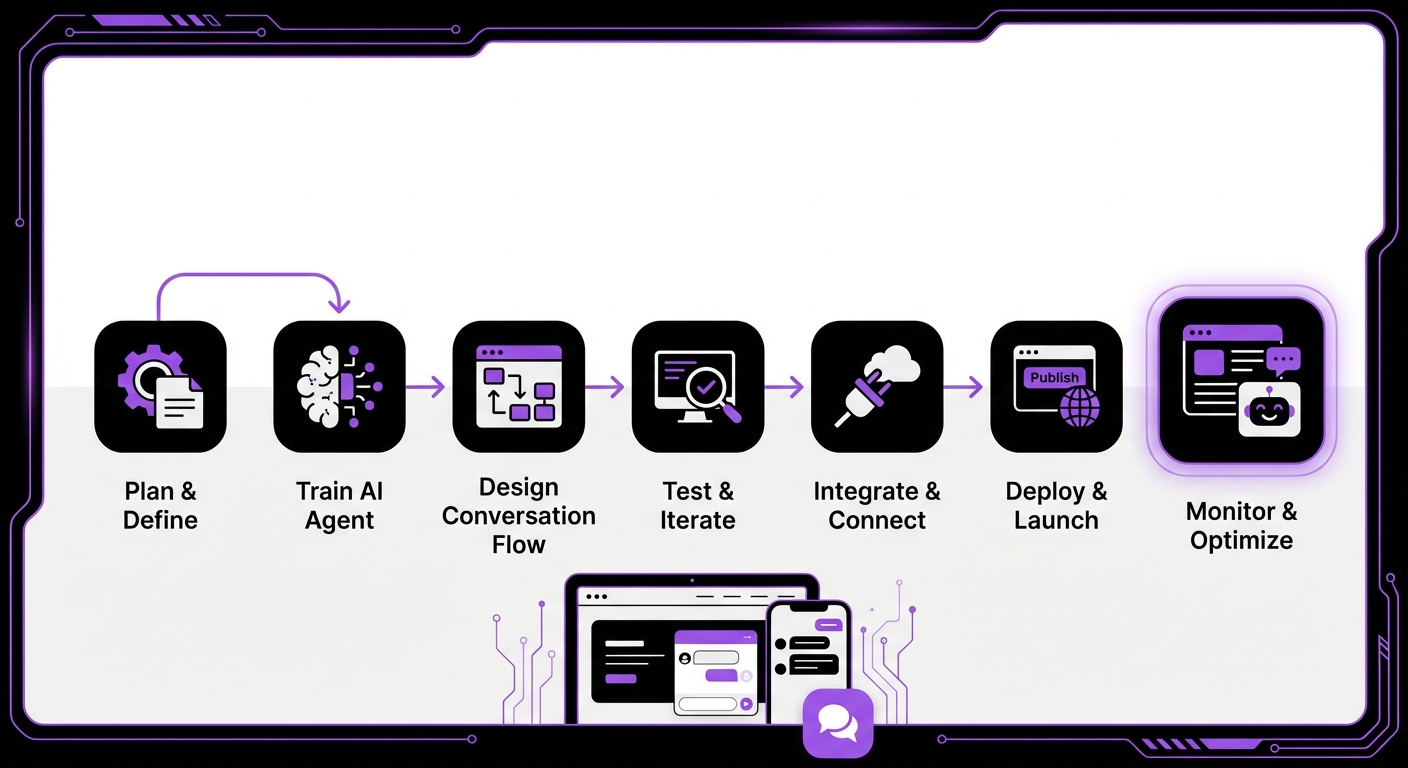
Step 1: Define Your Chatbot’s Purpose and Goals
A chatbot without a clear purpose is just a gimmick. Before you start building, you must define its primary function. Ask yourself:
- What problem will it solve? Will it answer frequently asked questions (FAQs), book appointments, qualify sales leads, or guide users through your website?
- Who is the target audience? Understanding your users will help you define the chatbot’s tone and personality.
- What are the key performance indicators (KPIs)? Set measurable goals, such as reducing support ticket volume by 25% or increasing lead captures by 15%.
Step 2: Choose the Right No-Code Chatbot Platform
Your choice of platform is the most critical decision you’ll make. With so many options available in 2026, look for a solution that offers:
- Ease of Use: An intuitive, drag-and-drop interface is essential for a true no-code experience.
- Integration Capabilities: The platform must connect seamlessly with your existing tools, especially your website’s content management system (CMS).
- AI Technology: Look for advanced features like Retrieval-Augmented Generation (RAG), which allows the bot to pull precise answers from your own documents.
- Customization: The ability to match the chatbot’s appearance and personality to your brand is crucial.
Step 3: Design the Conversation Flow
This is where you map out the user’s journey. Think of it as creating a script for your chatbot. Use a simple flowchart or mind-mapping tool to visualize the conversation.
Your flow should include:
- A warm welcome message that clearly states what the chatbot can do.
- Conversation branches based on common user queries, often presented as buttons or quick-reply options.
- A clear path for human handoff if the user needs to speak with a person.
- A fallback response for when the bot doesn’t understand a query (e.g., “I’m not sure I understand. Would you like to rephrase or speak to a human agent?”).
Step 4: Train Your Chatbot with Your Data
An untrained chatbot is an empty shell. To make it truly useful, you must feed it information about your business. Modern platforms make this incredibly simple. Instead of manually writing question-and-answer pairs, you can create a comprehensive knowledge base by uploading:
- FAQ documents
- Product manuals and specifications
- Company policy PDFs
- Blog posts and articles
- Shipping and return information
Step 5: Customize the Chatbot’s Appearance and Personality
Your chatbot is an extension of your brand. Customize its look and feel to ensure a consistent user experience.
- Visuals: Adjust the colors, fonts, and logo to match your website’s branding. Give your bot a name and an avatar to make it more relatable.
- Tone of Voice: Decide on a personality. Should it be professional and formal, or friendly and casual? Write its responses in a consistent tone that reflects your brand identity.
Step 6: Integrate and Deploy Your Chatbot
Once you’re happy with the design and training, it’s time to go live. With a no-code platform, this is typically straightforward. For a website, it often involves copying and pasting a small snippet of code or, even better, installing a plugin.
For example, integrating a chatbot on a WordPress site using a dedicated solution is often as simple as installing the plugin and activating it from your dashboard. This ensures perfect compatibility and adherence to WordPress best practices.
Step 7: Test, Analyze, and Iterate
Launching your chatbot is just the beginning. Continuous improvement is key to its long-term success.
- Test: Before a full launch, conduct thorough testing. Interact with the bot as a customer would to find any broken flows or awkward responses.
- Analyze: Use the platform’s analytics dashboard to monitor performance. Look at common questions, user satisfaction ratings, and points where conversations are abandoned.
- Iterate: Use these insights to refine your conversation flows and update your knowledge base regularly. A chatbot should evolve with your business.
Common Mistakes to Avoid When Building a No-Code Chatbot
Steer clear of these common pitfalls to ensure your project is a success:
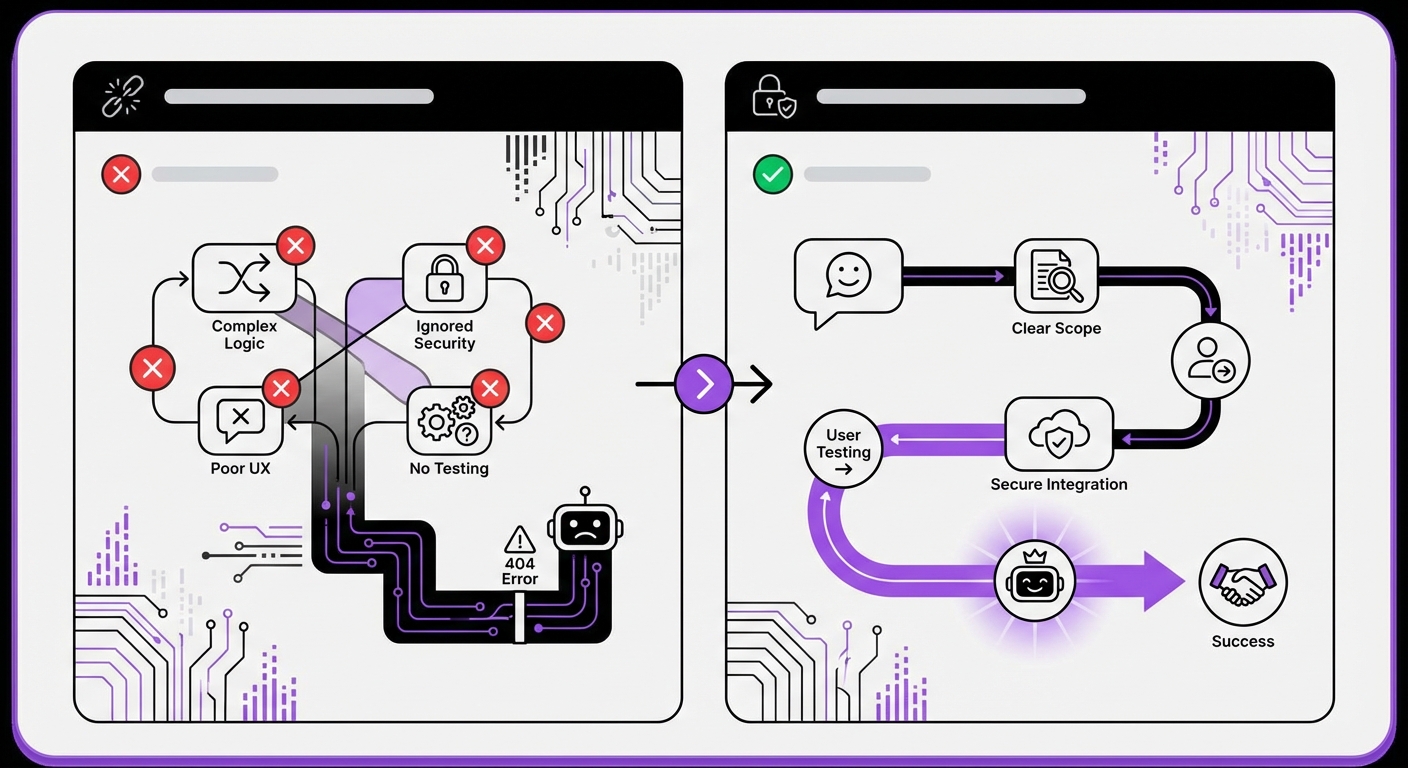
- Neglecting the Human Handoff: Never trap a frustrated user in a conversation loop. Always provide a clear and easy option to connect with a human agent.
- The “Set It and Forget It” Mindset: A chatbot is not a one-time project. It requires ongoing monitoring and refinement to remain effective.
- A Poorly Curated Knowledge Base: The principle of “garbage in, garbage out” applies here. Ensure your source documents are accurate, up-to-date, and well-organized.
- Overcomplicating the Initial Scope: Don’t try to build a bot that does everything at once. Start simple, solve a core problem, and expand its capabilities over time.
Expected Outcomes: What to Expect After Launch
After successfully deploying your chatbot, you can expect to see tangible results. Initially, you’ll notice a decrease in customer response times and an increase in engagement. Within the first few months, you should see a measurable reduction in repetitive support tickets and an uptick in qualified leads.
Long-term, a well-maintained chatbot delivers a significant return on investment through higher customer satisfaction scores, valuable insights into customer behavior, and substantial operational cost savings.
The journey of learning how to build a chatbot without coding is both rewarding and transformative for any business. By following these steps, you can create a powerful tool that works for you 24/7. As you explore your options, remember that the right platform is your greatest asset. Solutions like MxChat for WordPress are specifically designed to make this process intuitive and powerful, allowing you to deploy a sophisticated AI agent in minutes, not months. The future of customer interaction is here, and it’s more accessible than ever.