

Ecommerce Automation Tools To Streamline Your Online Store
Ecommerce automation tools feel like having a virtual operations team on call, quietly handling your routine tasks so you can focus on growing your store.

Picture a squad of digital assistants that monitor stock levels and post updates the instant a product sells. They link your Shopify, WooCommerce or marketplace accounts so you never wrestle with manual imports again.
Typical automation features include:
- Order Management: Automated returns, invoice generation, shipment tracking
- Inventory Synchronization: Real-time stock updates across every channel
- Customer Engagement: Triggered welcome emails, chat responses, follow-ups
These core functions form the backbone of reliable ecommerce automation. By replacing hours of spreadsheet wrangling and copy-paste chores, you free up time to refine marketing, source new products, or enhance customer experiences.
Later in this guide, we’ll dive deeper into each feature, share best practices for implementation, and compare leading platforms—including a focused look at MxChat. For a broader perspective on workflow solutions that underpin many ecommerce tools, see this complete guide to workflow automation software.
Comparison Of Ecommerce Automation Tool Categories
To help you pinpoint which automation type suits your store, here’s a side-by-side snapshot of the main categories, their functions, and the benefits they deliver.
| Category | Primary Function | Key Benefit |
|---|---|---|
| Inventory Management | Real-time stock syncing across channels | Prevent overselling and stockouts |
| Order Processing | Automated order routing and tracking | Faster fulfillment with fewer errors |
| Marketing Automation | Triggered email campaigns and workflows | Boosts engagement and repeat sales |
| Customer Service | AI chatbots and follow-up workflows | Provides 24/7 support and satisfaction |
This table gives you a quick overview so you can zero in on the automation category that best aligns with your goals. Next up, we’ll unpack each tool type in detail and walk through real-world examples.
Understanding Ecommerce Automation Concepts
Imagine a squad of skilled digital assistants working behind the scenes, so you can zero in on strategy rather than busywork.
They handle everything from inventory tracking—updating stock levels across channels in seconds—to speeding up order fulfillment and firing off customer engagement workflows without a single click from you.
Workflow Transformation
Automated workflows play out like a line of dominos: one action knocks down the next, right through to the customer’s inbox.
- Sale Event triggers an inventory update across every warehouse.
- Payment Confirmation sends a receipt and flags any hiccups.
- Shipping Label Generation prints labels and fires data to courier systems.
- Customer Notification delivers order status and a tracking link.
Once you set it in motion, nothing stalls. Every step flows smoothly from purchase to delivery.
Platform Architecture Overview
Think of your automation platform as a set of building blocks—data storage, workflow engine, AI module—snapping together like LEGO pieces.
That modular approach means you can swap or upgrade parts without dismantling the whole setup.
- Data Layer: Captures product, order, and customer details in real time.
- Workflow Engine: Runs rules for syncing, notifications, and task routing.
- AI Module: Spots patterns and refines decisions using machine learning.
A well-designed automation architecture ensures scalability and reliability across every sales channel.
This diagram highlights integration layers, data flows, and automated triggers that keep storefronts, warehouses, and marketing channels in sync.
Integration Points
Your automation tools need clear lines of communication with everything you use. That means linking up with storefronts like Shopify, marketplaces like Amazon, and accounting systems such as QuickBooks.
- API Connectors sync data in real time.
- Webhooks launch workflows based on specific events.
- Plugins & Extensions embed automation features directly into your platforms.
These connections break down data silos and keep every team on the same page.
Value Drivers
Streamlining operations doesn’t just save time—it cuts errors and frees your staff to chase growth.
The global ecommerce automation market sits at USD 10.5 billion in 2024 and is poised to climb at a CAGR of 13.5%, hitting USD 28.5 billion by 2032. Learn more on FutureDataStats
- Error Reduction: Automated steps eliminate manual entry mistakes.
- Scalability: Bots run around the clock, expanding capacity during peak seasons.
- Data-Driven Insights: Machine learning surfaces trends to fine-tune pricing and promotions.
Future Trends
- Adaptive Workflows will tweak rules on the fly as buying patterns shift.
- Governance Dashboards give your team clear visibility into every automated step.
- Smart Monitoring flags anomalies immediately, so you can investigate before small issues become big problems.
Machine Learning Impact
Machine learning adds a layer of smarts that evolves over time. By studying past orders and customer behavior, your system becomes more precise.
- Demand Forecasting predicts sales volume based on seasonality and emerging trends.
- Personalization crafts product suggestions tuned to each shopper’s habits.
Together, ML and automation turn raw data into actions that drive smoother, more profitable workflows.
Security And Compliance
When you automate, you also need rock-solid protection for customer and transaction data.
- Encryption secures information in transit and at rest.
- Access Controls ensure only the right people can tweak workflows.
- Audit Logs record every automated move for full accountability.
These safeguards keep your operations both efficient and compliant.
Exploring Core Ecommerce Automation Features
Think of automated order routing as a savvy concierge who sends each order to the perfect fulfillment center. It shaves processing time, cuts mistakes, and suits both neighborhood boutiques and sprawling retail chains.
Meanwhile, inventory synchronization acts like a vigilant warehouse manager, updating stock counts everywhere in real time. That way, you avoid selling items you don’t have—especially when demand spikes.
Then there’s the dynamic pricing engine, ready to tweak prices based on shifting demand, inventory levels, or your competitors’ tags. You hit your ideal profit margins without hashing out new figures by hand.
Finally, AI-driven marketing triggers behave like personal assistants, nudging shoppers who pause at checkout or linger on product pages. The result? Engagement climbs, and abandoned carts find their way back to the sales funnel.
How Core Features Work Together
When order routing, inventory sync, and dynamic pricing swap data, they form a self-aware loop. Each component reacts to updates from the others, creating a smooth, connected operation.
- Order routing updates trigger instant inventory adjustments, so stock records stay accurate.
- Fresh inventory data fuels pricing models to keep your offers competitive.
- Up-to-the-minute order and price info power marketing messages that hit at the right moment.
Seeing this interplay in action shows why picking a tool with strong integrations matters. You’ll want a platform that ties every function into one living network.
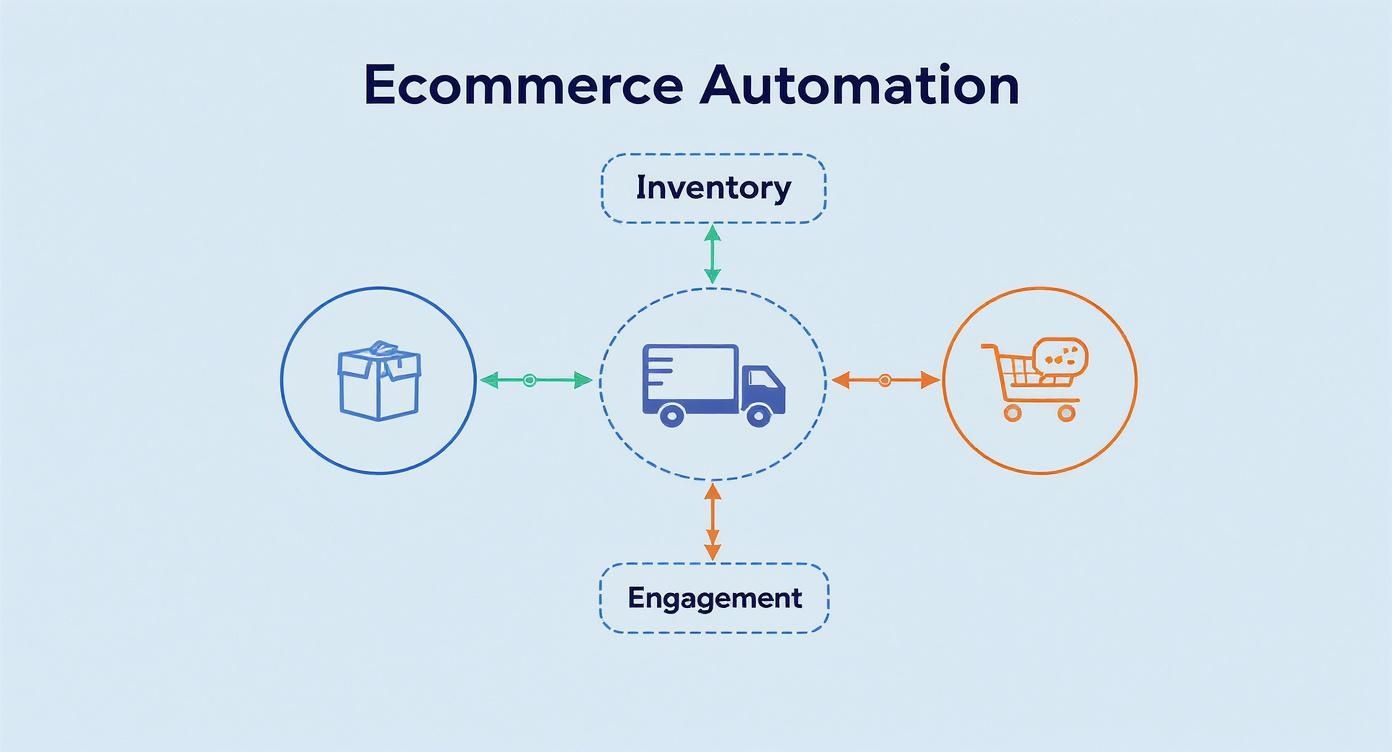
This infographic highlights Inventory, Orders, and Engagement as three hubs connected by data streams. Accurate stock levels mean fewer backorders, speedy routing cuts delivery times, and automated messages keep customers informed every step of the way.
Feature Breakdown With Real-World Scenarios
Imagine a small shop rolling out a seasonal collection. Automated order routing picks the nearest warehouse, slashing shipping times by 30% and trimming costs almost immediately.
On the other end of the spectrum, a high-volume retailer uses inventory sync alerts when stock dips below preset thresholds. As soon as levels fall, the system auto-creates purchase orders—no more manual spreadsheets or missed reorder windows.
Dynamic pricing tools scan competitors hourly. If demand surges, prices tick up within defined limits—so profits climb without someone watching charts all day.
AI-powered chatbots field routine product questions, freeing your support team to tackle complex issues. This blend of bot and human interaction elevates satisfaction without ballooning headcount.
“Order accuracy and speed improved dramatically after automating workflows,” says a WooCommerce store owner.
Here, you see MxChat’s drag-and-drop interface for building chatbot workflows. Teams can customize message flows, set triggers tied to order status, and review conversion data—all without writing a line of code.
Choosing Features Based On Business Goals
Use this quick checklist when you compare automation platforms:
- Pinpoint the busiest, most repetitive tasks that eat up your team’s time.
- Define rules for low-stock alerts, order routing priorities, and pricing thresholds.
- Map every customer touchpoint that could benefit from an AI marketing nudge.
For an AI solution designed specifically for WooCommerce shops, explore our guide on Chatbot For WooCommerce to see how you can build helpful support bots and boost sales in one swoop.
Tips For Seamless Automation Rollout
- Launch with a single workflow—like order routing—to fine-tune settings on a small scale.
- Build in safety buffers (for example, minimum stock levels) so you never oversell.
- Track your key metrics daily and tweak rules as you gather real-world data.
- Train your staff on exception handling before peak seasons hit.
Main Takeaways
- Automated order routing speeds up fulfillment and reduces errors.
- Inventory synchronization keeps stock levels accurate across every channel.
- Dynamic pricing adapts to market conditions and protects margins.
- AI marketing triggers engage customers at the right moments and recover lost sales.
Benefits Of Using Ecommerce Automation Tools
Imagine handing off heavy luggage to a porter who never tires. Automation frees your team from mundane chores, opening space for creative strategy and growth.
It’s like hiring a 24/7 workforce that never skips a shift. Returns get processed, stock levels update, and emails sort themselves out—no coffee needed.
- Recover Abandoned Carts with smart email reminders that gently nudge shoppers back to checkout.
- Speed Up Order Fulfillment by routing purchases instantly to the nearest warehouse.
- Tap Into Real-Time Analytics to spot pricing changes and sharpen promotions.
- Provide Round-the-Clock Support using AI chatbots that resolve simple queries on the spot.
Real Success Stories
A boutique retailer launched targeted email sequences and watched abandoned cart recovery soar by 30% in just two months. Suddenly, the marketing team had time to dream up eye-catching campaigns instead of chasing lost orders.
A mid-sized apparel brand cut order processing from hours to minutes by automating its fulfillment pipeline. That speed boost translated into a 20% lift in repeat purchases and glowing online reviews.
“Switching to automation felt like unlocking extra hours every day,” says one e-commerce manager. “We moved from firefighting manual errors to plotting our next product drop.”
Embracing AI Agents
More brands are using chatbots to smooth out customer interactions. For instance, a health and wellness shop integrated MxChat and began answering common product questions at lightning speed—freeing staff to handle deeper, more complex inquiries.
For a step-by-step walkthrough, see How to Automate Customer Service with MxChat.
Automation also delivers clear financial gains:
Statistics show 72% of successful e-commerce companies depend on automated workflows. Those adopters enjoy an 80% boost in lead generation and a 45% increase in ROI. Mobile commerce sales are set to reach USD 2.51 trillion in 2025—up 21.25% from 2024. Meanwhile, 75% of shoppers report positive chatbot experiences, and the global AI-enabled e-commerce market should hit USD 8.65 billion by 2025. With 93% of businesses viewing AI agents as a competitive edge and 70% of consumers ready to buy through bots, the message is clear. For more details, visit SellersCommerce.
ROI Of 24 Hour Reliability
Automation offers steady performance far beyond what manual teams can sustain.
- Increase Lead Generation by capturing interested visitors with timely chatbot prompts.
- Maximize Returns through optimized processes that cut overhead.
- Expand Sales Channels as staff use freed-up hours to explore new markets.
- Build Customer Loyalty with real-time order updates and personalized follow-ups.
- Scale Smoothly during peak seasons without adding extra headcount.
By handing busywork over to automation, your team shifts from day-to-day firefighting to planning bold new campaigns. Shoppers enjoy faster, error-free service—and your bottom line grows stronger.
Time Savings Action
Most businesses reclaim over 15 hours per week once they automate routine reporting and inventory checks. An electronics retailer, for example, slashed manual stock audits by 80%, then redeployed staff to customer outreach.
- Automate Reporting with dashboards that refresh key metrics each morning.
- Simplify Inventory Audits using alerts that flag discrepancies in real time.
- Streamline Returns by routing refund approvals through set workflows.
With those reclaimed hours, teams can run marketing experiments, test new product assortments, and respond instantly to shifting demand.
Implementation Best Practices For Ecommerce Automation

Rolling out ecommerce automation can feel like directing a staged production: you outline the scenes, rehearse key moments, test the lights, and only then invite your audience in. Breaking the process into four distinct phases keeps risk in check and builds momentum.
- Gathering Requirements
- Selecting Pilot Workflows
- Integration Testing
- Team Training And Rollout
Gathering Requirements
Start with a workshop that brings everyone to the table—operations, customer service, IT. Sketch out each manual step, from order entry to refund processing.
Audit your systems for clean product and customer data. Messy records often trigger false alerts or stalled workflows.
Use quick demos—like an auto-generated order confirmation—to spark excitement. Visual proofs help stakeholders see the potential ROI and back the project.
Pilot Workflow Selection
Next, pick a simple, high-volume task such as sending order-status emails. Automating this slice gives you fast feedback and real performance numbers.
Lay out clear fallback steps. For example, if an address validation fails, route the order to a backup queue. That safety net keeps things moving while you test.
Share initial findings in short updates. Highlight time saved, error reduction, and customer satisfaction to fuel wider team buy-in.
Integration Testing
Set up a sandbox that mirrors your live store. Run test orders through every sales channel and payment gateway to confirm smooth data flow.
Keep an eye on KPIs like execution success rate and mean time to resolution. Display these metrics on a shared dashboard for full transparency.
- Test API connectors with real payloads
- Simulate edge cases (split shipments, partial refunds)
- Verify notifications in email and chat channels
Tweak rules in quick sprints. Small, frequent adjustments beat large overhauls when it’s time to go live.
Automated tests provide confidence before full rollout
Team Training And Rollout
Train each team with hands-on exercises that mirror real issues. For instance, have reps process a flagged refund in your test setup.
Foster an open feedback channel—encourage everyone to log hiccups and suggest improvements. This turn-by-turn approach turns every phase into a learning moment.
In one example, a mid-sized apparel retailer rolled out automation in three stages over four weeks. They saw an 80% drop in errors before hitting the “go live” button.
Best Practices Checklist
- Host a stakeholder workshop to map end-to-end workflows
- Cleanse product and customer records before you start
- Choose low-risk workflows for your first pilot
- Use a sandbox environment for full integration tests
- Track KPIs like success rate and error frequency
- Document backup plans for exceptions
- Train staff with scenario-driven sessions
- Collect feedback and iterate on rules weekly
- Share early wins to build momentum
- Scale up in controlled, measured steps
Check out our guide on Help Desk Automation With MxChat to see how you can streamline support tasks and empower your team.
For practical guidance on implementing automation to enhance customer interactions, consider this practical guide to automating customer service.
Consistent iteration drives success
Refine rules with real data and feedback.
How To Choose The Right Ecommerce Automation Tool
Choosing an ecommerce automation solution is a lot like shopping for a new car. You check the horsepower (feature set), the fuel efficiency (pricing), and the maintenance plan (vendor support). Pick the wrong model and you’ll spend more time under the hood than on the road.
A small hatchback handles city runs with ease, while a heavy-duty truck tackles bulk deliveries. Similarly, your tool should fit your daily workflows and scale with seasonal traffic—no surprise breakdowns allowed.
Key Criteria For Selection
Before you dive in, test each platform against these five critical factors:
Scalability
- Can process 100,000 orders per day without hiccups
- Auto-scaling to absorb Black Friday peaks
Integration Ease
- Prebuilt APIs for Shopify and BigCommerce
- Webhooks and SDKs to connect custom apps
AI Capabilities
- Natural language chatbots that feel human
- Predictive analytics for stock levels and pricing
Cost Models
- Flat subscription vs per-interaction fees
- Upfront onboarding and optional premium support
Vendor Support
- 24/7 live chat and email
- SLA-backed response times and dedicated account managers
Testing And Validation
Treat your pilot like a test drive:
- Pick a high-impact workflow—abandoned cart recovery is a classic.
- Set up triggers in a sandbox environment.
- Track time saved and error rates.
- Tweak rules before flipping the switch to live traffic.
In our tests, usage-based pricing platforms delivered 20% lower monthly costs as order volume climbed.
Capture every metric. A clear dashboard of results justifies your choice and spots hidden expenses early.
Weighing MxChat Features
When you stack up options, MxChat shines in several areas:
- Drag-and-drop chat workflows for rapid setup
- Real-time analytics on conversion lift and sentiment
- Plug-and-play connectors for WooCommerce, WordPress, CRMs, and payment gateways
Additional perks:
- Unlimited chatbots with dedicated knowledge bases
- Retrieval-Augmented Generation for spot-on responses
- Custom bot personalities to match your brand voice
- In-chat forms that capture leads without extra plugins
- PDF and image analysis to tackle complex queries
The global ecommerce tools market jumped from USD 12.71 billion in 2025 to USD 44.84 billion by 2035 at a 15% CAGR. Read the full research about e-commerce tools market on Business Research Insights.
Sealing the deal often comes down to total cost of ownership—factor in setup fees, support, and future growth.
Check out our chatbot evaluation checklist to choose the best AI solution as you compare options.
Tool Comparison Overview
Below is a quick snapshot of four leading platforms. Refer to this table when you need a side-by-side look at features, pricing, and target users.
Comparison Of Top Ecommerce Automation Tools
Here’s a side-by-side look at four popular platforms:
| Tool Name | Key Features | Price Range | Ideal For |
|---|---|---|---|
| MxChat | Modular chat workflows, advanced analytics, plug-and-play connectors | One-time license from $299 | Small to mid-sized WooCommerce stores |
| ChatFlow | Prebuilt workflows, email campaigns, API integrations | $49–$199/month | Mid-market retailers |
| AutoCommerce Pro | Dynamic pricing, inventory sync, multi-channel support | $79–$599/month | High-volume sellers |
| BotCommerce | AI chatbots, lead forms, CRM sync | $0–$199/month | Startups and SMEs |
Evaluate each option against your top priorities. If you handle heavy support loads, weight chatbot power more heavily. For dynamic pricing, dig into performance benchmarks.
Decision Factors
Beyond features and price, look at:
- Future release cadence and roadmap transparency
- Data security standards and compliance certifications
- Active user community and plugin ecosystem
- SLA details: uptime guarantees, escalation paths, and maintenance windows
Arrange live demos, request trial accounts, and ensure support teams respond promptly before you commit. Then book your implementation kickoff and hit the accelerator.
FAQ About Ecommerce Automation Tools
When store owners dive into automation, they often hit unexpected roadblocks. Whether it’s tangled integrations or budgets that balloon, these hiccups can stall even the best-laid plans.
We’ve put together this FAQ to tackle real-world challenges—from integration woes and total cost of ownership to data consistency and ROI benchmarks.
Overcoming Integration Challenges
Integrating ecommerce automation tools feels a lot like fitting new puzzle pieces into an intricate mosaic. Different systems—your CRM, marketplaces, accounting software—each speak their own data dialect.
Try these tactics:
- Audit each platform’s data fields early to spot mismatches
- Leverage webhooks for real-time triggers instead of bulky batch imports
- Test with sandbox accounts to catch edge cases without risking live data
These steps echo our earlier discussion on modular architecture and help keep your workflows humming smoothly.
Estimating Total Cost Of Ownership
Total Cost Of Ownership (TCO) goes beyond the sticker price of a license. You’ll want to factor in onboarding, ongoing support, and maintenance over time—otherwise, surprise fees can derail your budget.
Key cost factors include:
- Setup Fees and customization time
- Ongoing Support or managed services
- Usage Limits that trigger extra charges
“Planning for hidden fees ensures your budget matches reality,” advises a seasoned operations manager.
By mapping out these expenses up front, your financial projections will stay on track.
Ensuring Data Consistency
Think of data consistency as the backbone of any automation strategy. When product listings or customer records go out of sync, you risk order errors and stock mishaps.
Follow these best practices:
- Standardize naming conventions across all channels
- Schedule nightly audits to spot and fix sync failures
- Build buffer zones for inventory to prevent overselling
Keeping your database clean ensures accurate order routing and inventory management, just as we covered in the inventory synchronization section.
Realistic ROI Timelines
Expecting instant ROI is like planting seeds and expecting a full harvest the next day. Real gains often unfold over several growth cycles.
Typically you’ll see:
- Initial efficiency gains within 4–6 weeks of go-live
- Error reduction and time savings stacking up by month three
- Full ROI realization around 6–9 months, depending on order volume
Set clear KPIs—time saved per order, drop in error rates—to measure progress. Tracking these metrics daily helps you tweak rules and speed up your payback.
Ready to simplify your workflows and boost conversions? Experience the power of AI-driven automation with MxChat.


