StepFun Step 5 Pricing: Tested on 3 Hosts
StepFun Step 5 pricing on OpenRouter is $1.00 per million input tokens and $2.70 per million output tokens, with cached input at $0.10. That rate is the same on all three hosts that serve it: StepFun itself, Featherless and GMICloud. Step 5 Preview is StepFun’s new flagship, a sparse mixture-of-experts model with 600 billion parameters in total and 27 billion active per token, built for agent work and coding. OpenRouter added it on 8 October 2026, and it accepts up to 1 million tokens of context on StepFun’s own endpoint.
Per-token rates do not tell a WordPress site owner what a chatbot will cost. So on 31 October 2026 we sent the same support-bot request from our own WordPress server to Step 5 Preview on each of its three hosts, at three reasoning-effort levels, and with reasoning switched off. We ran the same request against StepFun’s two cheaper Flash models and four rival models. That came to 96 calls, and every answer that came back was graded against our documentation.
The short answer: on StepFun’s own endpoint, Step 5 Preview cost $5.50 per 1,000 answers with no cache and answered in a 2.95-second median. When the prompt repeated, StepFun’s automatic cache cut the bill to $1.80, about two thirds off. Claude Haiku 5.5 cost $0.88 on the same request, and GPT-6.1 Terra cost $4.65. Reasoning cannot be switched off: every attempt returned HTTP 400. And the host matters for speed. Featherless charged the same rate but took a 15.7-second median, with one answer at 47 seconds.
Step 5 Preview pricing at a glance
These are the rates on OpenRouter’s model API on 31 October 2026. OpenRouter lists one model, stepfun/step-5-preview, with three hosts behind it. They charge the same per token but differ in quantization, context window and output limit.
| Host | Input / 1M | Cached input / 1M | Output / 1M | Weights | Context | Max output |
|---|---|---|---|---|---|---|
| StepFun | $1.00 | $0.10 | $2.70 | FP8 | 1M | 64K |
| GMICloud | $1.00 | $0.10 | $2.70 | FP8 | 1M | 944K |
| Featherless | $1.00 | $0.10 | $2.70 | FP4 | 262K | 32K |
StepFun’s cheaper models cost far less per token. Step 3.7 Flash lists at $0.20 / $1.15 on StepFun and Novita, and Step 3.5 Flash at $0.10 / $0.30 on SiliconFlow. For comparison, GPT-6.1 Terra lists at $1.00 / $5.00, so Step 5 matches it on input and charges about half as much for output. Claude Haiku 5.5 lists at $0.10 / $0.50.
On the day of our test, OpenRouter showed GMICloud with a degraded status and 0% uptime over the previous 30 minutes. StepFun and Featherless both showed 100%. GMICloud still answered 7 of our 8 requests; the eighth failed with HTTP 503 after three retries.
How we tested it
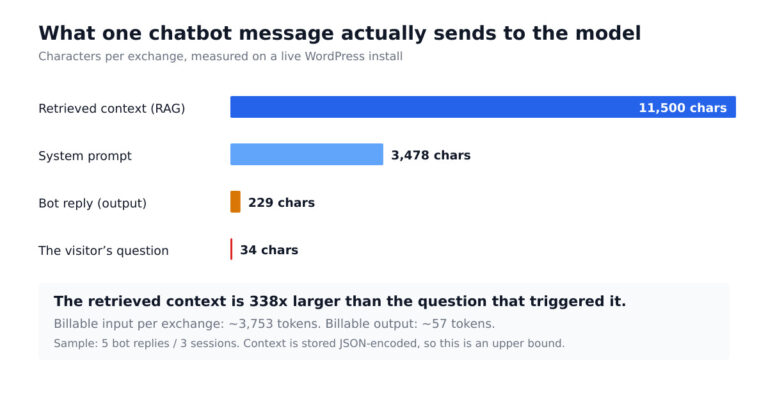
Every request was the one a MxChat support bot actually sends. It contained the site’s real system prompt plus four passages pulled from our own documentation, about 4,160 tokens on Step 5’s count, followed by one visitor question. We asked four questions, each twice:
- Does MxChat work with WooCommerce, and can the bot look up an order status for a logged-in customer?
- Do I need Pinecone to use the knowledge base, or can I store embeddings in WordPress?
- Can a visitor be handed over to a human on Slack or Telegram when the bot cannot answer?
- Can I use my own OpenRouter or OpenAI API key, and which models can I choose from?
We ran 12 setups:
- Step 5 Preview on each of its three hosts at the default setting, each host pinned with fallbacks disabled.
- Step 5 Preview on StepFun with reasoning effort set to low, set to high, and with reasoning switched off.
- Step 3.7 Flash and Step 3.5 Flash, StepFun’s cheaper models.
- GPT-6.1 Terra and Claude Haiku 5.5, plus GLM-5.3 and DeepSeek V4.1 Flash, two Chinese open models we have tested before. For GLM and DeepSeek we let OpenRouter pick the host, as MxChat does.
All calls went through OpenRouter from our WordPress server in the US. They were non-streamed, with usage accounting switched on, so OpenRouter reported the exact tokens and billed cost of every call. The first pass of each setup gives the “cold” cost. The second, identical pass shows what each host’s caching does. We graded every answer against the facts in the passages. For example, the WooCommerce answer had to say the feature needs MxChat Pro or its add-on and a logged-in customer, and the Pinecone answer had to say WordPress storage works.
What 1,000 chatbot answers cost

| Setup | Cost per 1,000 answers (cold) | Billed on repeat | Median answer time | Output tokens per answer | Correct |
|---|---|---|---|---|---|
| Step 5 on StepFun | $5.50 | $1.80 | 2.95 s | 495 | 8/8 |
| Step 5 on StepFun, effort low | $5.27 | $1.69 | 2.56 s | 408 | 8/8 |
| Step 5 on StepFun, effort high | $5.94 | $2.45 | 2.71 s | 660 | 8/8 |
| Step 5 on StepFun, reasoning off | HTTP 400 on all 8 calls: “Reasoning is mandatory for this endpoint and cannot be disabled.” | 0/8 | |||
| Step 5 on GMICloud | $5.69 | $2.15 | 4.42 s | 563 | 7/7 (one 503) |
| Step 5 on Featherless | $5.81 | $2.46 | 15.71 s | 611 | 8/8 |
| Step 3.7 Flash | $1.45 | $1.05 | 5.96 s | 534 | 8/8 |
| Step 3.5 Flash | $0.51 | $0.49 | 4.23 s | 309 | 8/8 |
| GPT-6.1 Terra | $4.65 | $0.71 | 2.59 s | 116 | 6/8 |
| Claude Haiku 5.5 | $0.88 | $0.88 | 2.16 s | 383 | 8/8 |
| GLM-5.3 (host picked by OpenRouter) | $2.16 billed | $1.11 | 1.46 s | 138 | 8/8 |
| DeepSeek V4.1 Flash (host picked by OpenRouter) | $0.35 billed | $0.17 | 0.73 s | 149 | 8/8 |
Three things stand out.
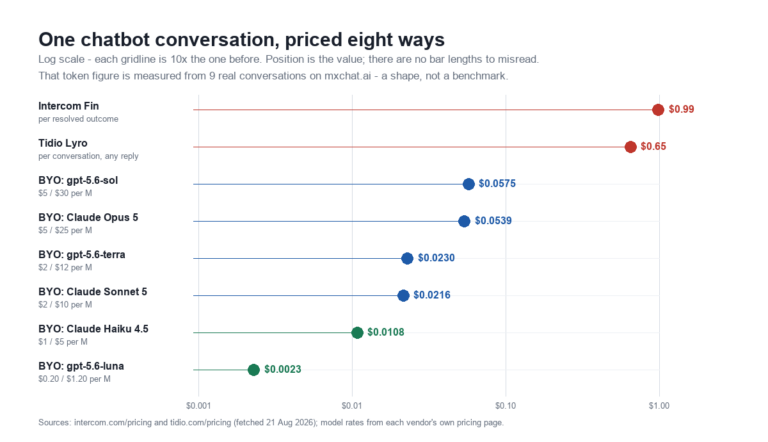
Input sets the price. Our prompt was about 4,160 tokens, so at $1.00 per million the input alone costs $4.16 per 1,000 answers before Step 5 writes a word. That is three quarters of the $5.50 total. Output, at $2.70 per million, adds about $1.34. A chatbot request is mostly input, so Step 5’s low output price helps less than it looks. It is also why Step 5 costs more than GPT-6.1 Terra here even though Terra’s output rate is nearly twice as high: Terra wrote 116 output tokens per answer, and Step 5 wrote 495.
Most of the output is thinking. OpenRouter did not split Step 5’s reasoning tokens from its answer tokens in the usage report, but the arithmetic is plain. The answers averaged 46 words, about 60 to 70 tokens, against 495 output tokens billed. Roughly 85% of the output was reasoning the visitor never sees. Setting effort to low cut output to 408 tokens and the cost to $5.27, and high raised it to 660 tokens and $5.94. All three settings got every answer right.
The tokenizer helps a little. The same request counted as about 4,160 tokens on Step 5 and 6,838 on Claude, 39% fewer. GPT-6.1 Terra counted 4,067. At equal per-token rates Step 5 would beat Claude per answer on that alone, but its input rate is ten times Haiku’s.
The two wrong answers in the whole test came from GPT-6.1 Terra. On both runs of the WooCommerce question it replied that it did not have enough information, even though the passages covered it. Every Step 5 answer was correct, and the answers were complete: they named the Pro requirement, the WordPress storage option and the settings path.
Reasoning cannot be switched off
On many reasoning models you can save money and time by turning thinking off for simple support questions. Step 5 Preview does not allow it. With "reasoning": {"enabled": false} on OpenRouter, StepFun’s endpoint rejected all eight calls with HTTP 400 and the message “Reasoning is mandatory for this endpoint and cannot be disabled.” It did not fall back to answering without reasoning.
The control you do have is effort. Low effort was the cheapest and fastest Step 5 setup we ran: $5.27 per 1,000 answers and a 2.56-second median, and it wrote the longest answers (58 words on average). High effort cost 8% more than the default and was no more accurate on these questions. For a knowledge-base chatbot, low is the setting to use.
This matters for plugin users. A chatbot plugin that sends reasoning: {enabled: false} to every model to keep costs down would get errors from Step 5, not cheaper answers. MxChat does not send a reasoning setting on the OpenRouter route, so the model runs at its default effort.
Speed: same price, very different waits

All three hosts charge the same rate, but the median wait ranged from 2.95 seconds on StepFun to 4.42 seconds on GMICloud and 15.71 seconds on Featherless. Featherless’s slowest answer took 47 seconds, and it produced output at a median of about 27 tokens per second against about 139 on StepFun. A visitor will not wait 15 seconds in a chat window, let alone 47.
StepFun’s own endpoint was also the most consistent: its answers took 1.3 to 7.0 seconds. GMICloud ranged from 1.9 to 11.3 seconds. For comparison, Claude Haiku 5.5 answered in a 2.16-second median and GPT-6.1 Terra in 2.59 seconds. The fastest model in the test was DeepSeek V4.1 Flash at 0.73 seconds, on hosts OpenRouter chose.
StepFun’s older models were slower than Step 5 here. Step 3.7 Flash took a 5.96-second median and Step 3.5 Flash 4.23 seconds. Both are cheaper, and both reason before answering too.
Prompt caching cuts the bill by two thirds

A chatbot sends nearly the same system prompt and knowledge passages again and again, and Step 5’s cache price is a tenth of its input price. On the second, identical pass:
- StepFun cached about 4,130 of the 4,160 prompt tokens automatically. Its bill fell from $5.50 to $1.80 per 1,000 answers, 67% less.
- Featherless cached the whole prompt, and its bill fell to $2.46. It wrote more output per answer, which is why it stayed higher.
- GMICloud reported most of the prompt as cached even on the first pass, so its billed cost was $1.72 on the first pass and $2.15 on the second.
- GPT-6.1 Terra cached almost everything and fell to $0.71, because it writes so little output.
- Claude Haiku 5.5 cached nothing, because Anthropic needs explicit cache breakpoints, which these calls did not send.
Caching changes the comparison. Cold, Step 5 costs six times as much as Haiku 5.5. Warm, it costs about twice as much. On a site where the same knowledge passages come up again and again, the real price sits much closer to the warm number.
What it costs per month
Here is what the measured costs come to at three traffic levels with no cache savings, and at 10,000 answers with a warm cache in the last row:
| Answers per month | Step 5 on StepFun | Step 5, effort low | Step 3.7 Flash | GPT-6.1 Terra | Claude Haiku 5.5 | DeepSeek V4.1 Flash |
|---|---|---|---|---|---|---|
| 1,000 | $5.50 | $5.27 | $1.45 | $4.65 | $0.88 | $0.35 |
| 10,000 | $54.99 | $52.68 | $14.47 | $46.49 | $8.75 | $3.52 |
| 100,000 | $550 | $527 | $145 | $465 | $88 | $35 |
| 10,000, warm cache | $17.97 | $16.89 | $10.50 | $7.07 | $8.85 | $1.66 |
For a small WooCommerce store answering 10,000 questions a month, Step 5 comes to $18 to $55 depending on how well the prompt caches. That is affordable, but it buys nothing a support bot needs over models that cost a fraction as much: every model in this test except Terra answered every question correctly.
Where Step 5 Preview falls short for a chatbot
- It is built for agents, not support chat. StepFun describes Step 5 as a model for agentic work and software engineering. A knowledge-base chatbot answering short questions does not use that, and pays for it in reasoning tokens.
- Reasoning is mandatory. You cannot turn it off to save money or time. Low effort is the closest you can get.
- The input rate is high for a chatbot. At $1.00 per million, input makes up three quarters of the bill on a knowledge-base prompt. Haiku 5.5 and DeepSeek V4.1 Flash charge a tenth of that or less.
- Host choice decides speed. Featherless charges the same and takes five times longer. GMICloud was degraded on the day of our test and dropped one request.
- It is a preview. The name says so. Preview models can change behaviour or price, or be replaced, with little notice. Test it again before you rely on it.
How to use Step 5 Preview in a WordPress chatbot
MxChat reaches Step 5 Preview through OpenRouter:
- Create an OpenRouter API key and add it under MxChat → Settings → API Keys.
- In the chatbot’s model setting, choose
stepfun/step-5-previewfrom the OpenRouter model list. The list is read live from OpenRouter, so new models appear without a plugin update. - Ask your bot the five questions your visitors ask most, check the answers against your knowledge base, and time them before you switch it on for everyone.
MxChat does not pin a host, so OpenRouter chooses one. If you use Step 5, exclude Featherless in your OpenRouter account settings so a visitor is never routed to the 15-second host. Our OpenRouter pricing test covers its fees against going direct. The MxChat documentation covers knowledge-base setup, and MxChat Pro adds the WooCommerce and live-agent features our test questions asked about.
Step 5 against the other models we have tested
We have run the same chatbot request against most of this year’s models:
- GPT-6.1 Terra: $4.49 per 1,000 answers in our 27 October test and $4.65 today. It costs less than Step 5 cold and far less warm ($0.71), but it missed the WooCommerce question twice today.
- Kimi K3.1 Pro: $12.76 per 1,000 answers and a 16-second median in our 29 October test. Step 5 is less than half the price and much faster.
- GLM-5.3: $2.16 per 1,000 answers today on hosts OpenRouter chose, with a 1.46-second median.
- DeepSeek V4.1 Flash: $0.35 and 0.73 seconds today, the cheapest and fastest model in this test.
- Claude Haiku 5.5: $0.88 and 2.16 seconds, the safest cheap default.
- Nemotron 3.5 Super: the same lesson about hosts. One open model, eight hosts, a 28-fold spread in speed.
Step 5 Preview gave correct, complete answers on every call, and on StepFun’s own endpoint it was quick enough for live chat. But at $5.50 per 1,000 answers cold, it costs six times as much as Haiku 5.5 for the same accuracy on support questions. Use it if your bot runs agent-style tasks that need a stronger model. For plain knowledge-base answers, a cheaper model does the job.
FAQ
How much does StepFun Step 5 cost?
On OpenRouter on 31 October 2026, Step 5 Preview cost $1.00 per million input tokens, $0.10 per million cached input tokens and $2.70 per million output tokens on all three hosts. On our chatbot request that came to $5.27 to $5.94 per 1,000 answers with no cache, and $1.69 to $2.46 when the prompt was cached.
Can you turn off reasoning on Step 5 Preview?
No. StepFun’s endpoint returned HTTP 400 with “Reasoning is mandatory for this endpoint and cannot be disabled.” You can set reasoning effort to low, which cost 4% less and answered faster in our test.
Which host is best for Step 5 Preview?
StepFun’s own endpoint. It answered in a 2.95-second median and cached the prompt down to $1.80 per 1,000 answers. Featherless charged the same and took 15.7 seconds. GMICloud took 4.4 seconds and dropped one of eight requests.
Is Step 5 Preview cheaper than GPT-6.1 Terra?
Per output token, yes: $2.70 against $5.00 per million. Per chatbot answer, no. Step 5 cost $5.50 per 1,000 answers against Terra’s $4.65 because it writes about four times as many output tokens, most of them reasoning.
What is the difference between Step 5 and Step 3.7 Flash?
Step 5 Preview is StepFun’s flagship, with 600B total and 27B active parameters. Step 3.7 Flash is the cheaper model at $0.20 / $1.15 per million tokens. On our request, Step 3.7 Flash cost $1.45 per 1,000 answers but was slower (5.96 seconds against 2.95), and both answered every question correctly.
Does Step 5 Preview work with MxChat?
Yes, through OpenRouter. Add an OpenRouter key and pick stepfun/step-5-preview from the model list.
Method note: 96 chat-completion calls through OpenRouter from mxchat.ai’s WordPress server on 31 October 2026, 12 setups × 4 questions × 2 runs. 87 returned an answer; 8 were HTTP 400 (reasoning off is not allowed) and 1 was HTTP 503 (GMICloud). Step 5 hosts pinned with fallbacks disabled; other models on OpenRouter’s default routing. Costs are measured token counts at list price with no cache, except GLM-5.3 and DeepSeek V4.1 Flash, which are first-pass billed costs because their hosts varied. Repeat-pass costs are what OpenRouter billed. Times are the median wall-clock time to a complete, non-streamed answer. Prices, quantizations, context windows, output limits and host status read from OpenRouter’s model API on 31 October 2026.