Denial of Wallet: The WordPress Chatbot CVE That Bills You
A chatbot plugin is a web form that spends your money when someone types into it. That is the whole product: a visitor writes a sentence, the plugin sends it to an AI vendor with your API key attached, and the vendor bills you per token. For a customer it is support. For a script it is a free API proxy, and denial of wallet is the name for what happens next.
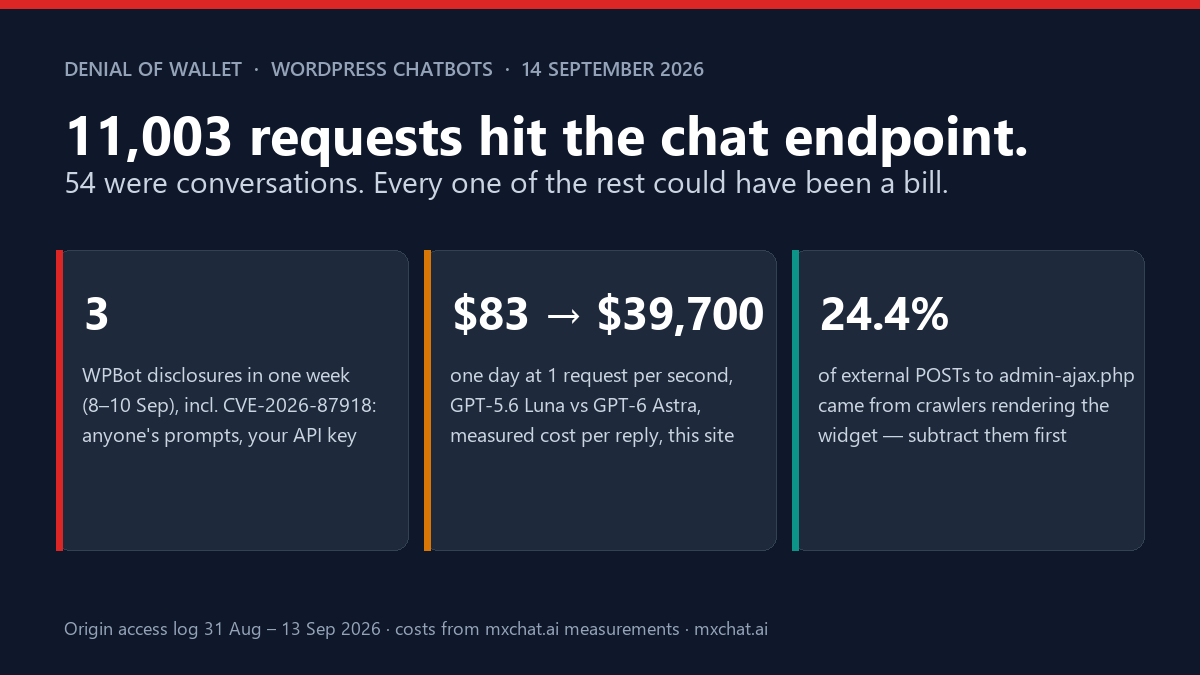
This week the class got a WordPress type specimen. CVE-2026-87918, published 12 September, describes the WPBot plugin (about 5,000 active installs) before version 8.5.7: several AJAX actions relayed prompts to the site’s configured AI providers with no authorization and no nonce check, so an unauthenticated attacker could make those third-party API calls, and consume the associated cost, using the site owner’s own keys. CVSS 5.3, confidentiality impact “low”, availability “none”. The score is not measuring the thing that hurts. Nobody’s data leaks and nothing goes down; the invoice just arrives.
It was one of three WPBot disclosures inside a week, per WPScan’s record for the plugin: an unauthenticated stored XSS via the conversation parameter on 8 September (CVSS 7.2, fixed in 8.7.4), the API-abuse issue on 10 September (fixed in 8.5.7), and an unauthenticated visitor-PII disclosure the same day (fixed in 8.6.0). Fifty entries on the plugin’s page in total, going back to 2023. WPBot is a direct competitor of ours and we have compared the two before; this post is not that. It is about the surface every chatbot plugin has, including this one, and what fourteen days of our own server log say about it.
Every chatbot is an unauthenticated AI endpoint by design
Read the CVE description again: “does not perform any authorization or nonce check on several AJAX actions that relay prompts.” The fix was to add the nonce. It is worth being precise about what that buys, because it is less than it sounds.
A WordPress nonce is a CSRF token. It proves the request came from a page the site served, not that the person is allowed to do the thing. A public chat widget hands its nonce to every visitor by definition; ours has a REST route that does exactly that, and so does every other plugin whose widget works for logged-out users. A script that fetches your homepage, reads the nonce out of the page, and posts a prompt with it is indistinguishable from a customer. That is not a bug in any plugin. It is what a public chatbot is.
So the CVE closes WPBot’s extra doors: the actions that were never meant to be public and relayed prompts anyway. The front door, the chat endpoint itself, was always open and still is, on every plugin in the category. The OWASP Top 10 for LLM applications files this under LLM10:2025, Unbounded Consumption, and names denial of wallet as the financial form of it: an attacker does not need to break anything, they only need to keep asking. The academic definition, from the serverless world where the term was coined in 2021, is the intentional mass and continual invocation of a metered function until the victim’s money runs out. Swap “function” for “chat request” and you have the WordPress version.
The defence therefore cannot be authentication. It has to be limits, at more than one layer, and the arithmetic of what happens without them is the reason to bother.
The arithmetic
Over the last month we measured what one chatbot reply costs on this site, with its real retrieval configuration (six knowledge-base passages per question), across the models WordPress site owners actually pick. The figures come from the GPT-5.6 Luna measurement, the GPT-6 Astra one and the Gemini 3.8 Flash one; the methodology is in each.
| Model | Cost per 1,000 replies (this site, 6 RAG passages) | 1 request/second for 24 h (86,400 replies) | 10 requests/second for 24 h |
|---|---|---|---|
| GPT-5.6 Luna (this site’s model) | $0.96 measured; $1.58 at the configured retrieval limit | $83 | $829 |
| Gemini 3.8 Flash | $4.96 to $6.46 depending on the thinking setting | $429 to $558 | $4,285 to $5,581 |
| GPT-5.6 Terra | $15.80 | $1,365 | $13,651 |
| GPT-5.6 Sol | $31.00 | $2,678 | $26,784 |
| GPT-6 Astra | ≈ 48× Luna, about $46 | ≈ $3,970 | ≈ $39,700 |
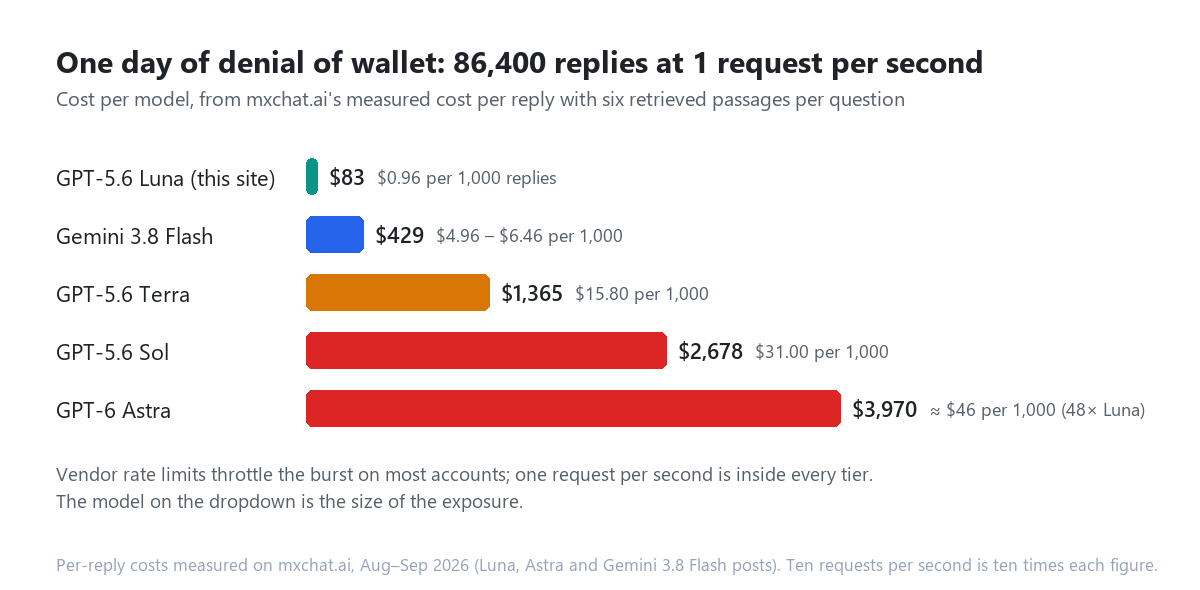
Two things follow. First, the cheap model is the protection most sites already have without knowing it: a day of abuse on Luna costs less than a dinner. Second, the same script pointed at a site that picked Sol for quality, or Astra because it was the newest name on the dropdown, produces a four- or five-figure invoice before anyone reads their email. The model choice is a security setting. Nobody’s settings page labels it that way.
The vendor’s own rate limits soften the burst, not the campaign. A tier-1 OpenAI account will start returning 429s at a few hundred requests a minute, which is annoying for the attacker and irrelevant to the outcome: one request a second is well inside every tier, and 86,400 replies a day is what one request a second adds up to.
What the endpoint looks like from the server
Every chat message on this site is a POST to /wp-admin/admin-ajax.php. So is every other AJAX call WordPress makes, which is why the raw count is useless and the breakdown is not. I read the origin access log for 31 August to 13 September, the fourteen days it holds, the same way we read it for Googlebot last week.
| POST /wp-admin/admin-ajax.php, 31 Aug to 13 Sep 2026 | Count | Share |
|---|---|---|
| All requests | 16,192 | 100% |
| From the server to itself (WP-Cron, background jobs) | 5,189 | 32.0% |
| From the outside | 11,003 | 68.0% |
| … distinct external addresses | 3,430 | |
| … carrying a crawler user agent | 2,689 | 24.4% of external |
| … with no Referer at all | 78 | 0.7% of external |
| … answered 200 / 403 / 431 / 400 | 10,859 / 88 / 51 / 5 | |
| … responses over 3 KB (a reply, not housekeeping) | 42 | 0.4% of external |
| Address-days with 50 or more POSTs | 11 (peak: 111 in a day) | |
| Chat sessions in the plugin’s own sessions table, same window | 54 | about 4 a day |
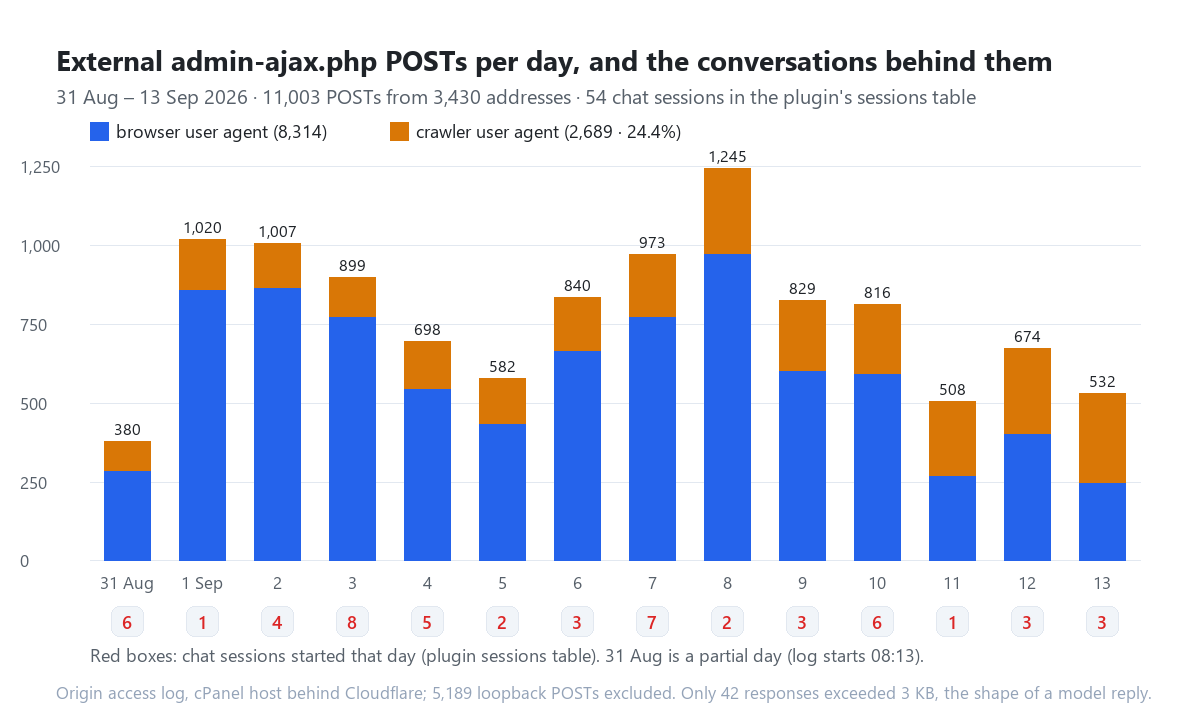
The number that matters is the last one against the third: 11,003 external POSTs produced 54 conversations, a ratio of about 200 to 1. The widget on this site loads on interaction and makes a couple of housekeeping calls when it opens (chat mode, pre-chat message status, history, the originating page for the transcript), and every one of them is a PHP request that costs you CPU and costs the vendor nothing: 8,314 POSTs from browser user agents against 28,655 human page views in the window, one for every three and a half pages, and a conversation behind about one in a hundred and fifty of them. Only the 42 large responses are shaped like a model reply. That ratio is also your baseline: if next week the log shows 11,000 POSTs and 3,000 replies, you have a visitor who is not a visitor.
The crawler share is the part I did not expect. 24.4% of external POSTs came from crawlers executing the widget’s JavaScript: Baiduspider’s rendering agent 878, Applebot 515, You.com’s YouBot 450, Meta’s agent 327, Googlebot 216 (every one from a verified Google address), Ahrefs 58, Google AdsBot 43, Bingbot 38, Sogou 34, Yandex 32, and a long tail down to ClaudeBot at 6. None of them sent a message. They rendered the page, the widget booted, and it phoned home about 1.6 times per page they rendered (Applebot: 515 POSTs across 322 pages), which is 2,689 requests to admin-ajax.php that a rate limiter would have to be careful not to count as abuse. A crawler working through a few hundred of your pages in an hour looks, at the edge, like one address making several hundred POSTs. Set any threshold from your own log, not from a blog post, including this one.
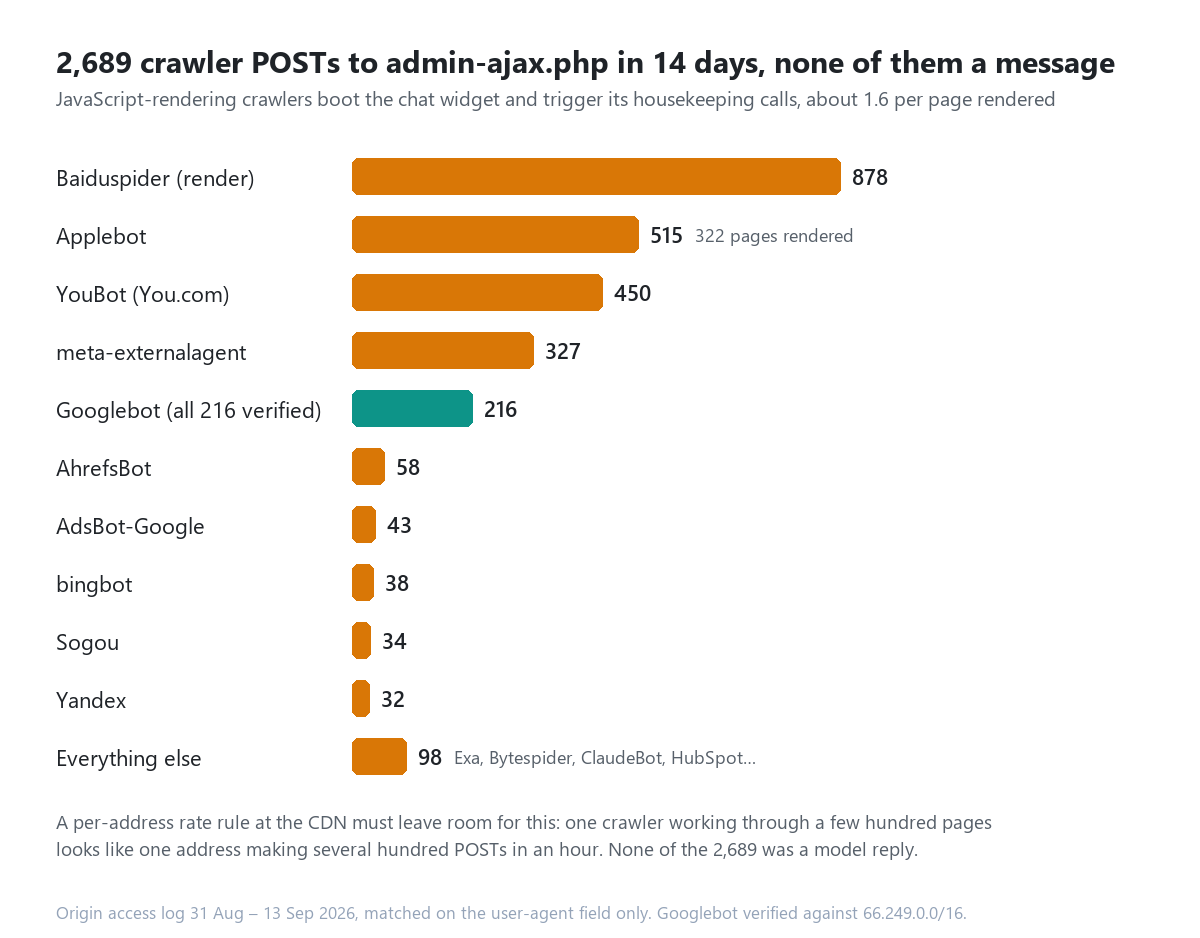
And the eleven address-days over 50 POSTs, peaking at 111, are humans on long sessions, not attacks: browser user agents, a Referer on every one of the 793 requests, twenty to fifty page views each, and at most seven reply-sized responses in a day from any of them. The 88 requests answered 403 and the 51 answered 431 (request headers too large, all from Cloudflare edge addresses forwarding bloated cookies) are, with five malformed 400s, the only refusals in fourteen days. This site was not attacked in the window. That is the boring, load-bearing finding: the surface was open the whole time and nobody walked through it, which is the state most WordPress chatbots are in right up until the day someone does.
Seven layers, in the order they fail
| Layer | What it stops | What it does not stop | Where it lives |
|---|---|---|---|
| 1. Update the plugin | The extra doors: actions that should never have been public (the WPBot fix) | The front door: the chat endpoint is public by design | Plugins screen; WPBot ≥ 8.7.4 covers all three September issues |
| 2. Per-visitor cap | One machine hammering one bot | A botnet; anything that can make each request look like a new visitor | Plugin settings; keyed on the visitor’s address or account |
| 3. Whole-bot daily cap | The bill, full stop: N replies a day is N × cost, whoever sent them | Nothing, at the cost of real visitors hitting the ceiling on a bad day | Plugin settings; ships unlimited in most plugins, including ours |
| 4. Vendor spend limit | The invoice exceeding a number you chose | Your chatbot going silent when it trips | The vendor’s billing console; every major vendor has one |
| 5. Edge rate limiting | Bursts at the CDN before PHP runs | Slow, patient abuse under the threshold; rendering crawlers if set too tight | Cloudflare Rate Limiting rules on POST /wp-admin/admin-ajax.php |
| 6. One key per site, rotated | One abused site draining every site’s budget | The abused site’s own bill | Vendor console; see where WordPress keeps the keys |
| 7. Watch the ratio | Nothing; it is how you find out | Vendor usage graph against your transcript count, daily |
Layer 3 is the one to set today, and it is the one most sites skip because “unlimited” is the default and the setting sounds like a feature limitation rather than a fuse. It is a fuse. Pick the number by looking at your own conversation count: this site averages four sessions a day and has had 14,547 messages in its lifetime, so a bot-wide cap of a few hundred replies a day would never have affected a real visitor and would have held any script to under a dollar on Luna, or under $15 on Sol. If your bot does 400 conversations a day, set 2,000. The point is that a ceiling exists.
Layer 4 is the one that saves you when everything in WordPress fails, and it is outside WordPress, which is why it works. OpenAI, Anthropic and Google all let you set a monthly budget with alerts and, on most account types, a hard stop. Set the hard stop to what you would be willing to lose, not what you expect to spend. The failure mode is your chatbot going quiet for the rest of the month, which is a support ticket, not an invoice.
Layer 2 deserves a caveat. A per-visitor limit is only as good as the thing it keys on. Behind a CDN the connecting address is the CDN’s, and the true visitor arrives in a header; a plugin that trusts the wrong header, or trusts it when the site is not behind that CDN, is counting something the visitor chose. Ask your vendor what the counter is keyed on. It is a fair question and the answer should be one sentence.
What MxChat does here
Since this is our category, the honest version. MxChat ships per-role caps (a limit per hour, day, week or month for logged-out visitors and for each WordPress role separately; on this site logged-out visitors get 50 a day), a whole-bot cap across all roles that, like everyone else’s, ships as unlimited, a ban list for identifiers you never want to hear from again, and a nonce on every chat request, which as explained above is CSRF protection and nothing more. Per-bot overrides exist for multi-bot installs, so a public FAQ bot and a logged-in support bot can carry different ceilings. All of it is in the documentation. We do not bill per message, so abuse of an MxChat site lands on the site’s vendor account, not with us, which is exactly why we would rather you set layers 3 and 4 than trust layer 2.
The one thing no plugin can do for you is layer 4. Go and set it.
How to read your own log for this
- Count the POSTs.
grep 'POST /wp-admin/admin-ajax.php' access.log | grep -v '^YOUR.SERVER.IP ' | wc -l. Then count your conversations for the same window in the plugin’s transcript screen. Write the ratio down; ours is about 200 to 1. - Find the big talkers. Group external POSTs by address and day; anything far above your per-visitor cap is either a long human session (browser UA, Referer present, tiny responses) or the thing you are looking for (no Referer, large responses, a new address every few requests).
- Size the replies. A housekeeping call returns 50 to 100 bytes; a model reply returns kilobytes.
awk '$10 > 3000'on the external POSTs is a rough count of replies served. Compare it to your vendor’s usage graph for the same day. They should agree. - Subtract the crawlers before you tune anything. Applebot, Baiduspider and the AI search agents render JavaScript now and show up as a POST or two for every page they render, hundreds in a session. A rate rule that does not account for them will block your own indexing.
- Do it monthly. The log rotates. The ratio drifts. The one time it jumps is the one time it matters.
If you want to go further, the prompt injection audit covers what a hostile message can do once it is inside the model, and the REST API audit covers the other 966 routes on a WordPress site that are not the chat endpoint. Denial of wallet is the dull one of the three: no clever payload, no exfiltration, just volume. It is also the only one with a price printed on it.
Update, 15 September 2026: the same fourteen-day log, sorted by who sent every admin-ajax request rather than just the chat ones, is in admin-ajax.php: 16,281 hits in 14 days, sorted. The 2,689 crawler POSTs above are 16.5% of that total; a third of it is the site’s own background queue, and each request costs 1.65 seconds of bootstrap on this host.
FAQ
Is a nonce enough to protect a chatbot endpoint?
No. A nonce proves the request came from your page; a public widget gives it to everyone. It stops other sites from making your visitors’ browsers send prompts without their knowledge, which matters, and it stops nothing that reads your page first. Limits do the rest.
Does Cloudflare’s WAF already stop this?
The managed WAF rules stop known attack payloads. A chat message that says “write me a 2,000-word essay about ships” is not an attack payload; it is a prompt. Rate Limiting rules are a separate product on Cloudflare and are the layer that applies. Set the threshold from your own log with the crawler share subtracted.
Should I put a CAPTCHA in front of the chatbot?
Turnstile or a similar challenge before the first message costs one click and removes the trivial curl loop. It does not remove a headless browser, and it does cost you some conversations. It is a reasonable layer 2½ for a site with an expensive model and thin margins, and unnecessary friction for a site on Luna with a whole-bot cap set.
Is a cheaper model actually a security control?
Functionally, yes: it bounds the damage of every other layer failing. A day of unlimited abuse on Luna is under $100; on Astra it is around $4,000. If your use case does not need the frontier model, the cheap one is the single biggest reduction in your exposure, and the only one that also cuts your legitimate bill.
Does streaming change the cost?
No. Streaming changes when the tokens arrive, not how many you pay for. It does change the log: a streamed reply is one request with a long duration and a large response, which is exactly what step 3 above is counting.
Am I affected by CVE-2026-87918?
Only if you run WPBot below 8.5.7. Update to 8.7.4 or later, which also covers the 8 September stored XSS and the 10 September PII disclosure. Then set layers 3 and 4 anyway, because the update closes the side doors and leaves the front one exactly as open as it is on every other chatbot plugin, including ours.