Self-Hosted AI Chatbot Costs: I Measured Every Token
A visitor asked my chatbot a question this week. The question was 34 characters long. To answer it, the site sent just under 15,000 characters to the model.
That ratio is the whole economics of a self-hosted AI chatbot, and almost nobody publishing pricing advice has measured it on a real install. So I did — on this one, running WordPress 7.0.4 with 48 active plugins and a live WooCommerce store attached.
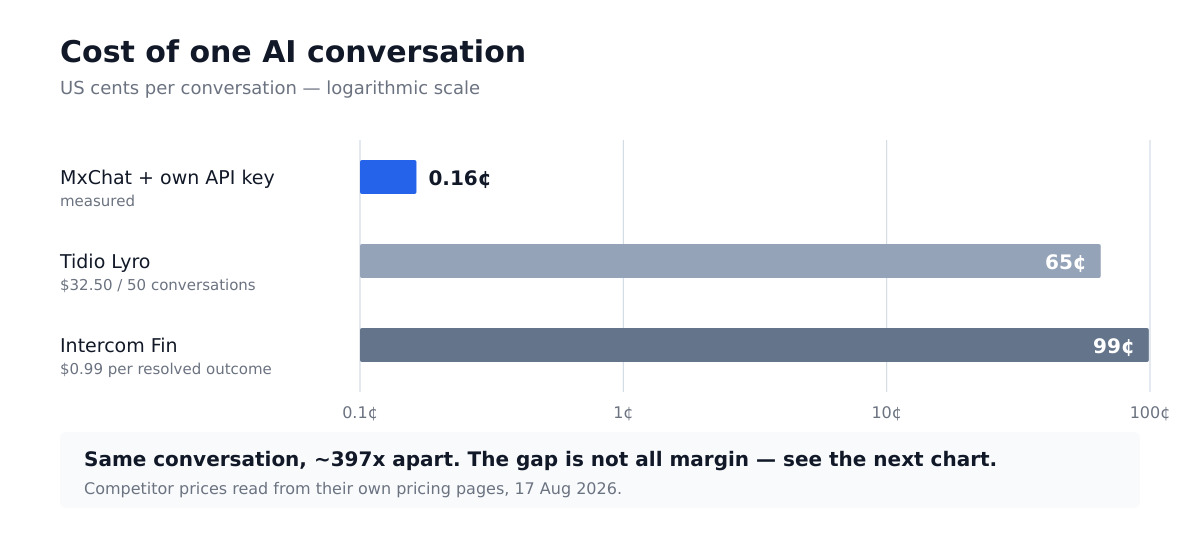
The short version: with your own API key, a conversation on this site costs about a sixth of a cent. The metered alternatives charge between 65¢ and 99¢ for the same conversation. That gap is real, it is roughly 400×, and — this is the part the comparison posts skip — most of it is not margin.
What “self-hosted” actually means for a chatbot
A WordPress chatbot plugin can bill you in one of two shapes.
Metered: you pay the vendor per conversation or per resolution. They hold the model keys, run the inference, and hand you a dashboard. Tidio’s Lyro and Intercom’s Fin both work this way.
Bring your own key: you buy the plugin once, paste in an API key from OpenAI or Anthropic, and pay the model provider directly for exactly what you use. Nobody sits between you and the meter.
The second shape is what people mean by a self-hosted AI chatbot. The pitch is obvious — cut out the middleman — and it is usually argued with hand-waving rather than numbers. Here are the numbers.
What one message actually sends
Every chatbot reply on this site stores the retrieved documents that produced it, which means I can read exactly what the model was given. Across the messages currently in the transcript table:
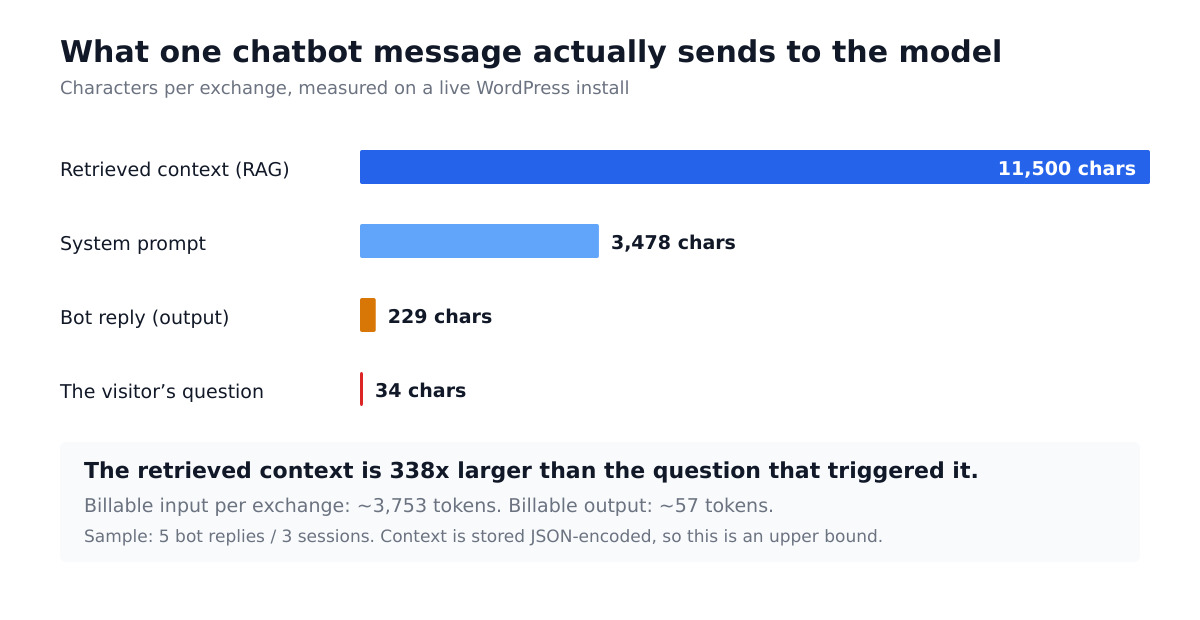
The visitor types 34 characters. The bot replies with 229. And wrapped around that tiny exchange are 3,478 characters of system prompt and 11,500 characters of retrieved context — the chunks of your own site that the plugin pulled in so the model could answer accurately.
The retrieved context is 338 times larger than the question that triggered it. Add everything up and the billable input is roughly 442× the visitor’s actual words.
This is not a flaw. It is how retrieval-augmented generation works, and it is precisely why an AI chatbot can answer a question about your refund policy that nobody explicitly programmed. But it means your bill is driven almost entirely by content you never see, and any cost estimate built on “how long are people’s questions” is off by two orders of magnitude.
I checked that the context really is sent
A stored record of retrieved documents proves the plugin retrieved them. It does not, by itself, prove they were sent to the model — they could be an audit trail written after the fact. That distinction is worth a grep, so I ran one.
In the active plugin, the system message is assembled as the instructions and the retrieved content concatenated together, in five separate call paths. The context is genuinely in the payload. Had I skipped that check, every number below would have rested on an assumption.
The token math
Converting characters to tokens at the usual English approximation of about four characters per token:
| Component | Characters | ≈ Tokens | Billed as |
|---|---|---|---|
| System prompt | 3,478 | 870 | Input |
| Retrieved context | 11,500 | 2,875 | Input |
| Visitor question | 34 | 9 | Input |
| Total input | 15,012 | 3,753 | — |
| Bot reply | 229 | 57 | Output |
This install runs gpt-5.6-luna, published at $0.20 per million input tokens and $1.20 per million output tokens. So one exchange costs:
- Input: 3,753 × $0.20 ÷ 1M = $0.00075
- Output: 57 × $1.20 ÷ 1M = $0.00007
- Total: about $0.00082 per exchange
The conversations in my sample run to roughly two exchanges each, which puts a complete conversation at about $0.0016 — a sixth of a cent.
Against the metered alternatives
I read both competitors’ pricing from their own pages on 17 August 2026 rather than trusting a comparison table.
| Option | How it bills | Cost per conversation |
|---|---|---|
| Own API key + one-time plugin | Model tokens only | ~$0.0016 (measured) |
| Tidio Lyro | From $32.50/mo for 50 conversations | ~$0.65 |
| Intercom Fin | $0.99 per resolved outcome | $0.99 |
Tidio’s Starter plan is $24.17/month for 100 billable conversations, with the first 50 Lyro conversations free for the lifetime of the account. Intercom charges $0.99 per Fin outcome on every plan, on top of seats at $29, $85 or $132 per month.
At 1,000 conversations a month, the token bill on this configuration is about $1.60. The metered equivalent is several hundred dollars. That is not a rounding difference, and if you run any real volume it dominates every other line in the comparison.
The honest half: what the 65¢ is actually buying
Here is where most “cut out the middleman” posts stop, and where this one should not.
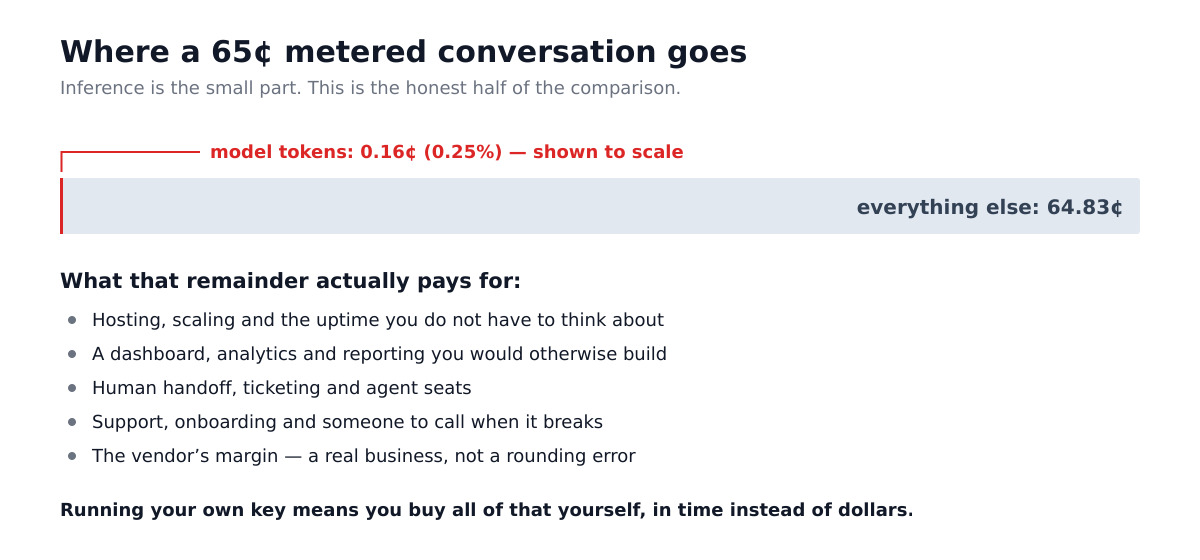
Inference is 0.25% of a metered conversation’s price. The other 99.75% is not the vendor being greedy. It pays for hosting and scaling, a dashboard and analytics, human handoff and ticketing, onboarding and support, an SLA — and yes, a margin, because it is a real business.
When you run your own key, you buy all of that yourself, in time instead of dollars. That is the actual trade, and it is a genuinely good deal for some people and a bad one for others.
When metered pricing is the right answer
Per-conversation billing wins when:
- Your volume is low and lumpy. Under a few hundred conversations a month, the absolute saving is a few dollars. It is not worth an afternoon.
- You need human handoff. A live-agent queue with routing, availability and mobile apps is a substantial product. A chatbot plugin is not that.
- Nobody at your company wants to own an API key. Someone has to rotate it, cap it, and notice when it leaks.
- You want one throat to choke. With your own key, an outage at your model provider is your problem to diagnose.
If two or more of those describe you, stop reading comparison charts and buy the metered product. It is the cheaper choice once your time is priced in.
What actually drives your bill — and how to cut it
If you do run your own key, the chart above tells you exactly where to aim. Your costs are input costs, and input is context.
Trim the retrieved context. This is 77% of the input on my install. Most plugins let you set how many chunks are retrieved and how large each one is. Dropping from six chunks to four is a direct, roughly linear cut to your bill. Test answer quality afterwards — sometimes it improves, because the model has less noise to sift.
Shorten the system prompt. Mine is 3,478 characters, or about 870 tokens, sent on every single call. Prompts accumulate instructions the way garages accumulate boxes. Half of mine were written for a version of the bot that no longer exists.
Use prompt caching. The system prompt is byte-identical on every request, which is exactly what cached input pricing is for — $0.02 per million tokens against $0.20, a tenfold cut on that portion. If your plugin and provider support it, this is close to free money.
Pick the right model tier. Within the same family the published input prices span $0.20 to $30.00 per million tokens — a 150× range for a decision that takes one dropdown. A support bot answering questions about your shipping policy does not need the reasoning tier.
Do not pay to answer the same question repeatedly. If 40% of your traffic asks about delivery times, that belongs in an FAQ block the bot can serve without a round trip.
The costs that never make it into the spreadsheet
Running your own key moves three responsibilities onto your plate, and all three are cheap to ignore until they are not.
The key itself. It is a bearer credential sitting in your WordPress database with a spending limit attached. When I audited every option row on this site, the interesting part was not that keys were exposed — it was how many places a key can end up without anyone deciding to put it there. Set a hard monthly cap in your provider’s dashboard on day one.
Data retention. Every conversation is now stored in your database, under your control, subject to your obligations. That sounds like a benefit until you check whether the deletion actually runs — on this install I found a retention policy that had quietly stopped executing, which is a very different thing from a retention policy.
Cost surprises. Metered pricing has a ceiling you agreed to. A raw API key has whatever ceiling you set, and a bot that gets scraped, looped, or hammered by a bad actor will happily spend money at machine speed.
How to measure your own
You do not need my numbers. You need yours, and they are ten minutes away:
- Find your system prompt and count the characters. Divide by four for tokens.
- Find what your retrieval actually sends. If your plugin logs retrieved context, read it. If it does not, check your provider’s usage dashboard — it reports input tokens per request, which is the ground truth.
- Multiply by your published rate and by your real monthly conversation count.
- Compare against the metered quote for that same volume, and add an honest number for your own time.
Step 2 is the one people skip, and it is the only one that matters. Every wrong chatbot cost estimate I have read went wrong by assuming the message is the payload.
One limit worth naming before the rest: per-token prices are not comparable across model generations any more. Claude 4.7 and later count roughly 30% more tokens for the same text than earlier models, so a hosted API that looks a third cheaper on the pricing page may only be about 13% cheaper in practice — and two models at an identical sticker price can differ by 30% on the invoice. If you are weighing hosted against self-hosted, see what the Claude tokenizer change does to your token bill before you trust the comparison.
The limits of these numbers
Stating these plainly, because a cost model you cannot audit is marketing:
- The sample is small. Five bot replies across three sessions. This install trims its transcript table aggressively, so I measured what was there rather than a month of history. The character counts were tightly clustered — the retrieved context ranged 11,500 to 11,619 — but five is five.
- The retrieved context is measured JSON-encoded, so the raw text reaching the model is somewhat smaller. My cost figure is an upper bound.
- Four characters per token is a rule of thumb, not a tokenizer. Expect ±15%.
- Two exchanges per conversation comes from the same small sample. Your visitors may be chattier.
- Volume is not conversations. This site has 3,247 sessions on record since 8 August, but a session is created when the widget loads, not when someone speaks. Treat it as a ceiling.
None of these move the headline. A 15% token error against a 400× price gap is noise.
So which should you buy?
If you are running meaningful volume on WordPress and someone on your team is comfortable holding an API key, bringing your own key is not a close call — you are paying a sixth of a cent for something otherwise billed at 65¢, and the plugin is a one-time cost. MxChat Pro is $69.97, which the token difference covers inside the first few hundred conversations.
If you need human handoff, or your volume is genuinely small, or nobody wants to own a credential with a credit card behind it, buy the metered product and stop optimising a line item that will never exceed your coffee budget.
What you should not do is decide either way from a pricing page. Measure what your bot actually sends. On this site, that turned out to be 442 times the visitor’s question — and that number, not the sticker price, is the one that determines the bill. For the plugin-licence side of the equation, our WordPress AI chatbot pricing guide covers the tiers in detail; if you are running a store, the WooCommerce chatbot setup has its own retrieval profile worth measuring separately.
Frequently asked questions
Is a self-hosted AI chatbot actually cheaper?
On token cost, dramatically — about $0.0016 per conversation measured here against $0.65–$0.99 for metered alternatives. Whether it is cheaper overall depends on how you price your own time for setup, key management and support.
Do I need my own server to self-host an AI chatbot?
No. “Self-hosted” here means the plugin runs on your existing WordPress site and calls the model provider with your own API key. Inference still happens on the provider’s infrastructure.
What does an AI chatbot cost per month?
At the rates measured here, 1,000 conversations costs roughly $1.60 in tokens. The plugin licence is the larger line item at low volume; tokens overtake it only at very high volume.
Why is the input so much bigger than the question?
Retrieval. To answer accurately about your site, the plugin pulls in relevant chunks of your content and sends them with every request, alongside a fixed system prompt. On this install that is 14,978 characters of overhead around a 34-character question.
Can I cap what my chatbot spends?
Yes, and you should before going live. Set a hard monthly limit in your model provider’s billing dashboard. It is the single most important step when moving from metered billing to your own key.
Related: the other half of this question is what the managed alternatives charge for the same conversation — Intercom Fin Pricing vs Raw Tokens puts $0.99 per resolution next to the measured token bill.
The per-token rates used in this breakdown are a moving target, and two of the cheapest options on the market right now are promotional rather than standard. For the current figures — and for which of them carry a published expiry date — see our August 2026 read of every major vendor’s own pricing page.