Updated 18 August 2026. The shutdown happened on schedule. OpenAI's deprecations page now lists gpt-5.2-chat-latest and gpt-5.3-chat-latest as retired on 10 August 2026, both pointing to gpt-5.6-sol as the replacement. If your chatbot still names either model, it is failing now rather than about to. Three further waves are already dated: the Videos API and Sora 2 models on 24 September 2026, older GPT-3.5 and GPT-4 snapshots on 23 October 2026, and gpt-5-2025-08-07 and o3-2025-04-16 on 11 December 2026. The checks below still work; treat them as a diagnosis rather than a precaution.
On 23 July 2026, OpenAI switched off gpt-5.1-chat-latest. If your WordPress chatbot plugin was pointed at that model ID, it stopped answering nine days ago. Nobody emailed you. The deprecation notice went to whoever owns the API account, and the plugin just started returning an error your visitors never see the reason for.
On 10 August 2026, two more go the same way: gpt-5.2-chat-latest and gpt-5.3-chat-latest. Then a much larger wave on 23 October, and another on 11 December.
This is the maintenance job nobody put on the list. Plugin updates get handled, PHP versions get handled, but the model ID sitting in your chatbot's settings table is a string that a third party can invalidate on a published schedule — and most site owners have never looked at it. Checking takes about two minutes. Here is how, and here is what we found when we audited our own plugin.
<img src="https://mxchat.ai/wp-content/uploads/2026/08/mxchat-content-1785571137-EA79iQ.jpg" alt="OpenAI model deprecation calendar affecting WordPress chatbot plugin settings" style="width:100%;height:auto;border-radius:8px;margin:24px 0" />What actually happens when a model is retired
A retired model does not degrade. It disappears. Requests to the OpenAI API using that model ID return HTTP 404 with an error code of model_not_found, exactly as if you had typed the name wrong.
What your visitors see depends entirely on how your plugin handles that response. Well-built plugins surface something like "Sorry, I'm having trouble connecting." Others show a raw error, or a spinner that never resolves, or nothing at all — the widget opens, you type, and the reply never arrives. None of those tell the site owner that a model ID needs changing.
Three things make this harder to catch than a normal outage:
- The notice goes to the API account, not the site. OpenAI emails the developer account that owns the key. If your agency set up the key, or the account uses an address nobody reads, the warning lands somewhere other than the person who owns the website.
- It is not an outage, so uptime monitoring misses it. The site is up. WordPress is fine. One HTTP call inside one plugin is failing.
- Chatbots fail quietly. A broken contact form gets reported within a day. A broken chat widget mostly gets abandoned — the visitor closes it and leaves, and you find out weeks later from a traffic report you can't quite explain.
The dates that matter right now
These come from OpenAI's own deprecations page, checked on 1 August 2026. Every row below is a model ID that a chatbot plugin might reasonably still have in its settings.
| Shutdown date | Model ID | OpenAI's recommended replacement |
|---|---|---|
| Already gone — 23 July 2026 | gpt-5-chat-latest | gpt-5.6-sol |
| Already gone — 23 July 2026 | gpt-5.1-chat-latest | gpt-5.6-sol |
| 10 August 2026 | gpt-5.2-chat-latest | gpt-5.6-sol |
| 10 August 2026 | gpt-5.3-chat-latest | gpt-5.6-sol |
| 23 October 2026 | gpt-4o-2024-05-13 | gpt-5.6-sol |
| 23 October 2026 | gpt-4 / gpt-4-turbo | gpt-5.6-sol |
| 23 October 2026 | gpt-4.1-nano | gpt-5.6-luna |
| 23 October 2026 | gpt-3.5-turbo | gpt-5.6-terra |
| 23 October 2026 | o1 / o1-pro | gpt-5.6-sol |
| 23 October 2026 | o3-mini | gpt-5.6-sol |
| 23 October 2026 | o4-mini | gpt-5.6-terra |
| 11 December 2026 | gpt-5-2025-08-07 | gpt-5.6-sol |
| 11 December 2026 | gpt-5-mini-2025-08-07 | gpt-5.6-terra |
| 11 December 2026 | gpt-5-nano-2025-08-07 | gpt-5.6-luna |
| 11 December 2026 | o3-2025-04-16 | gpt-5.6-sol |
If you set up your chatbot in 2024 and have not touched it since, you are almost certainly on a row in that table. gpt-4o and gpt-3.5-turbo were the defaults in nearly every plugin of that era, and both are on the October list.
The suffix is the whole story
This is the part that trips people up, and it is worth understanding properly because it decides whether you break or not.
OpenAI exposes three different kinds of model name, and they have different lifespans:
| Kind | Example | What it means | Lifespan |
|---|---|---|---|
| Alias | gpt-5.2 | Points at whatever snapshot OpenAI currently considers that model | Longest — the alias survives while individual snapshots behind it rotate |
| Dated snapshot | gpt-5-2025-08-07 | One frozen version, pinned. What you use when you need reproducibility | Fixed shutdown date, announced in advance |
-chat-latest variant | gpt-5.3-chat-latest | The model as tuned for ChatGPT rather than for the API | Shortest. OpenAI's own policy gives these only 3 months' notice |
Read OpenAI's notice policy carefully and it says so outright: generally available models get "at least 6 months" of notice, while specialized variants — and it names chat variants like gpt-5.1-chat-latest as the example — get "at least 3 months." Preview models, identified by preview in the name, get less than that.
So the practical rule is not "avoid old models." It is:
Check the suffix, not the number.
gpt-5.2andgpt-5.2-chat-latestlook like the same model and are not the same commitment. As of today,gpt-5.2-chat-latestis switched off on 10 August; the baregpt-5.2alias does not appear on the deprecations page at all.
For a website chatbot, the -chat-latest variants are a bad default in general. They exist so developers can match ChatGPT's behaviour, they change under you without warning, and they are the first things retired. A plain alias is the lower-maintenance choice for a support widget.

We audited our own plugin and found two dead options
Rather than write this as a warning to other people, we ran it against MxChat. Version 3.2.16 ships a model catalogue with 14 selectable OpenAI models. Here is every one of them against OpenAI's live deprecation table:
| Model ID in the dropdown | Label shown to the user | Status |
|---|---|---|
gpt-5.6-sol | GPT-5.6 Sol | Current |
gpt-5.6-terra | GPT-5.6 Terra | Current |
gpt-5.6-luna | GPT-5.6 Luna | Current |
gpt-5.5 | GPT-5.5 | Current |
gpt-5.4 | GPT-5.4 | Current |
gpt-5.4-mini | GPT-5.4 Mini | Current |
gpt-5.4-nano | GPT-5.4 Nano | Current |
gpt-5.3-chat-latest | GPT-5.3 Chat | Shuts down 10 August 2026 |
gpt-5.2 | GPT-5.2 | Bare alias — not on the deprecations page |
gpt-5.1-chat-latest | "Recommended for most use cases" | Already shut down, 23 July 2026 |
gpt-5.1-2025-11-13 | GPT-5.1 | Not on the deprecations page |
gpt-5 | GPT-5 | Alias; the snapshot behind it retires 11 December 2026 |
gpt-5-mini | GPT-5 Mini | Alias; snapshot retires 11 December 2026 |
gpt-5-nano | GPT-5 Nano | Alias; snapshot retires 11 December 2026 |
Two of those fourteen are problems. One retires in nine days. The other has been dead for nine days already — and it is the entry whose description reads "Recommended for most use cases." Any site owner who picked the recommended option and walked away has a chatbot that has been returning errors since 23 July.
That is a defect in our plugin and it is being fixed. It is also not unique to us: a model catalogue is a hardcoded list in PHP, it ships with a release, and releases go out on their own schedule rather than OpenAI's. Every plugin that offers a model dropdown has this problem structurally. The question is only how fast the list gets updated after a shutdown.
And it is not just the chat model
While we were in there, we checked the rest of the model IDs stored on our own production site. One of them was pplx-7b-online — a Perplexity model retired long ago, superseded by the sonar family. It has been sitting in the options table doing nothing for over a year.
That is the real shape of this problem. Model IDs rot in settings tables. They get set once during setup, they are never surfaced again, and nothing in WordPress tells you that a string you saved in 2024 now refers to something that does not exist.
The embedding-model trap
Chat models are the easy case: something breaks loudly and you swap a dropdown. Embedding models are worse, because nothing breaks at all.
If your chatbot answers from your own content — your pages, your docs, your product catalogue — it does that by converting your content into vectors with an embedding model and storing them. When a question comes in, the question gets embedded with the same model and compared against that store.
The two halves only work together if they used the same embedding model. Change the embedding model without re-indexing and you get:
- No error message. The API call succeeds.
- Similarity scores that are meaningless, because you are comparing coordinates from two different maps.
- A chatbot that starts confidently answering with the wrong source material, or falls back to "I don't have enough information" on questions it used to handle.
So if an embedding model is ever retired on you, the fix is not "pick the new one from the dropdown" — it is pick the new one and then re-index your entire knowledge base. Budget for that. On a large site it is the difference between a two-minute settings change and a job you want to run overnight.
Worth knowing which one you are on: text-embedding-ada-002 was superseded by text-embedding-3-small and text-embedding-3-large back in 2024. If you are still on ada-002, you are on borrowed time and you will need a re-index whenever it goes.
How to check your own site in two minutes
Three ways, in order of how much access you have.
1. From the WordPress admin
Open your chatbot plugin's settings and find the model selector. Write down the exact string — not the friendly label, the actual ID. "GPT-5.1 Chat Latest" is a label; gpt-5.1-chat-latest is the thing that matters. Then search for that string on OpenAI's deprecations page. If it is there, note the date.
2. From WP-CLI
If your plugin stores its settings in a single option, you can read the model without clicking through the UI. For MxChat:
wp eval '$o = get_option("mxchat_options"); echo $o["model"] . PHP_EOL;'To find model IDs anywhere in your options table, regardless of plugin:
wp db query "SELECT option_name, LEFT(option_value, 100) FROM wp_options
WHERE option_value REGEXP 'gpt-|claude-|gemini-|o[134]-|text-embedding|pplx-'
LIMIT 40"
Adjust wp_options for your table prefix. That query is how we found the dead Perplexity setting on our own site.
3. Just send a test message
The least technical check, and it catches the loud failures: open your own website in a private window and ask the chatbot something. If it fails, you have your answer. Do this on the morning of 11 August, and again on 24 October, and again on 12 December — the day after each shutdown.
What to switch to
OpenAI publishes a recommended replacement for every retired model, and for a website chatbot the choice is mostly about cost against capability:
| If you want | Model | Good for |
|---|---|---|
| Best answers, cost secondary | gpt-5.6-sol | Complex support questions, technical documentation, anything where a wrong answer costs you |
| Balanced | gpt-5.6-terra | The sensible default for most business sites |
| Cheapest, fastest | gpt-5.6-luna | High-volume FAQ deflection, simple routing, lead capture |
One caveat that applies to any model change: test your system prompt afterwards. Prompts are tuned against a model's behaviour, and a prompt that produced tight three-sentence answers on one model can produce rambling ones on another. Change the model, then ask your chatbot the ten questions you care most about and read the answers properly. If cost is what is driving the decision, our breakdown of what a chatbot actually costs covers how model choice feeds into the monthly API bill.
Make it a habit, not a fire drill
Model deprecation is now a permanent feature of running an AI-powered site. OpenAI has published four separate deprecation waves for 2026 alone. Anthropic, Google and the rest run their own schedules. This is not going to stop.
The maintenance habit that works:
- Once a quarter, read the deprecations page for whichever provider you use, and search it for the exact model IDs your site has saved. Fifteen minutes.
- Make sure the API account's email is one somebody reads. This is the single highest-value fix in the list, and it takes one minute. If your agency owns the key, ask them to forward deprecation notices.
- Prefer plain aliases over
-chat-latestvariants for a production widget. Three months' notice versus six, and the alias moves forward on its own. - Diary the shutdown dates. 10 August, 23 October and 11 December 2026 are already known. Put them in a calendar with a reminder to send one test message.
- Treat embedding-model changes as a project, not a setting. They carry a re-index.
None of this is difficult. It is just invisible, which is why it does not get done — the same reason the EU AI Act disclosure requirement caught so many chatbot operators off guard last week. Software you did not write, running on a schedule you do not control, quietly changing under a site you are responsible for.

Frequently asked questions
Will my chatbot break on 10 August?
Only if it is set to gpt-5.2-chat-latest or gpt-5.3-chat-latest specifically. Those two IDs are the entire 10 August list. If your model ID does not have -chat-latest on the end, that date does not affect you — though 23 October and 11 December might.
I use a plugin that does not let me pick a model. Am I safe?
You are dependent on the plugin author shipping an update before the shutdown date, and on you installing it. That is not nothing. If the plugin uses a hosted service rather than your own API key, the vendor handles it and you genuinely are fine — but check which of the two you have, because "no model setting" describes both.
Does this affect Claude or Gemini chatbots too?
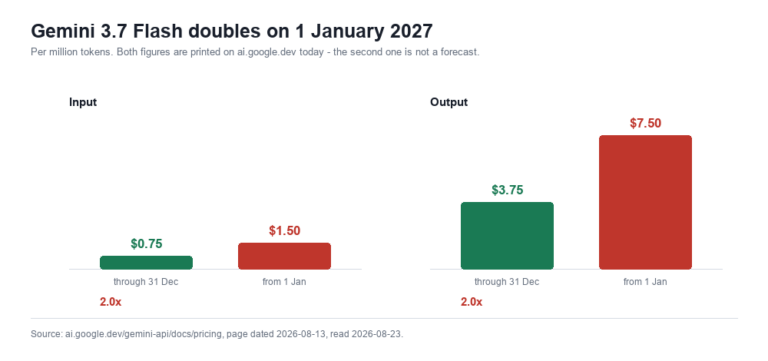
Yes, on their own schedules. Every provider retires models. The specific dates in this article are OpenAI's; if you run a chatbot on a different provider, find that provider's deprecation page and do the same exercise. The habit transfers even though the dates do not. Google's version of the calendar is a price rather than a shutdown: three Gemini Flash generations share one introductory rate that expires on 31 December 2026, so the model you keep costs double in January whether or not it is retired.
What is the difference between deprecation and shutdown?
Deprecation is the announcement — the model still works, you have been told it is going away. Shutdown is the date it stops responding. The gap between them is your window, and OpenAI's policy is at least six months for generally available models and at least three months for chat variants and other specialized snapshots.
Should I just pin a dated snapshot so nothing changes under me?
It is a reasonable choice if consistent behaviour matters more to you than never touching the setting — a pinned snapshot will not change its answers on you. But it guarantees you will have to migrate on a known date, whereas an alias moves forward on its own. Pin if you have tested carefully against one version; use the alias if you would rather it kept working unattended.
Model IDs are not the only moving part a site owner cannot control. What WordPress core itself commits to store on your behalf shifts too — the AI knowledge store planned for 7.1 did not make the release.
The short version
Go and look at the model ID your chatbot is using. If it ends in -chat-latest, check the date. If you set the site up in 2024 and have not touched it, check the October list. And if your chatbot has felt broken since late July and you have not been able to work out why, gpt-5.1-chat-latest is the first thing to rule out.
MxChat lets you switch models from a dropdown with your own API key, so a deprecation is a settings change rather than a support ticket — and the two stale entries in our own catalogue described above are being removed. If you are still deciding which plugin to run, our comparison of WordPress chatbot plugins covers how the major options handle model choice, and the MxChat documentation walks through changing the model and re-indexing the knowledge base.
Model IDs are not the only plugin setting worth auditing. The API keys those plugins store are loaded into memory on every request on a typical install — a first-party audit of wp_options found eleven server-side secrets, ten of them autoloaded.