Semantic Search vs Keyword Search A Modern SEO Guide
The whole semantic search vs keyword search discussion boils down to one key difference: keyword search is a literal word-matcher, while semantic search figures out what you actually mean. It’s like the difference between a thesaurus and a real conversation—one gives you synonyms, the other gets the subtext.
The Evolution From Keywords to Concepts in Search

If you look back, the history of search has been a slow crawl from literal to logical. The internet's early search engines were like meticulous but clueless librarians. You needed the exact title or author—the precise keywords—to find what you wanted. This keyword search model was a game-changer back then, but it was rigid. It had no grasp of synonyms, context, or the simple fact that people often have no idea what the "right" words are.
That rigidity became a real problem as people got more comfortable with search. We stopped typing like robots ("running shoes sale cheap") and started asking questions like we would to a person ("what are the best affordable running shoes?"). This natural evolution in how we search demanded a much smarter system on the other end.
The Rise of Meaning and Intent
Semantic search was built to bridge that gap. Instead of just scanning for a string of characters, it uses artificial intelligence and Natural Language Processing (NLP) to decipher the relationships between words and ideas. It’s how Google knows that when you search for "king of the jungle," you’re looking for information about lions, even if you never typed the word "lion."
Semantic search isn't about finding pages with your keywords sprinkled in. It’s about finding documents that actually answer the question you have in your head. It puts user intent first, not literal text.
This shift is huge for anyone creating digital content. SEO pros, marketers, and developers now have to think past just stuffing keywords into a page. The game is about covering a topic so thoroughly that you satisfy the user's real intent, whatever that may be.
Quick Comparison: Keyword vs Semantic Search
To see the differences at a glance, here’s a simple breakdown of how these two approaches stack up against each other.
| Attribute | Keyword Search | Semantic Search |
|---|---|---|
| Core Function | Matches exact text or phrases. | Understands the meaning and context. |
| User Input | Best for specific, known terms. | Excels with conversational questions. |
| Technology | Relies on indexing and text matching. | Uses AI, NLP, and vector embeddings. |
| Results Quality | Can be irrelevant if intent is unclear. | Delivers more relevant, context-aware results. |
Ultimately, understanding this core distinction is your first step to building better search, whether for a public website or an internal knowledge base. This same technology is what makes many modern AI applications tick; for instance, you can learn more about Retrieval-Augmented Generation, a technique that leans heavily on semantic understanding to power intelligent chatbots. The move from keywords to concepts isn't just an upgrade—it's what makes technology feel more human.
How Keyword Search Powers Information Retrieval

At its heart, traditional keyword search is all about direct text matching. It’s the original foundation of information retrieval and works much like a "find" function on a global scale. When you type in a query, the system scans a massive index for documents that contain those exact words. Simple, direct, and incredibly fast.
Its greatest strength is that straightforwardness. When you know exactly what you're looking for, keyword search is hard to beat for its raw speed and precision.
When Keyword Search Shines
Keyword-based systems truly excel when a query has zero ambiguity. They are built for scenarios where the user's intent is perfectly captured by specific, literal terms.
- Product Model Numbers: If you search for "Nikon Z6 II," you want results exclusively for that camera—not similar models or general photography guides. Keyword search nails this.
- Specific Error Codes: A developer searching for "Error 502 Bad Gateway" needs documentation on that precise issue. Any other result is just noise.
- Exact Names or Titles: Looking for a person named "Jane Doe" or the book "The Great Gatsby" requires a literal match, which is exactly what this system delivers.
The core value of keyword search lies in its reliability for known-item lookups. It guarantees that if a document contains the specified string of text, it will be found—a predictable and straightforward process.
But this literal approach is also its biggest handicap. The system is rigid and has no real grasp of the nuances of human language. This inflexibility creates major problems when queries get more complex or conversational, which is a key differentiator in the semantic search vs keyword search discussion.
The Inherent Drawbacks of a Literal System
The fundamental flaw of keyword search is its inability to understand what you mean. It can't connect the dots between synonyms, related ideas, or the context behind your words. This often leads to a frustrating cycle where the search engine gives you results that are technically correct but contextually worthless.
Here are a few classic examples of where it falls short:
- Ignoring Synonyms: A search for "cheap running shoes" could completely miss a fantastic deals page that uses the word "affordable" instead.
- Context Blindness: A query for "Java" is a coin toss. You could get results for the programming language, the island in Indonesia, or coffee. The system has no clue which one you want.
- Misinterpreting Natural Language: A conversational question like "how do I fix a leaky faucet" might only pull up pages with that exact phrasing, overlooking a much better article titled "Leaky Faucet Repair Guide."
Of course, before any search engine can even think about keyword or semantic matching, it first has to pull the raw text from web pages. The process of building a text extractor from website content is a fascinating look into this foundational step. It really underscores just how much the entire system depends on the literal text it can "see," making it clear why more sophisticated methods were needed.
How AI Gives Semantic Search Its Power
Think of keyword search as a meticulous digital librarian, perfectly matching words from your query to an index card. Semantic search, on the other hand, is more like a seasoned researcher who understands the question behind the question. This leap in capability is all thanks to artificial intelligence, particularly Natural Language Processing (NLP) and sophisticated machine learning models.
Instead of just looking for exact words, semantic systems use NLP to break down your query's grammar, context, and even its underlying sentiment. They don't just "see" the words; they interpret your intent. This is what allows them to surface genuinely relevant results, especially for complex or conversational questions where simple keywords would fall short.
From Words to Math: The Magic of Vector Embeddings
The real workhorse behind this process is a concept called vector embeddings. A machine learning model is trained on enormous datasets to learn the subtle relationships between words. It then translates every word, sentence, or document into a string of numbers—a vector—that represents its position in a vast, multi-dimensional space.
Words with similar meanings get placed closer together in this space. For example, the vectors for "king," "queen," and "monarch" would cluster together, while the vectors for "king" and "cabbage" would be miles apart. This numerical map is how a machine can mathematically calculate context and similarity. When you search, the system turns your question into a vector and finds the documents whose vectors are closest. You can see this technology in action in a vector embedding chatbot for WordPress.
Weaving It All Together with Knowledge Graphs
The other critical AI component is the knowledge graph. Imagine a massive, interconnected web of real-world entities—people, places, concepts—and all the relationships between them. It’s what tells a search engine that Leonardo da Vinci painted the Mona Lisa and that both are related to Italy and the Renaissance.
When you ask a question, the system uses this graph to add layers of understanding.
- Your Query: "Who was the president when the first man walked on the moon?"
- Keyword Search: Looks for documents containing "president," "man," "walked," and "moon."
- Semantic Search: Taps its knowledge graph to recognize "first man walked on the moon" as the Apollo 11 mission. It connects that event to the date July 20, 1969, and then identifies Richard Nixon as the U.S. President at that time, giving you a direct answer.
This ability to connect the dots is what fuels the rich answers, info boxes, and voice assistants we use every day. To see where this is all headed, you can explore the emerging field of Generative Engine Optimization (GEO), which builds on these very principles.
Semantic search isn't just a better keyword matcher; it's a reasoning engine. It uses AI to build a bridge between the ambiguous language of humans and the structured data of computers, fundamentally changing how we find information.
This sophisticated approach delivers real, measurable gains. Head-to-head studies show that semantic systems improve retrieval precision by around 25-35% over traditional methods, especially for tricky or ambiguous queries. In highly specialized fields like law or healthcare, semantic search has been shown to slash the number of irrelevant results by up to 40%, making it an indispensable tool for professionals who need accuracy and efficiency.
Comparing Key Differentiators in Search Technology
To really get to the heart of the semantic search vs keyword search debate, we need to go beyond basic definitions and see how they stack up in the real world. The way they're built from the ground up creates massive differences in accuracy, how they handle user intent, and what it takes to keep them running. A head-to-head comparison shows you exactly where each one shines.
The image below breaks down the core AI technologies that give semantic search its uncanny ability to grasp meaning.
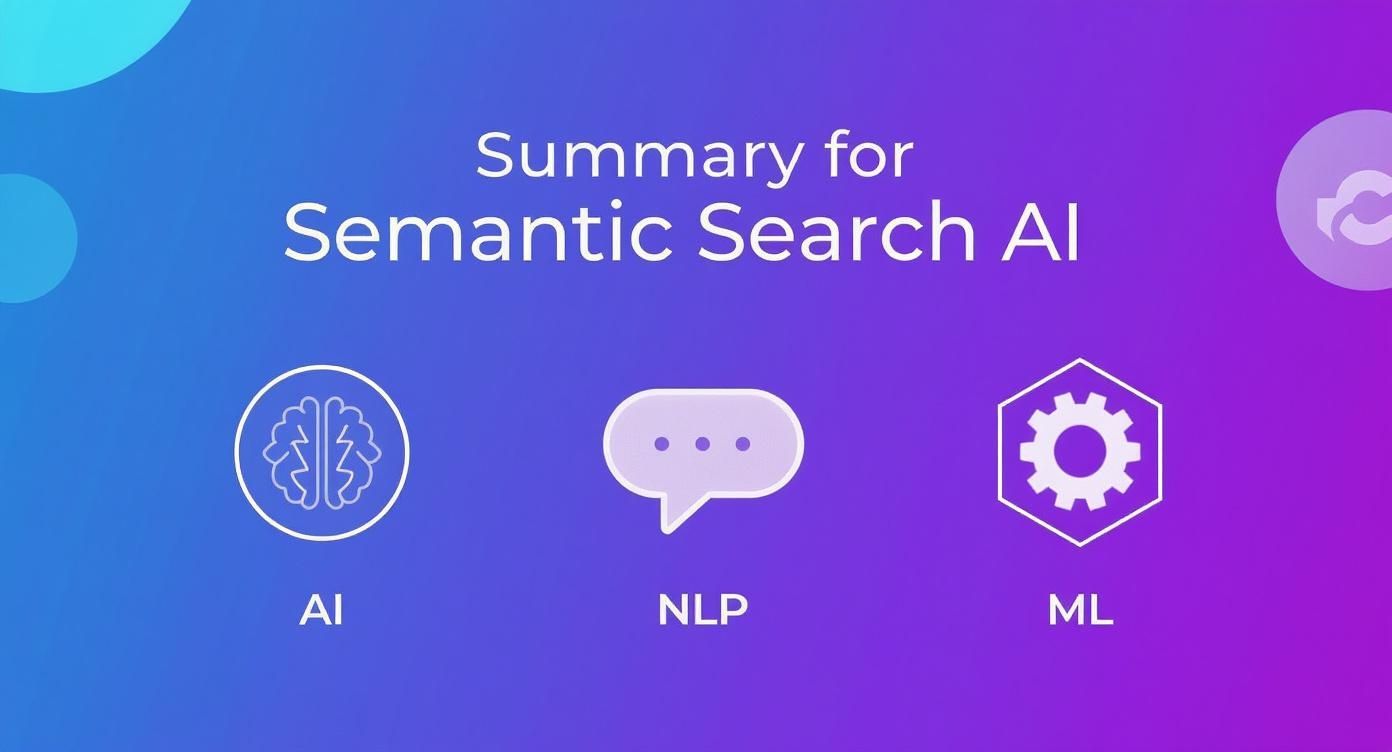
This illustrates how Artificial Intelligence, Natural Language Processing, and Machine Learning come together to figure out what you mean, not just what you typed.
Accuracy and Relevance: The Precision vs. Recall Trade-Off
The fundamental difference in how these two search types measure success boils down to precision (the quality of results) versus recall (the quantity of results). Keyword search is designed for high recall. If a document has your exact search term, it's coming back in the results—guaranteed. You won't miss a literal match.
The problem? This often leads to terrible precision. A search for "Java" will pull up results about coffee, an island in Indonesia, and a programming language. The system has no context, so you’re left drowning in irrelevant information.
Semantic search, on the other hand, is all about precision. It’s designed to understand your intent and deliver a tighter, more relevant list of results. For example, if you've been looking at coding bootcamps, a semantic search for "Java" will correctly guess you mean the programming language and filter out the noise. That focus on contextual relevance is its biggest strength.
The central trade-off is clear: keyword search casts a wide, literal net, while semantic search uses a precise, intelligent spear. Your choice depends on whether you can afford to miss potential matches or be buried in irrelevant ones.
To give you a clearer picture, this table breaks down the key differences across a few critical metrics.
Detailed Feature Comparison: Semantic vs. Keyword Search
| Evaluation Criteria | Keyword Search | Semantic Search | Recommendation |
|---|---|---|---|
| User Intent Handling | Ignores intent. It's a literal word-for-word match. | Focuses on deciphering the meaning and context behind a query. | For any conversational or ambiguous searches, semantic is the clear winner. |
| Synonym & Concept Handling | Fails to connect related terms like "cheap" and "affordable." | Understands that different words can point to the same concept. | Semantic is far superior for any natural language application. |
| Accuracy | High recall, but often low precision. You get a lot of noise. | Balances recall with very high precision for fewer, better results. | If relevance is your top priority, go with semantic search. |
| Speed & Latency | Blazing fast. Simple indexing and text matching is easy on hardware. | Slower. The AI models and vector math add computational overhead. | For instant, exact-match lookups, keyword is more efficient. |
This comparison highlights that the "better" technology really depends on the job at hand. You wouldn't use a sledgehammer to hang a picture frame, and the same logic applies here.
Implementation Complexity and Cost
Getting a basic keyword search up and running is pretty simple. Most databases and content management systems have built-in full-text search features that don't require much tinkering. The infrastructure isn't too demanding, and maintenance is straightforward, making it a very cost-effective choice for many use cases.
Semantic search is a different beast entirely. You need serious machine learning expertise to get it off the ground. You're looking at choosing and fine-tuning embedding models, managing massive vector databases, and dealing with the constant computational demands of AI-driven processes. All this complexity adds up to higher initial setup costs and ongoing maintenance bills. For bigger companies, even the API costs for a service like OpenAI Embeddings can be significant compared to hosting a simpler system yourself.
Let's look at a real-world e-commerce example:
- Keyword Search: A user searches for a specific product SKU like "NVM-2024-B". The system does a lightning-fast lookup and pulls the exact product. It's incredibly efficient and reliable for this kind of query.
- Semantic Search: A user searches for something like "warm jacket for hiking in the rain". The system has to understand the concepts of "warm," "hiking," and "rain," then find products with attributes like "insulated," "waterproof," and "outdoor-ready." It delivers a much better user experience but requires a far more sophisticated backend.
Scalability and Computational Demands
Scalability is another area where these two diverge dramatically. Keyword search scales in a predictable way. As your document library grows, the size of your text index increases more or less linearly. The architecture for managing this, even at a massive scale, is well-understood.
Semantic search scalability is far more complex because of its reliance on vector embeddings. The vector for a single piece of text can be much larger than the text itself, creating huge storage demands. For instance, a dataset of 7 million product reviews might generate a keyword index of just 2.6GB. The vector embeddings for that same dataset could take up anywhere from 21GB to over 80GB, depending on the model you use.
Querying these huge vector indexes quickly requires specialized databases and serious computational muscle, adding yet another layer of operational complexity and cost as you grow.
Making Your Content Work for Semantic SEO
The game has changed. We've moved far beyond the old SEO playbook of picking a keyword and hammering it into a page. Today, it's all about satisfying a user's entire need, not just matching the exact words they typed. This means we have to think much more strategically about how we create content.
Instead of obsessing over a single phrase, successful modern SEO is built around topic clusters. The idea is to create a central, highly detailed "pillar" page on a broad subject. Then, you build out smaller "cluster" pages that dive deep into related subtopics, all linking back to that main pillar. This structure tells search engines you're an authority on the subject, which is a huge trust signal.
From Keywords to Complete Answers
At its heart, semantic SEO is about answering questions completely. When someone searches for something, they almost always have a string of follow-up questions in their head. Your job is to get ahead of those questions and answer them within your content. The goal is to create a single, go-to resource that leaves the reader feeling like they have everything they need.
This means your content needs to be packed with related concepts, synonyms, and contextual details. For instance, an article on "how to choose a camera" is incomplete if it doesn't also touch on related entities like:
- Camera types: DSLR, mirrorless, point-and-shoot
- Key features: Sensor size, megapixels, lens compatibility
- Related concepts: Aperture, shutter speed, ISO
- User goals: Photography for travel, portraits, or sports
When you cover this whole ecosystem of ideas, your content isn't just more helpful to the reader—it becomes much easier for semantic search algorithms to understand what you're talking about.
Structuring Content for People and Machines
It's not just about the words on the page; how you organize your content is a big deal. Using schema markup (or structured data) is like putting clear, descriptive labels on your content for search engines to read. It explicitly tells them what a piece of content is—a product, a recipe, an event, or a how-to guide.
This markup is what powers those rich snippets you see in search results, like star ratings, event times, or FAQ dropdowns. Those little features don't just grab attention; they deliver quick answers and satisfy user intent before anyone even clicks on your link.
The new rule of SEO is simple: focus on the user's journey, not just their search query. A deep understanding of your audience’s intent is now far more valuable than a list of high-volume keywords.
Fueled by AI and natural language processing (NLP), semantic search technologies are all about grasping the meaning behind a query. This shift has completely reshaped SEO, allowing content to rank for entire topic areas rather than just specific terms. By covering a subject from all angles with related terms and concepts, you build authority and show up for a much wider variety of conversational searches, including long-tail keywords and voice queries. You can find more great insights about this topic on getgenie.ai.
Actionable Strategies for Your Content
To get your strategy in line with how semantic search works, you have to start thinking like a topic expert. This means going way beyond basic keyword research and really digging into the "why" behind every search.
- Figure Out User Intent: Use your tools and, more importantly, the search results themselves to understand what people really want. Are they trying to learn something, buy something, or find a local spot?
- Build Topic Clusters: Organize your content around those central pillar pages. It demonstrates your expertise and makes it incredibly easy for users to find related information on your site.
- Answer Questions Directly: Use clear, descriptive headings and build out FAQ sections to tackle common questions head-on. This makes your content easy to scan and perfect for voice search answers.
- Use Structured Data: Implement schema markup to give search engines the context they need to understand your content. This is your best shot at earning those valuable rich results.
Adopting these practices helps you create content that doesn't just please an algorithm but is genuinely helpful for your audience. This synergy is the key to long-term success. For example, understanding this connection is also critical for your on-site experience; our guide on how AI chatbots improve WordPress site SEO explores this relationship in more detail.
Hybrid Search: Why Most Production Systems Use Both
The framing of this article so far has been a comparison, because that is how the question is usually asked. In production, it is rarely an either/or. Most serious search systems built in the last few years run both retrieval methods and merge the results, and it is worth understanding why before you pick a side.
Keyword and semantic retrieval fail in opposite directions. Keyword search cannot find a document that never uses your words, but it is unbeatable when the query is the exact string — a part number, an error code, a surname, a SKU. Semantic search finds the document that means the right thing, but it will confidently return something conceptually adjacent when you needed a literal match. Ask a vector index for “error 0x8007007f” and it may hand you a general troubleshooting page, because in embedding space one error code looks a great deal like another.
Hybrid search runs both and fuses the two ranked lists — most commonly with Reciprocal Rank Fusion, which scores each document by its position in each list rather than trying to reconcile two incomparable scoring scales. A further refinement, reranking, takes the top few dozen fused candidates and re-scores them with a slower, more accurate cross-encoder model that reads the query and the document together. The pattern is cheap to reason about: cast a wide net twice, then spend real compute only on the shortlist.
The vocabulary, decoded
Much of the confusion in this topic is terminological rather than technical. Several of these terms get used as synonyms and are not:
| Term | What it actually refers to |
|---|---|
| Keyword search | Matching the literal terms in the query against terms in the documents. |
| Lexical search | The same thing. “Lexical” is the term of art you will see in retrieval literature and vendor documentation. |
| Full-text search | Also the same family — usually naming the database feature that implements it, such as MySQL full-text indexes or the Lucene engine behind Elasticsearch and OpenSearch. |
| BM25 | Not a kind of search but the ranking function most lexical engines use, weighting rare terms more heavily and damping the effect of repetition. When someone says “keyword search” about a modern system, this is usually the maths underneath. |
| Vector search | The mechanism — finding the nearest neighbours to your query in a high-dimensional embedding space. |
| Semantic search | The goal — retrieving by meaning. Vector search is how it is nearly always implemented, but they are not synonyms, and a system can add knowledge graphs or query rewriting on top. |
| Natural language search | A statement about the query format — the user types a full question instead of keywords. It says nothing about the retrieval method; a lexical engine can accept natural language queries and handle them badly. |
| Hybrid search | Running lexical and vector retrieval together and fusing the results. |
The practical consequence: if a vendor tells you they have “added semantic search”, the useful follow-up question is whether they replaced lexical retrieval or added to it. Replacing it is a downgrade for exact-match queries, and exact-match queries are a larger share of real traffic than most teams expect.
Searching internal documentation
Internal knowledge bases are where the difference is felt fastest, because the vocabulary mismatch is structural. Documentation is written by the people who built the thing, using the names they gave it. Questions are asked by people who do not know those names — someone searches “the login screen keeps kicking me out” against a page titled “Session token expiry configuration”. No amount of keyword matching bridges that, and it is why the same search box gets described as broken by users and as working by the team that maintains it.
Semantic retrieval closes that gap, with one caveat worth planning for: internal docs are dense with exact identifiers — config keys, endpoint paths, environment variable names, error codes. Those are precisely what pure vector search handles worst. Internal documentation is the strongest case for hybrid rather than a straight swap.
Product search for online retailers
Ecommerce is the mirror image, and the economics are unusually legible: a shopper who searches and gets nothing relevant leaves, and you can measure it. Semantic retrieval is what turns “something warm for a winter hike” into a results page of insulated jackets, and it rescues the long tail of descriptive queries that a keyword index answers with zero results.
But retail also has the hardest exact-match requirements anywhere — model numbers, sizes, brand names, and shoppers who know precisely what they want and will not forgive a near miss. Attribute filters and inventory state must stay authoritative regardless of how the candidates were retrieved. The retailers who get this right treat semantic retrieval as recall expansion on top of a lexical core, not as a replacement for it.
When to Use Each Type of Search Solution
Deciding between semantic and keyword search isn't a matter of which technology is "better." It’s about picking the right tool for the right job. The best choice really depends on your specific goals, the resources you have, and the kind of search experience you want your users to have. The whole semantic search vs keyword search debate boils down to a classic trade-off: precision versus flexibility.
Sometimes, you absolutely need the rigid, predictable results that only keyword search can deliver. It’s still the king when speed and exactness are non-negotiable and there’s zero room for interpretation.
When Keyword Search Is the Best Choice
Keyword search is the way to go when user queries are specific, unambiguous, and demand a literal match. It’s built for pure efficiency, especially for known-item lookups.
Here are a few scenarios where it excels:
- Product SKU and Model Lookups: When a customer types "SKU-8675309" into your search bar, they expect one thing and one thing only. Introducing semantic interpretation here would just add noise and slow everything down.
- Simple Database Filtering: If you're filtering a database for an exact username, a transaction ID, or a log entry with a specific error code, keyword search gives you the fastest, most reliable answer.
- Legal or Compliance Searches: In fields where you need to find documents containing a precise legal phrase or name, keyword search ensures nothing with that exact term gets missed.
In these cases, the literal nature of keyword search isn't a bug; it's a feature.
Keyword search provides an ironclad guarantee of retrieval for exact matches. It's the most efficient choice when the user knows precisely what they are looking for and can spell it out.
But the moment a user’s query becomes more conversational, vague, or conceptual, that literal approach becomes a brick wall. That’s where semantic search steps in.
Scenarios Demanding Semantic Search
Semantic search really comes into its own when understanding the intent behind the words is more important than matching the words themselves. It’s the engine behind modern, intuitive experiences where the system needs to think more like a person.
Consider these use cases:
- Customer Support Chatbots: A user might ask, "My order hasn't arrived yet." This query requires the system to grasp concepts like "order status," "shipping," and "delivery delay." This is a perfect job for a semantic-powered AI, like the kind you can build with a document chatbot for your knowledge base.
- Enterprise Knowledge Management: An employee searching an internal wiki for "our policy on working from home" needs to find the "Remote Work Guidelines" document, even though the phrasing is completely different.
- E-commerce Product Discovery: A search for "comfortable shoes for standing all day" requires the system to connect abstract ideas like "comfort" and "support" with concrete product features like "cushioned soles" and "ergonomic design."
Trying to handle these queries with a simple word-matching system is a recipe for user frustration. They demand a search solution that can read between the lines.
For many businesses, the answer isn’t one or the other but a hybrid approach. This model often uses keyword search as a fast first-pass filter for specific terms, then falls back on semantic search to handle more complex, natural language queries, giving users the best of both worlds.
Frequently Asked Questions
Let's clear up some of the common questions that pop up when people start digging into semantic search vs. keyword search. I'll give you some straightforward answers to help you put these ideas into practice.
Is Keyword Research Still Necessary?
Absolutely. Don't throw out your keyword research process just yet. It’s still the bedrock for understanding how real people search and what they're looking for. The game has just changed a bit.
Instead of hunting for exact-match phrases to stuff into a page, you're now using keyword data to map out entire topics. This information helps you build comprehensive content that answers the main question and all the little questions that come with it. This is exactly the kind of deep, helpful content that modern semantic search algorithms love.
How Can a Small Business Implement Semantic Search?
You don't need a massive budget or a team of data scientists to get started. The easiest entry point for a small business is to simply level-up your content strategy. Focus on creating pillar pages or in-depth articles that cover a topic from top to bottom, rather than dozens of thin pages targeting minor keyword variations.
A great practical first step is adding structured data (also known as schema markup) to your website. This is just a bit of code that gives search engines extra context about your content, which can seriously improve how you show up in search results. For your on-site search bar, many platforms have plugins that can add basic semantic search features without a major technical project.
Is Semantic Search the Same as Vector Search?
No. Vector search is the mechanism — nearest-neighbour lookup over embeddings. Semantic search is the objective, retrieving by meaning. Nearly every semantic search system is built on vector search, but a system can layer query rewriting, knowledge graphs or reranking on top, and calling them synonyms hides those choices.
Should I Replace Keyword Search With Semantic Search?
Usually not. Replacing lexical retrieval outright degrades exact-match queries — part numbers, error codes, SKUs, proper nouns — which are a bigger share of real traffic than most teams predict. The common production answer is hybrid retrieval: run both, fuse the ranked lists, and optionally rerank the shortlist.
What Is the Role of Semantic Search in AI Chatbots?
Semantic search is the brain behind modern AI chatbots, especially those using Retrieval-Augmented Generation (RAG). Think of it as the system's librarian. When a user asks a question, the RAG system uses semantic search to instantly find the most relevant snippets of information from its knowledge base by understanding the meaning of the query.
That perfectly matched information is then handed over to a large language model (LLM), which crafts a natural, accurate answer. Without semantic search, the chatbot would just be guessing, pulling irrelevant documents and giving frustrating responses. It's the critical link that makes AI assistants genuinely helpful.
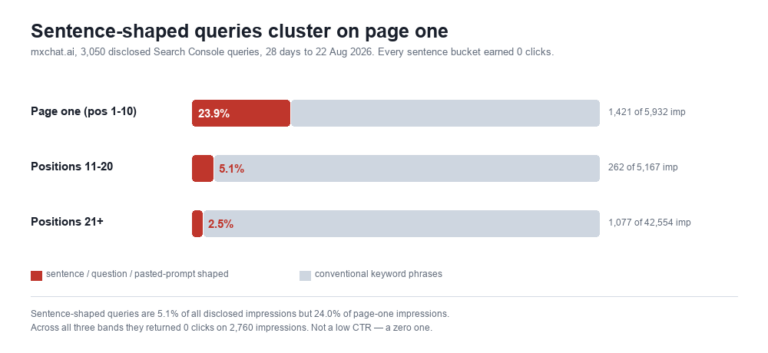
The same distinction turns up in your own analytics. Classifying 3,050 Search Console queries by whether they were phrased as keywords or as sentences showed that the sentence-shaped ones are 24% of page-one impressions and convert at exactly zero.
Ready to upgrade your WordPress site with a powerful AI assistant? MxChat uses advanced semantic search and RAG to deliver instant, accurate answers from your own content, turning visitors into customers 24/7. Learn more and get started with MxChat.