How to Make a Chatbot for WordPress
Thinking about adding a chatbot to your WordPress site but worried you need to be a developer? Good news: you don't. The whole process really boils down to three key phases: picking a no-code tool like MxChat, feeding it your business information to create its "brain," and then hooking it into the parts of your website that matter most.
Your Chatbot Building Blueprint
Creating a chatbot isn't the rocket science it used to be. With a clear plan, you can go from a simple idea to having a smart AI assistant greeting your visitors. The demand for this tech is exploding. The global market, which was just $396.2 million back in 2019, ballooned to $6.3 billion by 2023. Looking ahead, it's projected to hit a massive $27.3 billion by 2030, which tells you just how essential these tools are becoming.
Before we get into the nitty-gritty, let's look at the high-level roadmap. Think of this as the 30,000-foot view of your project.
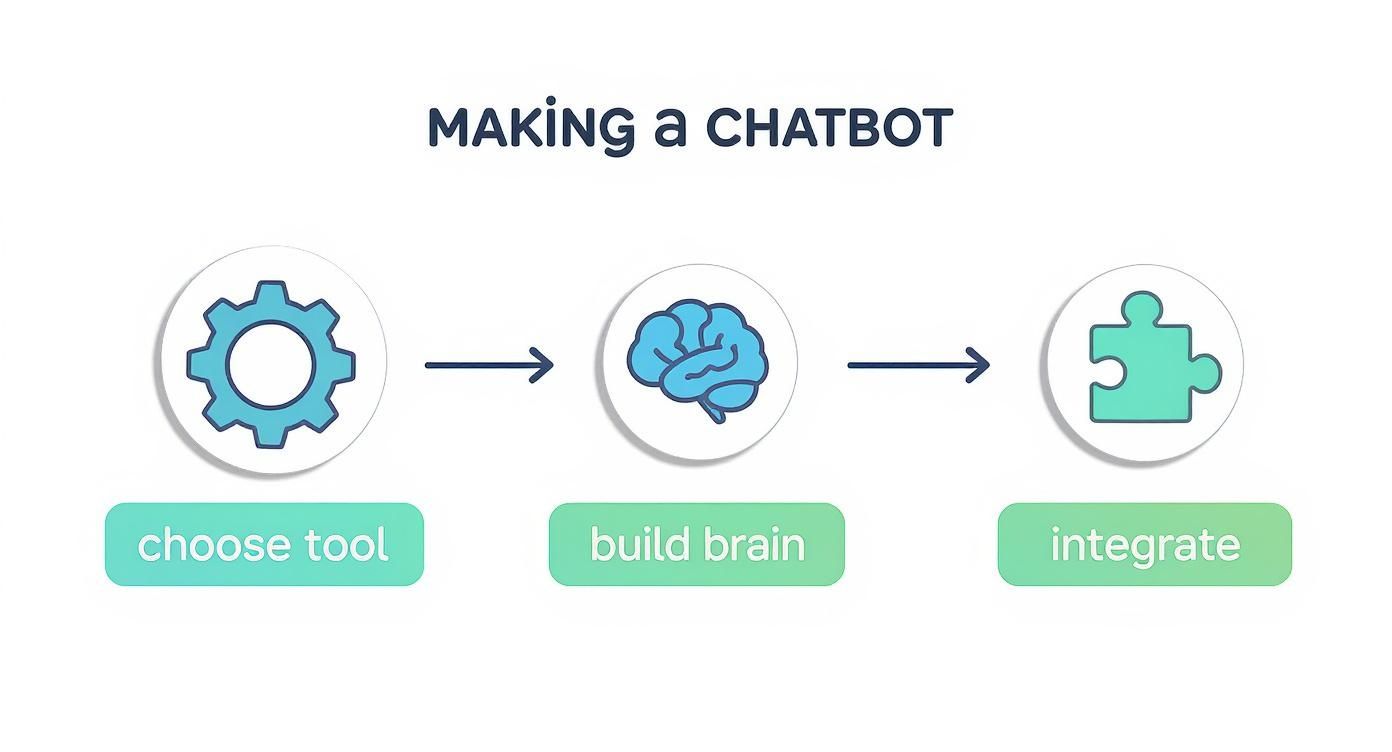
The journey is pretty straightforward—build a solid foundation with the right tools and knowledge, then connect it to your website to start driving results.
To give you a clearer picture, here’s a quick overview of the main stages you'll be working through.
Chatbot Creation Milestone Overview
| Milestone | Objective | Key Tool or Concept |
|---|---|---|
| Foundation & Setup | Choose a no-code platform and the underlying AI model. | MxChat, GPT-4, Claude |
| Knowledge Base | Train the chatbot on your specific business content. | Retrieval-Augmented Generation (RAG) |
| Integration & Action | Connect the bot to your site's e-commerce and lead gen tools. | WooCommerce, Form Integrations |
| Testing & Deployment | Test the chatbot's responses and embed it on your live site. | Live Testing, Widget Customization |
Each milestone builds on the last, taking you from a blank slate to a fully functioning AI assistant.
H3: Core Stages of Chatbot Creation
Your first big decision is picking a platform that doesn’t require a computer science degree. A no-code tool like MxChat handles all the heavy lifting, letting you focus on what the bot should say, not how it should be built. You’ll also need to select an AI model—like OpenAI’s GPT-4 or Anthropic’s Claude—that fits your performance needs and budget.
Next up is building the chatbot's brain. This is where you give it your company’s unique knowledge using a technique called Retrieval-Augmented Generation (RAG). You'll upload your own content—things like website pages, product manuals, and FAQs—so the bot can provide answers based on your information, not just generic web data.
A chatbot without a solid knowledge base is like a customer service agent with no training. It knows how to talk but has nothing useful to say. The quality of your input directly determines the quality of its output.
H3: From Knowledge to Action
The final stretch is all about integration. This is where your chatbot stops being just a Q&A machine and starts becoming a real part of your business. The most important connections you'll make are:
- WooCommerce Connection: Let your bot do things like answer specific product questions, check on an order status, or even help a customer find the right item.
- Form Integration: Turn conversations into leads. The chatbot can ask for a user's name and email and automatically fill out a contact or newsletter form for them.
- Website Customization: Tweak the chatbot's colors, icon, and welcome message to make sure it feels like a natural part of your brand.
By breaking the project down into these manageable stages, the whole process becomes much less intimidating. If you want a more in-depth look at each step, you can find a complete walkthrough in our comprehensive guide on how to build a chatbot.
Choosing Your No-Code Tools and AI Engine
https://www.youtube.com/embed/oGINCDvMgqk
To get a chatbot up and running on your WordPress site, the first real decision you’ll make is about the tech you're going to use. This choice dictates not just how easy the setup will be, but also how smart and genuinely helpful your chatbot turns out. We’re going the no-code route, which means you can build a seriously powerful AI assistant without writing a single line of code.
For this guide, we'll be using MxChat. It's a WordPress plugin built specifically for this job. Think of it as the chassis for your car—it provides the structure, the controls, and the framework to connect all the important pieces. Its main superpower is making it dead simple to link your website to the complex AI models that actually power the conversation.
Getting it installed is a breeze. Just head to your WordPress dashboard, go to Plugins > Add New, and search for "MxChat." Once you install and activate it, you can manage everything right from WordPress, which keeps your entire workflow in one familiar spot.
The Brains of the Operation: Picking an AI Model
With the framework in place, it’s time to choose the engine. The AI model is what does the actual "thinking," and honestly, it’s the most critical decision you'll make. It directly impacts your chatbot's conversational skills, its speed, and what it costs to run. MxChat plays nicely with several of the big names, so let's walk through the most common choices.
Here’s a quick look at the MxChat plugin page on WordPress.org, which is always a good place to check for the latest features and compatibility info.
This page is your best friend for checking recent updates, reading what other users are saying, and making sure the plugin fits your technical needs before you even install it.
When it comes to the AI engine itself, your options generally fall into a few key tiers:
- GPT-3.5 Turbo: This is the workhorse model from OpenAI. It’s incredibly fast, super affordable, and more than capable of handling everyday tasks like answering FAQs, sharing your business hours, or pointing users to the right page. If you're a small business or a blog just dipping your toes into AI, this is the perfect place to start.
- GPT-4 and GPT-4o: This is the premium, high-horsepower option. It’s much better at understanding nuance, following complex instructions, and crafting responses that feel remarkably human. An e-commerce store needing a bot to compare product specs or a support bot handling tricky troubleshooting will see a huge difference with this model. The trade-off? Higher API costs and slightly slower responses.
- Claude 3 (Sonnet & Opus): Made by Anthropic, the Claude models are serious contenders. They’re known for their massive context windows (meaning they can "remember" a lot more of the conversation) and a more cautious, "safe" conversational tone. Claude 3 Sonnet is a fantastic middle-ground option that balances speed and intelligence really well.
The best model isn't always the most powerful one—it's the one that fits your specific needs and budget. I always recommend starting with a cost-effective model like GPT-3.5 Turbo. Prove the chatbot's value first, then scale up to a more advanced engine once you know it's working.
Making a Strategic Choice
So, how do you actually decide? It really just comes down to a simple cost-benefit analysis. A small informational site might only spend a few dollars a month on GPT-3.5 API calls. A high-traffic e-commerce store using GPT-4 to help thousands of shoppers, on the other hand, could see that cost climb. But if it leads to more sales and fewer support tickets, that investment more than pays for itself.
The great thing about a modern no-code chatbot builder like MxChat is that you aren't locked in. You can easily swap models in the settings, so feel free to experiment and find that sweet spot between cost and performance.
If you’re the type who likes to look under the hood and are considering a more custom build, you might find this tutorial on how to create an AI text generator plugin for WordPress interesting. It gives you a much deeper look at the development side of things.
Ultimately, the goal is to pick a toolset that can grow with you. By pairing a user-friendly WordPress plugin with a scalable AI model, you’re building a foundation that's easy to manage today and powerful enough to handle whatever you throw at it tomorrow.
Building Your Chatbot's Knowledge Base
An AI chatbot is only as smart as the information you give it. This is where we build its "brain." We'll use a powerful technique called Retrieval-Augmented Generation (RAG), which is just a fancy way of saying your chatbot will pull answers directly from your content—not the entire internet. This makes it an expert on your business, and only your business.
Getting this part right is arguably the most critical step. A weak knowledge base means even the most advanced AI model will give vague, unhelpful answers when your customers need specifics.

Behind the scenes, this process taps into massive large-language models (LLMs) that have been trained to understand language and context. Normally, this requires serious computing power and machine learning know-how. But with a tool like MxChat, all that complexity is handled for you, letting you focus entirely on what information your chatbot needs.
Sourcing Your Chatbot's Information
First things first, you need to decide what your chatbot should know. MxChat gives you a few different ways to feed it information, and I've found that using a mix of these sources yields the best results.
- Website Sitemap: This is the easiest place to start. Just plug in your sitemap URL, and the tool will crawl your entire site. It’s a great way to quickly absorb all your blog posts, service pages, and company info.
- Specific URLs: Got a few really important pages? Maybe a detailed pricing table or a technical whitepaper? You can add those URLs individually to make sure the chatbot gives them extra attention.
- PDF Documents: This is a game-changer for structured content. Think product manuals, company policies, or detailed service guides. A SaaS company, for example, could upload its user manual, and the bot could instantly walk a customer through a specific feature.
- Plain Text or FAQs: You can also just copy-paste content directly or upload simple text files. This works perfectly for building a quick list of frequently asked questions and their answers.
The biggest mistake I see people make is trying to upload everything at once. Be more strategic. Start with your most important customer-facing content and expand from there.
Think of building a knowledge base like packing for a trip. You don't just throw your entire wardrobe into a suitcase. You choose the specific items you'll need for your destination. Be just as intentional with your chatbot's information.
Organizing Knowledge with Collections
You wouldn't store your sales brochures in the same file cabinet as your internal HR policies, right? The same logic applies to your chatbot's knowledge. This is where Collections come in—they are one of the most powerful features you can use.
A Collection is simply a separate, self-contained "bucket" of information. Using collections prevents what we call "context bleed," which happens when the chatbot gets confused and pulls an answer from a totally irrelevant source.
For example, you could set up a few distinct collections:
- Pre-Sales Questions: Feed this one with product pages, pricing info, and marketing copy. Its job is to help turn visitors into leads.
- Technical Support: This collection would contain your user manuals, troubleshooting guides, and technical FAQs. It’s designed to help existing customers solve problems fast.
- Company Information: Use this for your "About Us" page, career openings, and press releases to handle general questions about your business.
By segmenting knowledge this way, you can deploy multiple, specialized chatbots across your site. A visitor on your pricing page gets the sales bot, while a logged-in user in your support portal gets the tech support bot. This targeted approach makes the experience so much better for the user. We dive deeper into this strategy in our guide on how a knowledge base chatbot can enhance your WordPress site.
Taking the time to structure your information thoughtfully from the start is what separates a gimmick from a genuinely helpful tool. It turns a generic AI into a true digital expert for your brand.
Integrating Your Chatbot with WordPress and WooCommerce
You've built a powerful "brain" for your chatbot, but now it's time for the magic to happen. We need to connect that brain to the rest of your website, turning your AI from a knowledgeable expert into an active part of your business. This is where a simple chat widget becomes a genuine assistant that can guide users, capture leads, and directly boost your sales.
True integration isn't just about slapping a chat window in the corner of your screen. It's about creating a smooth, connected experience for your visitors and making your own operations more efficient. Imagine your bot not only answering questions about a product but actually helping a customer find it in your store, check on their order, and even sign them up for your newsletter—all in one conversation.

This kind of deep functionality is quickly becoming the norm. As of 2023, research shows that over 80% of companies globally have already brought some form of chatbot tech on board. The fact that the SaaS model accounts for 62.4% of these AI chatbot setups just shows how accessible tools like this have become for businesses of any size. You can see more details in this report on chatbot market growth and key statistics.
Power Up Your E-commerce with WooCommerce
If you're running a store on WordPress, the WooCommerce integration is a must-have. Flipping this switch in MxChat gives your chatbot a whole new set of e-commerce superpowers, essentially turning it into a sales assistant that never sleeps.
This connection lets the chatbot tap directly into your product catalog and customer order data in real time. Instead of just spitting out answers from a static document, it can perform live actions for your customers.
Here’s what that looks like in the real world:
- Smart Product Recommendations: A visitor asks, "Do you have any waterproof hiking boots under $150?" Instead of a generic reply, the bot searches your live inventory and serves up direct links to every matching product.
- Instant Order Status: A customer can pop in and ask, "Where's my order?" After they provide their order number, the bot looks it up and gives them the latest shipping update. No support ticket needed.
- Real-Time Inventory Checks: Someone might ask, "Is the blue t-shirt available in a size large?" The bot can check stock levels on the spot. That immediate answer can be the difference between making a sale and losing a customer to a competitor.
Getting this working is usually as simple as activating the WooCommerce extension inside your MxChat dashboard. The plugin handles all the tricky API stuff in the background, so you can focus on crafting the perfect user experience. To see a full walkthrough, check out this guide on setting up a chatbot for WooCommerce.
Turn Conversations into Leads with Form Integrations
Beyond just selling products, one of the most valuable jobs a chatbot can do is generate leads. Let's be honest, static "Contact Us" forms are boring and people abandon them all the time. A chatbot transforms this chore into an actual conversation.
With form integrations, your chatbot can collect information naturally during a chat and funnel it directly into any form on your WordPress site.
Instead of presenting a user with a wall of empty fields, a chatbot can ask for a name, then an email, then their question, one piece at a time. This conversational flow feels less like paperwork and can dramatically increase your lead capture rates.
For example, after a really helpful chat, your bot could say, "I'm glad I could help you out! Would you like to join our newsletter for more tips? I just need your email address." Once the user provides it, the bot quietly submits it to your newsletter signup form in the background. Easy.
Customize the Chatbot to Match Your Brand
Finally, integration is also about appearances. Your chatbot should feel like it belongs on your website, not like some third-party tool you just bolted on. A consistent look builds trust and makes your brand feel solid.
Most chatbot platforms, including MxChat, give you a control panel to dial in the visuals:
- Color Scheme: Tweak the colors of the chat widget, message bubbles, and buttons to perfectly match your brand’s color palette.
- Welcome Message: Write a proactive and friendly greeting that pulls people in. Something like, "Welcome! Looking for something specific or have a question? I'm here to help!" works way better than a silent icon just sitting there.
- Chatbot Avatar: Upload your logo or a custom icon to be the chatbot's face. This makes it instantly recognizable as your brand's assistant.
These final touches might seem small, but they make a huge difference. They ensure your chatbot not only works perfectly with your site but also looks the part, creating a professional and cohesive experience for every visitor.
Fine-Tuning Your Chatbot for Peak Performance
Getting your chatbot live on your site is a huge step, but don't pop the champagne just yet. The launch isn't the finish line; it’s the starting gun. This is where the real work—and the real magic—begins. A chatbot that evolves is one that becomes an indispensable part of your business.
Think of your newly launched bot as a smart rookie on their first day. It has all the training materials and knows the basic rules, but it's about to face the unpredictability of real customer interactions for the first time.
Putting Your Bot Through Its Paces
Before unleashing your chatbot on every visitor, you need to be its toughest critic. The goal here is to actively try and trip it up. Don't just lob it softball questions you know it can handle. You want to uncover its limitations and rough edges now, not after a potential customer gets frustrated.
I always recommend building a list of tough, real-world scenarios your customers might actually encounter. This kind of stress-testing lets you catch awkward or unhelpful responses before they can do any damage.
- The Annoyed Customer: "My package is late and the tracking link is broken. What's going on?" This is a great test of its ability to handle frustration and tap into that WooCommerce integration for live order data.
- The Feature Comparison: "Which of your WordPress themes is better for a photographer, Aperture or Portfolio Pro? I need something fast-loading with a masonry grid." This checks if the bot can dig into multiple product specs and deliver a nuanced, helpful comparison.
- The "What If" Scenario: Start simple with "What's your refund policy?" but then push it. Follow up with tricky edge cases like, "What if I used it for a week?" or "Can I get a refund on a discounted item?"
- The Curveball: Ask a question that has nothing to do with your business. A good bot should politely state it can't help with that, not invent a nonsensical answer (a phenomenon known as "hallucination").
To make sure you cover all your bases, structuring your testing around a comprehensive software testing checklist can bring a lot of clarity and discipline to the process.
The Goldmine: Conversation Logs
Once your chatbot is interacting with real users, your single best tool for improvement is the conversation history. Head over to your MxChat dashboard and you'll find a log of every question, every answer, every interaction. This isn't just data; it's a direct line into the minds of your customers.
Set aside time each week to dig into these logs. Don't just skim. Look for the patterns. Are 20% of users asking about a specific payment option you don't have documented? Is the bot consistently fumbling a particular product name? These are glaring signposts telling you exactly where to focus your efforts.
Your chatbot’s conversation logs are the most unfiltered focus group you will ever have. They reveal the precise gap between the information you think customers need and what they actually want to know, all in their own words.
Closing the Gaps and Refining the Tone
The insights you pull from testing and log analysis are the fuel for your optimization engine. It’s all about turning those observations into concrete improvements.
First, attack the knowledge gaps. If the logs are full of people asking about international shipping and the bot is coming up empty, the fix is obvious. Create a clear, detailed page or document covering your shipping policies, add it to the knowledge base in MxChat, and re-index. Just like that, the bot is smarter.
Next, listen to how the bot is talking. Sometimes the information is spot-on, but the delivery feels clunky or robotic. Maybe it sounds too casual when a customer is clearly frustrated. You can easily tweak the bot's core instructions in MxChat to adjust its personality. Prompting it to be more empathetic, a bit more professional, or simply more concise can dramatically improve how users feel about the interaction. This constant cycle of listening, tweaking, and improving is what turns a decent chatbot into a fantastic one.
Got Questions? Let's Talk Chatbots.
When you're getting ready to build a chatbot, the "how-to" is only half the battle. The other half is all the practical stuff that pops into your head. What's this really going to cost me? Will it mess up my site's speed? Let's dive into the questions I hear all the time from people just like you.
I want to give you straight answers, drawing from real-world experience helping WordPress site owners get this right.
What’s the Real-World Cost of Running a Chatbot?
This is usually the first question, and thankfully, the answer is "it depends"—in a good way. With a tool like MxChat, you’re looking at two main costs: the plugin itself and the API fees from your AI model, like OpenAI’s GPT.
For a small blog handling a handful of questions a day with GPT-3.5, you might only spend a few dollars a month on API fees. It’s an incredibly affordable way to get started. On the flip side, a bustling WooCommerce store using the more powerful GPT-4 for thousands of in-depth customer conversations will naturally have a higher bill.
The beauty of this model is that it scales with you. You can prove the chatbot's value on a small budget and let the investment grow right alongside your business. You're never paying for more than you actually use.
Can My Chatbot Speak Other Languages?
You bet. This is one of the most impressive things about modern AI. The big models like GPT-4 are multilingual right out of the box, which means they can understand and reply in dozens of languages without you having to do a thing.
If a customer asks a question in Spanish, the bot just answers in Spanish. Same for German, French, Japanese—it just works. It’s a game-changer for reaching a global audience.
Now, for the pro-tip: to get the absolute best, most nuanced answers, give it knowledge base documents in the languages you want to support. This way, the chatbot isn't just translating on the fly; it's pulling from information you've already perfected in that language.
How Can I Make Sure My Chatbot Gives Accurate Answers?
Your chatbot's accuracy comes down to one thing: the quality of its knowledge base. The AI model knows how to have a conversation, but your documents teach it what to say about your business. Using the Retrieval-Augmented Generation (RAG) feature is key, but think of it as an ongoing process, not a one-time setup.
Getting this right involves a simple, repeatable loop:
- Feed it good information. Start with your best, most current content—think detailed FAQs, product spec sheets, and clear service descriptions. Garbage in, garbage out definitely applies here.
- Listen to what it says. Spend time in your chatbot logs. This is your goldmine. You'll quickly spot where the bot gets confused or has to say, "I don't know."
- Fill in the blanks. See a pattern of questions the bot can't answer? That's your cue to create a new knowledge base article or update an existing one. Every time you do this, you’re making it smarter.
Accuracy isn't a switch you flip. It's a standard you build and maintain by curating your chatbot's brain.
Is This Going to Slow Down My WordPress Site?
Every WordPress owner lives in fear of slowing down their site, and for good reason. But with a well-built chatbot, you can breathe easy.
The heavy lifting—all the complex AI processing—doesn't even happen on your server. It happens on the servers of companies like OpenAI or Anthropic. The plugin on your site is just a lightweight messenger, handling the chat window and passing information back and forth. It’s a tiny piece of the puzzle.
Plugins like MxChat are built with performance in mind. Still, I always recommend running a quick site speed test before and after installing any new plugin. It’s just good practice and gives you peace of mind.
Ready to build an intelligent, no-code chatbot that boosts sales and delights your customers? With MxChat, you can deploy a powerful AI assistant on your WordPress site in minutes. Start turning your website traffic into revenue today with MxChat.