AI Chatbots for Customer Service Explained
Picture this: your customers get their questions answered the second they ask them. No hold music, no waiting for the next business day, no frustration. This isn't a futuristic dream; it's the reality that AI chatbots for customer service are building right now, turning support from a necessary expense into a powerful tool for earning customer loyalty.
The New Frontline for Customer Support

The leap from the clunky, rule-based bots of the past to the intelligent AI assistants of today has been incredible. Early chatbots were basically just interactive FAQ pages. If you asked a question that wasn't on their script, they'd get stuck. But thanks to huge strides in natural language processing, today's AI-powered chatbots understand what customers mean, not just the specific words they type.
This evolution is about more than just saving a few bucks. While efficiency is a fantastic perk, modern AI chatbots for customer service are now at the very heart of creating a standout customer experience. They go straight to the source of classic support headaches that can really tarnish a brand's reputation.
Solving Timeless Support Challenges
These smart systems are designed to fix the core problems that have bothered support teams forever:
- Long Wait Times: Nothing tests a customer's patience like being on hold. AI offers instant, 24/7 responses, completely wiping out frustrating queues.
- Inconsistent Answers: With a single, centralized knowledge base, chatbots ensure every customer receives the same correct information, every single time.
- Overwhelmed Agents: By taking care of all the common, repetitive questions, chatbots free up your human agents to tackle the complex, high-stakes issues where their expertise truly shines.
This technology isn't just another tool in the box. It’s a complete reimagining of how a business can talk to its customers, making support proactive, personal, and instantly accessible.
The shockwaves of this change are already hitting every industry. By 2025, some projections suggest AI will handle up to 95% of all customer interactions, and it's no surprise that 80% of companies worldwide are planning to bring them on board.
This focus on crafting better experiences is what really separates modern customer service vs customer support. It moves the goalposts from simply fixing problems after they happen to actively building strong relationships. When you automate the routine stuff, you can put your best people on the problems that matter most, creating a support system that's both incredibly efficient and genuinely human.
Core Benefits of an AI Support Strategy
Bringing AI chatbots into your customer service isn't just a tech upgrade—it's a smart business decision that pays off in real, measurable ways. The benefits stretch far beyond just saving a few dollars, creating a positive ripple effect that touches your operations, your customer relationships, and ultimately, your bottom line.
Think of it this way: the advantages stack up across three key areas, each one building on the last to make your business stronger and more agile.
Boosting Operational Efficiency
The first and most immediate change you'll notice is a massive jump in operational efficiency. Imagine a support team that works around the clock, handling thousands of conversations at once without ever getting tired or overwhelmed. That's what AI brings to the table.
With 24/7 availability, you can give customers instant answers no matter where they are in the world or what time it is. This instantly frees your human agents from the repetitive grind of answering the same questions over and over, like "Where's my order?" or "How do I reset my password?"
Elevating the Customer Experience
By letting automation handle the routine stuff, you empower your expert human team to focus on the complex, high-stakes problems where empathy and creative thinking really matter. This leads straight to the second major benefit: a dramatically better customer experience.
Let's be honest, modern customers expect speed. Making them wait on hold or for an email reply is a surefire way to create frustration. AI chatbots deliver instant gratification, slashing response times for common questions by as much as 80%. For a deeper dive into the numbers, Tidio offers some great insights on how AI impacts customer service statistics on Tidio.com. This speed shows customers you respect their time, which goes a long way in building trust.
Driving Tangible Revenue Growth
Faster, better support naturally leads to the third pillar: a direct impact on your revenue. When customers get the help they need right away, they feel valued. This builds loyalty, which is the secret sauce for increasing customer lifetime value.
There are many strategies for reducing customer churn and boosting retention, and providing excellent, instant support is one of the most effective.
It's a simple but powerful equation: Better support leads to happier customers, and happier customers buy more and stay longer. This transforms your customer service from a cost center into a proactive revenue-generating engine.
To see how these benefits come together, let's break down the specific business impacts you can expect.
Key Business Impacts of AI Chatbots
| Benefit Area | Specific Advantage | Business Impact |
|---|---|---|
| Operational Costs | Automates high-volume, repetitive queries | Reduces headcount needs and lowers overall support expenses. |
| Team Productivity | Frees human agents for complex, high-value tasks | Increases agent job satisfaction and improves problem resolution. |
| Customer Satisfaction | Provides instant, 24/7 answers to common questions | Boosts CSAT/NPS scores and strengthens brand loyalty. |
| Revenue & Sales | Proactively engages visitors and captures leads | Increases conversion rates and generates new sales opportunities. |
| Customer Retention | Delivers fast, consistent, and helpful support | Reduces customer churn and increases lifetime value (LTV). |
Ultimately, AI chatbots do more than just answer questions. They can proactively greet website visitors, guide them toward a purchase, and capture leads long after your team has gone home. This powerful combination of efficiency, experience, and retention creates a compounding return on your investment.
What Makes a Great Chatbot? Key Features to Look For
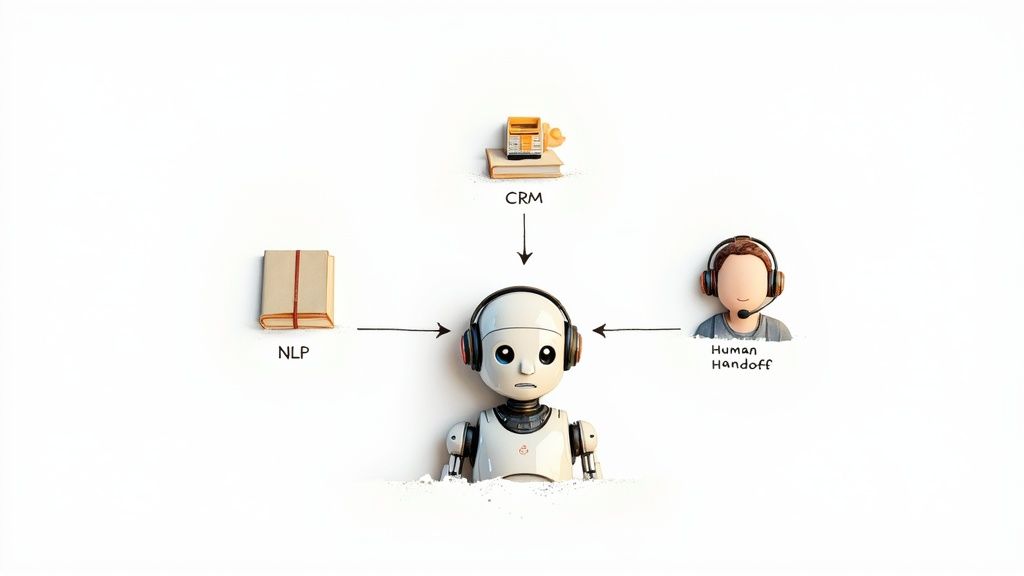
Let's be clear: not all chatbots are created equal. A simple, rules-based bot might be able to answer a few basic questions, but a truly high-performing AI chatbot for customer service is a different beast entirely. It acts less like a script and more like a capable member of your support team.
The magic behind this difference comes down to two core technologies: Natural Language Processing (NLP) and Machine Learning (ML).
Think of NLP as the chatbot's ability to understand human language in all its messy glory. It's what allows the bot to decipher what someone means, not just what they type—typos, slang, and all. Instead of just looking for keywords, a good NLP engine figures out the customer's actual intent.
Then there's Machine Learning, which you can think of as the bot's on-the-job training. Every single interaction is a learning opportunity. The chatbot figures out which responses solve problems and which ones don't, getting progressively smarter and more helpful over time. This is what truly separates a dynamic assistant from a rigid, pre-programmed tool.
Core Capabilities Every Good Chatbot Needs
These underlying technologies power a handful of non-negotiable features. When you're looking at different chatbot platforms, make sure these capabilities are front and center.
- Omnichannel Support: Your customers don't just live on your website. They're on Facebook, Instagram, WhatsApp, and your mobile app. A great chatbot provides the same, consistent experience no matter where the conversation starts.
- Seamless Human Handoff: Let's face it, no bot is perfect. The best chatbots know their own limits. When a customer gets frustrated or has a problem that's too complex, the bot should be able to smoothly pass the conversation—complete with the full chat history—to a live agent without missing a beat.
- Deep System Integration: A chatbot shouldn't be a silo. To be truly useful, it needs to talk to your other business tools. This means connecting with your CRM to pull up customer history, your helpdesk to create support tickets, or your e-commerce platform to check on an order status.
A powerful AI chatbot doesn't just answer questions; it acts as a central hub for your customer service operations, connecting different tools and departments to create a unified and efficient workflow.
Advanced Features for a Modern Support Team
Once you have the basics covered, a few advanced features can really take your customer experience to the next level. Look for bots that can deliver proactive and personalized support. For example, if your chatbot can integrate with your e-commerce system, it can offer up product recommendations based on a customer's real-time browsing behavior.
Finally, don't overlook analytics. Solid reporting is what turns a good tool into a strategic asset. You need to be able to track metrics like resolution rates, common customer questions, and satisfaction scores. This data is pure gold—it shows you exactly how to improve your support, your knowledge base, and even your products. Choosing a platform with these features ensures you're not just solving today's problems, but investing in a tool that can grow with you.
How AI Chatbots Work in the Real World
It's one thing to talk about what AI chatbots can do, but it’s another to see them in action. These aren't just glorified FAQ pages; they're digital workhorses that solve real problems for real customers, day in and day out, across just about every industry you can think of.
Let’s look at a few mini-stories to see how this technology tackles specific customer headaches with impressive speed and accuracy.
Everyday Chatbot Scenarios
Picture an online shopper, Sarah, nervously checking her watch and wondering where her package is. Instead of digging through a website to find a contact page and then waiting on hold, she just clicks the chat icon.
- E-commerce in Action: The chatbot instantly greets her and asks for her order number. It’s hooked directly into the store’s shipping system, so it pulls up the tracking details and even shows her a live map of the delivery truck. When Sarah remembers she needs to return something else, the bot walks her through it and emails a shipping label on the spot. All done.
This is exactly why customer expectations are changing. By 2025, 51% of consumers say they’d rather use a bot for quick help. And it’s not just them—70% of CX leaders believe chatbots are key to creating those personal touches that keep customers coming back. You can find more data like this in Zendesk's AI customer service statistics.
Now, let's switch gears to a software company. A new user, Mark, is having trouble getting a critical feature to work.
- SaaS Onboarding: He opens the chat and types, "How do I connect my calendar?" The bot doesn’t just dump a link to a help article in his lap. It starts an interactive walkthrough right there in the chat window, using quick GIFs to show him exactly what to do. Mark gets the feature running in less than two minutes without ever leaving the app.
These examples reveal the true value of a great AI chatbot. It doesn't just give answers; it guides people to a successful outcome. It becomes an active partner in the customer's journey, smoothing out bumps in the road and building their confidence in your product.
Finally, think about a bank.
- Finance and Security: A customer, David, messages the bank's chatbot to check his account balance. The bot provides the number, but it also flags a suspicious-looking charge from another city, thanks to its integration with the bank's fraud detection system. It asks David to confirm the purchase. When he says it wasn't him, the bot instantly freezes his card and opens a dispute ticket.
Each of these scenarios shows how a well-designed chatbot can turn a moment of potential frustration into a surprisingly positive experience. If you’re looking for more inspiration, check out our guide on other creative chatbot use cases.
Your Step-by-Step Implementation Plan
Getting an AI chatbot up and running for customer service can feel like a massive undertaking. The trick is to break it down into a smart, deliberate plan. Think of it less like a single, giant launch and more like a series of well-planned steps that ensure you get value right from the start.
The journey doesn't actually begin with the tech—it starts with your strategy. The first, and most important, step is to set clear, measurable goals. What specific business problem are you trying to fix? Just saying you want "better support" is too vague. You need concrete targets.
Define Your Key Objectives
Your goals are the North Star for the entire project. Without them, you can easily get distracted by fancy features and lose sight of the actual business impact you want to make.
- Slash First-Response Time: Aim to cut down the average time a customer waits for an answer by a specific number, like 50%.
- Lower Ticket Volume: Set a goal to automate a certain portion of common questions, maybe 30% of all incoming tickets.
- Boost Lead Generation: Target capturing a set number of qualified leads each month through the chatbot when your team is offline.
- Lift CSAT Scores: Focus on raising your customer satisfaction scores by a few points within the first three months after launch.
When you have clear objectives, you can actually measure whether your chatbot is working and show a real return on investment. This data-first approach transforms the project from a hopeful guess into a smart business move.
Identify the Right Starting Point
Once you know what you’re aiming for, it's time to pick the right place to begin. Don't make the mistake of trying to automate everything at once. The secret to a successful launch is to score some early wins by focusing on areas that give you the biggest bang for your buck.
Dig into your support tickets and find the questions that pop up over and over again. These are the low-hanging fruit for automation. We're talking about things like:
- "Where is my order?"
- "What's your return policy?"
- "How do I reset my password?"
These are perfect because they're high-volume but simple to solve. Automating them gives your human agents immediate breathing room, freeing them up to handle the trickier, more nuanced customer problems. For a closer look at this strategy, check out our guide on how to automate customer service the right way.
Design and Train Your Chatbot
With your initial use cases locked in, you can start mapping out the conversational flows. Sketch out the ideal path a customer would follow to get an answer, making sure the interaction feels natural and easy, not robotic.
Then comes the training. This is where you feed your AI chatbot the information it needs to be smart—your website content, help center articles, product manuals, and even past support chats. The quality of this data is everything; it directly determines how accurate your bot will be. A well-trained bot can give precise, helpful answers right out of the gate, making it a valuable resource for your customers from day one.
Choosing The Right AI Chatbot Platform
With a sea of options out there, picking the right AI chatbot can feel like a huge task. The secret is to find a platform that lines up with your team’s technical skills, your budget, and where you want your business to be in a few years.
Think of it less like buying a piece of software and more like hiring a new team member. You need the right fit for the job, not just the one with the flashiest resume.
Core Evaluation Criteria
Before you even look at demos, it's smart to have a checklist ready. A great platform is more than just a clever bit of code; it has to be practical, secure, and genuinely useful for your team.
- Ease of Use: Can your marketing or support teams build and tweak conversations without needing a developer? No-code platforms are fantastic for this, allowing the people who talk to customers every day to make changes on the fly.
- Integration Capabilities: A chatbot can't work in a silo. It needs to plug right into the tools you already use, like your CRM, helpdesk software, or e-commerce platform. This is how it pulls customer history and actually gets things done.
- Scalability and Performance: What happens if you get a sudden flood of customer questions after a big sale? The platform needs to handle that spike without breaking a sweat and be ready to grow as your business does.
- Security and Compliance: This is non-negotiable. The chatbot will be handling sensitive customer information, so it absolutely must meet high security standards to protect privacy and keep your customers' trust.
This decision-making process is a journey, starting with your core business goals and ending with a successful launch.
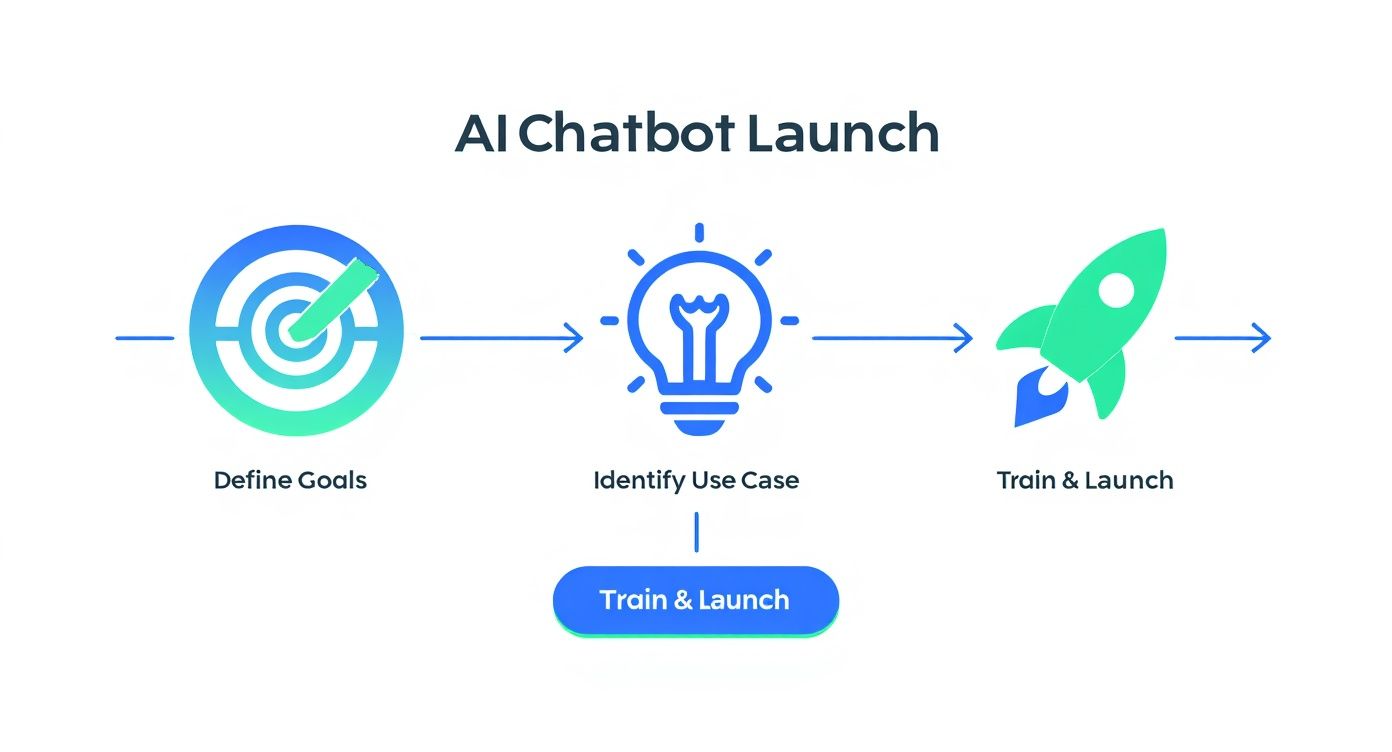
As you can see, a solid strategy has to come before you choose the technology. It’s the foundation for everything else.
A common mistake is getting wowed by a single cool feature. Instead, focus on the fundamentals: how well does it connect with your other tools, how easy is it for your team to manage, and can it handle your growth?
AI Chatbot Platform Comparison
To help you get a clearer picture, here's a quick breakdown of the different kinds of platforms you'll encounter. Each one is built for a different type of user and business need.
| Platform Type | Ideal For | Technical Skill Required | Key Strengths |
|---|---|---|---|
| No-Code / Low-Code | Marketing, sales, and support teams. Businesses wanting quick deployment. | Low – drag-and-drop interfaces | Speed to market, empowers non-technical users. |
| Full-Stack / Developer-Focused | Businesses needing deep customization, complex integrations, and proprietary logic. | High – requires coding knowledge (Python, etc.) | Ultimate flexibility, full control over data and logic. |
| Open-Source Frameworks | Tech-savvy companies and developers who want to build from the ground up. | Very High – expert-level programming | No licensing fees, completely customizable, strong community. |
| Pre-built GPTs | Individuals or small teams needing specialized, task-specific bots quickly. | Minimal – focus on prompting | Extremely fast to set up for niche tasks, leverages powerful LLMs. |
Choosing the right category narrows down your options significantly, ensuring you’re only evaluating platforms that are a realistic fit for your team’s capabilities.
When you're ready to explore options, checking out resources like the custom AI chatbots available in the GPT Store can show you what's possible with minimal setup.
For a more comprehensive look, our guide on selecting the best chatbot for customer service dives deeper into specific platforms. By weighing these factors carefully, you can make a confident investment that pays off immediately and continues to support your business for years to come.
Your AI Chatbot Questions, Answered
Jumping into any new technology brings up questions. It's only natural. When leaders start looking at AI chatbots for their customer service, they usually land on the same few concerns: How much is this going to cost? How much of a headache is it to set up? And what does this mean for my team?
Let's clear the air on those common questions.
What’s the Real Cost of an AI Chatbot?
The price tag on an AI chatbot can swing pretty wildly, but it's probably not as expensive as you're picturing. A straightforward bot that just answers basic FAQs can be surprisingly affordable. On the other hand, if you need a sophisticated system that talks to your CRM and other business software, you're looking at a bigger investment.
The smart way to think about it isn't the upfront cost, but the return on investment (ROI). A well-implemented chatbot doesn't just answer questions; it slashes your support costs, gives your team back hours of their day, and can even help capture new leads. It often pays for itself, sometimes faster than you’d expect. Plus, many modern platforms offer lifetime pricing, so you can ditch those unpredictable monthly bills.
How Long Until It's Up and Running?
Forget the nightmare of year-long IT projects. With today's no-code platforms, you can get a working AI chatbot for customer service live in a matter of hours or days—not months.
Of course, the timeline really hinges on what you need it to do. If you just want a bot to pull answers from your existing FAQ page, you could be live by the end of the day. If you're aiming for something more complex, like a bot that needs to plug into your order management system, that's going to take a bit more time to build and test properly.
The most important takeaway is that AI chatbots are not a replacement for human agents—they are a powerful tool to empower them.
Will This Bot Replace My Support Team?
This is probably the biggest and most important question out there, and the answer is a firm no. AI is fantastic at handling the repetitive, high-volume stuff—the questions you get a hundred times a day. This frees up your human agents to do what they do best: solve tricky problems, build real customer relationships, and navigate sensitive issues that need a genuine human touch.
Think of it this way: instead of replacing your team, chatbots make them superhuman. By automating the monotonous queries, you let your best people focus their talents where they'll make the biggest difference. The result? Higher job satisfaction for your team and much happier customers.
Ready to empower your support team and delight your customers? With MxChat, you can build intelligent, no-code AI chatbots for your WordPress site in minutes. Start automating your customer service today!