An animated image of a person working on a digital tablet in an office environment, surrounded by floating, colorful orb-like creatures with expressive faces.

WordPress How to Publish My Draft Pages – Quick Guide

Wondering how to publish your WordPress draft pages? We have your back! The process is straightforward and quick. And once you’ve published your pages, why not enhance your website’s user engagement with an easy-to-install chatbot? Meet MxChat, a top-notch chatbot solution for your WordPress site. But first, let’s dive into how to publish your WordPress draft pages.

How to Publish Your WordPress Draft Pages

Publishing WordPress drafts is a simple step-by-step process. Just follow the guide below:
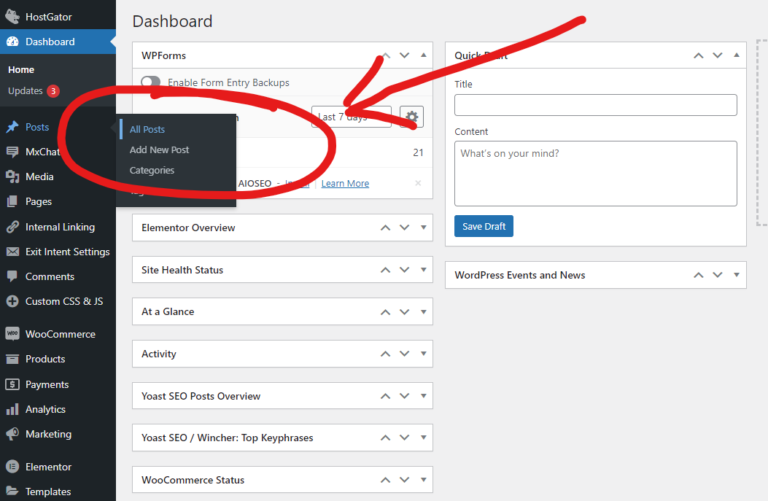
  1. Log into your WordPress dashboard.
  2. On the left-hand side menu, click ‘Posts’ if you’re publishing a blog post. For pages, click ‘Pages’.
  3. Find and click on your draft. This will open the WordPress editor.
  4. Once you’re happy with your changes, look for the ‘Publish’ button on the right-hand side. Click it, and your draft is now live!


Enhance Your WordPress Site with MxChat

Now that you’ve published your WordPress pages, it’s time to level up your user engagement. How? By integrating the MxChat chatbot into your site. MxChat is an AI-powered chatbot that provides accurate responses drawn from a large knowledge database to help answer user queries instantly.

MxChat Basic: A Free Chatbot Solution

Our free option, MxChat Basic, is a perfect solution for WordPress users seeking to enhance user engagement on their site. It’s easy to install and offers a limited customizable theme for seamless integration with your site’s design.

MxChat Pro: Advanced Features for Your Website

For users needing advanced chatbot features, MxChat Pro is the perfect choice. At $69.97, it offers full theme customization, chat transcript review, and personalized settings. Plus, you get to choose from a variety of AI models to fit your needs.

MxChat Agency: Multi-Site Licensing and the Full Add-On Library

At $174.97, the MxChat Agency license is ideal for agencies and anyone running more than one WordPress site. It includes all Pro features across five license keys, plus 14+ premium add-ons and lifetime updates.

Final Thoughts

After publishing your WordPress draft pages, enhancing your site’s user engagement is a must, and MxChat offers a range of chatbot solutions to fit any budget and need. Don’t wait, check out MxChat today and give your users an interactive experience they will appreciate.

Similar Posts