
MxChat Developer Hooks & Filters
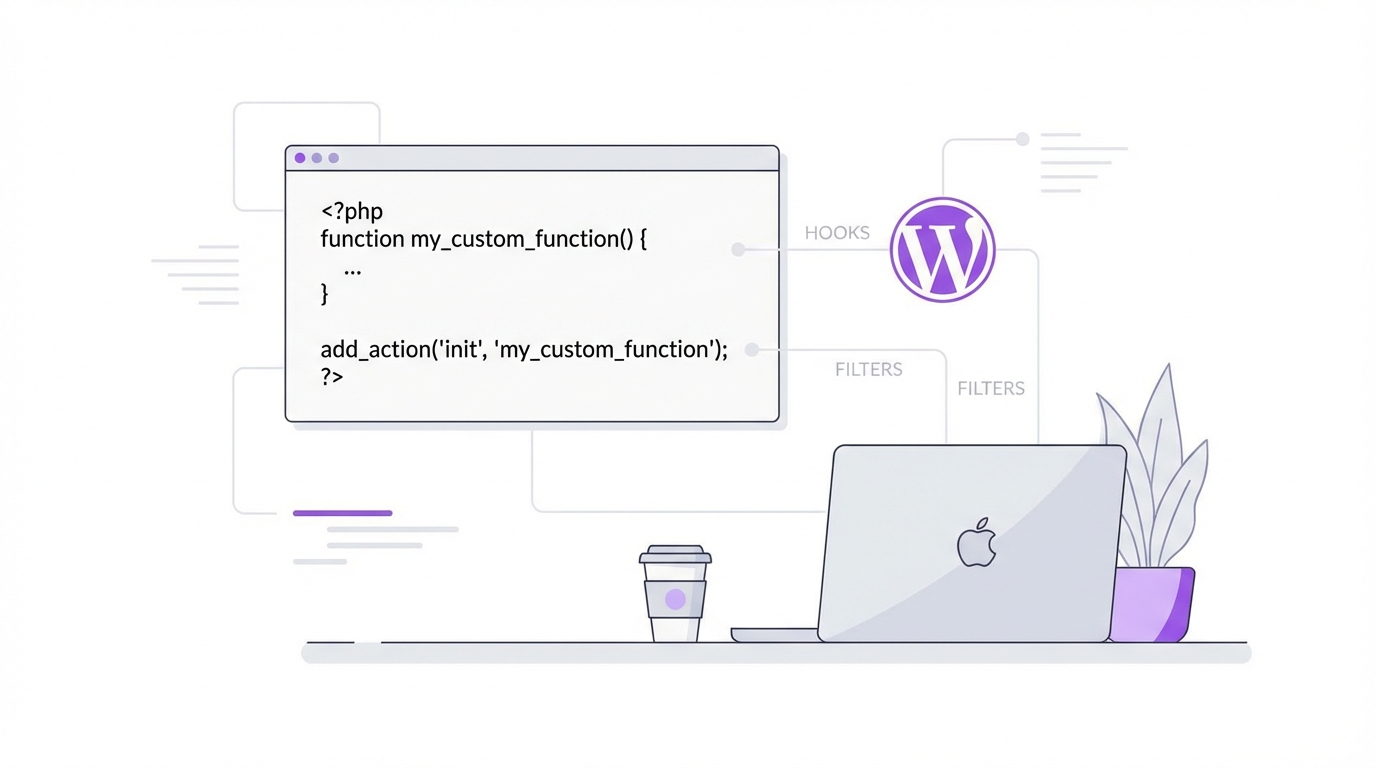
Two powerful WordPress filters to customize how your AI chatbot learns content and responds to visitors. Simple, flexible, and fully extensible.
mxchat_before_process_post
Modify a WordPress post's data right before MxChat indexes it into the knowledge base. This filter fires during knowledge base indexing — when you select posts, pages, or products to train your bot.
Arguments:
- $post (WP_Post) — the full WordPress post object being processed
- $bot_id (string) — which bot is being trained (e.g. 'default')
After your filter runs: MxChat extracts the post's title, excerpt, and content (plus WooCommerce data like price, SKU, and categories if applicable) and stores it in the knowledge base.
Example 1Add custom field data to the knowledge base
Append product specifications or FAQs stored in custom fields so MxChat learns them:
add_filter('mxchat_before_process_post', function($post, $bot_id) {
    // Append custom field data so MxChat learns it
    $specs = get_post_meta($post->ID, 'product_specifications', true);
    if ($specs) {
        $post->post_content .= "\n\nSpecifications:\n" . $specs;
    }
    return $post;
}, 10, 2);Exclude content from the knowledge base
Strip out internal notes or sensitive sections before indexing:
add_filter('mxchat_before_process_post', function($post, $bot_id) {
    // Remove [internal_note]...[/internal_note] blocks
    $post->post_content = preg_replace(
        '/[internal_note].*?[/internal_note]/s',
        '',
        $post->post_content
    );
    return $post;
}, 10, 2);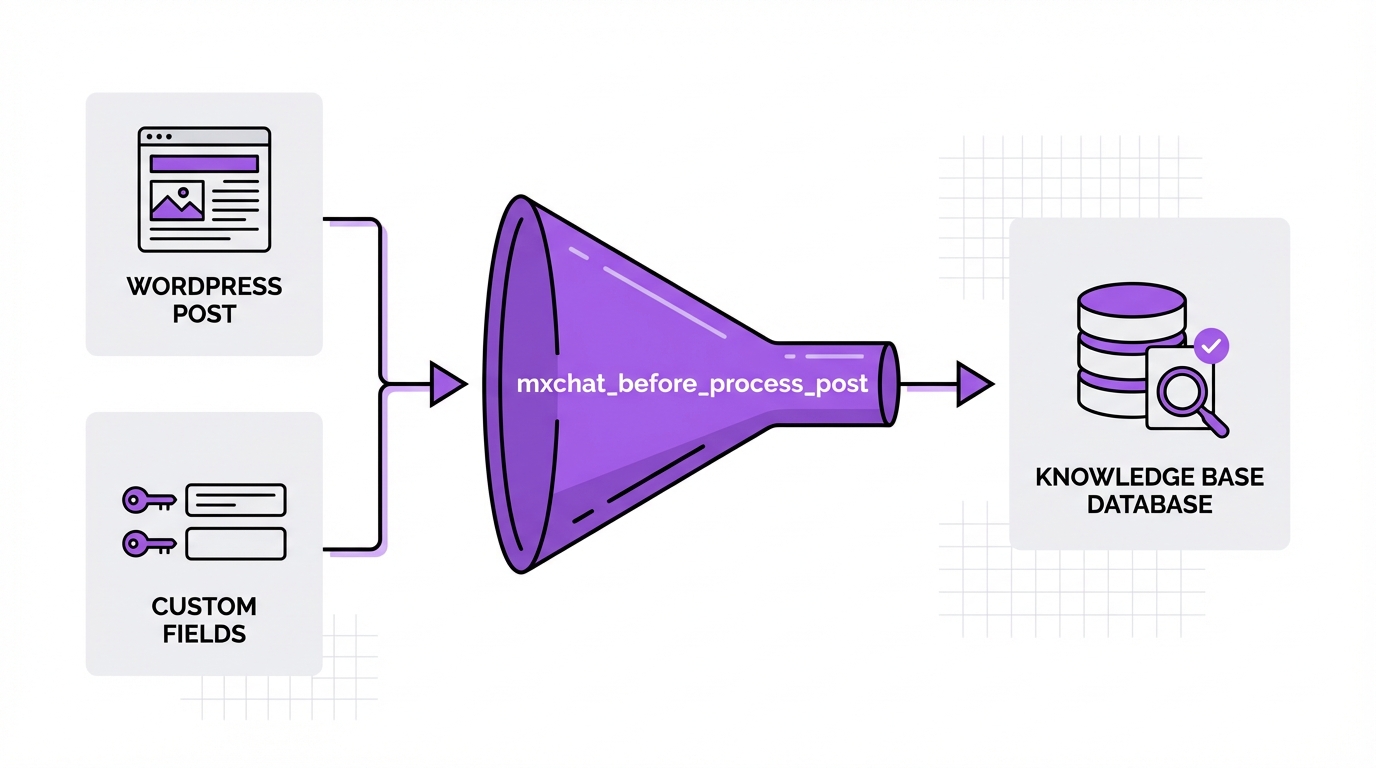
mxchat_system_instructions
Dynamically modify the system prompt sent to the AI before every response. Inject live data, customize bot behavior, or add conditional logic to your prompts.
Arguments:
- $instructions (string) — the system prompt text (placeholders like {visitor_name} already replaced)
- $bot_id (string) — which bot this is for
- $session_id (string) — the current visitor's session ID
Processing order:
- Bot Instructions
- →
- Fallback Default
- →
- URL Stripping
- →
- {visitor_name}
- →
- Your Filter
- →
- do_shortcode()
- →
- Sent to AI
Since do_shortcode() runs after the filter, you can insert shortcodes in your filter and they'll be processed automatically.
Example 1Inject live data into the system prompt
Give the AI real-time awareness of business hours or stock status:
add_filter('mxchat_system_instructions', function($instructions, $bot_id, $session_id) {
    // Add current store hours for accurate answers
    $today = current_time('l');
    $hours = get_option('store_hours_' . strtolower($today), 'Closed');

    $instructions .= "nnToday is {$today}. Store hours: {$hours}.";

    return $instructions;
}, 10, 3);Customize behavior per bot
Give different bots different personalities using the $bot_id argument:
add_filter('mxchat_system_instructions', function($instructions, $bot_id, $session_id) {
    if ($bot_id === 'sales') {
        $instructions .= "nnAlways suggest relevant products and include pricing.";
    } elseif ($bot_id === 'support') {
        $instructions .= "\n\nFocus on troubleshooting. Ask clarifying questions first.";
    }
    return $instructions;
}, 10, 3);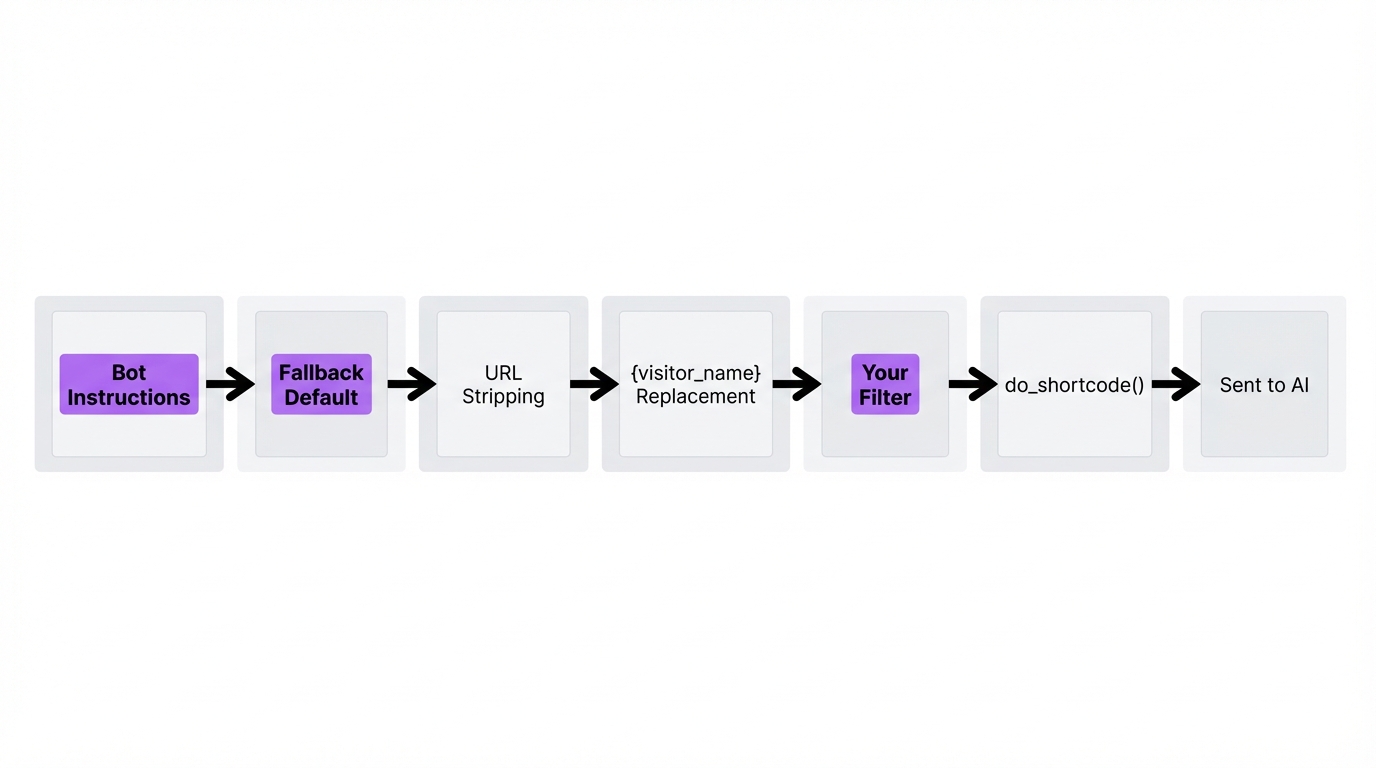
Shortcode Support in System Prompts
You can type WordPress shortcodes directly into your system prompt field in MxChat settings — no PHP required. MxChat automatically expands them before sending the prompt to the AI.
How it works: do_shortcode() runs at the end of the processing pipeline, so any shortcode — whether added in settings or injected via the mxchat_system_instructions filter — gets fully expanded before reaching the AI.
Example: Add your return policy shortcode to the system prompt and MxChat will always have your latest policy text:
Our current return policy:
[return_policy]
MxChat will expand [return_policy] into your actual return policy text every time a visitor asks a question — ensuring the bot always has your latest content.
Hooks for add-ons and site integrations
MxChat 3.2.22 adds six filters, two browser events and one helper. They let an add-on or theme put a button in the chat toolbar, write to a chat transcript, shape what live agents read, and adjust the visitor address and the date line MxChat sends with every message.
Filtermxchat_client_ip
Override the visitor address used for logged-out rate limiting and transcript identifiers. MxChat resolves the connecting address, or the address Cloudflare reports when the request arrives from a Cloudflare edge. Receives the resolved address and the raw REMOTE_ADDR. Return a valid IP address; anything else is ignored.
add_filter('mxchat_client_ip', function($ip, $remote) {
    // Site behind a trusted proxy that sets X-Real-IP
    $real = isset($_SERVER['HTTP_X_REAL_IP']) ? trim($_SERVER['HTTP_X_REAL_IP']) : '';
    return filter_var($real, FILTER_VALIDATE_IP) ? $real : $ip;
}, 10, 2);mxchat_current_datetime_line
Reword or suppress the line that tells the model the current date and time in the site's timezone. MxChat sends it with every message, outside the cached instructions, so it never affects prompt caching. Receives the line and the bot ID. Return the text to send, or an empty string to send none.
add_filter('mxchat_current_datetime_line', function($line, $bot_id) {
    // The archive bot answers about past events only; send it no date line
    return $bot_id === 'archive' ? '' : $line;
}, 10, 2);mxchat_transcript_user_message
Change how a visitor message is recorded for humans without changing what the AI receives. Receives the message, the session ID and a context: transcript for the stored row or agent for the text relayed to a live agent in Telegram or Slack. Return the text to store or relay. The Forms add-on uses it to turn its wizard completion signal into a readable line.
add_filter('mxchat_transcript_user_message', function($message, $session_id, $context) {
    // Show humans a readable line instead of an internal token
    if (strpos($message, '[BOOKING_DONE]') === 0) {
        return 'Completed the booking wizard';
    }
    return $message;
}, 10, 3);mxchat_ai_conversation_history
Filter the transcript rows about to become the model's conversation history. Receives the chronological entries (each with id, role, content, timestamp and agent_name) and the session ID. Drop or rewrite entries an add-on wrote for humans that the model already receives another way.
add_filter('mxchat_ai_conversation_history', function($history, $session_id) {
    // Keep rows written for humans out of the model's history
    return array_values(array_filter($history, function($row) {
        return strpos($row['content'], 'Completed the booking wizard') !== 0;
    }));
}, 10, 2);mxchat_chat_toolbar_items
Add a button to the chat toolbar from an add-on or a theme. Receives the current items and the bot ID. Return the array with your item added under a key, with html and an order. The markup is rendered with the page (buttons, spans and inline SVG icons are allowed) and only when the site's toolbar is switched on, so your code never has to check that setting or wait for the toolbar to appear. Open any panel the button controls from your script and append it to the body, not to the toolbar.
add_filter('mxchat_chat_toolbar_items', function($items, $bot_id) {
    if (is_admin()) {
        return $items;
    }
    $items['my-help'] = array(
        'id'    => 'my-help',
        'html'  => '<button type="button" class="toolbar-btn my-help-btn" title="Help" aria-label="Help">?</button>',
        'order' => 20,
    );
    return $items;
}, 10, 2);mxchat:toolbar-ready and mxchat:opened
Two events on the document for scripts. mxchat:toolbar-ready fires once, after the toolbar has been shown or hidden according to the site's setting, with detail.enabled. mxchat:opened fires once per chatbot the first time its window is on screen, from the launcher, the pre-chat bubble, an embedded widget or another script, with detail.botId and detail.embedded. Use them to bind behaviour or make requests only when a visitor actually opens the chat instead of on every page view. Scripts that load late can read MxChatInstances.toolbarReady and call MxChatInstances.hasOpened(botId).
document.addEventListener('mxchat:toolbar-ready', function (e) {
    if (!e.detail.enabled) { return; }
    document.querySelectorAll('.my-help-btn').forEach(function (btn) {
        btn.addEventListener('click', openHelpPanel);
    });
});

document.addEventListener('mxchat:opened', function (e) {
    // Runs once per bot, the first time its window is shown
    fetch('/wp-json/my-plugin/v1/warm?bot=' + encodeURIComponent(e.detail.botId));
});mxchat_handoff_card_sections
Add sections to the live agent handoff card sent to a Telegram topic or Slack channel. Receives the current sections, the session ID and the destination (telegram or slack). Return an array of sections, each with a title and a list of plain-text lines. Escaping for the destination is handled for you.
add_filter('mxchat_handoff_card_sections', function($sections, $session_id, $destination) {
    $sections[] = array(
        'title' => 'Account',
        'lines' => array('Plan: Pro', 'Renews: 1 December 2026'),
    );
    return $sections;
}, 10, 3);MxChat_Utils::save_session_message
A static helper for add-ons that need to append a message to a chat transcript. Pass the session ID, the role (user, bot, system or agent) and the message; the new row ID is returned, or 0 when nothing was written. Guard the call with method_exists so your add-on keeps working on older MxChat versions.
if (method_exists('MxChat_Utils', 'save_session_message')) {
    MxChat_Utils::save_session_message($session_id, 'system', 'Completed the booking wizard');
}
Start Customizing Your MxChat Bot
Use these hooks to make your AI chatbot smarter, more accurate, and perfectly tailored to your WordPress site. Copy the examples above and start building.
Purchase MxChat